Just a very quick posting on a problem I experienced late last year and have been meaning to post a blog posting on it to hopefully save someone the time i spent trying to work it out.
Late last year I had been battling to connect to our test VMware View 4.5 environment and couldn’t work out the reasons why. Each time I tried to connect to the environment the client would just sit on the connecting phase of the login whereas for my colleagues they could connect perfectly fine.After over a week of speaking with the networking guys and trying loads ideas I decided to do what I should have done in the first place and Google search the problem. Google found me a posting on the VMware communities and the solution right at the bottom of the first page was on the money as I had recently installed Internet Explorer 9 beta and doing the compatibility “fix” did the trick and got it all working again. So if you’ve installed IE9 beta and now your VMware View client just hangs on connecting you know why and how to fix it now
I haven’t tested with VMware View 4.6 so I’m not sure if this will/still apply to it.
Just a very quick reminder that next week Thursday evening is the next instalment of the London vBeers. My aim is to actually try make this one and hopefully meet up with some familiar faces and hopefully some new ones.
If you’ve never heard of vBeers before here is the “official” definition of vBeers:
vBeers is an informal get together of virtualisation enthusiasts and professionals to meet and discuss all things IT. It’s a great opportunity to network, learn and meet like minded people.
Enjoy Talking Virtualization? Come & Socialise at vBeers!
Fancy meeting up every month with other IT virtualization enthusiasts to socialise and chat over a cold beer, wine or soft-drink? If so, then vBeers is for you! This is a great opportunity to meet with other virtualization enthusiasts and professionals and enjoy discussing all things virtualization, and in fact anything else that comes up in conversation…
vBeers is open to everyone so whether you are a VMware vSphere, Microsoft Hyper-V, Citrix XenServer user/fan or none of the above it really doesn’t matter as “it’s all about the virtualization”.
The London vBeers meet-up is held at the lovely ole English pub, ‘The Cittie of Yorke’. Details and directions below:
When & Where
The London vBeers is held on the first Thursday of every month starting at 6pm in ‘The Cittie of Yorke’ pub which is placed centrally to both London’s West End and The City. This venue serves a fine of selection of English beers along with soft drinks and bar snacks.
Last week I was fortunate enough to be able to attend the VMware vSphere: Manage For Performance course. I did the lab related to this course at VMworld Europe last year and in my now increasing preparations for the VCAP-DCA exam I knew I needed to strengthen my troubleshooting skills and more importantly fine tuning my ESXTOP/RESXTOP skills. Quite a few people commented that they really liked my VMware vSphere: Manage and Design for Security Course Experience posting so I thought i would try do the same for this one for anyone interested or thinking about booking the course.
Day one covered the first three and a half modules Course Introduction, Performance in a Virtualized Environment, Virtual Machine Monitor and part of CPU Performance. It introduced you to all the monitoring tools you can use with an introduction to the performance graphs in Virtual Centre and ESXTOP,how to utilise these tools to work out possible problems and what to look for that may be good indicators of problems. Probably the thing I enjoyed the most about this course was that there was loads of labs for you to learn how to do it all yourself rather than learning it off a PowerPoint sheet or your course guide. If you are a regular reader of this blog then you’ll know I’ve been trying to perfect my knowledge of ESXTOP/RESXTOP and wrote a blog about it too “Understanding and using ESXTOP/RESXTOP”. This learning of it was a great stepping stone for the skills they covered in the course and for a few parts the links and resources in my blog gave me an even deeper knowledge of ESXTOP. For the virtual machine monitor module it covered Software and hardware virtualisation techniques which i knew fairly well from my studying for my VCP exams and the labs for it were really great in covering how the usage of these varying techniques can really help with the performance of your virtual machines/environment. Next we got into a bit of the CPU Performance module which introduced the CPU scheduler, CPU Cache contention and the NUMA. As with the hardware/software virtualisation techniques i had a good bit of knowledge about the CPU scheduler and NUMA from my VCP studies but it was a great refresher on the NUMA particularly and allowed me to better understand how it works and how the misallocation of resources can impact your virtual machines due to NUMA. Frank Denneman has done two brilliant postings all about the sizing of VM’s and NUMA Nodes and ESX 4.1 NUMA Scheduling which covers pretty much everything you need to know about this feature and how to use it correctly in your environment.
Day 2 we finished off CPU Performance by learning how to use ESXTOP and the performance metrics in vCentre to find and recognise possible cpu problems and how to fix them. Next we covered Memory Performance which was fairly straight forward in my opinion but did give great recommendations on how to utilise your memory effectively and how ballooning and memory swapping works and what the increase of these values means to the performance of your environment. Yet again Frank Denneman has covered these topics brilliantly in two blog postings Memory reclamation, when and how? and Disable ballooning? which I’ll personally be rereading through myself so as to better my understanding of how it can help/impact my virtual machines. Next we did the Network Performance module which covered all the varying network card options you can select,what each allows you to do,what additional features each one gives and how these features work. This was also a refresher for me due to my VCP studies but it did seem to alert a lot of the people on the course with me to the benefits of upgrading all your virtual machines to hardware version 7 and changing their network cards to VMXNET3. VMware have a great KB article on this Choosing a network adapter for your virtual machine. For the rest of the module it was yet again teaching you how to find and troubleshoot possible network problems using the performance charts and ESXTOP.
Day 3 finished off the last three modules Storage Performance,Virtual Machine Performance and Application Performance. Storage performance was good and was very interesting to hear how many people don’t use thin provisioning due to their belief that it impacts performance in certain ways. I’m not going to get into it on here and I agree it does in certain instances but like I said to the people on the course with me I would recommend reading the VMware white paper on it first and make your own decisions from there. There are also loads of top blog postings on the subject so I would also recommend reading a few of those (Duncan Epping’s and Eric Gray’s in particular). For the last two modules of Virtual Machine Performance and Application performance these were essentially just applying what you learn for cpu,memory and network to your virtual machines and what to consider for the virtualising of differing applications.
Funnily enough whilst on the course the latest release of the vSphere performance troubleshooting guide for 4.1 came out which is perfect post course reading material for me. Duncan Epping’s posting alerted me to the release so only right to point to his posting here.
Well that’s a high level review of what I learnt/was covered in the course. As with any course though what you get out of the course is very dependant on your knowledge of the product/s and even though I have a fairly good amount of knowledge on the product and features I did still learn a fair amount and it was a really great refresher on certain features in preparation for my VCAP: DCA exam sitting.
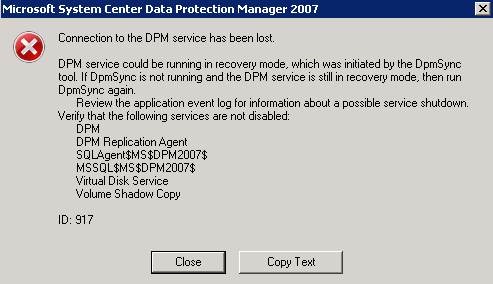
A few days ago while running restores on our Data Protection Manager(DPM) server the MMC failed and brought up the below error message
I checked all the services and the DPM and DPMRA services had stopped so i restarted them and made sure all the others were running also and then tried to reopen the DPM 2007 Administrator Console and after five to ten seconds it would fail and give me the same error above.
So I decided to start searching the Microsoft forums and the internet for any mention of this error and hopefully a solution. I found a number of postings with varying solutions and tried quite a few of them, from reinstalling DPM 2007 SP1, installing hotfixes and scouring the DPM error logs for any kind of answers but none of the worked/helped. So after having tried a sufficient amount of time to fix it myself i logged a ticket with Microsoft support as fortunately EMC is a gold partner. After finally getting hold of the support engineer (he asked me to call him for my support ticket…) he asked me to send him my log files which were located in a different place than what was mentioned in any of the forums I saw as mine were under C:\Program Files\Microsoft DPM\DPM and the log in particular that the engineer said I would find the error and where he found it was the MSDPMCurr.errlog file. In here after Caught unhandled exception ,right at the end of the line is the error message that shows what your problem is “There is an error in XML document (1, 1). —> System.Xml.XmlException: Data at the root level is invalid. Line 1, position 1” The engineer said if I put this into a search engine and looked for it it would have told me my problem although I’ve tested this and can’t seem to see any solution that would have saved me calling them.
First we backed up the DPM Database by running “dpmbackup –db” and making sure it created it successfully under C:\Program Files\Microsoft DPM\DPM\Volumes\ShadowCopy\Database Backups.
We then opened SQL Management Studio (I right clicked on the application and ran it as administrator due to my DPM being installed on Server 2008) and logged into the DPM database (if yours doesn’t show up by default as an option like mine didn’t, unless it was manually renamed it will be servername\”name after MSSQL in the error message” so mine as shown in the screenshot above was ms$dpm2007$)
Once we were into SQL Management Studio we right clicked on the DPM server and selected “New Query” *NB* Change the database in the selection box from master to the DPM DB and then we pasted the following query into the window and ran it.
UPDATE tbl_TE_TaskTrail SET ExecutionState = 3, LastStateName = ‘Failure’, StoppedDateTime = GetUtcDate() WHERE ExecutionState NOT IN (2,3)
UPDATE tbl_JM_JobTrail SET JobState= ‘Failed’, EndDateTime = GetUtcDate() WHERE jobstate= ‘Execute’ OR jobstate= ‘Retire
At the bottom of the window it will tell you if the query executed successfully which mine did and then we opened the DPM Administrator Console and it wasn’t crashing anymore .
The engineer said it was due to certain jobs having crashed and their XML files being corrupted so running the above query retires the jobs and fixes the problem.
Hopefully this helps people and saves them the time and effort I had to endure.
After the VMUG the standard vBeers will take place. If you’ve somehow never heard of vBeers before the below is just for you . Sadly yet again I can’t make the VMUG or vBeers after due to my being on holiday
vBeers
Is an informal get together of virtualisation enthusiasts and professionals to meet and discuss all things IT. It’s a great opportunity to network, learn and meet like minded people.
Enjoy Talking Virtualization? Come & Socialise at vBeers!
Fancy meeting up every month with other IT virtualization enthusiasts to socialise and chat over a cold beer, wine or soft-drink? If so, then vBeers is for you! This is a great opportunity to meet with other virtualization enthusiasts and professionals and enjoy discussing all things virtualization, and in fact anything else that comes up in conversation…
vBeers is open to everyone so whether you are a VMware vSphere, Microsoft Hyper-V, Citrix XenServer user/fan or none of the above it really doesn’t matter as “it’s all about the virtualization”.
The London vBeers meet-up is held at the Pavilion End Pub. Details and directions below:
When & Where
The London vBeers are held on the first Thursday of every month or after a VMUG meeting starting at 6pm in the ‘pavilion end pub’
The stats helper monkeys at WordPress.com mulled over how this blog did in 2010, and here’s a high level summary of its overall blog health:
The Blog-Health-o-Meter™ reads This blog is on fire!.
Crunchy numbers
A helper monkey made this abstract painting, inspired by your stats.
The average container ship can carry about 4,500 containers. This blog was viewed about 15,000 times in 2010. If each view were a shipping container, your blog would have filled about 3 fully loaded ships.
In 2010, there were 56 new posts, growing the total archive of this blog to 65 posts. There were 64 pictures uploaded, taking up a total of 3mb. That’s about 1 pictures per week.
The busiest day of the year was October 26th with 150 views. The most popular post that day was VCAP-DCA & DCD.
Where did they come from?
The top referring sites in 2010 were communities.vmware.com, twitter.com, consultingblogs.emc.com, simonlong.co.uk, and jasonnash.wordpress.com.
Some visitors came searching, mostly for this computer is now hosting the specified directory instance, but active directory web services could not service it. active directory web services will retry this operation periodically. and vcap dcd.
Attractions in 2010
These are the posts and pages that got the most views in 2010.
There have been some brilliant blog postings since my last All Things Virtual,the release of some great news for android phones and a book written by two of the top VMware professionals in the world. If this is the first time you are reading one of my All Things Virtual then the idea of the posting is a quick post up of all the things virtual and linked to virtual that I have been doing/working with/learning/reading up on in the past few weeks.
Frank Denneman of frankdenneman.nl fame and Duncan Epping of Yellow-Bricks.com fame have written and released the vSphere 4.1 HA and DRS technical deepdive book. These two guys are probably the two best people in the fields of DRS and HA with Duncan having the very successful and extremely in-depth HA Deepdive and DRS Deepdive postings on his blog as well Frank having some of the best postings on DRS on his blog. I have ordered the book already and am awaiting its arrival. Both Duncan and Frank have already covered what is in the book in such detail that I feel it’s pointless to rehash what they have already said so here is Duncan and Franks postings about the book. I look forward to reading through the whole book when it arrives and strengthening my knowledge on the two technologies.
As I’ve said a few times before I enjoy testing myself by trying to obtain certain certifications, not to be a certification collector but to set goals to try to continually push myself and strengthen my knowledge and not sit still. So the release of the new certifications by EMC really caught my attention as I’m currently trying to strengthen my knowledge on storage technologies and practices by doing the ISM(Information Storage and Management) course. One of the perks of working for EMC is I’m able to do the course as a e-learning course for free and with the release of the new EMC Cloud Architect certifications the first step is obtaining your Information Storage and Management Associate (EMCISA) certification which fits in perfectly to my study goals for 2011. To make sure I don’t explain it incorrectly I would recommend reading Chuck Hollis’ blog where he has detailed the new certifications.
Speaking of certifications I’m really pleased by the amount of traffic my VCAP-DCA&DCD Study Resources Page and my VCP Study Resources Part 1 and Part 2 pages are receiving. Thanks to everyone who has linked to it/tweeted about it. One of the main resources listed in my VCAP-DCA study resources is Sean Crookston’s VCAP-DCA Index. Sean has now written the exam and has posted a brilliant write up on his impressions of the exam here. Rynardt Spies has also recently written the exam and posted his impressions here. I’ve decided to try sit the exam by March/April next year as I’m not likely to be ready before I go on holiday next year and have learnt from experience that writing an exam just before I go on holiday isn’t a good idea.
Next is one of my blog postings of the year due to its depth of information and brilliant supporting links and documents to cover his claim. It’s a blog by Julian Wood (@Julian_wood) all about how he feels vCenter is letting VMware’s side down. I would highly recommend everyone read it as it is both amusingly true to anyone looking after a virtual environment and covers many of the obstacles you may hit in the future with your own virtual centre server so you can be as prepared as possible if you are implementing any of the technologies. I agree with what Julian is saying and do think VMware need to make a plan with virtual centre as there are far too many bugs and problems still with virtual centre and for something that is so integral to the smooth working of your virtual environment it really needs to be as solid and reliable as possible.
With the release of PowerCLi 4.1 it is now possible to manage permissions with PowerCLI. The VMware blogs have covered all the new capabilities and how to do them here. I’m busy trying to teach myself PowerCLI by trying to do as much of my daily work with PowerCLI and VMA due to a large part of the VCAP-DCA exam being based on you knowing how to do things via these tools. Seeing as I’m a point and click person these are skills I need to learn very quickly and be able to do it as second nature.
One of the new features of vSphere 4.1 is VAAI (vStorage API’s for Array Integration). Recently both Duncan Epping and Eric Sloof have posted brilliant information on this feature and in Eric’s case have attached a video detailing how it all works. These are great for anyone who is working with VMware technologies and is likely to be either using vSphere 4.1 or will be upgrading to vSphere 4.1.
One of the biggest technologies to come out in virtualisation this year is VMware’s vCloud Director. It was the lab that was taken the most at VMworld Europe and everyone is trying to learn about it seeing as it is VMware’s product to help you move your resources into the cloud. I too did all the vCloud Director labs at VMworld Europe and have been collecting as many top postings about vCloud Director as possible so I can fully understand it so when I’m asked to implement it I’ll know how. Two blog postings have been added to this list from the past few weeks; one is from David Davis of Trainsignal fame interviewing the infamous Scott Lowe and was posted on the VMware blogs page interviewing Scott on Cloud Computing and vCloud Director. This posting really got my attention as it was really interesting to me to learn more about how the technologies from EMC and the VCE are perfect to help you move as smoothly as possible to the cloud, especially seeing as I work at EMC so I really should know about all of this. Next is an amazing demo by Duncan Epping that he created for the Dutch VMUG all about vCloud Director, creation of an Organization and its resources this demo is exactly what I love to watch and learn from as I’ve only recently been able to install vCloud Director in my home lab so it’s great to see how it’s all done and seeing as vCloud Director is such an in-depth and complex product any resources to shed some light on different things about how things are done within it are greatly appreciated by myself. I know I said two but if you missed me mentioning this in one of my previous postings and want to learn more about vCloud Director then look at the resources Scott mentioned in his interview and have a look at Hany Michael of Hypervizor.com fame’s vCloud Director page. Hany also has great video on vCloud director and his posting on VMware vCloud Director in a Box is what I used to setup my lab environment.
Next is the announcement of the Partnership between VMware and LG to virtualise android smartphones for usage by business users. Mobile virtualisation has been spoken about for quite a while but this next step is very exciting and as one of my colleagues Jaspal Dhalliwal posted that Virtualization is Coming of Age now and means VMware is going from servicing a few hundred thousand people to tens of millions of people via their smartphone devices. Simon Long also posted about this announcement on his page and has posted a very cool video of it. I’m not a massive phone person to be honest, I don’t have a smartphone or an iPhone but watching tat video is really making me think of getting myself one very soon.
Last but not least is the announcement by Veeam that they are giving away free NFR keys to VCPs, VCIs and vExperts. This is a brilliant idea and it shows that Veeam know who their dedicated followers are and who is likely to give them great press about the products and help them gain even more popularity. I’ve already downloaded mine and am due to install it into my lab environment very soon. If you’re a VCP/VCI or vExpert then get yourself a copy before they stop the deal.
Well that’s everything that has been on my to read list and all the news that has caught my interest.
Amazingly it is now exactly a year since I first created this blog and posted my first posting London VMware User Group. Since this posting I am very pleased to say my blog has gained a very pleasing amount of views (13307 to be exact), been linked to and referenced on some of the top bloggers postings and their blogroll’s and had postings from it featured on the VMware Buzz page for both VMworld US and Europe(top blog below,under “VMworld 2010 Blog Coverage”.)
I started this blog as a personal goal to try better my skills in VMware and Microsoft technologies and try give back to the community from which I have learnt and gained so much. I’m pleased to say that I think I have accomplished that as looking at my postings a year ago to ones I have done recently I think my blog writing and technical skills are much much better,I’ve become a VCP4 and VTSP 4 and strengthened my knowledge on almost all the VMware technologies and practices.
Most pleasing to me is that two of my top 3 most read postings are my VCP4 Study Resources Part 1 and Part 2 which is very gratifying to know that I’ve possibly helped people better prepare for their VCP4 exam. Also my VCAP DCA & DCD Study Resources page is already receiving a growing number of views and been linked to in one of the VCAP-DCA brownbag’s (vFail BrownBag Follow-Up) as a resource to use/look at in your preparations for the VCAP exams and so is on it’s way to being another most read posting. Hopefully next year this time I will be looking back at the over 13 thousand views to my blog as a small number compared to the amount I will have received and have made the Top 25 Virtualisation Blogs and become a vExpert too if John and the community feel I/my blog are worthy .
A big thanks to all the people who have re-tweeted links to my blog postings,linked to my blog in their own blogs and for everyone who has left a comment saying how much a posting has helped them. For anyone thinking of starting their own blog I would highly recommend it but first read Scott Lowe’s Blogging for the Right Reasons and know it is a labour of love and something you should do for the right reasons.
One of the bits of information I took out of my VMware vSphere: Manage and Design for Security course was setting up vMA for Remote logging of the syslog files from your virtual centre server and ESX hosts. I have played with vMA bit before but over the past week I’ve made a concerted effort to try better my skills as it is something i really need to strengthen before the next realise of vSphere which has no ESX included and therefore I need to know how to do my daily role through vMA and PowerCLI (everyone recommended I learn both as each has it’s pro’s and con’s).
I’m not going to get too in-depth with the process as some top bloggers have already done such a great job of it I would only be re-covering what they have already said. If you haven’t used vMA before then I would recommend a document created by William Lam of virtuallyghetto.com fame all about Getting Started with the vMA and there is even a VMware KB TV video all about vMA here
Next I secured my credentials in vMA by following the knowledge base article here. This is something I learnt on the course and maybe it’s overkill as someone would have to take the VMDK files of my vMA and reverse-engineer the encryption algorithm and decrypt the passwords but it’s always good practice to try secure your passwords as best you can so I did it
Having changed my keyboard layout from US to UK(EN) I noticed that due to this my vi-admin password wasn’t what i wanted it to be so after looking around and asking on twitter I was pointed to logging into my vMA using single-user mode and resetting my vi-admin password that way. I used this Red Hat FAQ to show me how to make this change.
Next I configured my vMa for Active Directory Authentication as recommended and detailed in the vSphere Management Assistant Guide on page 14. Also William Lam did a great posting detailing in a bit more of a user friendly fashion.
Now my vMa is remote logging,secured and using Active Directory Authentication.
Since my last All Things Virtual there has been a massive amount of news coming out of the virtualisation arena. One of the main sources of these were due to VMworld Europe happening from the 11th to the 14th of October. I was fortunate enough to attend and I was very pleased with the amount of views my All Things VMworld Europe Day1, Day 2 and Day 3 blog postings received.
The week prior to me attending VMworld I was able to attend a day arranged by VMware and Alan Renouf where some of the top VMware GURUs came to London and gave some exclusive presentations on VMware API’s, performance, PowerCLI and Onyx. The day was seriously in depth and really opened my eyes to the amount of data and things you can get and do with the VMware API’s and ESXTOP. Alan has posted the slide decks from each session ran on the day on his blog.The sessions are listed below with their links, these are something I am planning to get through in my preparations for the VCAP exams
Due to there being such a large amount of time between All Things Virtual 18 and All Things Virtual 19 (a month and a half) there are a few articles on my list that are a few weeks old but nevertheless still brilliant and so I kept them on here.
As I have said before I ,like a large number of other professionals in the virtualisation field am preparing and studying for the VCAP exams. For my own usage and because amazingly a few people sent me messages saying that my VCP4 Study Resources(Part 1, Part 2) proved very helpful with their preparations for their VCP4 exams and were asking if I planned to do the same for the VCAP exams. So I have created a dedicated page for all the resources I will be using in my preparations and will constantly try to update it with any new resources I find. The page has only been up for a month and a half and already over 1000 people have viewed it which is really great and hopefully it is helping people find out about great podcasts/blog postings/videos that will help them be prepared for the exams.
Duncan Epping of Yellow bricks fame posted a very small but very important posting all about Storage IO Control Best Practices. If you attended either of the VMworld conferences then I would recommend watching the session Duncan speaks of in his posting “Tech Preview: Storage DRS” and another session i watched all about SIOC “prioritizing Storage Resource Allocation in ESX Virtual Environments using Storage I/O Control”. Speaking of SIOC Luc Dekens has posted a brilliant posting on how to automate SIOC.
While at VMworld Europe Mike Laverick of RTFM.com fame went around and got himself a bag full of Swag and is raffling it all off in aid of UNICEF. The competition is open to anyone worldwide so go get yourself a ticket and donate to a very worthy cause at the same time.
Eric Sloof posted all about the availability of the the Technical White paper for Application HA. My knowledge of Application HA has only started growing very recently after attending VMworld this year and actually seeing some of providers stands and exhibitions of the technologies and their capabilities. I haven’t as yet read the white paper but like so many of these great resources it is on my technical reading list. Eric has also posted a video of the installation of Symantec Application HA.
Simon Seagrave of TechHead fame posted about some great free NTP Time Sources and the NTP Pool project. I’ve already been using the same source for my NTP synchronisation for my home lab and it works a charm
During VMworld Europe David Davis of Trainsignal’s VMware vSphere Video Training fame was able to do a video interview with VCDX001 Mr John Arrasjid. The video is a brilliant one for anyone looking to take on the VCDX certification as John is one of the main people involved in the VCDX and gives great insight into the certification and how it is all done.Jason Boche was also interviewed by David at VMworld US all about the VCDX certification here. These are two really great resources and have been added to my VCDX study list .
Speaking of Jason Boche he posted a brilliant posting all about the conversion of CPU ready to %RDY in ESXTOP. I am currently learning and strengthening my knowledge on ESXTOP and how to utilise it for my daily job and Jason’s posting is a great resource for learning all about how the %RDY value is calculated. I would recommend reading through a posting I did a while back about Understanding and using ESXTOP/RESXTOP as this will give a great base knowledge before going through Jason’s posting.
Steve Jin of DoubleCloud.org Fame posted all about using vSphere APIs to Collect vCentre and ESX Logs.After having attended the VMware vSphere: Manage and Design for Security Course last week I’ve gained an even keener interest in learning all about collecting logs for security reasons as well as troubleshooting reasons and Steve’s posting was right on time for my interest in learning more about it all. I would recommend everyone learns how to do this as it will be a life saver at some point for you.
Vladan Seget posted all about a whitepaper by VMware on the top ten most forgotten things when building your disaster recovery plan. The white paper is a really great resource and has some very good pointers and recommendations when you are building out your disaster recovery plan. If you have a disaster recovery plan or are planning one then I would highly recommend reading the white paper.
The next is an unusual one but one that I experienced myself and therefore feel I should link to it here even though I have already added it to my Upgrading from ESX,VMware Update Manager and Virtual Centre 4.0 to Version 4.1 posting. VMware have put out a KB article on an error where after upgrading your Virtual Centre Server to version 4.1 the transaction log for the vCentre Server database grows excessively large. Thankfully someone posted the KB article on twitter and i noticed it and fixed the problem before it severely impacted my Virtual Centre server.
Bas Raayman posted some really nice installation tips for installing VMware vCloud Director. I am yet to install vCloud Director to my home lab and so the installation tips are now part of my build documentation to go through when i finally get round to installing it.
Duncan Epping of Yellow-Bricks.com fame posted one of the best articles of the year over a week ago now all about VMotion, the story and confessions. The post covers the initial idea and building of a VMotion(misspelling intended) prototype to a number of top bloggers confessions on how amazed they were when they first saw or heard about VMotion and how it has impacted their work life and for some their career paths.
Well that’s all the postings of the past few weeks that have gained my interest.


![vBeers[7]](https://i0.wp.com/www.techhead.co.uk/wp-content/uploads/2010/06/vBeers7.jpg "vBeers[7]") Fancy meeting up every month with other IT virtualization enthusiasts to socialise and chat over a cold beer, wine or soft-drink? If so, then vBeers is for you! This is a great opportunity to meet with other virtualization enthusiasts and professionals and enjoy discussing all things virtualization, and in fact anything else that comes up in conversation…
Fancy meeting up every month with other IT virtualization enthusiasts to socialise and chat over a cold beer, wine or soft-drink? If so, then vBeers is for you! This is a great opportunity to meet with other virtualization enthusiasts and professionals and enjoy discussing all things virtualization, and in fact anything else that comes up in conversation…

 .
. ). If you haven’t registered i would highly recommend you do so ASAP as these are more often than not fully booked a week or two before the event.
 . Sadly yet again I can’t make the VMUG or vBeers after due to my being on holiday


![clip_image001[1]](https://thesaffageek.co.uk/wp-content/uploads/2010/12/clip_image0011.png "clip_image001[1]")

 .
.

 TheSaffaGeek