TheSaffaGeek

My ramblings about all things technical


1 Comment

What’s New In vCloud Automation Center 6.1

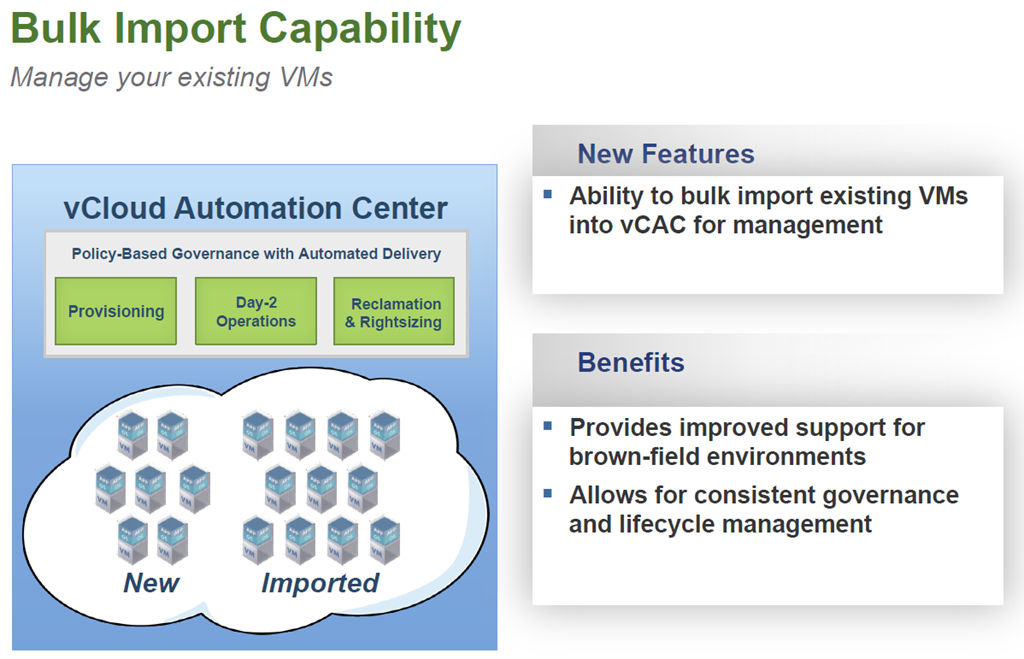
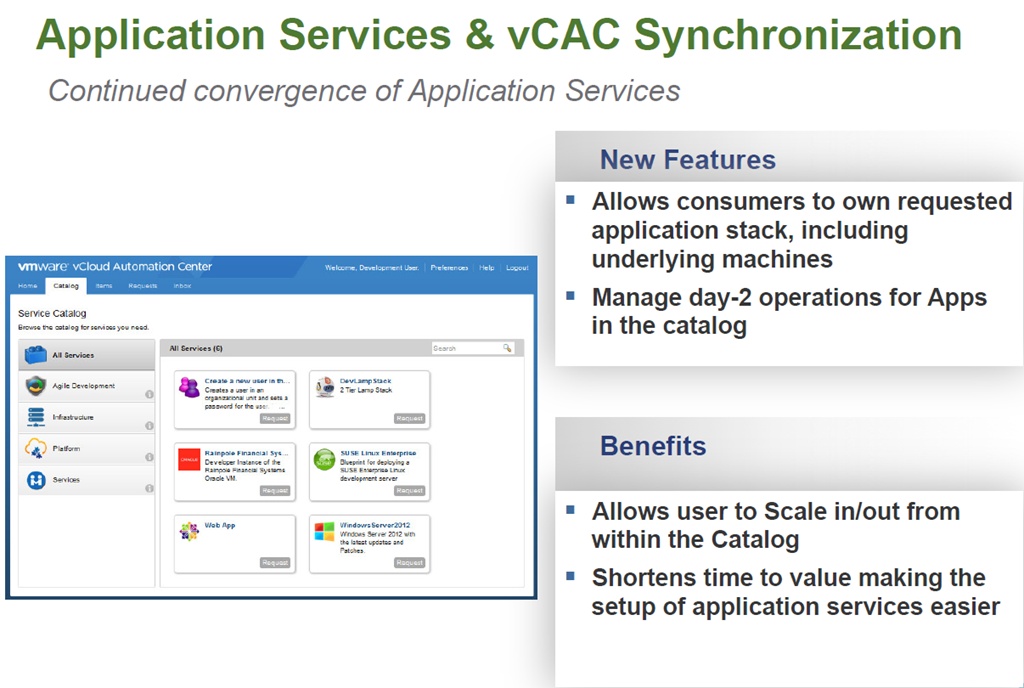
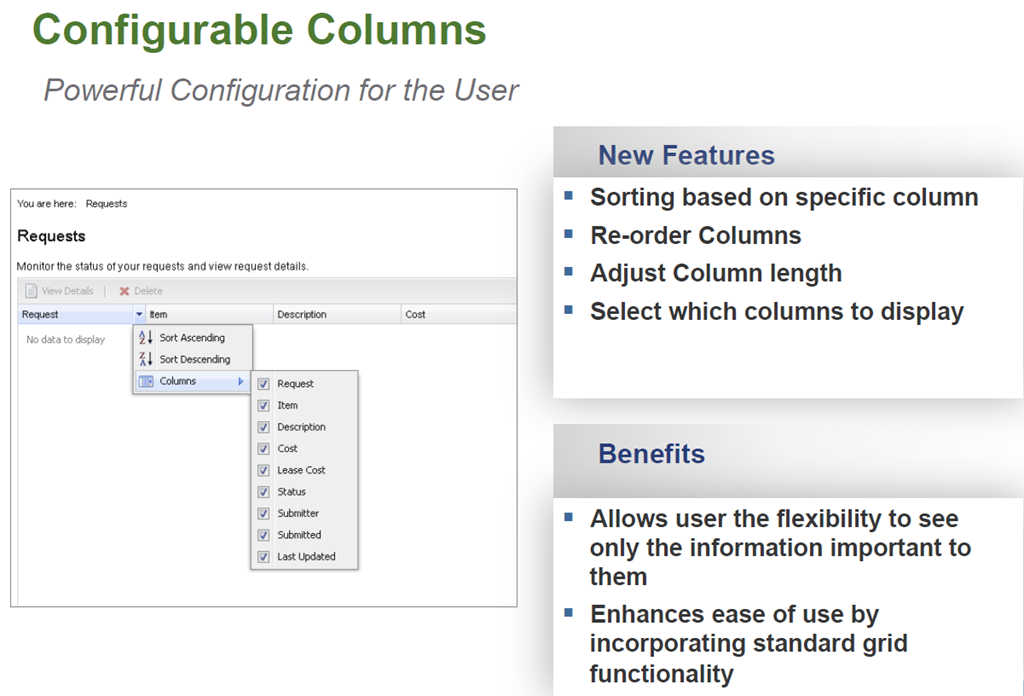
Not long after VMworld Europe vCAC 6.1 was released. For the past year I have been very fortunate to have been on some very large vCAC projects as an extension of VMware PSO and have seen the product change dramatically. there have certainly been some challenges but I’m super excited about vCAC 6.1 and from the experience I have gained of it so far it is looking very solid and now can work seemlessly with vCO along with a number of other great new feaures. So below is an overview of what is new in vCAC  6.1.

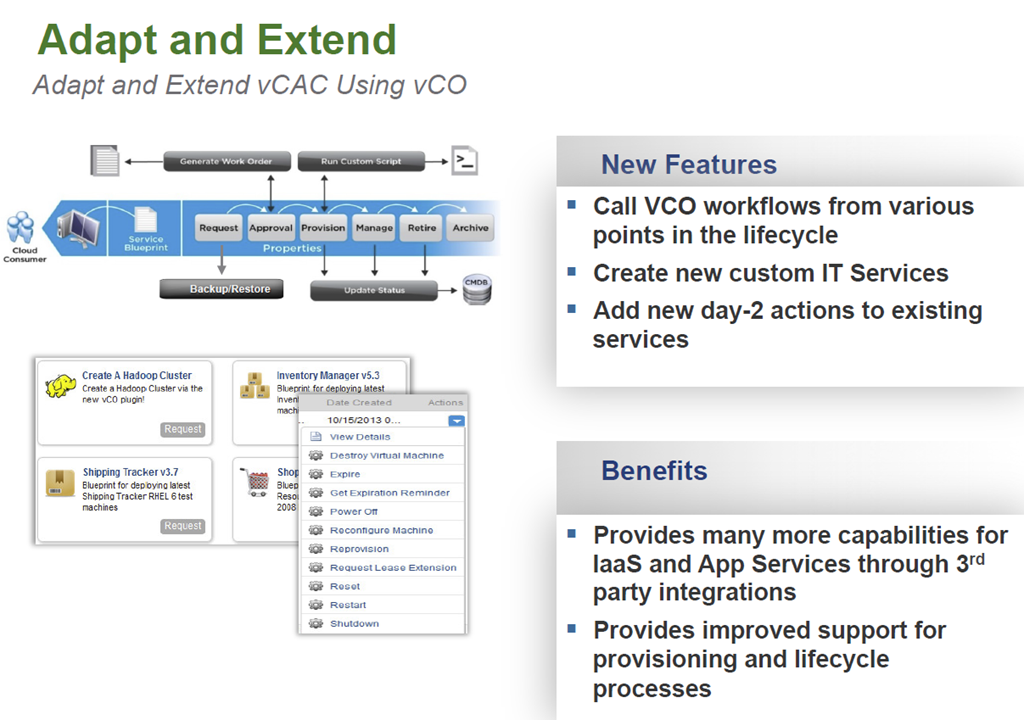
vCAC Extension

image

image

image

image

Interested in Developing a VCO Plugin?
Free Access to the vCO Plug-in SDK

  • The SDK has samples and documentation to facilitate development
  • http://communities.vmware.com/community/vmtn/developer/forums/orchestrator
  • Additional Resources

    Distribution on VMware Solutions Exchange
    – Contact: Meenakshi Nagarajan
    mnagarajan@vmware.com for additional info

    image

    image

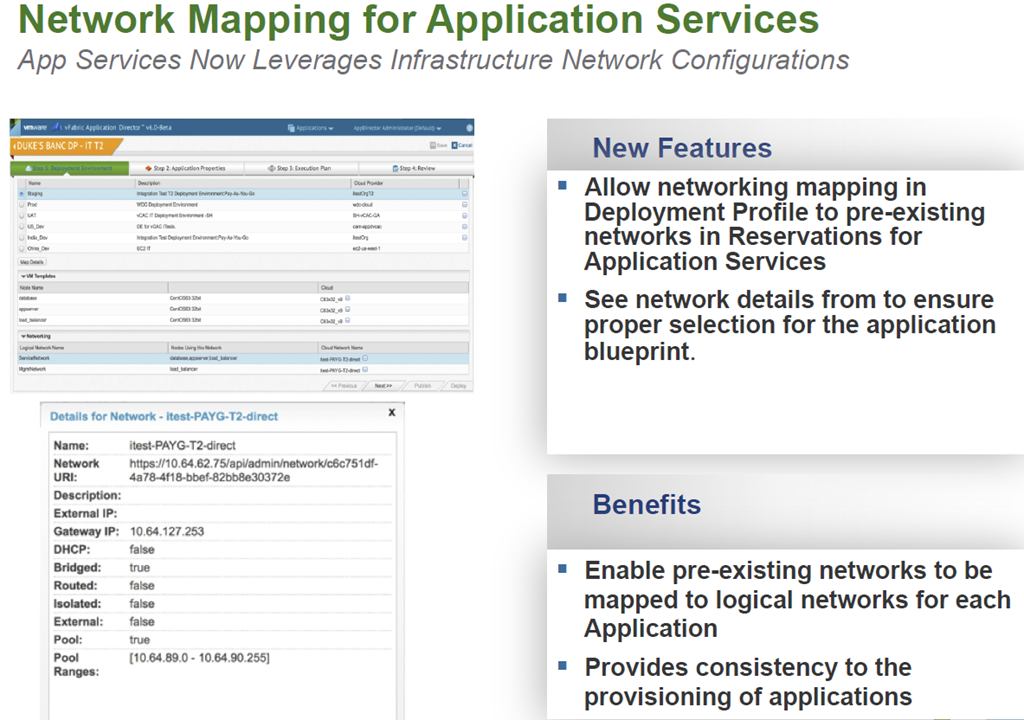
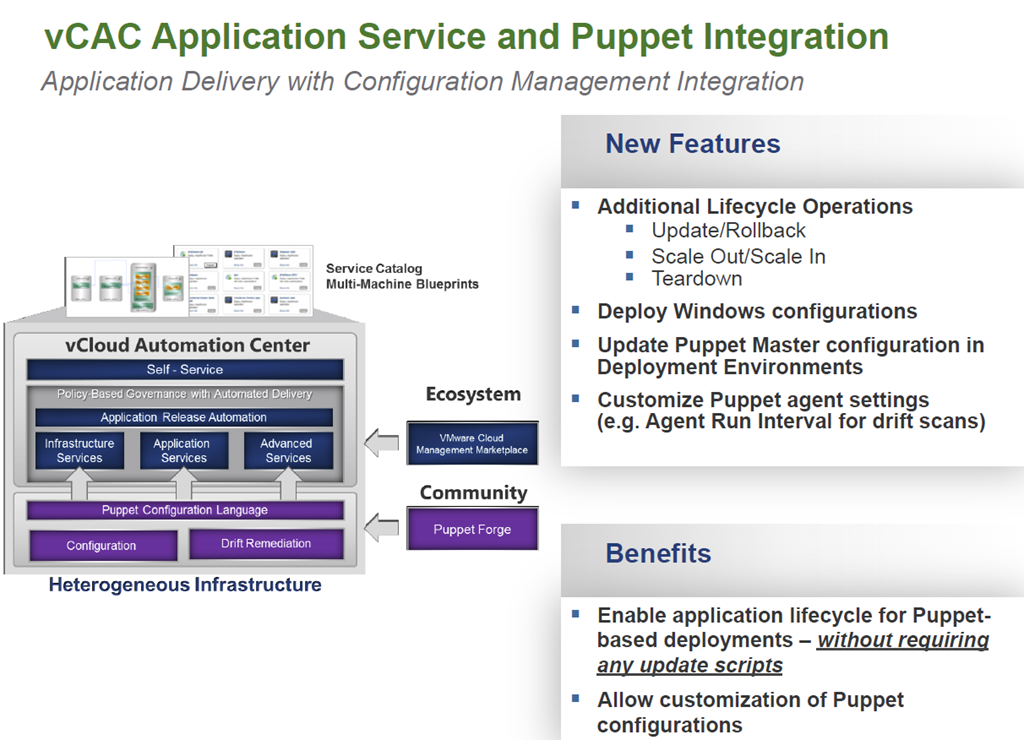
    Automating Application and Infrastructure Services

    Simplifying the deployment and management of single machines and complex multi-tired applications.

    image

    image

    image

    image

    image

    User Experience

    image

    image

    image

    image

    image


    2 Comments

    #VMworld Announcement #1 VMware EVO:RAIL – What is it?


    imageAt VMworld US this morning VMware will announce numerous new solutions and one of these will be VMware EVO: RAIL I mean MARVIN I mean VMware EVO: RAIL, but what is it and what does it do. Below is a high level overview of the solution. Make sure you also  watch the live keynote to learn more.

    Introducing VMware EVO: RAIL
    image

    VMware EVO: RAIL™ combines compute, networking, and storage resources into a hyper-converged infrastructure appliance to create a simple, easy to deploy, all-in-one solution offered by VMware qualified partners.

    Simplicity Transformed

    EVO: RAIL enables power-on to VM creation in minutes, radically easy VM deployment, one-click non-disruptive patch and upgrades, simplified management…you get the idea.

    Software-Defined Building Block

    EVO: RAIL is a scalable Software-Defined Data Center (SDDC) building block that delivers compute, networking, storage, and management to empower private/hybrid-cloud, end-user computing, test/dev, and branch office environments.

    Trusted Foundation

    Building on the proven technology of VMware vSphere®, vCenter Server™, and VMware Virtual SAN™, EVO: RAIL delivers the first hyper-converged infrastructure appliance 100% powered by VMware software.

    Highly Resilient by Design

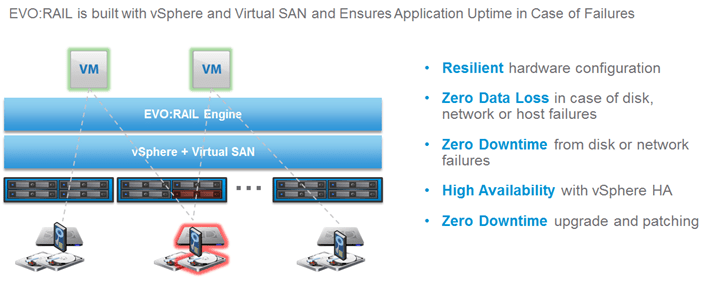
    Resilient appliance design starting with four independent hosts and a distributed Virtual SAN datastore ensures zero application downtime during planned maintenance or during disk, network, or host failures.

    Infrastructure at the Speed of Innovation

    Meet accelerating business demands by simplifying infrastructure design with predictable sizing and scaling,by streamlining purchase and deployment with a single appliance SKU, and by reducing CapEx and OpEx.

    Freedom of Choice

    EVO: RAIL is delivered as a complete appliance solution with hardware, software, and support through leading
    systems vendors; customers choose their preferred brand.

    Hardware

    VMware is not entering the hardware market. The EVO: RAIL software bundle is available to qualifying EVO:RAIL partners. The partner, in turn, sells the hardware with integrated EVO: RAIL software, and provides all hardware and software support to customers.

    Appliance

    Each EVO: RAIL appliance has four independent nodes with dedicated computer, network, and storage resources and dual, redundant power supplies.
    image

    Nodes

    Each of the four EVO: RAIL nodes have:

    • Two Intel E5-2620v2 six-core CPUs
    • 192GB of memory
    • One SLC SATADOM or SAS HDD for the ESXi™ boot device
    • Three SAS 10K RPM 1.2TB HDD for the VMware Virtual SAN™ datastore
    • One 400GB MLC enterprise-grade SSD for read/write cache
    • One Virtual SAN-certified pass-through disk controller
    • Two 10GbE NIC ports (configured for either 10GBase-T or SFP+ connections)
    • One 1GbE IPMI port for remote (out-of-band) management

    Fault Tolerance and Reliability

    Each EVO: RAIL appliance has the following hardware components and reliability features:

    • Four ESXi hosts in a single appliance enables resiliency for hardware failures or maintenance
    • Two fully redundant power supplies
    • Redundant 2 x 10GbE NIC ports per node for all communication
    • ESXi boot device, HDDs, and SSD are all enterprise-grade
    image

    Automatic Scale-Out

    EVO: RAIL Version 1.0 can scale out to four appliances – for a total of 16 ESXi hosts, 1 Virtual SAN datastore backed by a single vCenter Server and EVO: RAIL instance. EVO: RAIL handles deployment, configuration, and management, allowing the compute capacity and the Virtual SAN datastore to grow automatically. New appliances are automatically discovered and easily added to an EVO: RAIL cluster with a few mouse clicks.

    Software

    EVO: RAIL delivers the first hyper-converged infrastructure appliance 100% powered by VMware’s proven suite of core products. The EVO: RAIL software bundle is fully loaded onto the EVO: RAIL qualified partner’s hardware.
    This software bundle is comprised of:

    • EVO: RAIL Deployment, Configuration, and Management
    • VMware vSphere® Enterprise Plus, including ESXi for compute
    • Virtual SAN for storage
    • vCenter Server™
    • vCenter Log Insight™

    EVO: RAIL is optimized for the new VMware user as well as for experienced administrators. Minimal IT experience is required to deploy, configure, and manage EVO: RAIL, allowing it to be used where there is limited or no IT staff on-site. As EVO: RAIL utilizes VMware’s core products, administrators can apply existing VMware knowledge,
    best practices, and processes.

    EVO: RAIL leverages the same database as vCenter Server, so any changes in EVO: RAIL configuration and management are also reflected in vCenter Server and vice-versa.

    Compute, Networking, Storage, and Management

    EVO: RAIL Compute

    Virtual Machine Density

    • EVO: RAIL is sized to run approximately 100 average-sized, general-purpose, data center VMs. Actual capacity varies by VM size and workload. There are no restrictions on application type. EVO: RAIL supports any application that a customer would run on vSphere.
      General-purpose VM profile: 2 vCPU, 4GB vMEM, 60GB of vDisk, with redundancy
    • EVO: RAIL is optimized for VMware Horizon® View with configuration options that allow up to 250 View VMs on a single EVO: RAIL appliance. Actual capacity varies by desktop size and workload.
      Horizon View virtual desktop profile: 2vCPU, 2GB vMEM, 32GB vDisk linked clones

    EVO: RAIL Network

    image

    Connections

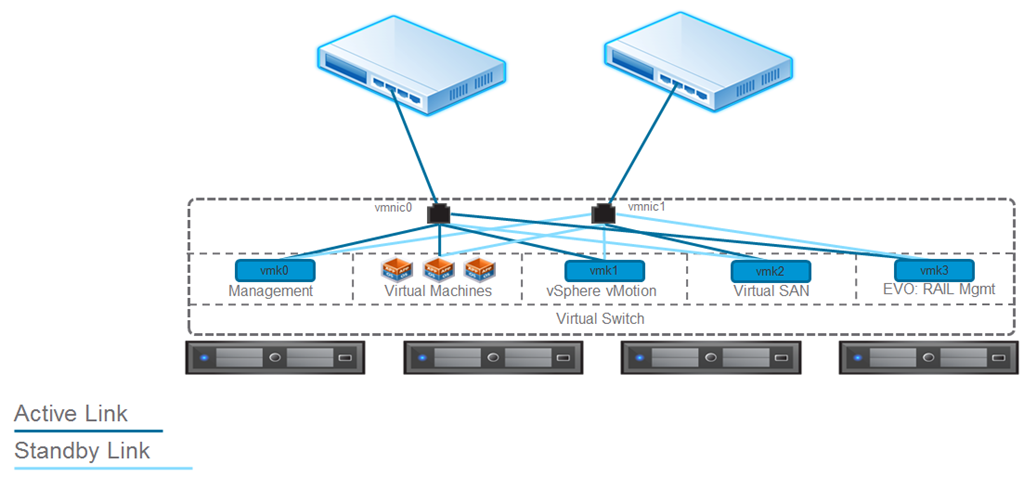
    • Each node in EVO: RAIL has two 10GbE network ports. Each port must be connected to a 10GbE top-of-rack switch that has IPv4 and IPv6 multicast enabled.
    • Remote/lights out management is available on each node through a 1GbE IPMI port that can connect to a management network. NOTE: In some configurations, there may be additional 1GbE ports that are covered and disabled.

    Traffic

    • EVO: RAIL supports four types of traffic: Management, vSphere vMotion®, Virtual SAN, and Virtual Machine.Traffic isolation on separate VLANs is recommended for vSphere vMotion, Virtual SAN, and VMs. EVO: RAIL
      Version 1.0 does not put management traffic on a VLAN.
    • IPv4 and IPv6 multicast must be enabled on the top-of-rack switch(es). EVO: RAIL’s automated scale-out feature uses IPv6. (It is not required for your complete network to support IPv6.)
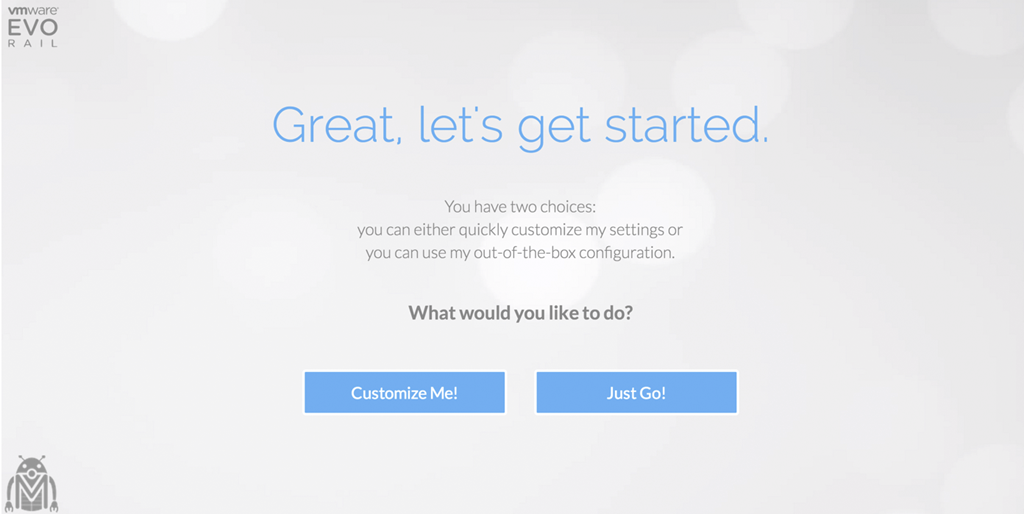
    • VLANs are not required when customizing a EVO: RAIL configuration; however, they are highly recommended.When using the Just Go! option, it is assumed VLANs are configured.

    EVO: RAIL Storage

    EVO: RAIL creates a single Virtual SAN datastore from all local HDDs on each ESXi host in a EVO: RAIL cluster. Virtual SAN read caching and write buffering uses SSD capacity. Total storage capacity is 16TB per EVO: RAIL appliance:

    • 14.4TB HDD capacity (approximately 13TB usable) per appliance, allocated to the Virtual SAN datastore for virtual machines
    • 1.6TB SSD capacity per appliance for read/write cache
    • Size of pre-provisioned management VM: 30GB

    EVO: RAIL Management

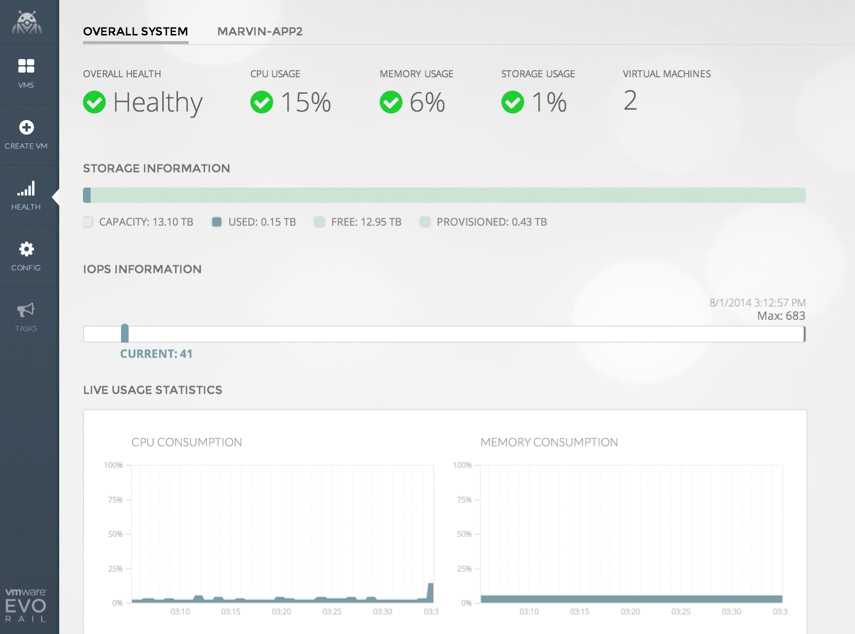
    EVO: RAIL enables deployment, configuration, and management through a new, intuitive HTML5-based user interface showcased in the next section. EVO: RAIL provides new non-disruptive updates for VMware software with zero downtime and automatic scale-out of EVO: RAIL appliances.

    User Interface

    image

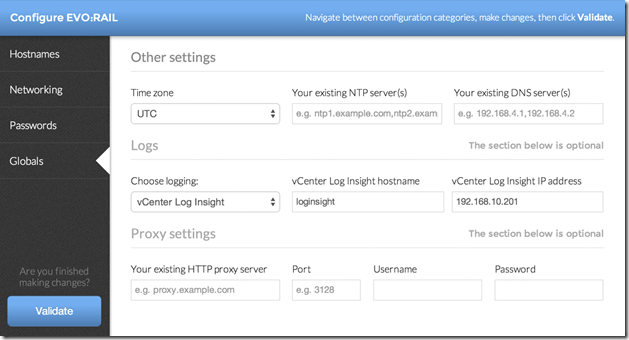
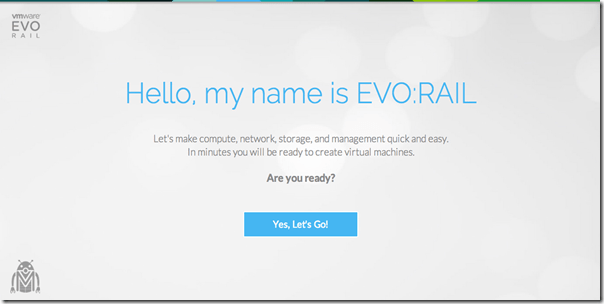
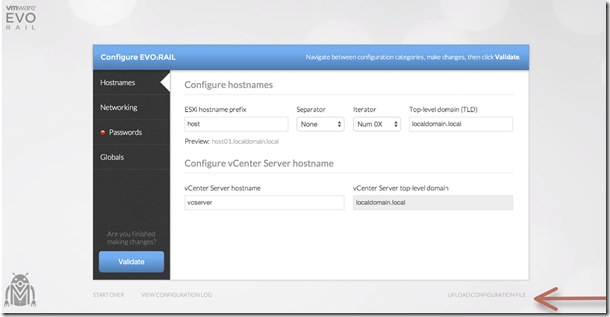
    Configuration Screenshots

    Below are a few configuration screenshots showing how intuitive and easy it is to configure EVO:RAIL.

    image

    image

    image

    image

    image

    image

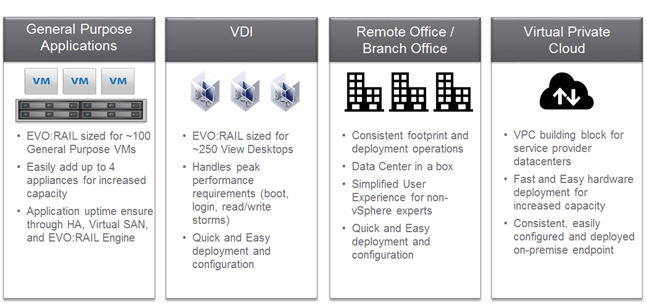
    Use Cases

    Below are some of the use cases for EVO:RAIL.
    image

    Make sure you  watch the live VMworld keynote to learn more.


    Leave a comment

    VMworld US 2014 – The Calm Before the vStorm

    For several years I have been very fortunate to attend VMworld Europe either via my company paying for the trip or in the case of last year, being able to attend as part of the vBrownbag crew and I’m very pleased to say that I will be attending this years VMworld US via the welcomed sponsorships of the vBrownbag sponsors (VMTurbo , Cisco , Brocade ,Infinio and Coho Data) for the TechTalks. Due to going as part of the vBrownbag crew VMware were gracious enough to give me a bloggers pass to cover my conference entrance fee and when I am not helping with the TechTalks or the VMunderground Open Acts i plan to blogging and tweeting away. But I am not only looking forward to going just for these reasons (certainly they are amazing enough reasons) but for several others and so I thought I would put out the reasons I’m looking forward to VMworld US and why if you haven’t booked to attend yet then why I would HIGHLY encourage you to register.

    Social

    142679-spongebob-square-pants-sponge-nerd

    I know what you are thinking and yes there certainly are some amazing parties and there are people who sadly take it as a jolly rather than experiencing the conference but the social I am referring to is social media as well as actual human interaction with like minded people. I am sure a number of people are like me where we sit behind a computer for countless hours,then sit on our phone or tablet tweeting away to people about the latest virtualisation or related technology but have never actually met these people. In fact most of the people you tweet with are actually on the opposite side of the world but their blog posting/communities response/book/podcast/webinar or twitter response to a question you posted saved you countless hours of work or helped you get that new role or certification. Well VMworld is the perfect place to meet these people and thank them for their help, get your book signed by the author or throw the book at them if they were wrong (physical violence no matter how funny it may be from afar isn’t the answer…most of the time). This also allows you to talk about how cool the new features in vSphere 6.0 are and not get that placating nod your wife/girlfriend (husband/boyfriend for those super vWoman in the community) gives you when you get excited about it. For me the interaction and friendships I have had and made from VMworld conferences have sometimes been the best part as being able to chat to the person who wrote the book on VSAN/PowerCLI/VMware Networking for example is worth the conference fee in itself.

    Sessions/Labs

    The sessions,labs and announcements are brilliant and the only reason I chose social first is due to it being something not that many people think about. The sessions and labs are amazing and even though you can watch almost all the sessions (breakouts aren’t recorded) and do all the labs now via  labs.hol.vmware.com ,being able to attend the sessions for the week and hear about all the great new features and how people have taken the solutions provided by VMware and met their companies or customers requirements with them without being bothered by home life or work is an amazing learning experience. The same applies to the Hands on Labs where you can take the labs and skill up on the most recent technologies or even older ones that you might not have had the time to learn up until now. There are sessions for everyone as there are sessions where they are entry level for those people just getting into VMware technologies to advanced sessions where it is VMware engineers or product teams talking about the knitty gritty of the solutions. There are also loads of panel sessions ranging from meet the vExpert bloggers panel sessions to VCDX panel sessions where you can ask questions and learn from top vBloggers and or ask all those questions about the VCDX or the pre-requisites exams from those who have done it. If you are working for a VMware partner there is a partner day where as you guessed it, it is exclusively for partners and VMware will do sessions covering all the technologies and how they are working to make it better for partners or those selling their solutions.

    TechTalks

    Ok I’m probably very biased but the vBrownbag crew along with the help of our sponsors run the TechTalks from the community area where people who may not have had their sessions accepted to present at VMworld (this is not a reflection on the quality I can assure you) present about numerous different topics (no sales pitches) for ten minutes and they are streamed as well as recorded. The TechTalks have been a major success with loads of people watching the live stream, a very large number of views of the recordings and we also have a very good amount of live audience watching them. The schedule for the TechTalks is due out imminently and from having seen some of the amazing names on the list it will not disappoint.

    Solutions Exchange

    The solutions exchange is where all the vendors including sponsors have their stalls/booths where you can talk to them about their latest release, speak to some of their top people around possibly solutions you are looking to implement or need help fixing and even go to the VMware Expert bar. The Expert bar allows you to talk to the best people for each VMware technology and hear and see what all the new solutions from VMware can do for your business. As you would expect there are loads of freebies and competitions from all the vendors and this is the place where you can hear about that new technology and then be able to drop it in a conversation with your boss to show how on the ball you really are.

    vmworld12-solutions exchange.png

    General

    There are also numerous activities that fall under the general banner like the VMworld party which last year had Train and Imagine dragons performing at the AT&T Park and three years ago were the Killers. There are also a number of vendor parties, parties exclusively for VCDX/vExperts and vendor excursions (brewery tours etc.) . The parties and meet ups in the evenings are amazing and if you have some self restraint and make sure you answer your phone when the wife calls, you can have an amazing time and still get the most out of the conference during the day. These are also a really great place to make new friends and even speak to some of the top names in the industry and realise they are 9 out of ten times really humble and friendly people.

    If your significant other wishes to join you then there is spousetivities run by Crystal Lowe where vWidows/ partners of conference attendees can do day excursions.

    Register Now!

    If you haven’t registered for VMworld then I would highly recommend doing so here as it is well worth attending and if you need to justify it to your boss then why not use the VMworld letter for that. If you are attending then I would love to meet you and have a beverage with you or just chat tech. I will most likely be wearing one of my vExpert shirts or hanging around with the vBrownbag crew.

    I am also planning to blog about a number of the announcements from VMworld so keep an eye out on my blog for those Smile

    Gregg


    Leave a comment

    VMworld US Day 1

    Now that the dust has started to settle on day 1 of VMworld US 2013 let’s have a look at what was announced, what seems to have been missed from the keynote that I felt are a few major improvements/fixes in vSphere/vCloud 5.5 and all the other important releases coming from the conference. *disclaimer* I am not at VMworld US so this is my take from across the Atlantic.

    The day started with the keynote form VMware CEO Pat Gelsinger. I’m not going to detail a minute by minute commentary on it as I think the blog postings I will be mentioning below cover everything you need to know and you can watch the keynote for yourself clip_image001 Also Scott Lowe has done a brilliant live blogging of the keynote here.

    I was fortunate enough to again be invited to an early access blogger program by VMware almost two months ago around all the announcements that were due to come out at VMworld. It has been really hard as a consultant to not mention it to customers especially the changes/rebuild of SSO. I did have a few blog postings in the works on the announcements but felt I could not do them justice so left it for better people and I was right in doing this I think as Chris Wahl has done an amazing nine part series on all the announcements which I think are a great overview of all the new features and changes and would have destroyed mine:

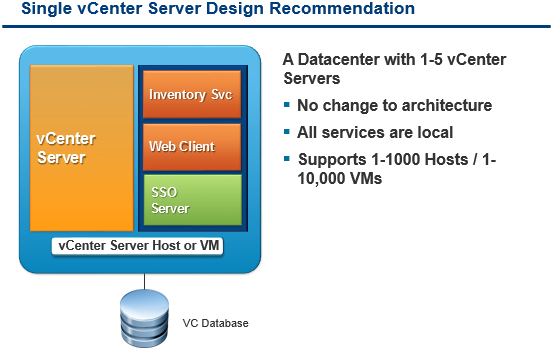
    As I mentioned one of the big changes in vSphere 5.5 that I felt should have been mentioned in the keynote and would have probably got a loud cheer from the crowd was the massive changes to SSO. The SSO service has been almost totally rebuilt and when I was on the early access blogger webinars everyone breathed a sigh of relief as the SSO in vSphere 5.1 was not a simple thing to install especially seeing as it was recommended to break up all the individual components. This has now changed and it is recommended that they are all kept on one machine. Below is the recommended layout now for the vCenter Server design.

    image

    Kendrick Coleman also gave a great overview of it from 30k feet here . For me the real improvement is the simple steps to setup SSO now which are:

    1. Accept License agreement (EULA)

    2. Prerequisite check summary

    3. Edit default port number 7444 (if necessary)

    4. Select Deployment placement

    5. Provide Administrator@vSphere.local password

    6. Provide a site name or select a previous site name

    7. Edit destination directory (if necessary)

    8. Summary

    9. Installation Complete

    I’m one of the hosts of the EMEA vBrownbag and all of the US Brownbag and a few of the APAC vBrownbag team are out at VMworld US doing the very popular Tech Talks. The Tech Talks are 10 to 15 minute presentations by members of the VMware community on topics of their choice, almost like a mini #vBrownBag. They are being streamed live by the vBrownbag guys and are being recorded for people like me to watch them when you can. The schedule for the Tech Talks can be found here. Make sure you watch the stream live and give the guys the support they deserve as all of these presentations are from the community.

    Talking about the vBrownbag crew one of the main culprits Nick Marshall has released alongside Scott Lowe, Forbes Guthrie, Matt Liebowitz and Josh Atwell (another vBrownbag host) the next instalment of the Mastering VMware vSphere book for vSphere 5.5. A massive congratulations to Nick on this project and for being asked and doing such an awesome job whilst still helping out on the vBrownbag. Nick has detailed the announcement on here blog here.

    One of the biggest announcements from the keynote was the release of VMware NSX, as Forbes Guthrie said I’m waiting for NSXi clip_image003 but until that day the below are some of the highlights of the new feature and I would highly encourage you to read Chris Wahl’s detailing of the feature from above.

    NSX Highlights:

    • VMware NSX is a next-generation network virtualization solution
    • Provide the key functions of network virtualization: decouple, reproduce, and automate
    • NSX will support any hypervisor, any CMP, any network hardware
      • vSphere, KVM, and Xen are currently supported
      • CMPs currently supported are OpenStack, CloudStack, and vCAC/VCD
    • NSX optimized for vSphere leverages the platform’s enhanced functionality

    High-level View of VMware NSX Architecture:

    clip_image004

    VMware NSX Controllers:

    • Designed with a distributed, scale-out architecture.
      • Minimum of 3 controllers for an NSX controller cluster.
      • NSX optimized for vSphere scales to 5 controllers.
    • NSX controllers run a common code base in different form factors.
      • Controllers run as infrastructure/service VMs in NSX optimized for vSphere.
      • Controllers run as physical appliances in multi-hypervisor environments.
    • Controller functions optimized in each delivery option.

    VMware NSX Virtual Switches:

    • NSX uses programmable virtual switches on the hypervisors
    • In NSX optimized for vSphere, NSX leverages:
      • the vSphere Distributed Switch (VDS)
      • the UW (Userworld) Agent for communications with NSX controllers
    • In multi-hypervisor environments, NSX uses:
      • Open vSwitch for KVM and Xen
      • NSX vSwitch (an in-kernel virtual switch) for ESXi

    VMware NSX Gateways:

    • The gateways are the “on ramp/off ramp” into or out of logical networks
    • Both L2 (bridging) and L3 (routing) gateway functionality available
    • Basic functionality the same regardless of delivery option
      • NSX optimized for vSphere leverages NSX Edge (derived from vCNS Edge)
      • In multi-hypervisor environments, gateways are physical appliances leveraging a scale-out architecture

    VMware have also posted the What’s New pdf for vSphere 5.5 which gives you a very good overview of all the new features and services here

    VMware have released a new VMware certification called the VMware Certified Associate for those people looking to get into the IT industry. Unlike the VCP there is no required training but there are free eLearning courses available for people to skill up for the exam. These do look like a good starter for people thinking of learning the basics of virtualization and in my opinion would be great for high school students thinking of going into IT and virtualization after high school.

    Well that is what caught my attention from day 1 of VMworld US. I’m looking forward to more information coming out and to getting my hands on all the new vSphere 5.5 tools.

    Gregg


    6 Comments

    VMware vSphere 5.5 Latency-Sensitivity Feature

    Today at VMworld US vSphere 5.5 was announced in the keynote and one of the new features released with vSphere 5.5 is the Latency-Sensitivity Feature. The latency-sensitivity feature is applied per VM, and thus a vSphere host can run a mix of normal VMs and VMs with this feature enabled. To enable the latency sensitivity for a given VM from the UI, access the Advanced settings from the VM Options tab in the VM’s Edit Settings pop-up window and select high for the Latency Sensitivity option as shown below:


    clip_image003

    What Latency-Sensitivity Feature Does

    With the latency-sensitivity feature enabled, the CPU scheduler determines whether exclusive access to PCPUs can be given or not considering various factors including whether PCPUs are over-subscribed or not. Reserving 100% of VCPU time increases the chances of getting exclusive PCPU access for the VM. With exclusive PCPU access given, each VCPU entirely owns a specific PCPU and no other VCPUs are allowed to run on it. This achieves nearly zero ready time, improving response time and jitter under CPU contention. Although just reserving 100% of CPU time (without the latency-sensitivity enabled) can yield a similar effect in a relatively large time scale, the VM may still has to wait in a short time span, possibly adding jitter. Note that the LLC is still shared with other VMs residing on the same socket even with given exclusive PCPU access.


    The latency-sensitivity feature requires the user to reserve the VM’s memory to ensure that the memory size requested by the VM is always available. Without memory reservation, vSphere may reclaim memory from the VM, when the host free memory gets scarce. Some memory reclamation techniques such as ballooning and hypervisor swapping may significantly downgrade VM performance, when the VM accesses the memory region that has been swapped out to the disk.  Memory reservation prevents such performance degradation from happening. 


    Bypassing Virtualization Layers:

    Once exclusive access to PCPUs is obtained, the feature allows the VCPUs to bypass the VMkernel’s CPU scheduling layer and directly halt in the VMM, since there are no other contexts that need to be scheduled. That way, the cost of running the CPU scheduler code and the cost of switching between the VMkernel and VMM are avoided, leading to much faster VCPU halt/wake-up operations. VCPUs still experience switches between the direct guest code execution and the VMM but this operation is relatively cheap with the hardware-assisted visualization technologies provided by recent CPU architectures.


    Tuning Virtualization Layers:

    When the VMXNET3 para-virtualized device is used for VNICs in the VM, VNIC Interrupt coalescing and LRO support for the VNICs are automatically disabled to reduce response time and its jitter. Although such tunings can help improve performance, they may have a negative side effect in certain scenarios. If hardware supports SR-IOV and the VM doesn’t need a certain virtualization features such as vMotion, NetIOC, and FaultTolerance, we recommend the use of a pass-through mechanism, Single-root I/O virtualization (SR-IOV), for the latency sensitive feature.


    1 Comment

    All Things VMworld Europe 2011 Day 3


    Yet again (I’m not sure why I keep doing this) I decided to get up early and into the conference so i could get my Day 2 blog posting out and be awake enough for Paul Maritz’s keynote. A number of my fellow LonVMUG colleagues also made their way in early and we ended up watching the keynote from the food hall on the big screen. I decided against trying to cover the keynote and give my opinions as seeing as a large portion of it was customers talking about their experiences with VMware technology and then Paul’s chat was exactly what was said at VMworld US. Therefore, i would recommend watching the keynote here and if you missed Steve Herrod’s or Raghu Raghuram’s from Tuesday and Wednesday respectively then you can watch them.

    After this, i made my way to my first and only session of the day (due to the time my flight left i only had enough time for the 11am slot unfortunately) which was VSP1708 VCDX Panel Defence Preparation. The session was everything i had hoped it would be and a little more. One of my future aims is to obtain my VCDX (looking like VCDX 5 due to time constraints now) and so I really wanted to attend the session to get a good idea of the process and what happens on the day and what the panelists are expecting and looking for. If you are going to watch one VMworld session video and are thinking of doing the VCDX one day then this has to be it as it scared me a little but also gave me an amazing idea of what i need to do and aim for now to be ready to build, defend and obtain my VCDX. The biggest tip I got out of it that john Arrasjid said was “start building your design now as the people who rush to build their designs are normally the people who fail and don’t fully understand their designs”

    After the session, i had some lunch and hung out at the bloggers lounge and even almost got onto one of the vSoup videos but instead decided to watch from a far and was mentioned by the guys on it here. I still say if they don’t announce the band, it is only right to make wild speculations of who the band will beclip_image001.

    After chatting to a number of the bloggers and vExpert’s I made my way to the airport and after my flight being delayed by two hours and the pilot having to abort our landing at the last second i made it back to the UK after a very successful and tiring VMworld Europe 2011.

    Gregg


    Leave a comment

    All Things VMworld Europe 2011 Day 2

    As I did with Day 1, for day 2 I also got in around half seven to be able to get into the labs as they opened. It seems that loads of other people had the exact same idea though as by half eight there was a waiting queue in the waiting area of over 50 people and loads more in the line outside. My first lab was all about deploying Nexus 1000V via Distributed Switches and was really really good and is one I would highly recommend. After I finished the lab, I walked straight back in and got myself on “Optimising Your Network Structure and Consolidating Network Management”. The lab mainly went through deploying standard virtual switch networking, then creating, and migrating it to distributed switching whilst keeping the hosts up and running as well as the virtual machines. I had learnt loads of this for my VCAP but it was really good practice in preparation for my retry of my VCAP-DCA.
    Next, I wrote up my All Things VMworld Europe Day 1 posting in the bloggers lounge whilst chatting to a number of fellow bloggers and vExpert’s. Talking of Day 1 the recording of Steve Herrod, “CTO and Senior VP of R&D at VMware” and
    Maurizio Carli (Senior Vice President and General Manager for EMEA ) keynote is now available
    here and Raghu Raghuram, (Senior VP and General Manager of Cloud Platforms for VMware) from Tuesdays morning session is up also.

    After having some lunch I attended the session “Design, Deploy and Optimise SharePoint 2010 on vSphere”. The session was highly interesting as we do a number of SharePoint 2010 deployments on VMware at present and it was good to see and hear what they experienced and the best practices for it. Once the sessions go up on the VMworld, website i would recommend watching this one and going through the slidedeck before doing a SharePoint 2010 implementation in your own environment.

    The VMworld TV summary of Day 2 has also gone up and covers all the news and even a super hero guest appearance.

    After the session I wandered around the solutions exchange chatting to a few people and also chatted to a number of the guys I know operating the EMC booth and even got one of the guys a good contact for some work for EMC. The day slowly quieted down from here, as a number of people seemed to have left to go change and get ready for the VMworld Party. The party was help at the Carlsberg Museum in downtown Copenhagen and was set out in an eighties retro style of Blade runner meets Tron styling. The evening was a great one personally, as it let me meet even more of the top bloggers and VMware experts like the infamous Dave Hill and Chris Colotti of vCloud Director Fame to name but two.The night was a real success even though there was no big band like the US.

    clip_image001

    For all the VMware people I met last night it was great meeting you all clip_image002

    Gregg


    1 Comment

    All Things VMworld Europe Day 0

    Yet again, i have been fortunate enough to be given the opportunity to attend VMworld Europe. I really enjoyed my time last year and knowing what to expect made it even more exciting for me than last year. Monday is Partner day and they definitely made sure all the partners felt welcome with free drinks, loads of top sessions and awards at the end of the day. I only arrived around 2pm so i had already missed one or two of the sessions and felt like a number of the VMworld sessions that I can watch them off the VMworld website in my own time later on and i would rather meet up with fellow vExpert’s and some of the top bloggers and talk shop. One confirmation that I am a real nerd is that I got Duncan Epping and Frank Denneman to sign my copy of the VMware vSphere 5 Clustering technical deepdive book clip_image001. Day 0 went by very quickly and I had been invited to two of the parties. The official VMUG party hosted by the Danish VMUG and the vGeekfest run by EMC. Seeing as EMC were so nice in sending me yet again and because a number of the people I really wanted to meet and chat to were going to the vGeekfest party. After getting lost trying to find the party, I finally found it at the Apollo Brewery. A very nice location and the whole ground floor was allocated to us with home brewed beers and very nice food. The main thing I really enjoyed about the evening though was meeting loads of the top bloggers and social media experts so I’m sure I’m going to miss out a few but I was fortunate enough to meet Aaron Demp,Fred Nix (@nixfred) ,Delon Karrim (@delonk) , Travers Nicholas (@travern),Simon Rahilly (@noneonemany), Scott Lowe,Bas Raayman, Simon Long ( aka the SLOG) ,Steve Chambers, Craig Stewart and Simon Seagrave to name but a few clip_image002. The VMworld TV team have already posted a video of Day 0 although due to it not being the official first day they don’t cover very much of the technology yet but more the conference centre and what they are hoping to see and here

    If you are at the conference and see some nerdy Saffa walking around stop me and say hi, as I’d love to meet as many people as possible

    Gregg


    Leave a comment

    The leader of the pack


    Having only got into the virtualisation community with the past year and a half I’m obviously a relative newcomer compared to the likes of Duncan Epping of Yellow Bricks Fame and Scott Lowe of ScottLowe.org fame to name but two. But the way the community has shared their knowledge and helped me to grow to a point where I’ve been selected as a vExpert I think comes down to the leadership and excellence of one man and the honorary leader of the VMware Community and the owner of the vExpert community John Troyer. I first got to know about John and his hard work via the VMware Communities Roundtable podcasts that he hosts every week. As a true leader he’s always working to make the community better and puts in a substantial amount of work every week for the podcasts, hosts the live interviews from both VMworld US and Europe,has been spreading new about virtualization at the VMTN Blog since 2005 and makes sure the vExpert community is giving back to the whole VMware community while making sure the vExpert community is a place you want to join and stay a part of.

    I was very fortunate to meet John in person at VMworld Europe last year and spoke briefly to him and told him how it was my first year and my impressions of it all which he was highly interested in. From this interest he even got me to give my opinion on being a first year attender to the conference and what I enjoyed for the conference on the VMworld Europe wrap up roundtable podcast.

    So on his birthday along with all the other vExperts and wider VMware community I’d like to thank John for all his hard work and dedication in making the VMware community somewhere like no other community I’ve ever been a part of and for his hard work on the roundtable’s and the vExpert community. Also a big HAPPY BIRTHDAY

    image


    Gregg


    Leave a comment

    VMworld Sessions Public Voting Now Open

    Just a very quick posting to alert anyone that hasn’t noticed that the public voting for VMworld 2011 sessions is now open. Unfortunately I personally couldn’t get a good enough idea down to submit a session myself like I had hoped I would but from the amount of talk of it on twitter already today it looks like loads of the top people in the industry have submitted quite a few and they have all been approved to go through to the public voting phase.

    To be able to vote you will need to have a VMworld account, which you should have already since I’m sure you’ll have all been watching all the previous VMworld session videos to hone your skills and knowledge. There are a substantial amount of sessions to select from once you have logged into the session selection page so I would recommend using the search options and selecting the kinds of sessions you would like to see to try save you time

    image


    Good luck to all those who have got their sessions approved and hopefully all the sessions I’ve voted for will get through.

    Gregg