Today at VMworld Europe, VMware are going to announce vRealize Automation 6.2 which is the renamed vCloud Automation Center solution but obviously the next version which is due to be available in Q4 this year. It does seem like there is a new version every six months of the solution as vCAC 6.1 was only GA 6 weeks ago which added a whole host of new features.
Below is an overview of what is being added in the vRealize Automation 6.2 product, fortunately there isn’t a change to the architecture so for those who have recently deployed vCAC 6.1 to customer like I have recently you don’t have to stress about doing the upgrade like it was between previous versions.
Upgrade and Migrate to vCAC 6.1
Release 6.0.1.1 to release 6.1
6.0 must first be upgraded to 6.0.1.1
In-place upgrade from 6.0.1.1 to 6.1
Application Services (AppD) requires side-by side migration
Release 5.2.1 to release 6.1
Older versions must be first upgrade to 5.2.1
6.1 will be installed side by side with 5.2.1
A migration utility will move data from 5.2.1 to new 6.1 deployment
Will require some system down time
Does not include AppD
vRealize Automation 6.2 Summary
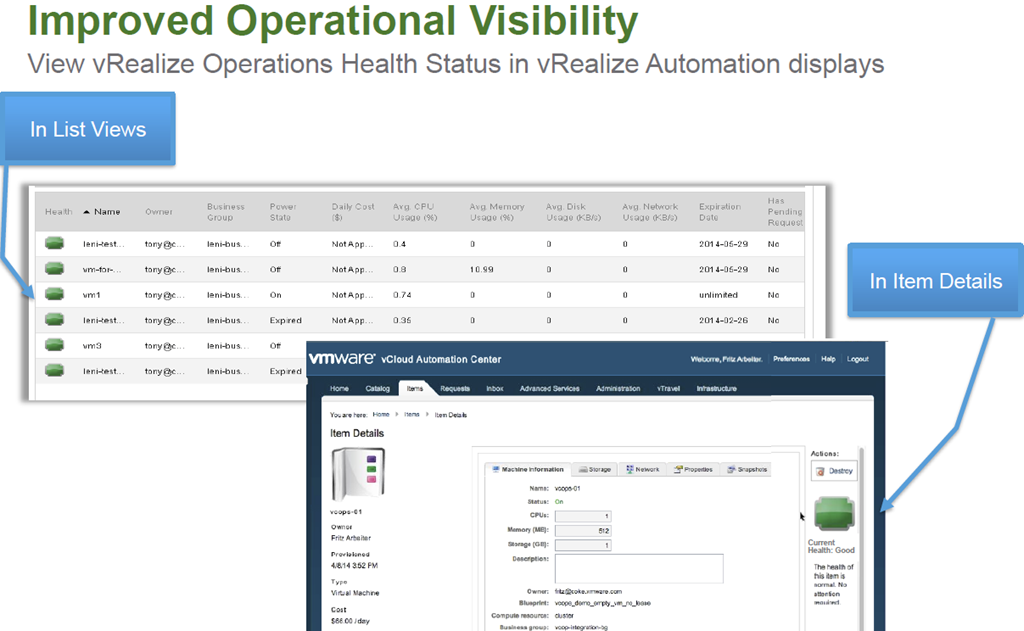
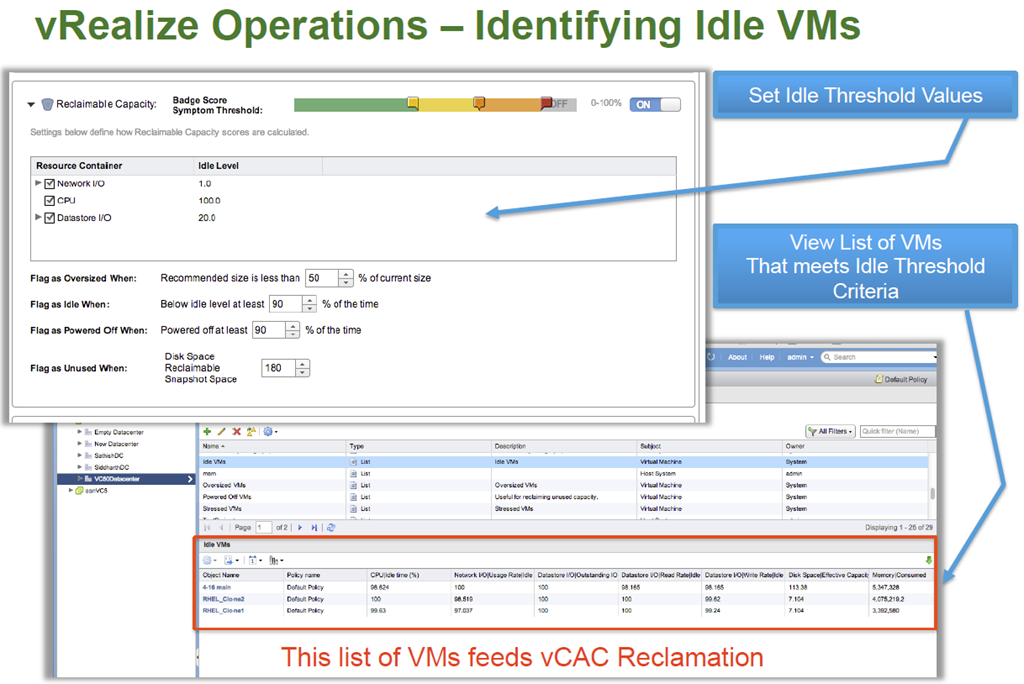
Enhanced integration between vRealize Operations and Automation
Health status displays
Reclaims inactive VMs
Admin Friendly CLI
Simplify scripting of vRealize Automation commands
Enhanced Endpoint Support
vSphere 6 (Q1-15)
XenDesktop 7
Enhancements to vCloud Air
Proxy Support
Pay as you go support (Q1-2015)
OpenStack (Havana)
vRealize Automation 6.2 In-Depth
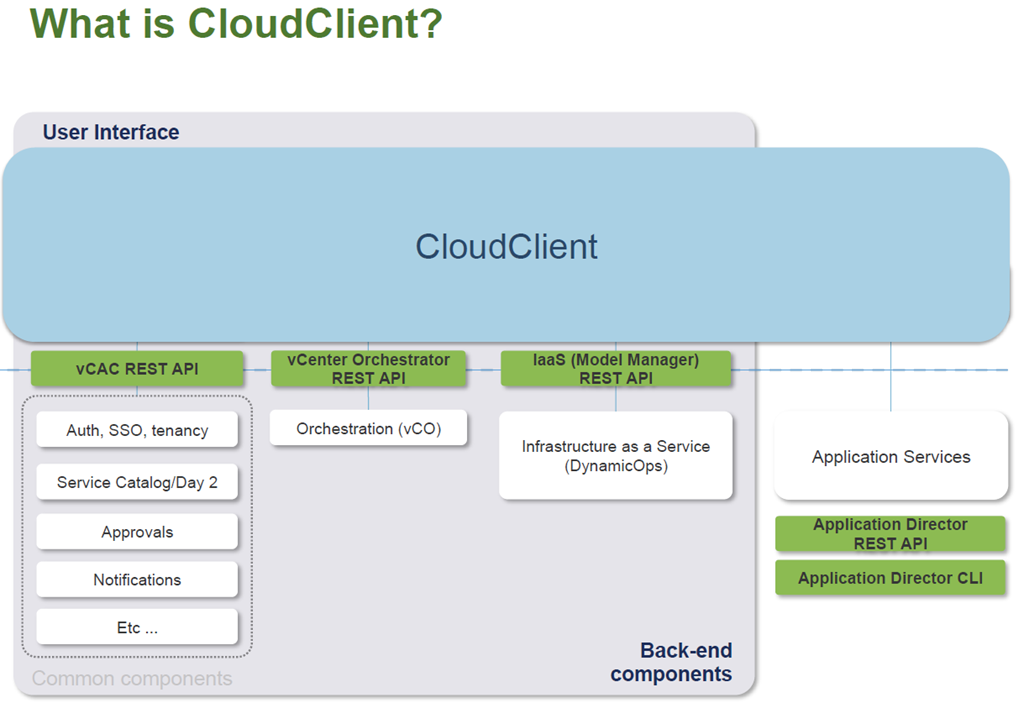
CloudClient
CloudClient Overview
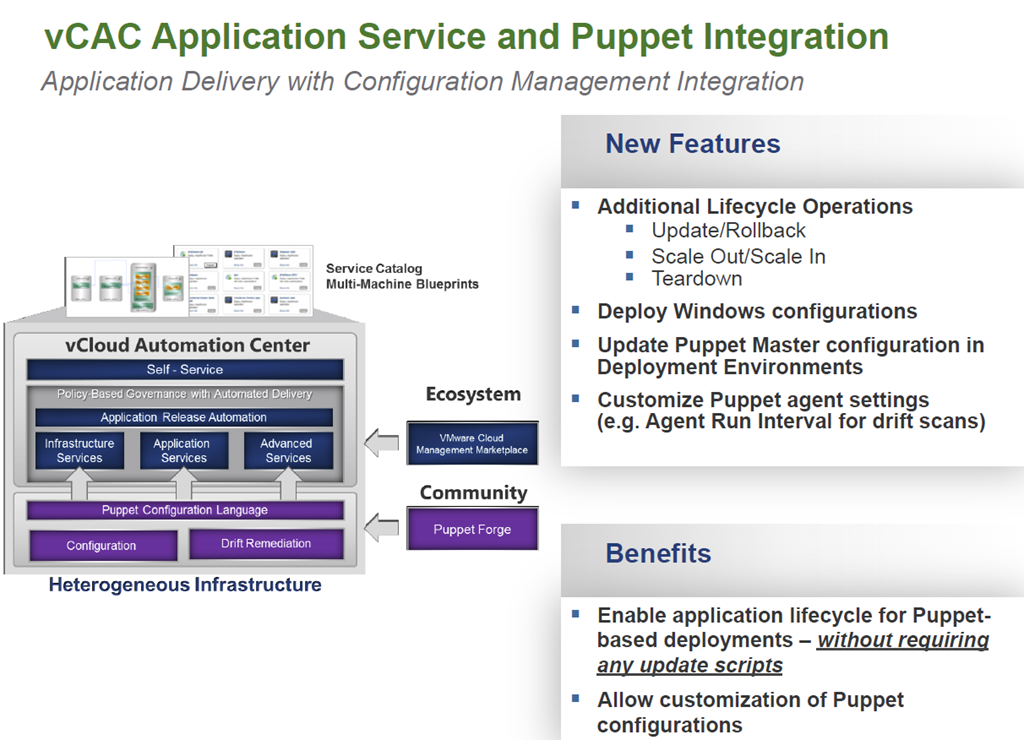
Command-line utility that provides verb-based access with a unified interface across the vCAC APIs (including IaaS, Applications, vCO)
Focused on providing an easy-to-use command-line interface for the IT administrator where scripting and CLI use is more feasible than direct API calls
Stable interface while underlying APIs may change over time
Provides common security; exception handling; JSON, CSV and tabular formatting; file export; auto login for scripting (password and keyfiles); and auto-generated documentation.
Available as a separate Download in Early Q4 (supports 6.1)
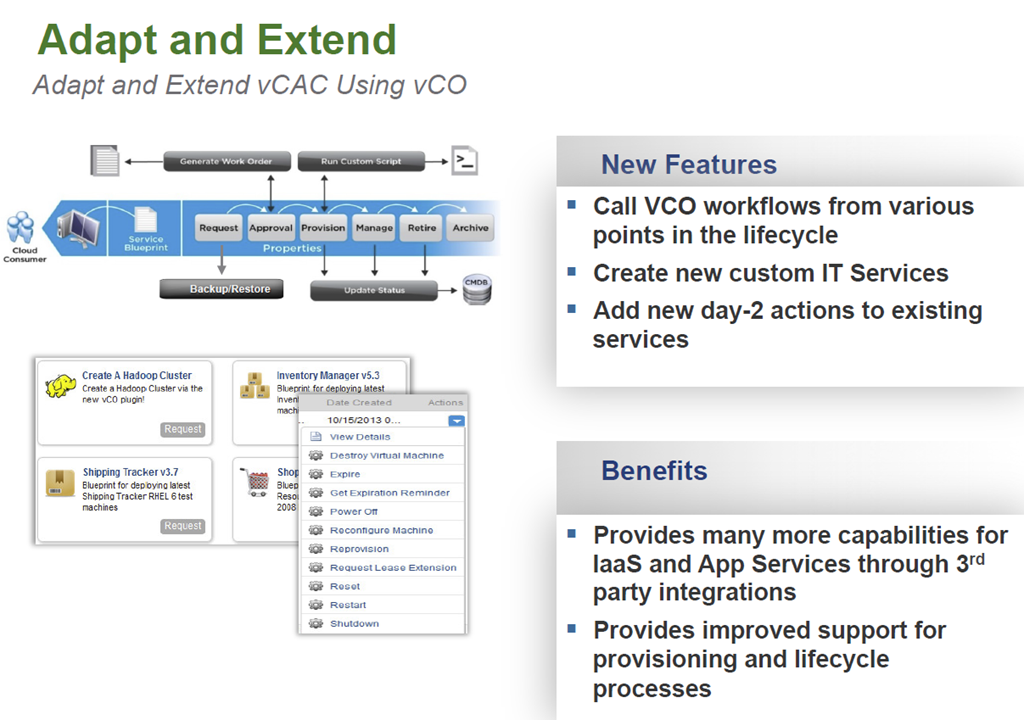
Not long after VMworld Europe vCAC 6.1 was released. For the past year I have been very fortunate to have been on some very large vCAC projects as an extension of VMware PSO and have seen the product change dramatically. there have certainly been some challenges but I’m super excited about vCAC 6.1 and from the experience I have gained of it so far it is looking very solid and now can work seemlessly with vCO along with a number of other great new feaures. So below is an overview of what is new in vCAC 6.1.
vCAC Extension
Interested in Developing a VCO Plugin? Free Access to the vCO Plug-in SDK
The SDK has samples and documentation to facilitate development
Today at VMworld EU there are going to be a number of announcements and as has become the norm for VMworld Europe, VMware are making a number of announcements around their new management solutions. One of these announcements is vRealize Operations 6.0.
If you are wondering what I mean with the vRealize name then below is a very quick summary:
vRealize Suite
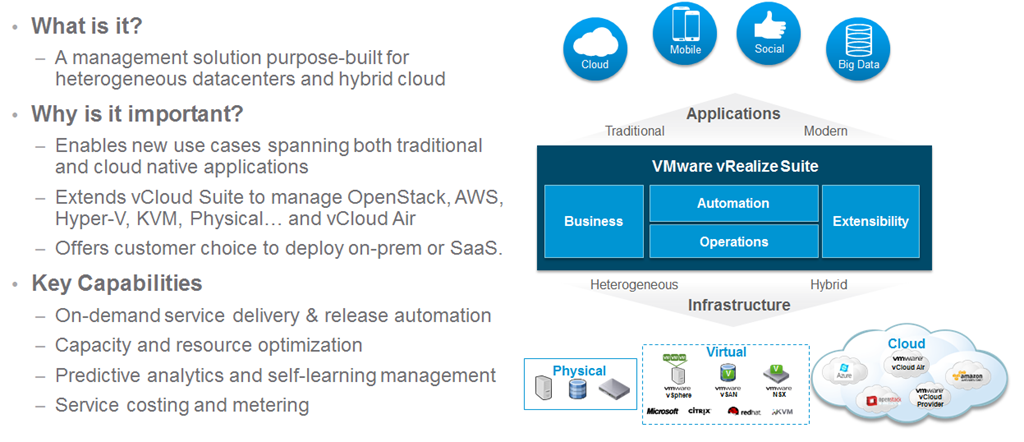
VMware vRealize is changing the name of the management solutions into simpler packaging and suites and as announced at VMworld US, vRealize Air Operations,Automation and Business will be available soon to provide a new SaaS solution for VMware customers via the renamed vCloud Air offering.
vRealize Operations 6
There are a number of new features and enhancements in vRealize Operations 6.0 one of these is the new scale-out architecture allowing high resiliency and availability as well as self monitoring to ensure that if an instance/slice is lost, it is reported and brought back seamlessly.
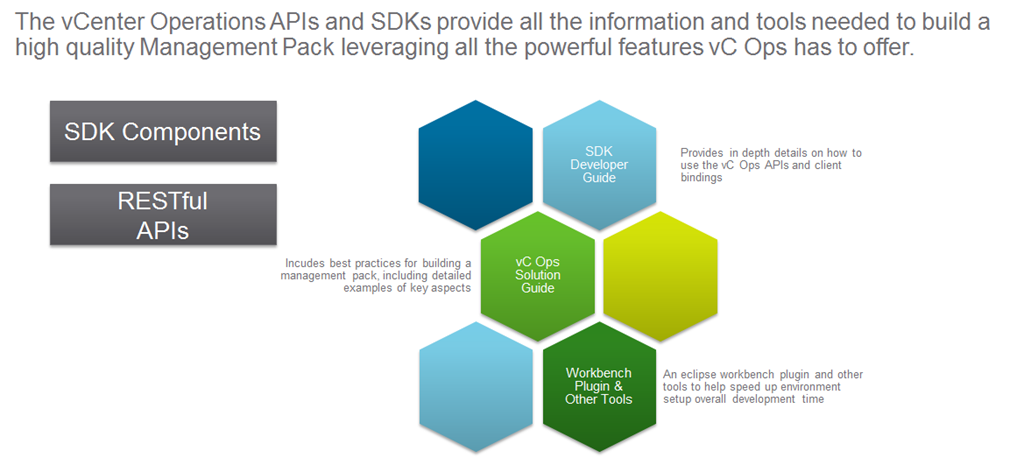
vRealize Operations 6.0 is now providing a public set of RESTful API’s to allow customers and partners to extend as well as get information in and out with ease so that it can be used for custom reporting or in the case of a project i have been on recently will allow monitoring of vCAC DEM’s and automatic provisioning of more if required.
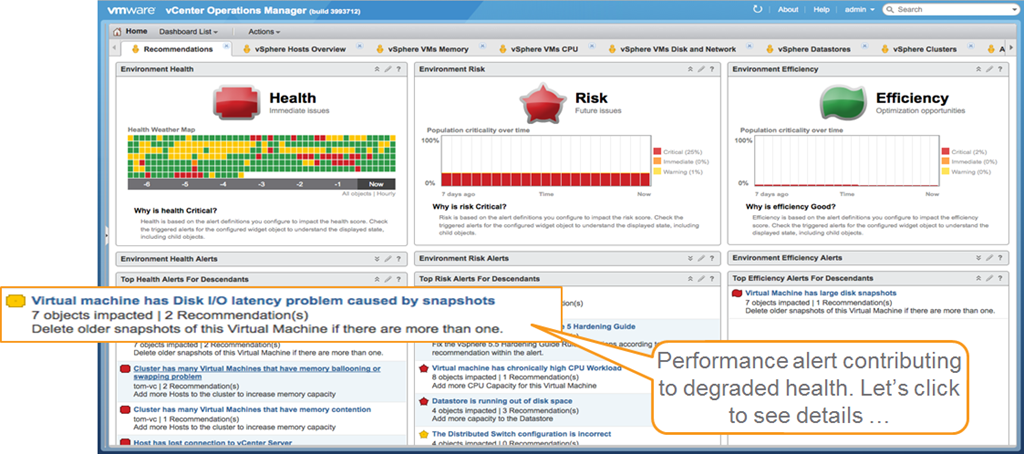
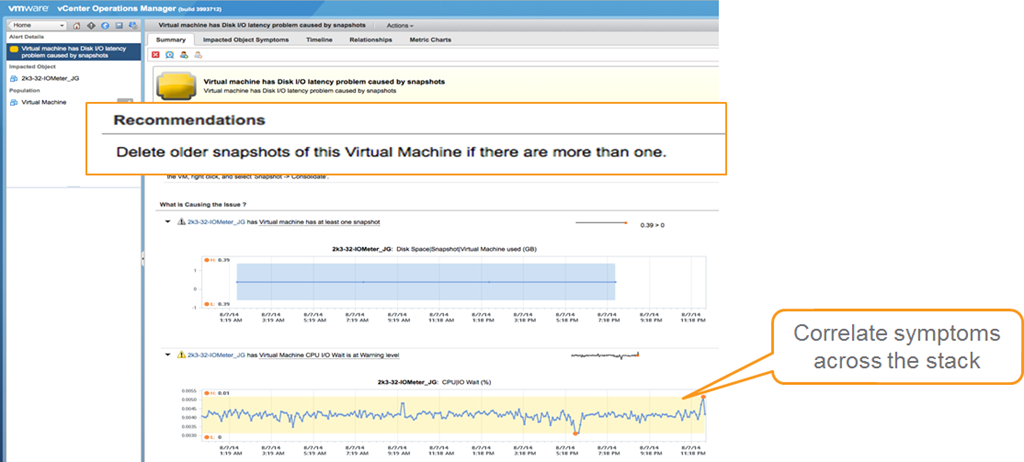
The management dashboard of vRealize Operations 6.0 has maintained the same three panels on health Risk and Efficiency to provide viewing and reporting of immediate and future problems as well as opportunities to optimise. With vRealize Operations 6.0 you now have a new section below each of the three panels there are now problem alerts which give you correlation of problems and the ability to click the alerts to see the details as shown below.
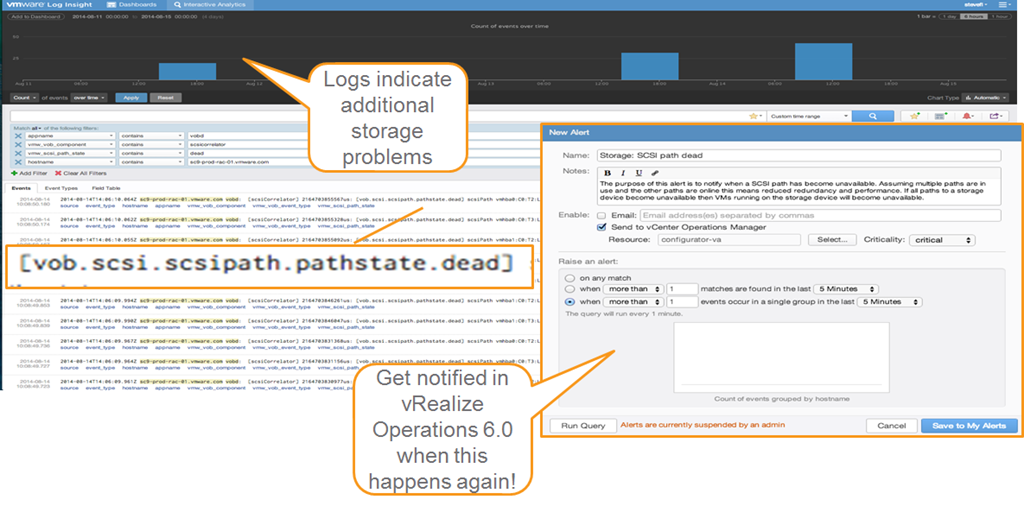
There is also the ability to dig deeper into the problems by using vRealize Log Insight which can send alerts into vRealize Operations 6.0 if certain problems arise and allow custom reporting and alerting for partners and bigger customers who are looking for custom reporting and deep analysis.
Below is a summary of all the new features and solutions in vRealize Operations 6.0 allowing reporting of public and private architecture as well as simplistic single pane of glass management.
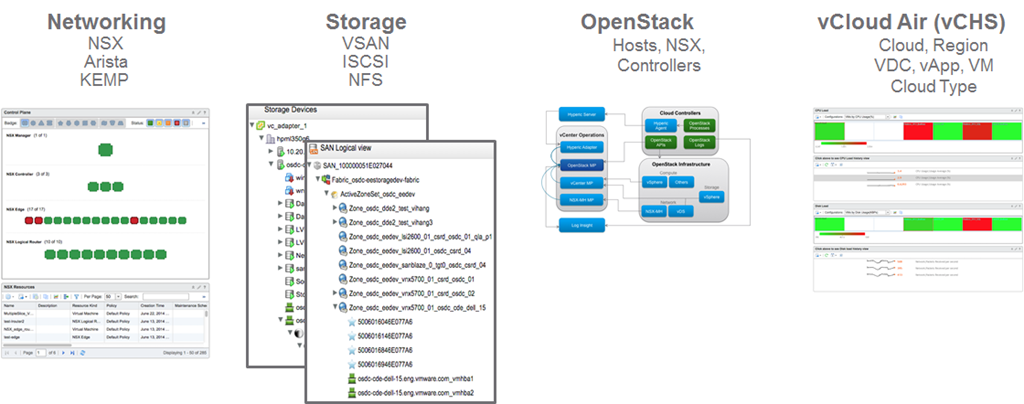
One of the biggest abilities of vRealize Operations 6.0 that I really like and i think will make all the customers I see as a consultant very happy is the support for new SDDC and hybrid cloud platforms meaning you can now monitor and report on networking,storage, OpenStack and vCloud Air. This will truly allow you to manage and report on your whole SDDC environment.
vRealize Operations 6.0 NSX Management Pack
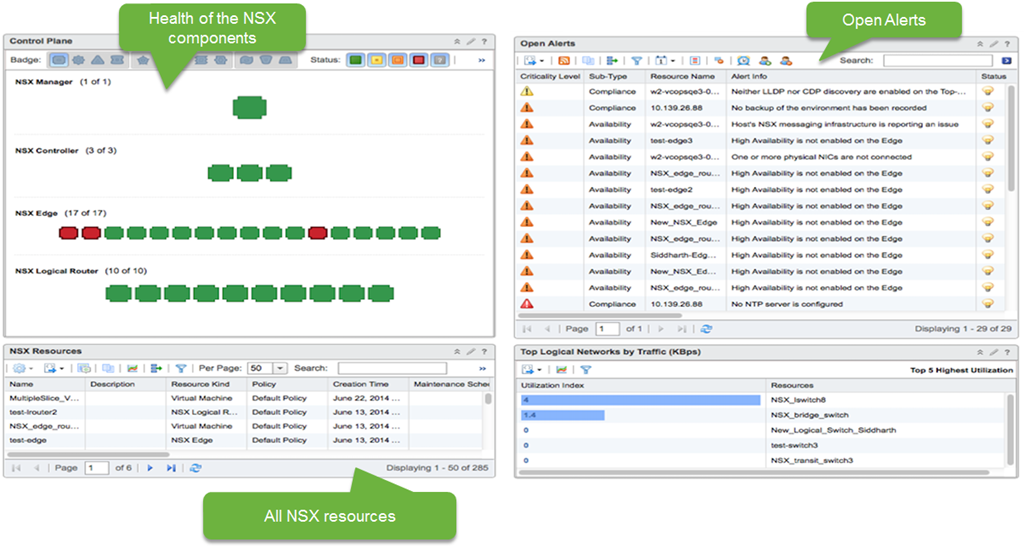
With vRealize Operations 6.o as shown above is the ability to monitor and report on SDN solution NSX. With vRealize Operations 6.0 there is a new management pack for NSX.In the image below, you can see the heat map showing the transport layer. The transport layer is effectively all of the transport nodes (NSX term for hypervisors). These boxes are the ESX hosts registered with NSX, grouped by a particular transport zone. Transport zone is a group of hypervisors that share the same transport behaviour. On the bottom, the widget shows the top talkers. If there is a lot of traffic, this widget can help us figure out which VMs are responsible for the most network traffic.
There are three NSX dashboards: NSX main dashboard, NSX logical topology and NSX Edge services.
The current view is from the NSX main dashboard. Currently, we are a seeing information for a particular NSX Manager instance. The control plane widget is all the objects corresponding to the NSX Manager (API and connection to the vCenter Server for configuration), Controllers (responsible for configuring switches), Edge (VMs that deploy certain logical network services like DHCP, Load balancer etc. ), Logical Routers (Distributed routers responsible for configuring the routing software on each individual host).
All the alerts related to NSX are captured in Open Alerts widgets. This is based on hard threshold violations. We can see a number of High Availability violations. We have 40-50 alerts that are configured out of the box. We have detailed documentation on each of these metrics and what the alerts mean.
vRealize Operations Management Pack for OpenStack
OpenStack is emerging as the leading cloud platform for enterprises and some SPs. VMware are going to provide a management pack to support OpenStack providers. It will mostly be sold to existing vSphere customers who have OpenStack deployments currently.
Based on vRealize Operations 6.0
Unified UI for vSphere, NSX, OpenStack and other resources
Health, Risk and Efficiency badges for OpenStack objects
Sub-badges for OpenStack objects (workload, faults etc.) and capacity model
Problem detection and remediation for OpenStack infrastructure and tenants
Reporting templates for activity, capacity and issue frequency
Inventory, availability and capacity of ESX and non-ESX hosts, NSX and vSphere data stores registered with OpenStack
Integration with vSphere and NSX Multi Hypervisor Management Packs
OpenStack Controller Services Dashboard
Correlation of OpenStack Controllers to vSphere VMs
Services availability monitoring
Availability
Target GA date is Dec 2014
vRealize Operations Management Pack for vCloud Air
’Hybrid Cloud ‘Analytics
Provides utilization for cloud resources and deep VM performance data
Supports shared and dedicated/private Cloud
Includes 40 VM metrics related to CPU/memory/disk/network
Collects change events and resource topology from vCloud Air
Comprehensive vSphere like Out-of-box Dashboards
One operations console across private and public clouds
Out-of-the-box dashboards enable isolation and quick resolution of performance issue
Multiple Resources Supported
vCHS Cloud, vCHS Region, vCHS vApp, VDC ,VM, Cloud Type
All Form Factors Supported
vApp, Standalone – Windows and Linux
What’s Coming Next
Storage and networking service resource details or metrics
Summary
vRealize Operations 6.0 is going to enable both SMB and Enterprise customers who have either or both on premise and off premise workloads in their private or public clouds to monitor, report and make more efficient their environments. I am looking forward to working with vRealize Operations 6.0 and seeing all the capabilities especially through the RESTful API availability to enable my customers both large and small to get all the reporting and management they require integrated into their existing solutions.Make sure you watch the live VMworld keynote to learn more.
For security standards there are a few and for these they are normally for government,finance,military and telecommunications. There are a few standards each of these keep to and they largely overlap into the next point of compliancy. For example here in the United Kingdom there are a few cloud vendors who run community clouds where they assure they meet business impact levels and each of these levels determines the requirements for protection. A really good article straight from the UK government is here where information security is defined based on a number of criteria. A lot of government and military companies keep data in IL2 or IL3 and vSphere 4.0 and 4.1 were actually verified to meet IL3 compliancy. Recently they are still EAL4+ and FISMA certified.
For your conceptual design you will need to know what abstraction is required based on whatever the relevant security standard is and most likely have to sit down with the compliancy officer and determine what they feel is required for them to approve your solution meets their security standards.
Identify relevant industry compliance standards.
There are a number of compliance standards that are used from various companies who process credit cards, hospitals who keep peoples personal data to companies who have to keep to specific regulations. There are a number of these and some are only applicable in specific countries but the ones I think are the most likely to be seen in a vCloud environment are:
Sarbanes-Oxley
Health Insurance Portability and Accountability Act (HIPAA)
Federal Financial Institutions Examination Council (FFIEC)
Payment Card Industry Data Security Standard (PCI DSS)
International Organization for Standardization (ISO) 17799
National Institute of Standards and Technology (NIST)
International Organization for Standardization (ISO) 27001
A really great example of this is the Architecture Design Guide for Payment Card Industry (PCI) document by VMware. This is PERFECT in showing the kinds of things you need to keep in mind and the varying mechanisms to achieve this. The document goes much deeper than conceptual but seeing as you will have to go from conceptual to logical and then to physical it makes sense to learn it now.
This along with the two points above are covered perfectly in appendix B of the vCAT Architecting a VMware vCloud pdf. For the conceptual design this is more around isolation and multi-tenancy but the whole of appendix B gives a great break down of the kinds of security that is possible within vCloud and the mechanisms and products that can be used to achieve this.
Identify the auditing capabilities of vCloud technologies.
This is the vast mechanisms such as logging,log retention, syslog shipping and firewall logging via vCNS to name but a few that are possible via vCloud. Appendix B of the vCAT covers these off really well and the retention policies mentioned in the Architecture Design Guide for Payment Card Industry (PCI) document cover off the kinds of auditing you may be requested to do. For conceptual this isn’t very applicable and I’m amazed it is actually mentioned here.
Skills and Abilities
Based on customer requirements, determine auditing requirements for a vCloud conceptual design.
These would be determined in design workshops and discussions with different subject matter experts within the customer around what they are looking to audit/log and if there are any compliancy standards they needs to meet. If they are a service provider who provides public cloud to the general public then there is a very good chance they have to meet PCI compliancy for example and so retain logs and do auditing to ensure security and allow retrospective inspection. For a conceptual design auditing isn’t something you would put in your “napkin” design but knowing if you need additional auditing does mean you have to design to be prepared for this in the logical and physical designs.
Based on customer requirements, determine security requirements for a vCloud conceptual design.
A large portion of this is the same as above as with security requirements around compliancy includes auditing also. For example if it is a private cloud that is being designed but it is for a hospital, then HIPAA standards need to be met and so certain security measures need to be applied. For conceptual this is mainly around separation, defence in depth and usage of two factor authentication to name a few off my head. How different zones within the cloud offering are separated and secured also need to be planned for and conceptually designed.
Based on customer requirements and vShield Edge security capabilities, determine the impact to a vCloud conceptual design.
For this you need to know what vShield Edge is capable of doing and in what use cases each of these would be used. A perfect document that describes this is the vShield Edge Design Guide Whitepaper. The actual impact to a conceptual design is mainly that vShield Edge allows isolated virtual datacentre’s hosted on a common physical infrastructure instead of needing siloed physical infrastructures. The separation via the vShield Edge firewall is in most cases more than sufficient but knowing where physical separation is required (PCI for example) is also very important.
vShield Edge also provides IPSec VPN capabilities which are very important for the security of your cloud infrastructure. Knowing that the vShield edge can provide this along with NAT,Load balancing and most importantly for this section firewall capabilities via one device means you don’t need multiple devices like in a traditional multitenant design.
Explain the logging capabilities of the various VMware products.
There are numerous products within the VMware product set that enable logging capabilities. The main ones that will apply to the vCloud infrastructure are:
If you feel I have covered something incorrectly please let me know as I’m learning like everyone else and I certainly don’t claim to be perfect (near it but not perfect ). Also the vBrownbag covered the whole of objective 1 here.
A colleague of mine at Xtravirt, Richard Renardson was experiencing an ambiguous “System Exception” error on the requests page in the vCAC 6.0.1 portal at a very high profile customer. Upon checking the server side log it was showing an error stating that “cat_request” does not exist. We tried a few things and looked through quite a few VMware KB articles but were unable to find anything that matched our problem.
After some troubleshooting we were able to determine what the problem was and a fix so he graciously allowed me to blog it to hopefully save someone else the time especially with vCAC becoming so popular recently. The problem seems to happen when an external database has been configured and the hstore extension is missing/has not been created and this extension is required by vCAC for the creation of tables. What we had to do in the end is to create the hstore extension in the vCAC database. The steps we followed to create the hstore extension was to :
Log in to the external DB using the pgAdmin tool.
Within the pgAdmin console we had to run this SQL statement to connect to the vCAC DB:
\connect "YOURDBNAME";
Within the pgAdmin tool we needed to create the hstore extension by running the following statement:
create extension hstore;
Now you just need to restart the vCAC Appliance.
After a bit of a wait for it to restart fully the problem was fixed
Hopefully this saves someone the time we spent on the problem
I am currently working on a project that is using vCAC 5.2 ,vFabric Application Director 5.2 and vCloud 5.1 to provide automated self service provisioning of resources for customers (super learning experience).
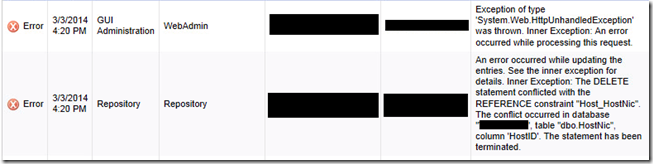
Whilst going through the manual steps of removing a test customer from the solution before automating the steps through VCO, I hit a very strange problem where at the point of deleting the endpoint to the vCloud Organisation that was assigned for the test customer I got an error stating “ Error has been caught,see event logs located on the vCAC server for detail” and as shown below.
If I went to the the logs within vCAC there were two errors linked to the problem. the main one stating “…. Inner Exception: the DELETE statement conflicted with the REFERENCE constraint “HostNic….”
The error is showing that a computer resource is still attached to the endpoint even though I had removed the computer resource from the vCloud Enterprise Group computer resources selection, removed the Org VDC from vCloud and run a manual data collection. It seems that there is a bug at present that doesn’t allow the removal via the UI (bug report already opened before someone asks) so what you need to do is (I make no promises or guarantees around this script so use at own discretion and backup your DB before running this):
Go to the SQL server that hosts the vCAC database.
Open SQL Management Studio as a user with sufficient permissions.
Select the vCAC database and click the New Query button at the top left.
Ensure the vCAC database is selected.
Paste the following SQL script in the query box and change the ‘ORG VDC NAME’ to the name of the Organisation VDC that the endpoint was connected to and execute the query.
DECLARE @HostId uniqueidentifier
SET @HostId= (SELECT HostId FROM Host WHERE HostName = ‘ORG VDC NAME’)
DELETE FROM VirtualMachine WHERE HostID = @HostId
DELETE FROM HostNicToReservation WHERE HostNicID IN (SELECT HostNicID FROM HostNic WHERE HostID = @HostId)
DELETE FROM HostReservation WHERE HostID = @HostId
DELETE FROM HostNic WHERE HostID = @HostId
DELETE FROM HostToStorage WHERE HostID = @HostId
DELETE FROM AdminGroupToHost WHERE HostID = @HostId
DELETE FROM ResourcePool WHERE HostID = @HostId
DELETE FROM Host WHERE HostUniqueID = (SELECT HostUniqueID FROM Host WHERE HostID = @HostId) AND ClusterHostID = @HostId
DELETE FROM Host WHERE HostID = @HostId
The results should show that some values have been changed.
Now you can remove the endpoint from vCAC and the computer resource won’t show up for selection under the vCloud Enterprise Group either.
I hope this saves someone the time I spent trying to fix the problem.
As most people who work with VMware will know vCloud Automation Center version 6 was released last week and with the plans for vCAC to become the route for non VSPP partners for cloud plus the added features and functionality of 6.0 the twitterverse is alive with people looking to learn more. I am one of those people and was even fortunate enough to be part of the beta for 6.o but there is loads to learn so I decided to start a list of really great resources around the product that I could use to skill up with and thought it would probably help other people as well and so this is what this blog posting is about. I am hoping to continually add more resources to this list and welcome any recommendations on good resources.
Just because some people will still be asked to do vCAC 5.2 . Also the installation notes only cover installing all the components on one server whereas Arnim has detailed how to do it when you have separated the components like you would in a production environment. I’ve used these notes on a 5.2 engagement and assure you these are correct compared to the actual VMware instillation notes
















 ). Also the vBrownbag covered the whole of objective 1

 TheSaffaGeek