TheSaffaGeek

My ramblings about all things technical


9 Comments

What’s New in vRealize Automation 6.2

Today at VMworld Europe, VMware are going to announce vRealize Automation 6.2 which is the renamed vCloud Automation Center solution but obviously the next version which is due to be available in Q4 this year. It does seem like there is a new version every six months of the solution as vCAC 6.1 was only GA 6 weeks ago which added a whole host of new features.

Below is an overview of what is being added in the vRealize Automation 6.2 product, fortunately there isn’t a change to the architecture so for those who have recently deployed vCAC 6.1 to customer like I have recently you don’t have to stress about doing the upgrade like it was between previous versions.

Upgrade and Migrate to vCAC 6.1

Release 6.0.1.1 to release 6.1

  • 6.0 must first be upgraded to 6.0.1.1
  • In-place upgrade from 6.0.1.1 to 6.1
  • Application Services (AppD) requires side-by side migration

Release 5.2.1 to release 6.1

  • Older versions must be first upgrade to 5.2.1
  • 6.1 will be installed side by side with 5.2.1
  • A migration utility will move data from 5.2.1 to new 6.1 deployment
  • Will require some system down time
  • Does not include AppD

vRealize Automation 6.2 Summary

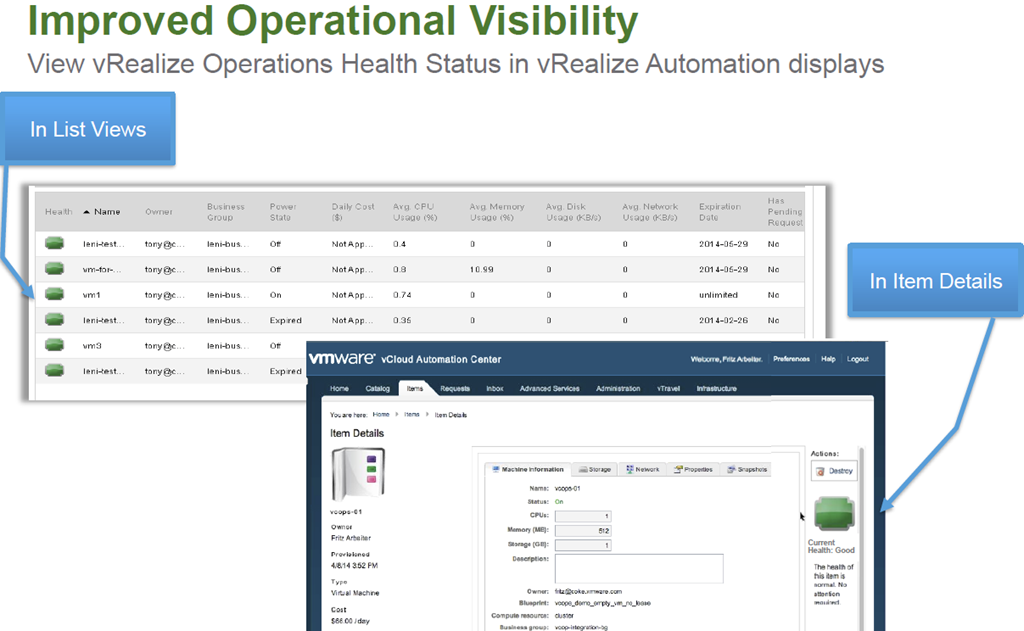
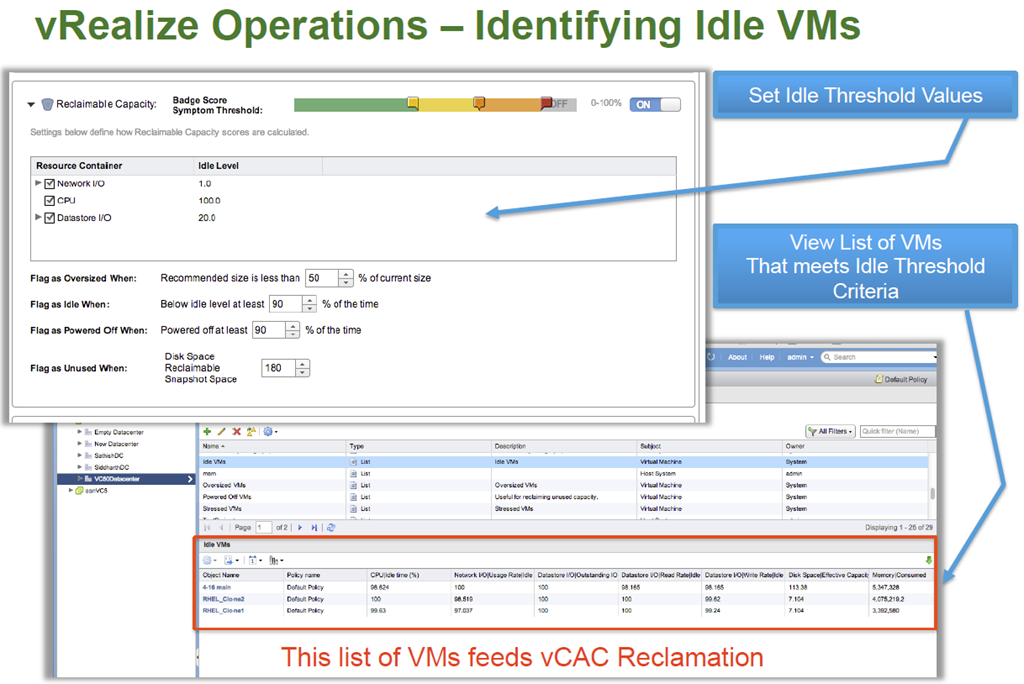
Enhanced integration between vRealize Operations and Automation

  • Health status displays
  • Reclaims inactive VMs

Admin Friendly CLI

  • Simplify scripting of vRealize Automation commands

Enhanced Endpoint Support

  • vSphere 6 (Q1-15)
  • XenDesktop 7
  • Enhancements to vCloud Air

Proxy Support

  • Pay as you go support (Q1-2015)
  • OpenStack (Havana)

vRealize Automation 6.2 In-Depth

image

image

image

image

image

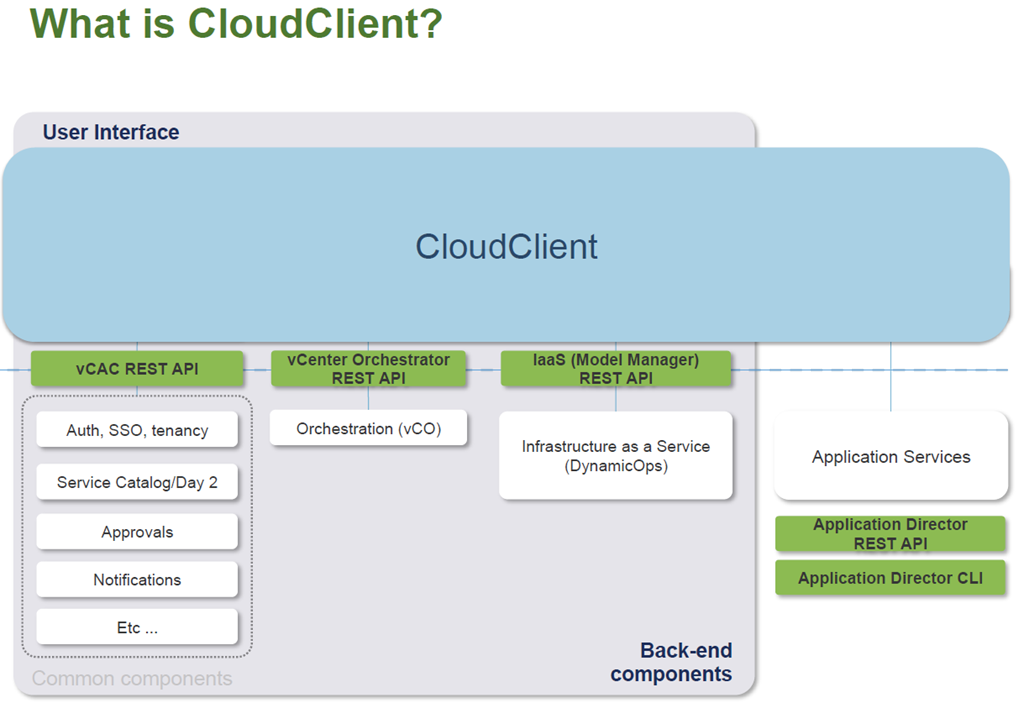
CloudClient

image

CloudClient Overview

  • Command-line utility that provides verb-based access with a unified interface across the vCAC APIs (including IaaS, Applications, vCO)
  • Focused on providing an easy-to-use command-line interface for the IT administrator where scripting and CLI use is more feasible than direct API calls
  • Stable interface while underlying APIs may change over time
  • Provides common security; exception handling; JSON, CSV and tabular formatting; file export; auto login for scripting (password and keyfiles); and auto-generated documentation.
  • Available as a separate Download in Early Q4 (supports 6.1)

Make sure you  watch the live VMworld keynote to learn more.


1 Comment

What’s New In vCloud Automation Center 6.1

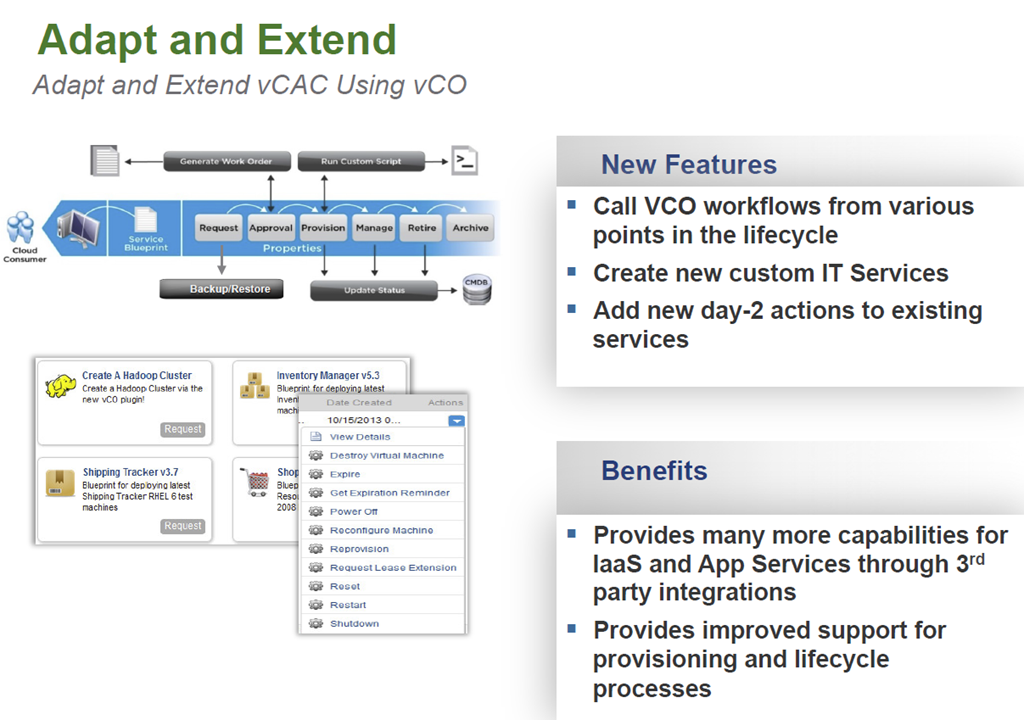
Not long after VMworld Europe vCAC 6.1 was released. For the past year I have been very fortunate to have been on some very large vCAC projects as an extension of VMware PSO and have seen the product change dramatically. there have certainly been some challenges but I’m super excited about vCAC 6.1 and from the experience I have gained of it so far it is looking very solid and now can work seemlessly with vCO along with a number of other great new feaures. So below is an overview of what is new in vCAC  6.1.

vCAC Extension

image

image

image

image

Interested in Developing a VCO Plugin?
Free Access to the vCO Plug-in SDK

  • The SDK has samples and documentation to facilitate development
  • http://communities.vmware.com/community/vmtn/developer/forums/orchestrator
  • Additional Resources

    Distribution on VMware Solutions Exchange
    – Contact: Meenakshi Nagarajan
    mnagarajan@vmware.com for additional info

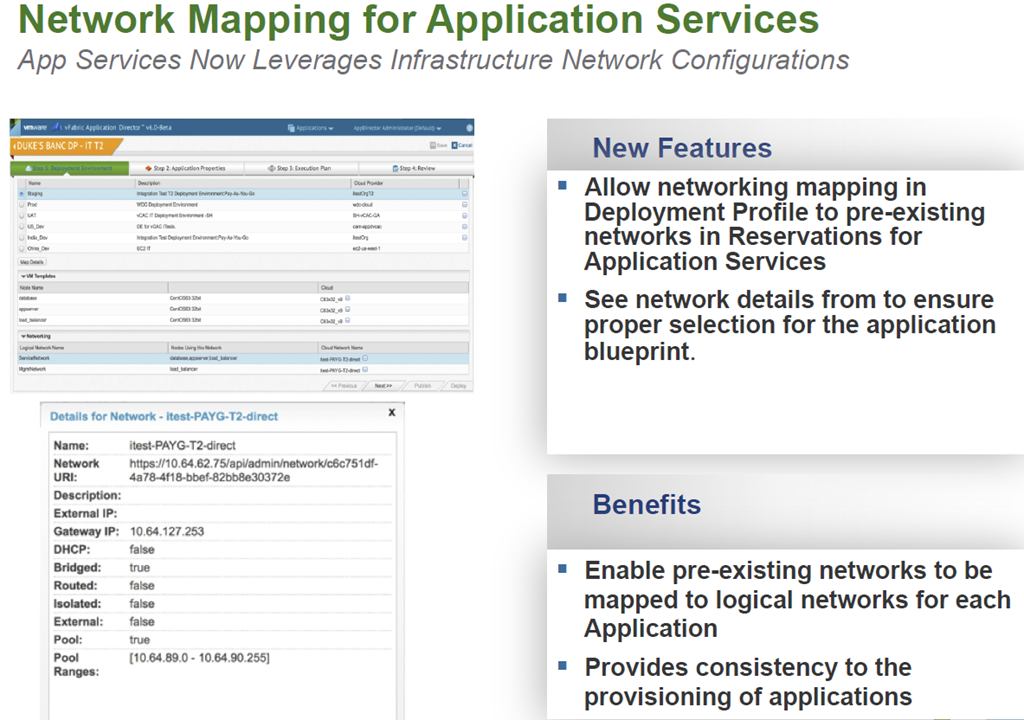
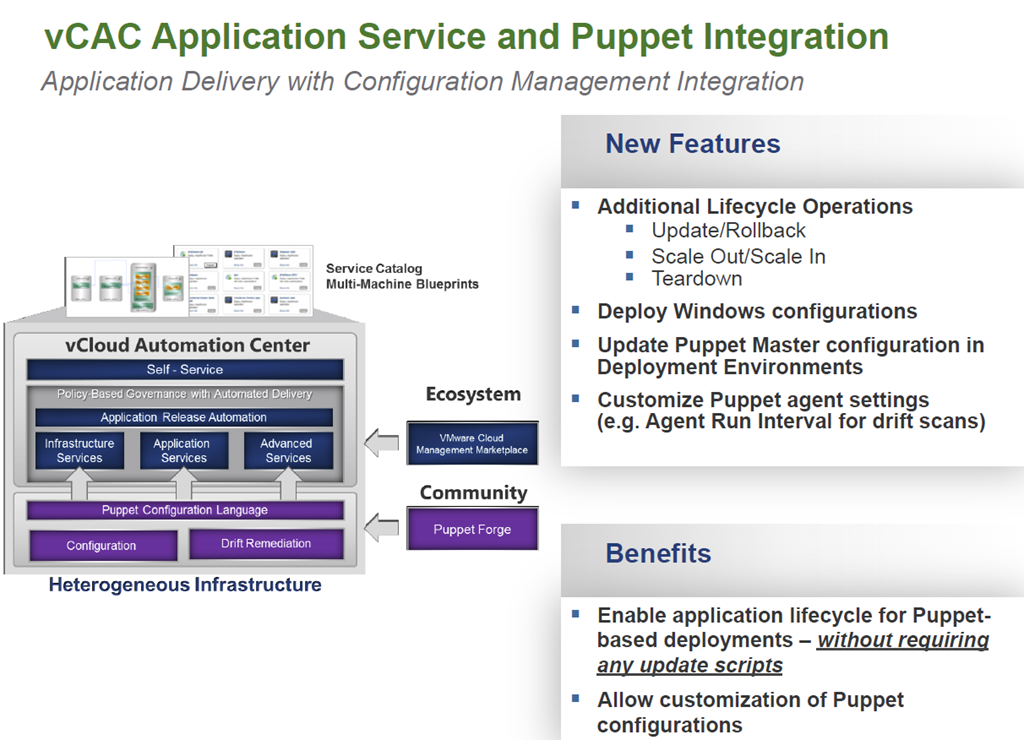
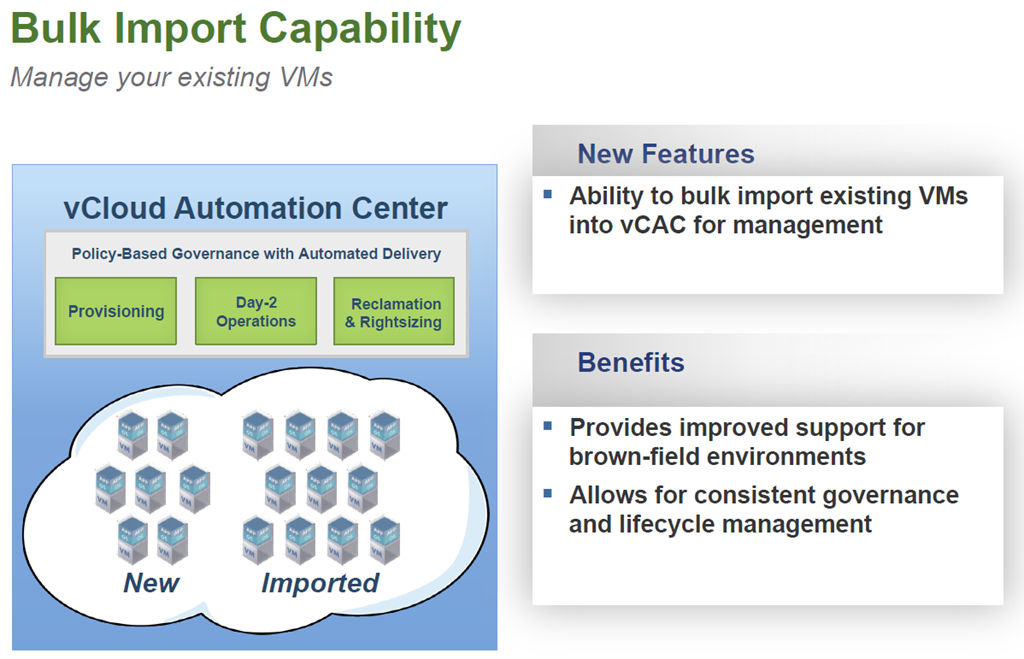
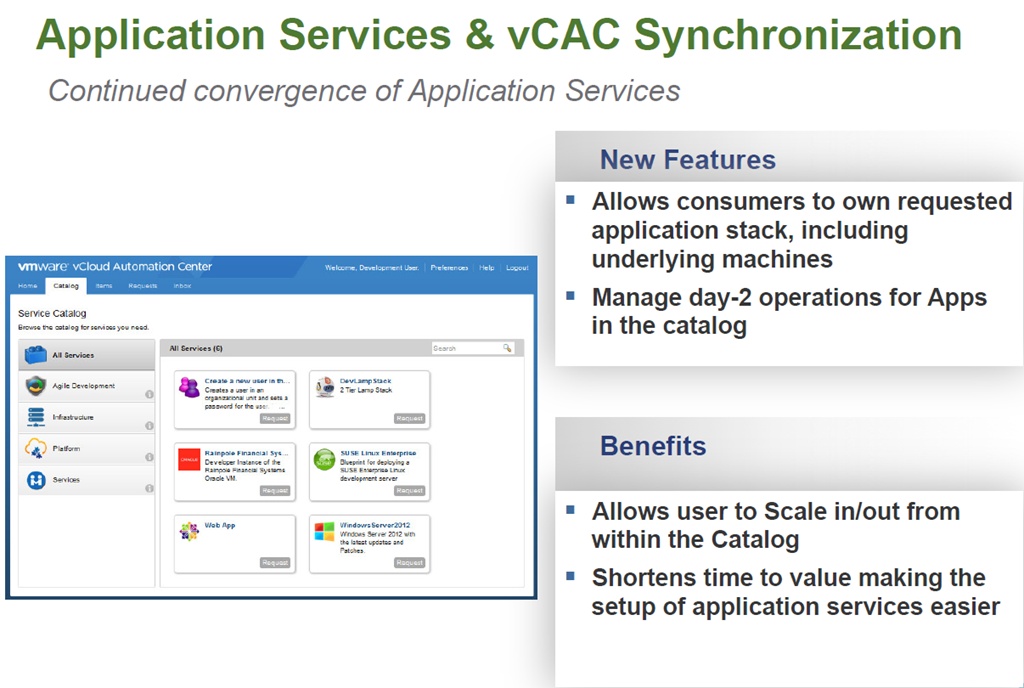
    image

    image

    Automating Application and Infrastructure Services

    Simplifying the deployment and management of single machines and complex multi-tired applications.

    image

    image

    image

    image

    image

    User Experience

    image

    image

    image

    image

    image


    1 Comment

    vRealize Operations 6.0

    Today at VMworld EU there are going to be a number of announcements and as has become the norm for VMworld Europe, VMware are making a number of announcements around their new management solutions. One of these announcements is vRealize Operations 6.0.

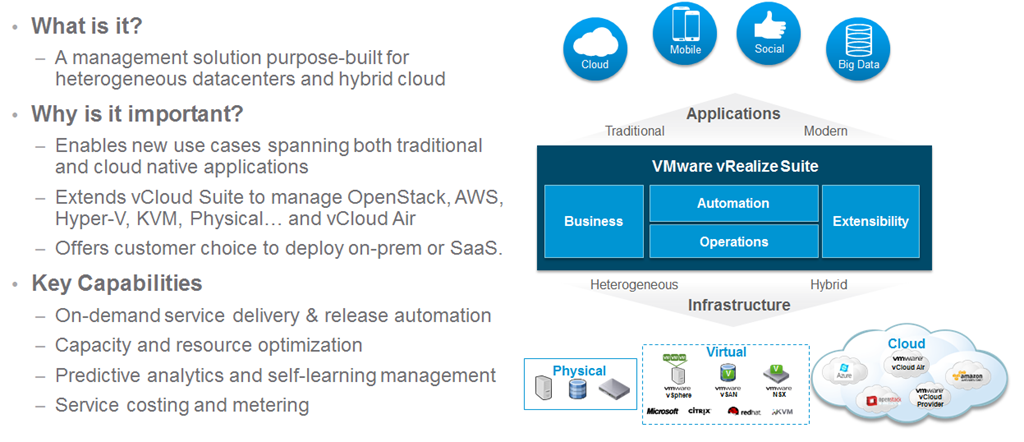
    If you are wondering what I mean with the vRealize name then below is a very quick summary:

    vRealize Suite

    image

    VMware vRealize is changing the name of the management solutions into simpler packaging and suites and as announced at VMworld US, vRealize Air Operations,Automation and Business will be available soon to provide a new SaaS solution for VMware customers via the renamed vCloud Air offering.

    image

    vRealize Operations 6

    There are a number of new features and enhancements in vRealize Operations 6.0 one of these is the new scale-out architecture allowing high resiliency and availability as well as self monitoring to ensure that if an instance/slice is lost, it is reported and brought back seamlessly.

    image

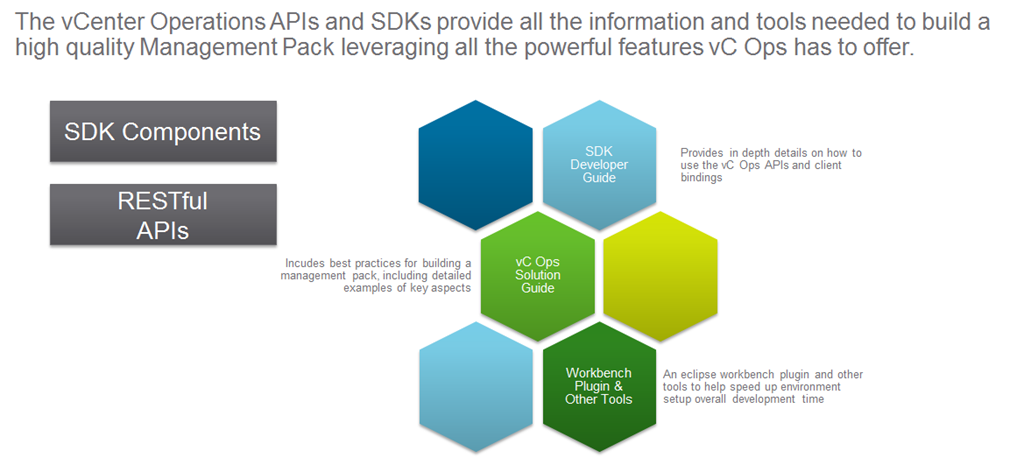
    vRealize Operations 6.0 is now providing a public set of RESTful API’s to allow customers and partners to extend as well as get information in and out with ease so that it can be used for custom reporting or in the case of a project i have been on recently will allow monitoring of vCAC DEM’s and automatic provisioning of more if required.

    image

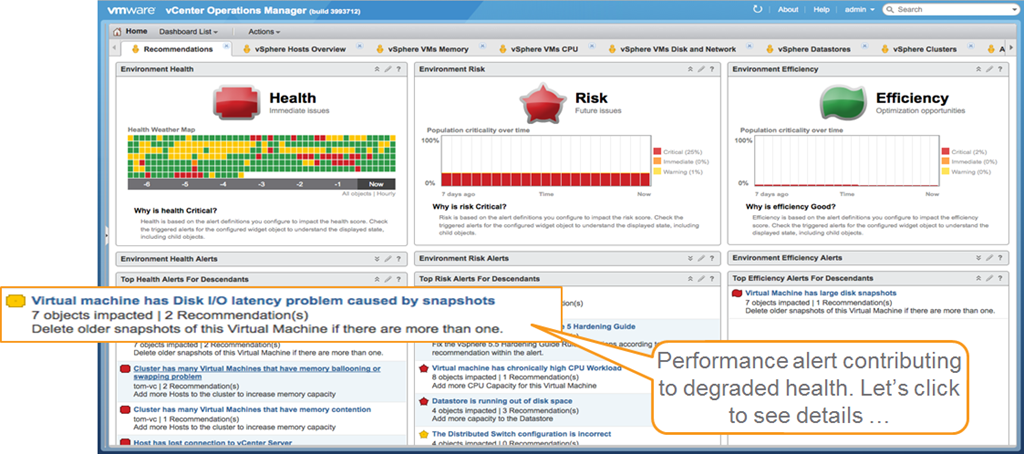
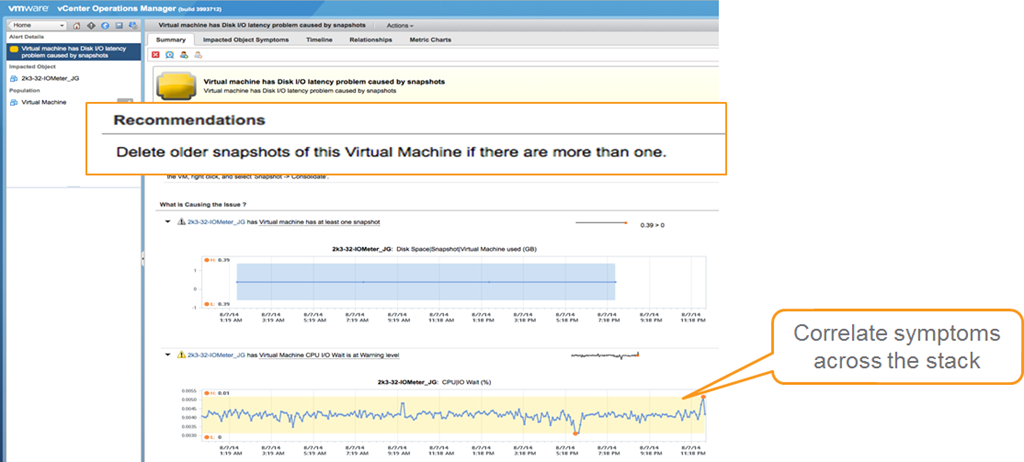
    The management dashboard of vRealize Operations 6.0 has maintained the same three panels on health Risk and Efficiency to  provide viewing and reporting of immediate and future problems as well as opportunities to optimise. With vRealize Operations 6.0 you now have a new section below each of the three panels there are now problem alerts which give you correlation of problems and the ability to click the alerts to see the details as shown below.

    image

    image

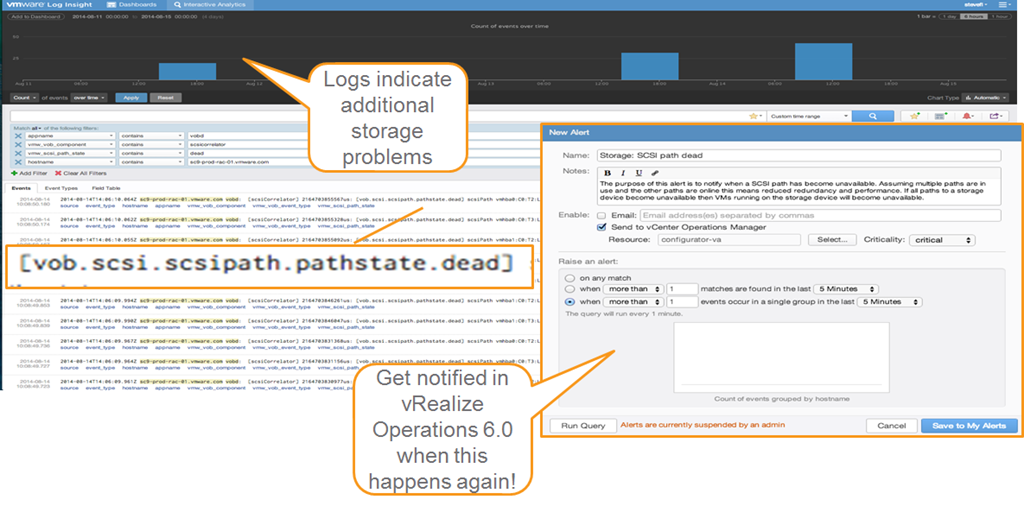
    There is also the ability to dig deeper into the problems by using vRealize Log Insight which can send alerts into vRealize Operations 6.0 if certain problems arise and allow custom reporting and alerting for partners and bigger customers who are looking for custom reporting and deep analysis.

    image

    Below is a summary of all the new features and solutions in vRealize Operations 6.0 allowing reporting of public and private architecture as well as simplistic single pane of glass management.

    image

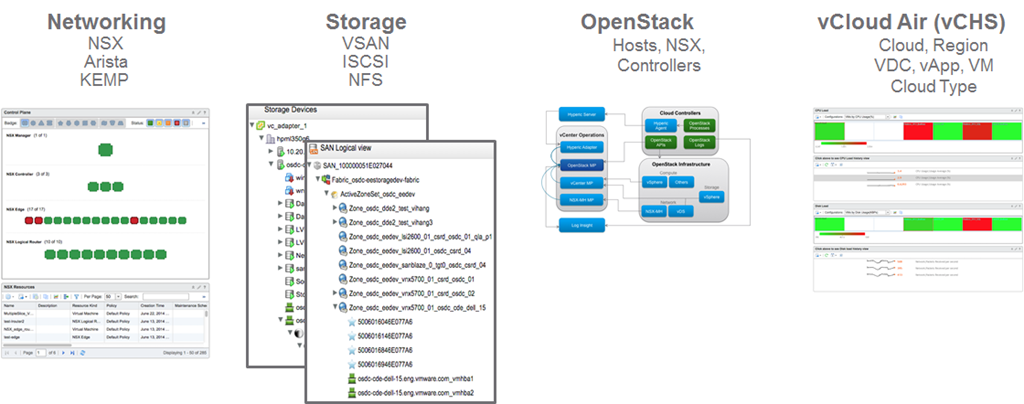
    One of the biggest abilities of vRealize Operations 6.0 that I really like and i think will make all the customers I see as a consultant very happy is the support for new SDDC and hybrid cloud platforms meaning you can now monitor and report on networking,storage, OpenStack and vCloud Air. This will truly allow you to manage and report on your whole SDDC environment.

    image

    vRealize Operations 6.0 NSX Management Pack

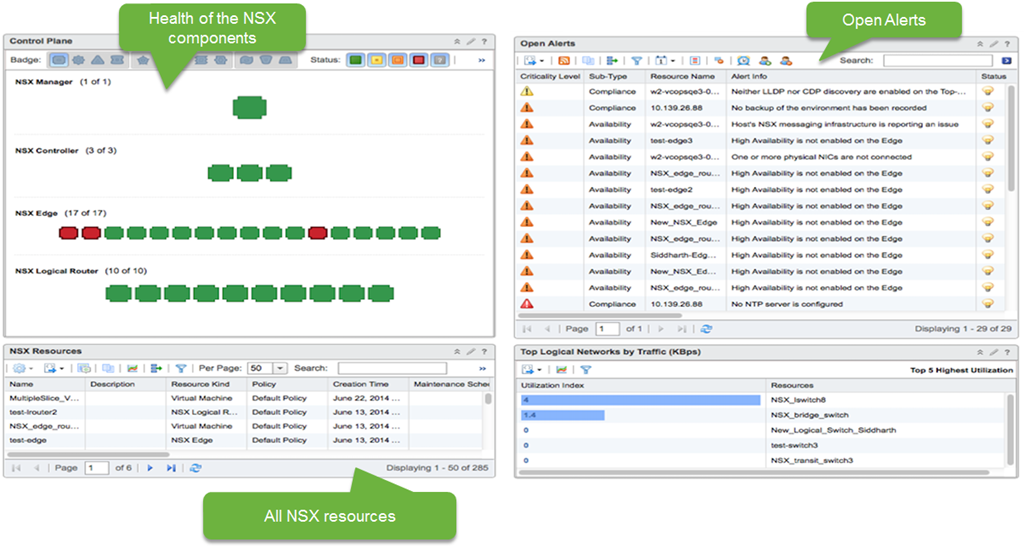
    With vRealize Operations 6.o as shown above is the ability to monitor and report on SDN solution NSX. With vRealize Operations 6.0 there is a new management pack for NSX.In the image below, you can see the heat map showing the transport layer. The transport layer is effectively all of the transport nodes (NSX term for hypervisors). These boxes are the ESX hosts registered with NSX, grouped by a particular transport zone. Transport zone is a group of hypervisors that share the same transport behaviour. On the bottom, the widget shows the top talkers. If there is a lot of traffic, this widget can help us figure out which VMs are responsible for the most network traffic.

    image

    There are three NSX dashboards: NSX main dashboard, NSX logical topology and NSX Edge services.

    The current view is from the NSX main dashboard. Currently, we are a seeing information for a particular NSX Manager instance. The control plane widget is all the objects corresponding to the NSX Manager (API and connection to the vCenter Server for configuration), Controllers (responsible for configuring switches), Edge (VMs that deploy certain logical network services like DHCP, Load balancer etc. ), Logical Routers (Distributed routers responsible for configuring the routing software on each individual host).

    All the alerts related to NSX are captured in Open Alerts widgets. This is based on hard threshold violations. We can see a number of High Availability violations. We have 40-50 alerts that are configured out of the box. We have detailed documentation on each of these metrics and what the alerts mean.

    image

    vRealize Operations Management Pack for OpenStack

    OpenStack is emerging as the leading cloud platform for enterprises and some SPs. VMware are going to provide a management pack to support OpenStack providers. It will mostly be sold to existing vSphere customers who have OpenStack deployments currently.

    Based on vRealize Operations 6.0image

    • Unified UI for vSphere, NSX, OpenStack and other resources
    • Health, Risk and Efficiency badges for OpenStack objects
    • Sub-badges for OpenStack objects (workload, faults etc.) and capacity model
    • Problem detection and remediation for OpenStack infrastructure and tenants
    • Reporting templates for activity, capacity and issue frequency

    OpenStack Compute, Storage & Network Infrastructure Analytics

    • Inventory, availability and capacity of ESX and non-ESX hosts, NSX and vSphere data stores registered with OpenStack
    • Integration with vSphere and NSX Multi Hypervisor Management Packs

    OpenStack Controller Services Dashboard

    • Correlation of OpenStack Controllers to vSphere VMs
    • Services availability monitoring

    Availability

    • Target GA date is Dec 2014

    vRealize Operations Management Pack for vCloud Air

    ’Hybrid Cloud ‘Analytics

    • Provides utilization for cloud resources and deep VM performance data
    • Supports shared and dedicated/private Cloud
    • Includes 40 VM metrics related to CPU/memory/disk/network
    • Collects change events and resource topology from vCloud Air

    Comprehensive vSphere like Out-of-box Dashboards

    • One operations console across private and public clouds
    • Out-of-the-box dashboards enable isolation and quick resolution of performance issue

    Multiple Resources Supported

    • vCHS Cloud, vCHS Region, vCHS vApp, VDC ,VM, Cloud Type

    All Form Factors Supported

    • vApp, Standalone – Windows and Linux

    What’s Coming Next

    • Storage and networking service resource details or metrics

    Summary

    vRealize Operations 6.0 is going to enable both SMB and Enterprise customers who have either or both on premise and off premise workloads in their private or public clouds to monitor, report and make more efficient their environments.  I am looking forward to working with vRealize Operations 6.0 and seeing all the capabilities especially through the RESTful API availability to enable my customers both large and small to get all the reporting and management they require integrated into their existing solutions.Make sure you  watch the live VMworld keynote to learn more.


    2 Comments

    #VMworld Announcement #1 VMware EVO:RAIL – What is it?


    imageAt VMworld US this morning VMware will announce numerous new solutions and one of these will be VMware EVO: RAIL I mean MARVIN I mean VMware EVO: RAIL, but what is it and what does it do. Below is a high level overview of the solution. Make sure you also  watch the live keynote to learn more.

    Introducing VMware EVO: RAIL
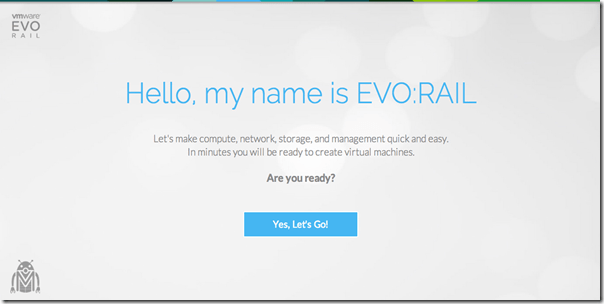
    image

    VMware EVO: RAIL™ combines compute, networking, and storage resources into a hyper-converged infrastructure appliance to create a simple, easy to deploy, all-in-one solution offered by VMware qualified partners.

    Simplicity Transformed

    EVO: RAIL enables power-on to VM creation in minutes, radically easy VM deployment, one-click non-disruptive patch and upgrades, simplified management…you get the idea.

    Software-Defined Building Block

    EVO: RAIL is a scalable Software-Defined Data Center (SDDC) building block that delivers compute, networking, storage, and management to empower private/hybrid-cloud, end-user computing, test/dev, and branch office environments.

    Trusted Foundation

    Building on the proven technology of VMware vSphere®, vCenter Server™, and VMware Virtual SAN™, EVO: RAIL delivers the first hyper-converged infrastructure appliance 100% powered by VMware software.

    Highly Resilient by Design

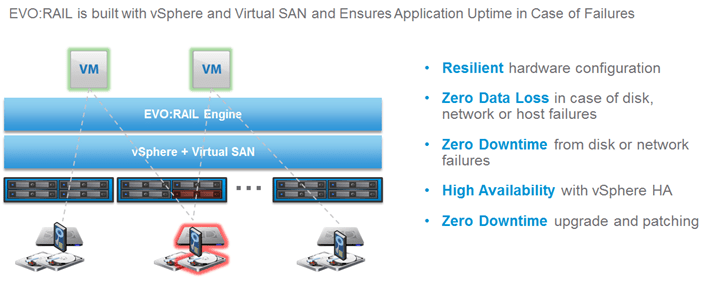
    Resilient appliance design starting with four independent hosts and a distributed Virtual SAN datastore ensures zero application downtime during planned maintenance or during disk, network, or host failures.

    Infrastructure at the Speed of Innovation

    Meet accelerating business demands by simplifying infrastructure design with predictable sizing and scaling,by streamlining purchase and deployment with a single appliance SKU, and by reducing CapEx and OpEx.

    Freedom of Choice

    EVO: RAIL is delivered as a complete appliance solution with hardware, software, and support through leading
    systems vendors; customers choose their preferred brand.

    Hardware

    VMware is not entering the hardware market. The EVO: RAIL software bundle is available to qualifying EVO:RAIL partners. The partner, in turn, sells the hardware with integrated EVO: RAIL software, and provides all hardware and software support to customers.

    Appliance

    Each EVO: RAIL appliance has four independent nodes with dedicated computer, network, and storage resources and dual, redundant power supplies.
    image

    Nodes

    Each of the four EVO: RAIL nodes have:

    • Two Intel E5-2620v2 six-core CPUs
    • 192GB of memory
    • One SLC SATADOM or SAS HDD for the ESXi™ boot device
    • Three SAS 10K RPM 1.2TB HDD for the VMware Virtual SAN™ datastore
    • One 400GB MLC enterprise-grade SSD for read/write cache
    • One Virtual SAN-certified pass-through disk controller
    • Two 10GbE NIC ports (configured for either 10GBase-T or SFP+ connections)
    • One 1GbE IPMI port for remote (out-of-band) management

    Fault Tolerance and Reliability

    Each EVO: RAIL appliance has the following hardware components and reliability features:

    • Four ESXi hosts in a single appliance enables resiliency for hardware failures or maintenance
    • Two fully redundant power supplies
    • Redundant 2 x 10GbE NIC ports per node for all communication
    • ESXi boot device, HDDs, and SSD are all enterprise-grade
    image

    Automatic Scale-Out

    EVO: RAIL Version 1.0 can scale out to four appliances – for a total of 16 ESXi hosts, 1 Virtual SAN datastore backed by a single vCenter Server and EVO: RAIL instance. EVO: RAIL handles deployment, configuration, and management, allowing the compute capacity and the Virtual SAN datastore to grow automatically. New appliances are automatically discovered and easily added to an EVO: RAIL cluster with a few mouse clicks.

    Software

    EVO: RAIL delivers the first hyper-converged infrastructure appliance 100% powered by VMware’s proven suite of core products. The EVO: RAIL software bundle is fully loaded onto the EVO: RAIL qualified partner’s hardware.
    This software bundle is comprised of:

    • EVO: RAIL Deployment, Configuration, and Management
    • VMware vSphere® Enterprise Plus, including ESXi for compute
    • Virtual SAN for storage
    • vCenter Server™
    • vCenter Log Insight™

    EVO: RAIL is optimized for the new VMware user as well as for experienced administrators. Minimal IT experience is required to deploy, configure, and manage EVO: RAIL, allowing it to be used where there is limited or no IT staff on-site. As EVO: RAIL utilizes VMware’s core products, administrators can apply existing VMware knowledge,
    best practices, and processes.

    EVO: RAIL leverages the same database as vCenter Server, so any changes in EVO: RAIL configuration and management are also reflected in vCenter Server and vice-versa.

    Compute, Networking, Storage, and Management

    EVO: RAIL Compute

    Virtual Machine Density

    • EVO: RAIL is sized to run approximately 100 average-sized, general-purpose, data center VMs. Actual capacity varies by VM size and workload. There are no restrictions on application type. EVO: RAIL supports any application that a customer would run on vSphere.
      General-purpose VM profile: 2 vCPU, 4GB vMEM, 60GB of vDisk, with redundancy
    • EVO: RAIL is optimized for VMware Horizon® View with configuration options that allow up to 250 View VMs on a single EVO: RAIL appliance. Actual capacity varies by desktop size and workload.
      Horizon View virtual desktop profile: 2vCPU, 2GB vMEM, 32GB vDisk linked clones

    EVO: RAIL Network

    image

    Connections

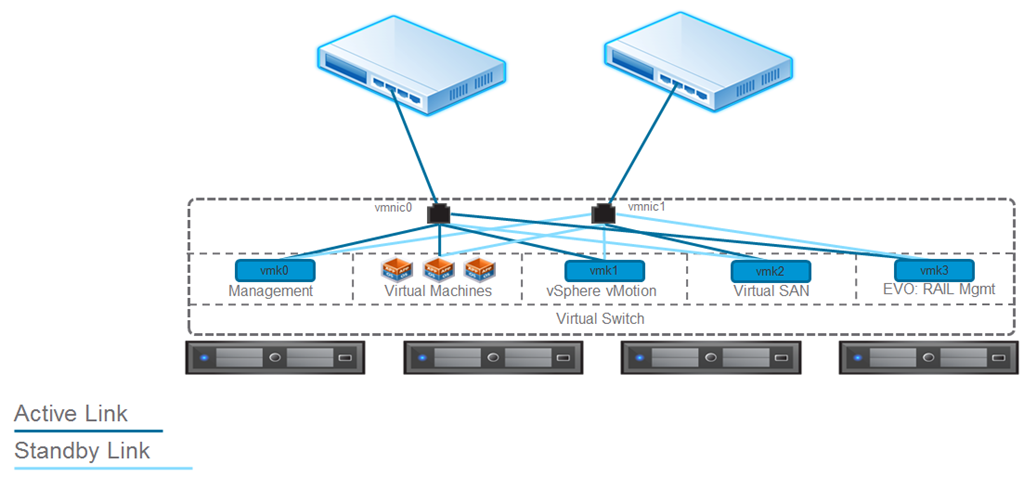
    • Each node in EVO: RAIL has two 10GbE network ports. Each port must be connected to a 10GbE top-of-rack switch that has IPv4 and IPv6 multicast enabled.
    • Remote/lights out management is available on each node through a 1GbE IPMI port that can connect to a management network. NOTE: In some configurations, there may be additional 1GbE ports that are covered and disabled.

    Traffic

    • EVO: RAIL supports four types of traffic: Management, vSphere vMotion®, Virtual SAN, and Virtual Machine.Traffic isolation on separate VLANs is recommended for vSphere vMotion, Virtual SAN, and VMs. EVO: RAIL
      Version 1.0 does not put management traffic on a VLAN.
    • IPv4 and IPv6 multicast must be enabled on the top-of-rack switch(es). EVO: RAIL’s automated scale-out feature uses IPv6. (It is not required for your complete network to support IPv6.)
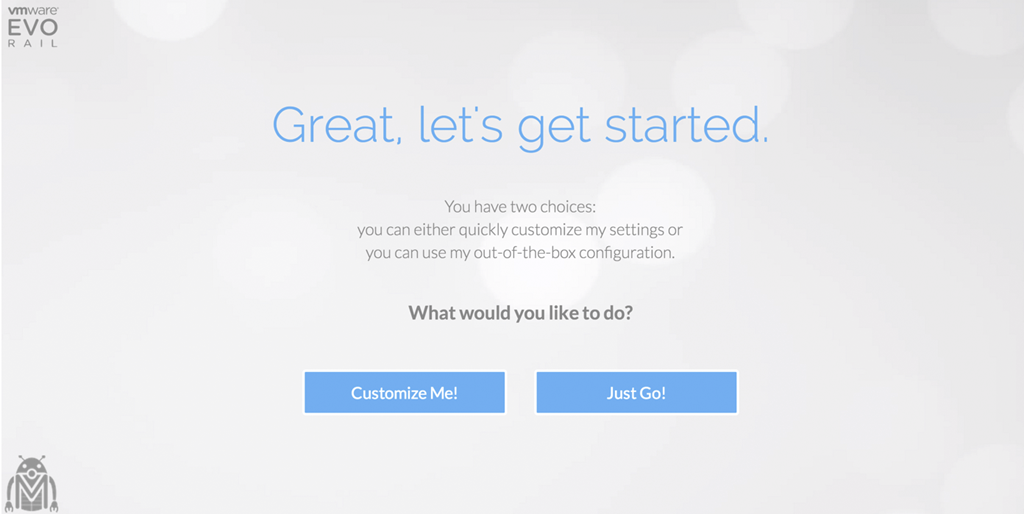
    • VLANs are not required when customizing a EVO: RAIL configuration; however, they are highly recommended.When using the Just Go! option, it is assumed VLANs are configured.

    EVO: RAIL Storage

    EVO: RAIL creates a single Virtual SAN datastore from all local HDDs on each ESXi host in a EVO: RAIL cluster. Virtual SAN read caching and write buffering uses SSD capacity. Total storage capacity is 16TB per EVO: RAIL appliance:

    • 14.4TB HDD capacity (approximately 13TB usable) per appliance, allocated to the Virtual SAN datastore for virtual machines
    • 1.6TB SSD capacity per appliance for read/write cache
    • Size of pre-provisioned management VM: 30GB

    EVO: RAIL Management

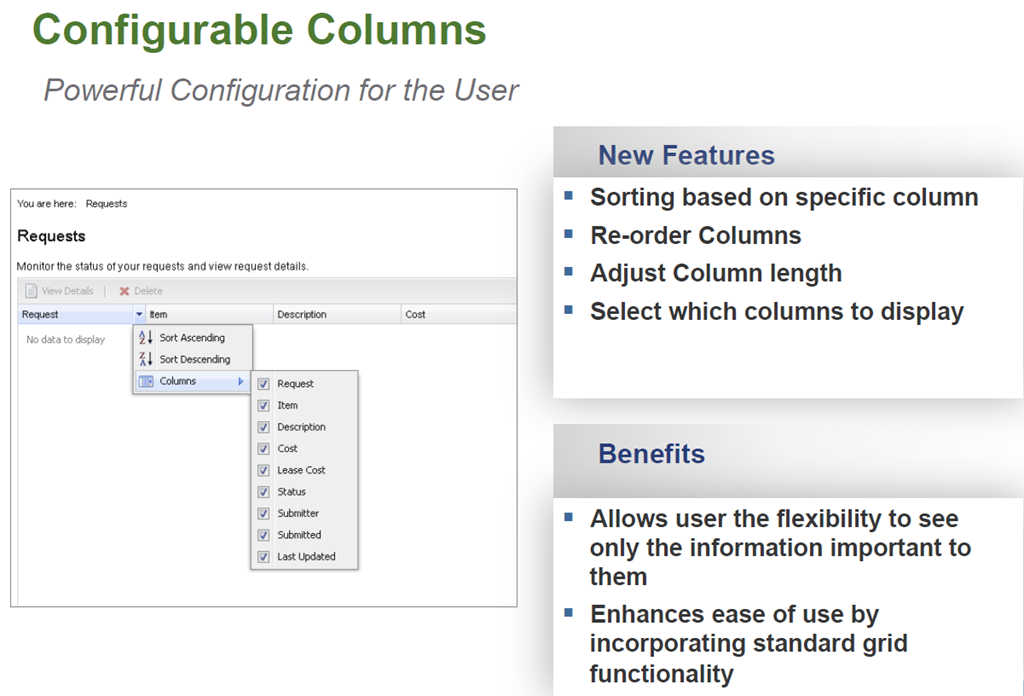
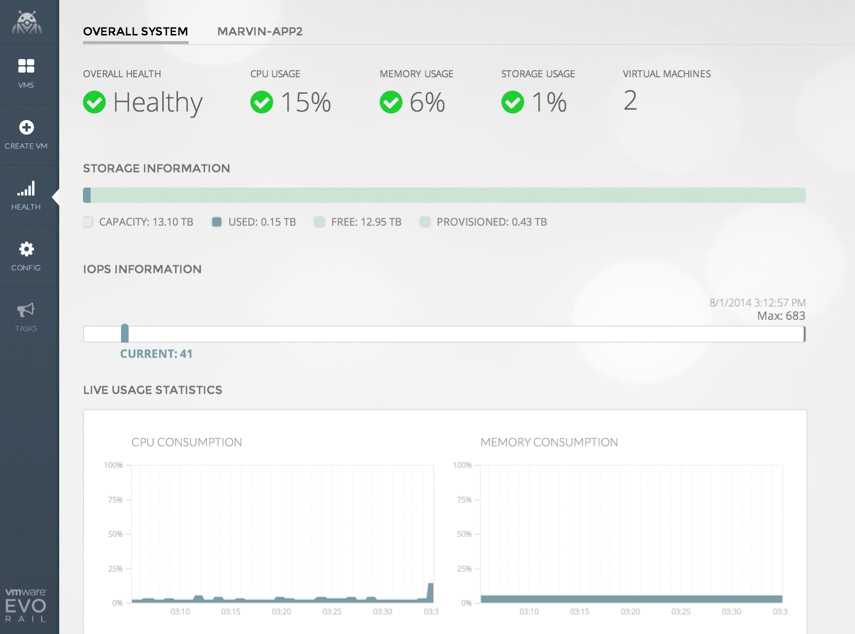
    EVO: RAIL enables deployment, configuration, and management through a new, intuitive HTML5-based user interface showcased in the next section. EVO: RAIL provides new non-disruptive updates for VMware software with zero downtime and automatic scale-out of EVO: RAIL appliances.

    User Interface

    image

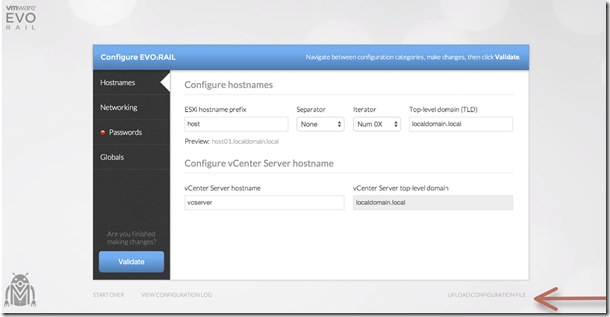
    Configuration Screenshots

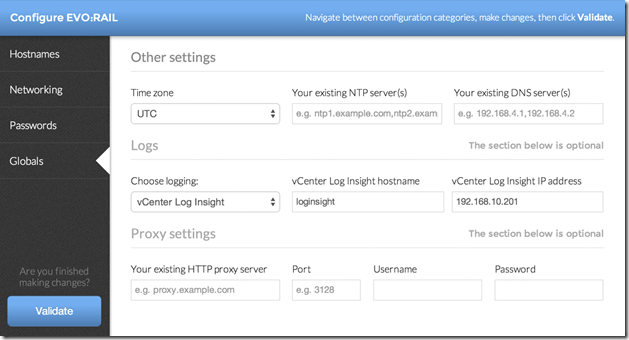
    Below are a few configuration screenshots showing how intuitive and easy it is to configure EVO:RAIL.

    image

    image

    image

    image

    image

    image

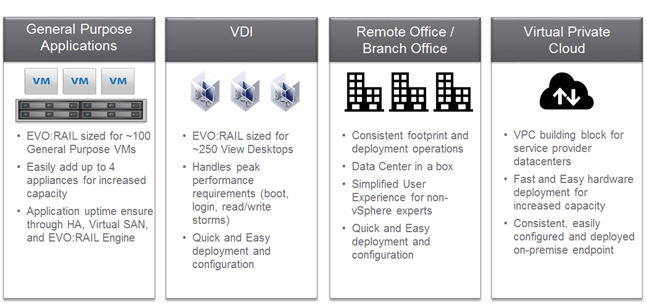
    Use Cases

    Below are some of the use cases for EVO:RAIL.
    image

    Make sure you  watch the live VMworld keynote to learn more.


    1 Comment

    vCAC System Exception Error

    A colleague of mine at Xtravirt, Richard Renardson was experiencing an ambiguous “System Exception” error on the requests page in the vCAC 6.0.1 portal at a very high profile customer. Upon checking the server side log it was showing an error stating that “cat_request”  does not exist. We tried a few things and looked through quite a few VMware KB articles but were unable to find anything that matched our problem.

    After some troubleshooting we were able to determine what the problem was and a fix so he graciously allowed me to blog it to hopefully save someone else the time especially with vCAC becoming so popular recently. The problem seems to happen when an external database has been configured and the hstore extension is missing/has not been created and this extension is required by vCAC for the creation of tables. What we had to do in the end is to create the hstore extension in the vCAC database. The steps we followed to create the hstore extension was to :

    1. Log in to the external DB using the pgAdmin tool.
    2. Within the pgAdmin console we had to run this SQL statement to connect to the vCAC DB:
      1. \connect "YOURDBNAME";
    3. Within the pgAdmin tool we needed to create the hstore extension by running the following statement:
      1. create extension hstore;
    4. Now you just need to restart the vCAC Appliance.
    5. After a bit of a wait for it to restart fully the problem was fixed Smile

    Hopefully this saves someone the time we spent on the problem

    Gregg


    Leave a comment

    vCloud endpoint wont delete from vCAC 5.2

    I am currently working on a project that is using vCAC 5.2 ,vFabric Application Director 5.2 and vCloud 5.1 to provide automated self service provisioning of resources for customers (super learning experience).

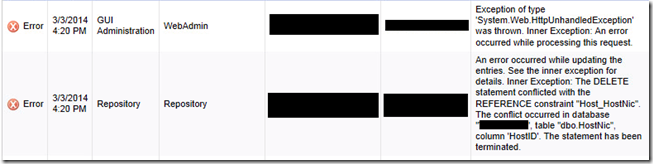
    Whilst going through the manual steps of removing a test customer from the solution before automating the steps through VCO, I hit a very strange problem where at the point of deleting the endpoint to the vCloud Organisation that was assigned for the test customer I got an error stating “ Error has been caught,see event logs located on the vCAC server for detail” and as shown below.

    clip_image001

    If I went to the the logs within vCAC there were two errors linked to the problem. the main one stating “….  Inner Exception: the DELETE statement conflicted with the REFERENCE constraint “HostNic….”

    clip_image002

    The error is showing that a computer resource is still attached to the endpoint even though I had removed the computer resource from the vCloud Enterprise Group computer resources selection, removed the Org VDC from vCloud and run a manual data collection. It seems that there is a bug at present that doesn’t allow the removal via the UI (bug report already opened before someone asks) so what you need to do is (I make no promises or guarantees around this script so use at own discretion and backup your DB before running this):

    1. Go to the SQL server that hosts the vCAC database.
    2. Open SQL Management Studio as a user with sufficient permissions.
    3. Select the vCAC database and click the New Query button at the top left.
    4. Ensure the vCAC database is selected.
    5. Paste the following SQL script in the query box and change the ‘ORG VDC NAME’ to the name of the Organisation VDC that the endpoint was connected to and execute the query.

    DECLARE @HostId uniqueidentifier

    SET @HostId= (SELECT HostId FROM Host WHERE HostName = ‘ORG VDC NAME’)

    DELETE FROM VirtualMachine WHERE HostID = @HostId

    DELETE FROM HostNicToReservation WHERE HostNicID IN (SELECT HostNicID FROM HostNic WHERE HostID = @HostId)

    DELETE FROM HostReservation WHERE HostID = @HostId

    DELETE FROM HostNic WHERE HostID = @HostId

    DELETE FROM HostToStorage WHERE HostID = @HostId

    DELETE FROM AdminGroupToHost WHERE HostID = @HostId

    DELETE FROM ResourcePool WHERE HostID = @HostId

    DELETE FROM Host WHERE HostUniqueID = (SELECT HostUniqueID FROM Host WHERE HostID = @HostId) AND ClusterHostID = @HostId

    DELETE FROM Host WHERE HostID = @HostId

    1. The results should show that some values have been changed.
    2. Now you can remove the endpoint from vCAC and the computer resource won’t show up for selection under the vCloud Enterprise Group either.

    I hope this saves someone the time I spent trying to fix the problem.

    Gregg


      Leave a comment

      VCAP-CID Objective 1.1 – Create a Conceptual Design Based on Business Requirements

      Due to an imminent customer engagement I am due to be working on I have been refining my vCloud skills and dusty away the cobwebs. One of these tasks was to book the VCP5-IaaS and sit it so that it forced me to learn the basics again and be sure I had a solid base knowledge with no gaps. My experience of the exam and the resources I used for it are mentioned in my VCP5-IaaS Exam Experience blog posting. I have now been using the VCAP-CID blueprint as a structure for perfecting my vCloud design skills and so I thought I would slowly post up each objective for my own benefit but also hopefully help other people looking to take the VCAP-CID. I will be consolidating all the objectives on my blog page here

      Skills and Abilities

      • Distinguish between virtualization, automation and cloud computing.

        • This could be defined in a number of ways (I’m more than happy to be corrected here) but the way I piece it all together is:
          • Virtualization is what VMware has been doing for years with vSphere and its complementing technologies. This is nothing new to anyone preparing for this exam and if it is then I hate to tell you this but this exam isn’t for you.
          • Automation ties perfectly into the NIST definition of on-demand self-service which is :  Unilaterally provision computing, as needed, automatically without requiring human interaction
            • This can be done through multiple technologies and mechanisms like VMware’s vCenter Orchestrator, vCAC,vFabric Application Director and third party tools like Puppet, Razor and IBM’s Virtualization Automation solution. Without true automation you can’t have a Cloud.
          • Cloud computing is perfectly defined by the industry recognised NIST cloud requirements which are:
            • On-demand self-service: Unilaterally provision computing, as needed, automatically without requiring human interaction
            • Broad network access: Capabilities are available over the network and accessed through standard mechanisms
            • Resource pooling: The provider’s computing resources are pooled with virtual resources dynamically assigned and re-assigned according to consumer demand.
            • Rapid elasticity: Capabilities can be rapidly and elastically provisioned, in some cases automatically, to quickly scale out and be rapidly released to quickly scale in.
            • Measured service: Cloud systems automatically control and optimize resource use by leveraging a metering capability. Resource usage can be monitored, controlled, and reported providing transparency of the utilized service.
          • For VMware’s IaaS definition from which they define the VMware vCloud blueprint is:
            • A cloud must be built on a pooled, virtual infrastructure. Pools include not only CPU and memory resources but also storage, networking, and associated services.
            • The cloud should provide application mobility between clouds, allowing the consumer to enter and leave the cloud easily with existing workloads. The ability to use existing consumer tools to migrate workloads to or from the cloud is highly desirable. Mobility of workloads between clouds requires cross-cloud resource management.
            • The cloud should be open and interoperable, allowing the consumption of cloud resources over open, Internet-standard protocols. Access to cloud resources does not require any other specific network protocols or clients.
            • Cloud consumers should pay only for resources they consume or commit to consuming.
            • The cloud should be a secure, trusted location for running cloud consumer workloads.
            • Cloud consumers should have the option and the ability to protect their cloud-based workloads from data loss.
            • Cloud consumers are not responsible for the maintenance of any part of the shared infrastructure and do not need to interact with the cloud provider to maintain the infrastructure. They are not responsible for storage and network maintenance, ongoing cloud infrastructure patches, or business continuity activities. The cloud should be available to run high-availability workloads, and any faults occurring in the cloud infrastructure should be transparent to cloud consumers as a result of built-in availability, scalability, security, and performance guarantees.
      • Distinguish between private, public, hybrid and community cloud computing.

        • These are defined perfectly in the vCAT 3.1 introduction document as:
          • Private cloud: A private vCloud (also known as an internal vCloud.) operates on private networks, where resources are accessible behind the firewall by a single company. In many cases, all the tenants share one legal entity. For example, a university might offer IaaS to its medical and business schools, or a company might do the same for various groups or business units. The private vCloud can be managed by the enterprise and hosted on premise or operated on a dedicated infrastructure provided by a vCloud service provider or systems integrator. In any case, a private vCloud must conform to the organizational security constraints.
          • Public cloud: A public vCloud offers IT resources as a service through external service providers and is shared across multiple organizations or the Internet. This can be viewed as a vCloud infrastructure that is operated by one organization for use by multiple, legally separated organizations. A public vCloud is provisioned for open access and might be owned, managed, and operated by one or more entities. A public vCloud provider might also support a private, community, or hybrid vCloud.
          • Hybrid cloud: A hybrid vCloud combines the benefits of the private and the public vCloud, with flexibility and choice of deployment methods. A hybrid vCloud consists of multiple, linked vCloud infrastructures. These distinct vCloud infrastructures can be private, community, or public, they but must meet a set of requirements defined by the providers and agreed to by the consumers. Connecting these vCloud instances requires data and application mobility as well as management. When load-balancing between vCloud instances (cloud bursting), use a consistent monitoring and management approach when migrating an application or data workload.
          • Community cloud: A Community vCloud is a specific public vCloud use case where the cloud is shared, and typically owned, by a group of organizations with a common set of requirements. In many cases, the organizations also include some level of legal separation. Community vCloud resources are shared, with some parts under central control and other parts with defined autonomy. A vCloud built for government, education, or healthcare might be an example of a community vCloud. A community vCloud can be offered by a traditional service provider, by a member of the community, or by a third-party vendor and hosted on one or more sites. It can be placed on-premise at one or more of the organizations’ sites, off-premise at a vCloud provider site, or both on- and off-premise.


      • Analyze a customer use case to determine how cloud computing can satisfy customer requirements.

        • For this I would recommend you read the Service Definitions document from the vCAT as this covers all the definitions and how they map to customer requirements and fulfil these requirements. Also the VMware vCloud Implementation Examples document also from the vCAT shows you how varying implementations can benefit businesses in differing ways


      • Given a customer use case, determine the appropriate cloud computing model.

        • This is one I feel you can only do once you have a firm understanding of the capabilities of all the different Cloud offerings and how each of them meet varying requirements and also have differing constraints/disadvantages.


      10 Comments

      vCenter Operations Management Suite Resources

      Recently I was tasked to get myself up to speed with vCenter Operations Manager and Configuration Manager as part of the vCenter Management Suite for a client delivery we’re doing at Xtravirt. So due to this I have been collecting all the resources I could to help me do this and thought I may as well do a blog posting on it for anyone also looking to implement the suite soon or who are just interested in learning about it. I will be constantly updating this and plan to do two separate postings on the tips and tricks I learnt after deployment for each of the products and my opinions of each.

      VMware Operations Manager 5.x

      • The below videos are a great introduction to the product done by VMware via their YouTube channel

      VMware vCenter Operations Manager Introduction
      VMware vCenter Operations Manager
      • As is standard there are the Administration and Installation Guides which I would highly recommend reading through especially the Getting Started Guide to help you prepare before you deploy it.

      http://www.vmware.com/support/pubs/vcops-pubs.html

      http://www.vmware.com/pdf/vcops-5-installation-guide.pdf

      http://www.vmware.com/pdf/vcops-5-getting-started-guide.pdf

      • You can download an evaluation of VCOPS for your own testing and to let you play around with it and learn how it all works. I’ve already done this as actually deploying and working with the solution helps me understand a hundred times better than reading documents on it.

      https://www.vmware.com/tryvmware/index.php?p=vcenter-ops5&lp=default

      • The communities are a great place to read a few people problems and make sure you don’t make the same mistakes/prepare so you don’t hit the same hurdles:

      http://communities.vmware.com/community/vmtn/server/vcenter/vcops

      • VMware have done a webcast on Automating Infrastructure and Operations Management with VMware vCenter Operations Management Suitewhich gives a great overview of the whole Operation Management Suite and Operations Manager capabilities:

      http://event.on24.com/r.htm?e=397322&s=1&k=22E3A47A4D3EEC4794EEEAD75C1BC6E7&partnerref=WEB

      VMware vCenter Configuration Manager

      • VMwareTV have also done a video covering vCenter Configuration Manager and the change management capabilities of the product. The video gives you a really good overview of the layout of the product too and the extensive amount of data and information you can find and create.
      • VMware vCenter Configuration Manager 5.5 has just been released and the best place for all the information is the Documentation Resources page for the product here:

      http://www.vmware.com/support/pubs/vcm_pubs.html

      • The communities are a great place to read a few people problems and make sure you don’t make the same mistakes/prepare so you don’t hit the same hurdles.

      http://communities.vmware.com/community/vmtn/server/vcenter/vcm

      • I’m very fortunate to work for a VMware partner and so there are a whole load of really great resources for VCM. The ones I have used and would recommend to people who also work for VMware partners are:

      VMware vCenter Configuration Manager Essentials [V5.X]

      vmLIVE – What’s New with vCenter Configuration Manager 5.5

      Both give you a good overview of the product, it’s layout and what it is capable of and with the vmLIVE presentation you will be able to update your knowledge for the latest release.

      • The VMware Operations Management team were nice enough to ReTweet this posting and advised me that there is an official course called VMware vCenter Configuration Manager Fundamentals that has been upgraded to version 5.5 . The course looks to cover everything you could possibly need and I’m hoping I can get myself added onto it as it is self-paced which is perfect for consultant like myself who can’t take the time away from the client to attend a course.

      Fellow vExpert and #LonVMUG attendee Ed Grigson has done an amazing blog posting all about Using vCenter Operations v5 – Introduction and deployment and has linked to loads of top VMworld Sessions and podcasts that I had no idea were out there. Make sure you have a look at his posting and keep an eye out for his future two postings on the subject.

      vCenter Operations Manager for View


      Hopefully these will help people looking to learn about the Suite and as I stated at the beginning I plan to update this with more resources as I come across them. If you know of any other resources out there please do leave a comment or drop me a tweet on twitter on @greggrobertson5

      Gregg


      Leave a comment

      All things virtual VIII


      It’s been a very busy but also a very rewarding productive few weeks for me. Even though it came down to a relatively simple solution the working of my VMware Update Manager was a massive weight off my shoulders and a lot of lessons learnt from it which is always something valuable.

      On the virtualisation news side it’s been a very interesting couple of weeks with some brilliantly written blogs and articles.

      • Vladan Seget (@vladan) did a very good posting on setting a static MAC address in VMware. This is something you learn when you’re studying for your VCP but is something that personally I’ve forgotten really easily but is a very helpful feature especially if you have a vm with software on it that requires a licence to be attached to the vm’s MAC address but you still want to be able to migrate the vm around for either HA or DRS capabilities.
      • Next is the VMware Support Toolbar by Rick Blythe (@rickblythe) aka VMwareWolf. The toolbar is a very clever idea and the only reason I’ve linked Vladan’s posting on it is that he details all the features it has and how to set it up etc and seeing as Rick linked to it at the top of his posting about the toolbar it seems he’s happy with the posting being used for his toolbar. I’ve only partly played around with the toolbar but it’s a great example of how professionals are thinking of new ways for a VMware administrator to be able to keep up to date and easily search for VMware knowledge base items.
      • Cody Bunch (@cody_bunch) of http://professionalvmware.com has been doing some really great VCDX brown bag sessions on all the things you should know for you VCDX and obviously as the name alludes to they are discussions amongst fellow professionals about the topics you will need to know to do your defence. A “study group” is another way of describing it. Cody was nice enough to reply to me on twitter when I enquired about the ability to watch/listen to the previous brown bag sessions and I was pleased to find out they have been recorded and the second brown bag session is already up. I’ve always found discussions amongst fellow professionals about a common technology highly beneficial as sometimes i really need someone to explain something in laymen’s terms to me for me to understand it. I’d recommend registering for the next one and to keep an eye out for the future sessions. He’s also done a few VCP brown bag sessions and theses have also been recorded so if you’re looking to write your VCP soon or even like me keep your knowledge fresh then these are perfect for this.
      • Duncan Epping of Yellow Bricks fame did a very informative posting all about aligning your VMs virtual hard disks. I spoke partly of this in one of my blog postings a few weeks back and Duncan has added some great information to this discussion and is one i learnt quite a few things from so is well worth the read. Duncan also did a very helpful posting on where to find pre-windows 2008 sysprep packages for those who are battling to find them.
      • Eric Sloof (@esloof) posted two great articles these past few weeks. The first one was a very interesting interview with one of the attendee’s of his VMware vSphere Design Workshop course and his opinions of how the course went and how good it was. After watching it it’s made me even more keen to attend the course and gain the knowledge they you can gain from it especially from fellow VMware professionals. The other is his announcing of the upcoming vSphere 4 Automation course. It shows the growing need and trend of VMware professionals to have the knowledge and ability to automate some of the tasks performed in their VMware environment as well as a great course for gaining the knowledge you will require for managing your environment in ESXi.
      • Talking of ESXi and the push by VMware for people to migrate from ESX to ESXi, Eric Siebert (@ericsiebert) of http://vmware-land.com/ posted a very very good blog posting all about how VMware’s desire for people to adopt ESXi isn’t going as well as they may have hoped and how VMware are going to need to fix a number of issues that ESXi has that ESX doesn’t before the change over and how their motivators for the switch aren’t as strong as they make out. The article is brilliant and is especially so to me as I agree wholeheartedly with many of the points in it and myself don’t see nor agree with the whole idea of them moving over to ESXi and scrapping ESX.
      • There has always been the discussion of scale up versus scale out when you are creating a Virtual environment and over the past few weeks there have been a few great postings from some of the top virtualisations bloggers about this discussion. It seems the whole thing kicked off from a blog posting Duncan Epping did about scaling up due to the release of the new Intel 5600 series that has six cores. Which set off a blog posting by Ian Koenig at http://itsjustanotherlayer.com/ titled scale up or scale out in which he brings up some brilliant check points every VMware administrator should ask when determining whether to scale up or scale out. Scott Lowe then commented on Ian’s posting  in his Virtualization Short Take #37 and gave his opinion on the discussion which in turn made Steve Chambers (@Stevie_chambers) write an article about how he feels UCS is the solution to the worry about having “all your eggs in one basket”. His blog posting is also very informative about the features UCS has and how it allows you to have all your machines on one big server. This in turn brought Scott to write a posting describing his opinions in full and how he feels as is always said for anything in IT “it depends”  on a number of factors and one model or decision is never the same for every company/environment/situation. Lastly a great blog posting by a twitter friend of mine and top VMware professional Daniel Eason(@Daniel_Eason) about High Density Virtual Hosts gives a great insight into more of the factors you need to consider when building a “Super ESX Host(my own words)”. All of these articles are brilliantly informative and as with any great article they encourage discussion. You make your own decisions and I encourage you to read all the comments below each of the articles as these are as good if not maybe a little bit better than the articles.
      • This past week the applications for the VMware vExpert award have been opened. The vExpert for anyone that doesn’t know it is “a way for VMware to acknowledge and help those who ‘go the extra mile’ and give back to the VMware user community by sharing their expertise and time. vExperts are bloggers, book authors, VMUG leaders, event organizers, speakers, tool builders, forum leaders, and others who share their virtualization expertise.” As you can imagine there has been a very large amount of chat in twitterverse about the applications and who may be honoured by the awarding of it. Personally I’d love to become one and hope that with my continued efforts to give back to the community and grow my contributions to the field I’ll one day soon be awarded the title. If you know of anyone that deserves this award then get an application in for them. But be warned that multiple nominations don’t count extra so applying for yourself 100 times and asking loads of people to apply for you won’t help you to win this.
      • In my Distributed Virtual Switches blog posting i detailed the process of upgrading your virtual machines hardware version to version 7 but Sander Daems (@sanderdaems) posted a very helpful posting on how to downgrade your vm hardware level from 7 to 4 if it is needed to fix an issue you may be having. It always makes me smile when a blog posting like this is posted as I’m always so focused on the newest things and the latest versions of software that i forget that sometimes the need for rolling back to an older possibly more stable version is the option.
      • Even though this next posting is old it’s one I feel is very important and useful in the growth of anyone’s scripting knowledge. Alan Renouf created a very helpful Quick Reference Guide for the VI toolkit which you can print off and obviously reference whenever you need it.
      • VMware have recently posted a new white paper detailing performance results of tests conducted of a vSphere 4.0 environment using Microsoft SQL Server 2008. The white paper can be downloaded here.
      • Rich Brambley (@rbrambley) posted all about the reasoning and some fixes/solutions you can make as to why cloning a vm from a template can take such a long time. Rick’s posting has some great links for IOPS and gives some very in depth solutions and reasons as to why the problem might happen. The posting is very helpful and sheds light on points some people may miss in their aim of making their virtual environment run as quickly and smoothly as possible.
      • Arnim van Lieshout (@avlieshout) did a great blog posting about how to setup and get running The VESI (Virtualization EcoShell Initiative). If you’ve never heard of The VESI before then i would recommend reading the FAQ before reading and then implementing the solution into your environment. Arnim has detailed every step and installation needed in getting it working and is a massive help for someone trying to get it setup.
      • Last by definitely not least was a posting by Devang Panchigar (@storagenerve) with the video of the VBlocks presentation at the GestaltIT Tech Field Day 2010 in Boston Massachusetts this past week. The presentation was highly informative and a great insight into the solution and is well worth the watch.

      As I’ve said before I’m always happy for people to leave a comment below or add me on twitter at @greggrobertson5. If you feel I’ve missed something or not given credit or wrongly described yours or someone else’s posting as this is the last thing i mean to do, please tell me an I’ll change it.

      Gregg Robertson

      VMW_09Q3_LGO_VMwareCertifiedProfessional_K

      MCSES(rgb)MCTS(rgb)_1079_1080_1078image


      1 Comment

      How to ease the management and monitoring of VMware Snapshots


      Recently I have been doing some cleaning up of old snapshots that users have created and forgotten to delete and have therefore been around for too long and are in danger of either using up all the space on the datastore they are on or corrupting once the snapshot is ”deleted”/applied to the vm. I came across an additional way I can make my management and monitoring snapshot tasks easier and so I though I would write up a quick post of all the tools I use that save me having to manually go through a crazy amount of machines. I have used a few of my fellow virtualisation friends scripts and tools to help me do this.

      • First and the one i use the most is the SnapReminder script by scripting guru Alan Renouf. Alan’s script is a fairly straight forward one (his words not mine as I’m not at the level yet to be able to write this). The script is simple yet so very effective as it automatically finds the snapshot that meets your time criteria,finds out who created it ,retrieves their mail address from AD and mails them reminding them that they have this snapshot and it is older than a number of days. It’s really great when you get a mail back from a user replying to one of these mails and saying they don’t need it anymore as you know it’s going to make your environment better while you barely had to do anything to remind and alert them to it.
      • Next is part of the vCheck daily report ,one I have spoken of before which is also created by Alan. The vCheck tool is a brilliant reporter for gathering all the information you need to know to make sure your environment isn’t having any problems and enables you to be proactive so as to stop problems before the arise. The snapshot part of this report is always helpful so i know if people have removed their snapshots after being pestered by the SnapReminder e-mails and gives me a good idea of my progress in minimising the amount of snapshots over the limit.
      • Last one is one I stumbled across this morning while researching some other things and is one i didn’t think of creating but is one that is a brilliant idea especially for automated monitoring. Sadly i can’t seem to find the name of the guy who wrote up the article and did the video as i like to give credit where i can but good work to them for doing a video of it. The article shows and details how to configure VMware vCenter Server to send alerts when virtual machines are running from snapshots and reach a certain size. I’ve always used the alerts for memory,cpu and hosts errors which are pretty much the standard ones you get with vSphere with the additional and tweaking of a few to customise it for our environment but I’ve never thought of it for alerting me about snapshots. 

       Hopefully these tips and tricks will help save you some time and heartache with the management and monitoring of your companies snapshots.

      Gregg Robertson

      VMW_09Q3_LGO_VMwareCertifiedProfessional_K

      MCSES(rgb)MCTS(rgb)_1079_1080_1078image

      ***UPDATE****

      As is my luck ,on the heels of me posting this Alan brings out his latest instalment of vCheck, version 5. This new one has some brilliant features and really is an improvement over the last one. I’ve already given it a run over a few of the environments I support and the webpage view it now allows you to view the report in is actually a bit overwhelming with all the data and reporting you get back and has flared up some warnings i didn’t even know were there which is brilliant!

      Also a quick congrats to Alan who has now become the latest member of Chad Sakac’s vSpecialists. A brilliant hire there if I do say so myself and very exciting for an EMC employee like myself that someone like him is now part of the team.