TheSaffaGeek

My ramblings about all things technical


4 Comments

vSphere 5.1 Announced with Enhanced vSphere Replication

vSphere Replication

vSphere Replication (VR) is the industry’s first and only genuinely hypervisor-level replication engine.

It is a feature first introduced with Site Recovery Manager 5.0 to allow for the vSphere platform to protect virtual machines natively by copying their disk files to another location where they are ready to be recovered.

VR is a software based replication engine that works at the host level rather than the array level.

Identical hardware is not required between sites, and in fact customers can run their VMs on any type of storage they choose at their site – even local storage on the vSphere hosts, and VR will still work.

It provides simple and cost-efficient replication of applications to a failover site

VR is a component delivered with vSphere editions of Essentials Plus and above, and also comes bundled with Site Recovery Manager. This offers protection and simple recoverability to the vast majority of VMware customers without extra cost.

•With VR, a virtual machine is replicated by components of the hypervisor, removing any dependency on the underlying storage, and without the need for storage-level replication.

•VMs can be replicated between *any* type of storage platform: Replicate between VMFS and NFS, from iSCSI to local disk. Because VR works above the storage layer it can replicated independently of the file systems. (It will not, however, work with physical RDMs.)

•Replication is controlled as a property of the VM itself and its VMDKs, eliminating the need to configure storage any differently or to impose constraints on storage layout or management. If the VM is changed or migrated then the policy for replication will follow the VM.

•VR creates a “shadow VM” at the recovery side, then populates the VM’s data through replication of changed data.

•While VR can be deployed through the “thick client” all management and interaction with VR is done strictly through the vCenter 5.1 web interface.

•Only vSphere 5.0 and 5.1 will work for vSphere Replication as the VR Agent is a component of the vSphere 5.x hypervisor.

•vSphere Replication can not co-exist with the vSphere Replication pieces originally shipped with SRM 5.0. If an existing SRM 5.0 vSphere Replication environment is in place it will need to be uninstalled and replaced with the standalone vSphere Replication from vSphere 5.1.

•While both Storage DRS and sVmotion are supported, they will cause certain scenarios to be aware of

•While Storage vMotion of a VR protected VM can be done by an administrator, on vSphere 5.0 this may create a “full sync” scenario in which a VM must be completely resynchronized between source and destination, possibly violating the configured recovery point objective for that VM.

•Storage DRS compounds this problem by automating storage vMotion, and thereby may potentially cause the protected virtual machines to create continual full sync scenarios, driving up I/O on the storage, thereby creating cyclical storage DRS events. Because of this it is unsupported with 5.0.

•Storage vMotion and SDRS are only able to be run on the *protected* VM and can not execute against the *replica* of the VM.

•When using vSphere Replication with Site Recovery Manager, storage vMotion and storage DRS are *not supported*

•Neither of these scenarios is true with vSphere 5.1 as the persistent state file that contains current replication data is migrated along with the rest of the VM, which did not occur in vSphere 5.0.

vSphere Replication is not “new” as it has more than a year-long track record of success with Site Recovery Manager.

VR is a non-disruptive technology: It does not use vSphere file-system snapshots nor impact the execution of the VM in any abnormal way.

Since VR tracks changes at a sub-VM level, but above the file system, it is completely transparent to the VM unless Microsoft Volume Snapshot Service is being used to make the VM quiescent. Even then VR uses fully standard VSS calls to the Microsoft operating system.

Virtual machines can be replicated irrespective of underlying storage type • Can use local disk, SAN, NFS, and VSA
• Enables replication between heterogeneous datastores
• Replication is managed as a property of a virtual machine

• Efficient replication minimizes impact on VM workloads

vSphere Replication Use Cases

Protecting VMs within a site, between sites, or to and from remote and branch offices.

Can use dissimilar storage, low cost NAS Appliances, even independent vSphere hosts with only local disk.

VR Deployment

VR is deployed via a standard virtual appliance OVF format.

The OVF contains all the necessary components for VR.

•What used to be both the “VRMS and VRS” in the SRM 5.0 implementation of VR are included in the “VR Appliance” now

•This allows a single appliance to act in both a VR management capacity and as the recipient of changed blocks

•Scaling sites is an easy task, simply deploy another VR Appliance at the target site and it will contain the necessary pieces to either pair and mange replication for a site or simply receive changed blocks as per the VRS

vSphere Replication Limitations

vSphere Replication is targeted at replicating the virtual disks of powered on virtual machines only. It is based on a disk filter to track changes that pass through it, therefore static images can not be tracked.

Powered-off or suspended VMs will not be replicated. The assumption is that if the VM is important enough for protection, it is powered on.

That also means non-disks attached to a VM (ISOs, floppy images, etc) are not replicated. Also any disks, ISOs, or configuration files not associated with a VM will not be replicated.

Files that moreover are not required for the VM to restart (e.g., vswp files or log files) are not replicated by VR.

Since VR works above the disk itself at the virtual device layer, it can be completely independent of specifics about the VMDK it is replicating. VR can replicate to a different format than its primary disk – i.e. you can replicate a thick provisioned disk to be a thin provisioned replica.

VM snapshots in and of themselves are not replicated but instead are collapsed during replication. A VM with snapshots may be configured for protection by VR (and you can take and revert snapshots), but the remote state for such VMs will be “flat” without any snapshots. Snapshots are aggregated into a single VMDK at the recovery location.

Note: Reverting from a snapshot may cause a full sync!

VMs can be replicated with a recovery point objective (RPO) of at most 15 minutes and at least 24 hours. This means that a recovery of replicated VMs will lose at least 15 minutes worth of recent data.

How it works

Fundamentally VR is a handful of virtual appliances that allow the vSphere kernel to identify and replicate changed blocks between sites. The configuration and deployment is a handful of simple steps.

Once the administrator has deployed the components it is a matter of pairing a source and destination.

Lastly, configuration of an individual VM for protection tells VR to start replicating its changes, and where to put them at the recovery location.

Only replicates changed blocks

On an ongoing basis, after the first sync, VR will only ship changed blocks.

Within the RPO defined by the administrator, VR tracks which blocks are being dirtied and will create a “lightweight delta” (LWD) bundle of data to be transferred to the remote site.

Pointers to changed blocks are kept in both a memory bitmap as well as a “persistent state file” (psf) located in the directory of a VM. Memory contents are always current, the PSF file represents the current shipping LWD. After an LWD is shipped and completely acknowledgd, the memory bitmap is copied to the PSF file and the memory bitmap is restarted for the next LWD.

VR will use the defined RPO to determine how often to create a LWD. Time must be allowed to create the block bundle, transfer it, and successfully complete writing the entire bundle to ensure that the RPO is not violated. In order to do this, VR will track the length of the previous 15 transfers to create an estimate of how long it will take to complete the transaction of the subsequent LWD.

For example, if a transfer takes 1 minute to create, 8 minutes to transfer, and 1 minute to write, by the time the data is successfully written the original VM is now 10 minutes old. With, for example, a 1 hour RPO set for a VM, the next transfer would need to take place at least within the next 40 minutes. This presumes 10 minute old data plus the next 10 minute transfer = 20 minutes gone out of the 1 hour RPO to ensure the data at the recovery site is never older than the RPO defined.

If a transfer of a LWD takes more than half the time of the RPO it is very likely that the RPO will be violated based on the incremental “catch up” to the RPO period and it will be flagged as a potential RPO violation.

VR will create a per-host replication schedule by taking into account *all* the VMs being replicated from that particular host. This allows it to do host-wide scheduling for each replicated VMDK and allows transfers to take place according to variables such as length of transfer, size of LWD, etc. and gives the scheduler flexibility to send data when appropriate.

The scheduler will execute each time an event occurs that alters replication patterns, such as a power task on a replicated VM, changes to RPOs or a full sync, or an HA event such as a host crash.

Only the most-recent transfer information is persisted. If hostd crashes, or the VM is migrated, or reconfigured, the historic transfer state is lost, and must be re-accumulated for the scheduler to be most effective.

It is important to note that VR is *not* using vSphere based snapshots to create redo logs of the primary VMDK. The VMDK is not interrupted in any fashion at all, and there is no snapshot created.

It also does NOT use “CBT” or “Changed Block Tracking”, another feature of the vSphere Platform. The vSCSI filter of VR is completely independent of CBT by design. This allows CBT to remain untouched for other tools such as VADP and backup software. If CBT were to be used it would reset the changed block tracking epoch, breaking backups and other uses of CBT.

VR is 100% isolated from snapshots and CBT.

Recovering a VM with a few clicks

A VM can be recovered only if it is not powered on somewhere else or is not reachable by the recovery vCenter Server. This is to avoid having duplicate VMs running at the same time.

For further safety, the VM is booted with no networks connected to help avoid duplicate VMs colliding.

Once the recovery is processed, you can not reconnect and re-enable replication of that VM. You must re-start protection all over again. You may, however, use the old VMDK that might remain at either site as a seed to begin replication again.

Four steps for full recovery

As long as the replication has completed at least once a VM can be recovered quickly and easily directly from the vCenter Web Client.

From the Replication location in the Web Client, choose a VM that has been replicated, right-click and choose to recover.

Choosing a target folder and resource (Cluster, host, or resource pool) will then instantiate the replicated vm, create and register the vmx, attach the VMDK and power-on the VM if chosen.

This can not be automated, and can only be done a single VM at a time.

2 Comments

vSphere 5.1 Announced with Distributed Switch Enhancements

With the release of vSphere 5.1, VMware brings a number of powerful new features and enhancements to the networking capabilities in the vSphere platform. These new features enable customers to manage their virtual switch infrastructure with greater efficiency and confidence. The new capabilities can be categorized into three main areas: operational improvements, monitoring and troubleshooting enhancements, and improved scalability and extensibility of the VMware vSphere Distributed Switch (VDS) platform. Following are some of the key features:

1)Network Health Check support – helps detect mis configurations across physical and virtual switches

2)Configuration Backup Restore – Allows vSphere admins to store the VDS configuration as well as recover the network from the old configurations

3)Rollback and recovery – Addresses the challenges that customer faced when management network failure caused the Hosts to disconnect from the vCenter Server

4)Port Mirroring enhancements – New troubleshooting capabilities are introduced by supporting RSPAN and ERSPAN

5)Netdump – Provides the ESXI hosts without disk (stateless/Autodeploy) the ability to core dump over network

6)Improved Scaling numbers

Network Health Check

Network Health check prevents the common configuration error such as Mismatched VLAN, MTU and teaming configuration.

This tool is very helpful in an organization where the network administrators and vSphere administrators respectively take the management ownership of physical network switches and vSphere hosts. In such organizations vSphere admins can provide the network related warnings to the network admins and help identify issues quickly.

Configuration Backup and Restore

VDS configuration is managed through vCenter Server and all the virtual network configuration details are stored in the vCenter database. Previously, In case of database corruption or database loss events, customers were not able to recover their network configurations and had to rebuild the virtual networking configuration from scratch. Also, there was no easy way to replicate the virtual network configuration in another environment or go back to the last working configuration after any accidental changes to virtual networking settings.

All of the above concerns are addressed through the VDS configuration backup and restore feature.

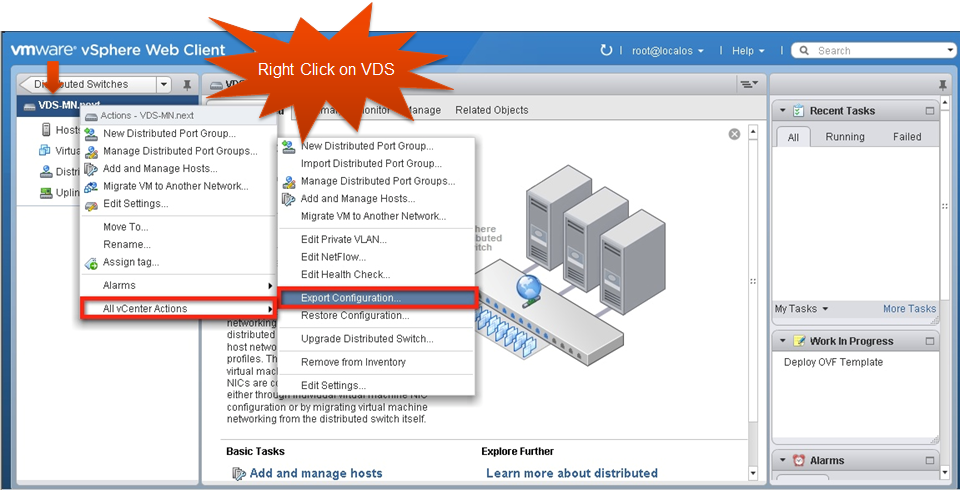
Backup a VDS Configuration

image

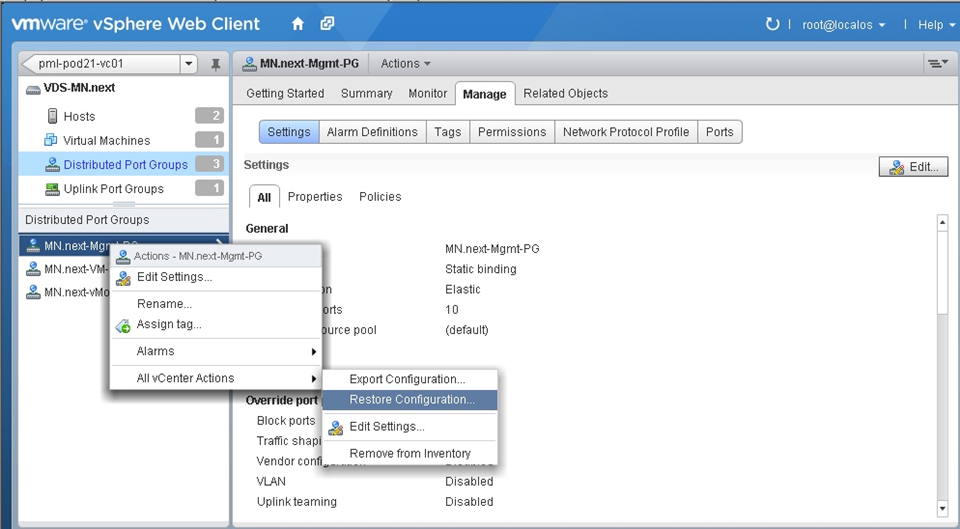
Restore a Port Group Configuration

image

Rollback and Recovery

The management network is configured on every host and is used to communicate with vCenter Server as well as to interact with other host during vSphere HA configuration. This is critical when it comes to centrally managing hosts through vCenter Server. If the management network on the host goes down or there is a misconfiguration, vCenter Server can’t connect to the host and thus can’t centrally manage resources.

If there is any issue with management network the Hosts can’t reach the vCenter server. And thus vCenter server can’t make any changes to the network and push to the hosts.

In such situation, The only way for the customer to recover is to go to individual hosts and build a standard switch with proper management network configuration. Once all the hosts have their management networks attached to a standard switch, vCenter Server can manage the hosts and re-configure the VDS.

With Rollback and recovery option customers don’t have to worry about going to standard switch route to recover from any mgmt. network failure scenario.

The Automatic Rollback and Recovery feature addresses all the concerns that customers have regarding the use of management network on a VDS. First, the automatic rollback feature automatically detects any configuration changes on the management network and if the host can’t reach the vCenter Server, it doesn’t allow the changes to take effect. Second, customers also have an option to reconfigure the management network of the VDS per host through DCUI. Customers have to connect to each host and through DCUI can change the management network parameters of the VDS

LACP

Link Aggregation Control Protocol (LACP) is a standard based link aggregation method to control the bundling of several physical network links together to form a logical channel for increased bandwidth and redundancy purposes. LACP allows a network device to negotiate an automatic bundling of links by sending LACP packets to the peer. As part of the vSphere 5.1 release, VMware now supports this standard based link aggregation protocol.

Single Root IO Virtualization is a standard that allows one PCI express (PCIe) adapter to be presented as multiple separate logical devices to the VMs. The hypervisor manages the physical function (PF) while the virtual functions (VFs) are exposed to the VMs. In the hypervisor SR-IOV capable network devices offer the benefits of direct I/O, which includes reduced latency and reduced host CPU utilization. VMware vSphere ESXi platform’s VM Direct Path (pass through) functionality provides similar benefits to the customer, but requires a physical adapter per VM. In SR-IOV the pass through functionality can be provided from a single adapter to multiple VMs through VFs.

SR-IOV

Single Root IO Virtualization is a standard that allows one PCI express (PCIe) adapter to be presented as multiple separate logical devices to the VMs. The hypervisor manages the physical function (PF) while the virtual functions (VFs) are exposed to the VMs. In the hypervisor SR-IOV capable network devices offer the benefits of direct I/O, which includes reduced latency and reduced host CPU utilization. VMware vSphere ESXi platform’s VM Direct Path (pass through) functionality provides similar benefits to the customer, but requires a physical adapter per VM. In SR-IOV the pass through functionality can be provided from a single adapter to multiple VMs through VFs.

BPDU Filter

BPDUs are data messages or packets that are exchanged across switches to detect loops in a network. These packets are part of the Spanning Tree Protocol (STP) and are used to discover the network topology. The VMware virtual switches (VDS and VSS) do not support STP and thus do not participate in BPDU exchange across external physical access switches over the uplinks.

The BPDU filter feature available in this release allows customer to filter the BPDU packets that are generated by virtual machines and thus prevents any Denial of Service attack situation. This feature is available on VMware vSphere Standard and Distributed switches, and can be enabled by changing the advanced “Net” settings on ESXi host.

Port Mirroring and NetFlow Enhancements

To address the network administrator’s need for visibility into virtual infrastructure traffic, VMware introduced port mirroring and NetFlow features as part of the vSphere 5.0 release. These features provide necessary and familiar tools to network administrators that help them in monitoring and troubleshooting tasks. In vSphere 5.1, the port-mirroring feature is enhanced through the additional support for RSPAN and ERSPAN capability.

IPFIX or NetFlow version 10 is the advanced and flexible protocol that allows customer to define the NetFlow records that can be collected at the VDS and sent across to a collector tool. Following are some key attributes of the protocol:

Customers can use templates to define the records

Template descriptions are communicated by the VDS to the Collector engine

Can report IPv6, MPLS, VXLAN flows.

VDS Management Plane Scalability

Following are the scalability numbers for VDS management plane

  • Static dvPortgroups goes up from 5 K to 10 K
  • Number of dvports goes up from 20 K to 60 K
  • Number of Hosts per VDS goes up from 350 to 500
  • Number of VDS supported on a VC goes up from 32 to 128

Netdump

Netdump is a vSphere ESXi platform debug feature that helps dump the vmkernels core dump to a server on the network. In this release of vSphere 5.1 the netdump support is extended to the ESXi host without local disks or also termed as stateless ESXi or Auto deploy environments.

In vSphere 5.0, enabling netdump on an ESXi host with the management network configured on a VDS was not allowed. In vSphere 5.1, this limitation has been removed. Users now can configure netdump on ESXi hosts using management network on VDS.


1 Comment

vSphere 5.1 Announced with Enhanced vSphere Web Client

Another of the new features of vSphere 5.1 is the Enhanced vSphere Web Client. The web Client was already part of vSphere 5 but now it is the Primary client for administrators in vSphere 5.1. Some facts

Enhanced vSphere Web Client:

The NEW virtual infrastructure client

  • Primary client for vSphere administrators in vSphere 5.1
  • Matched functionality to legacy vSphere Client
  • Additional vCenter 5.1 functionality, only available through the vSphere Web Client

Browser based

  • Internet Explorer / FireFox / Chrome fully supported (Rumours are Chrome is the fastest)
  • others (Safari, etc.) are possible (But without VM console access)

vSphere Web Client – Installation

Installer located on ISO image

Install on vCenter Server or separate server (recommended)

Login using

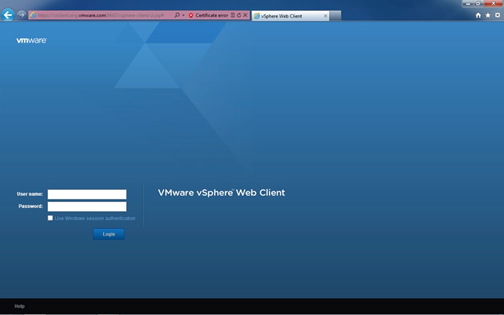
  • https://<FQDN or IP Address>:9443/vsphere-client/
  • Install Client Integration Plugin for console access

image

  • vSphere Web Client included with vCenter Server Appliance

vSphere Web Client – Object Navigator

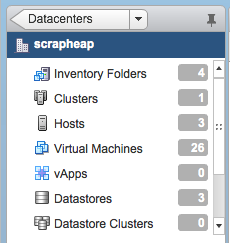
Breaks the traditional hierarchy view of an object

  • Objects linked and displayed by relationships

image

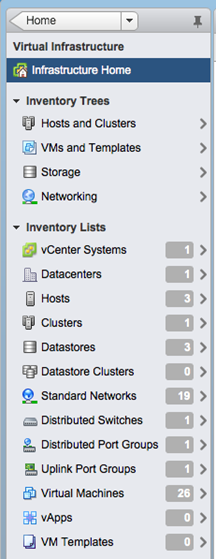
Conventional top level hierarchy view maintained on HOME screen and links to object navigator

  • Allows an admin to view objects by solutions
  • But maintains global perspectives

image

  • Allows an admin to jump to the crucial element faster via object relationships and object search
  • Reduces client clutter and repetitive information by simplifying display of objects
  • Displayed objects are all that is communicated between server and browser

image

vSphere Web Client Interface

The new interface has the look and feel of vCloud Director but with loads of new features and goes to the same layout that vCenter Operations Manager for example has already.

image

vSphere Web Client – Plugin’s

Plugins are now server based

•Recreated in FLEX

•HTML Plugins (temporary work around)

VMware Plugins (90 Days post GA)

•vSphere Update Manager (VUM)

•vCenter Site Recovery Manager (SRM)

•vShield Manager

All VMware Solutions will integrate as they get updated

Third Party Plugins

•EMC, NetApp, HP, Dell etc

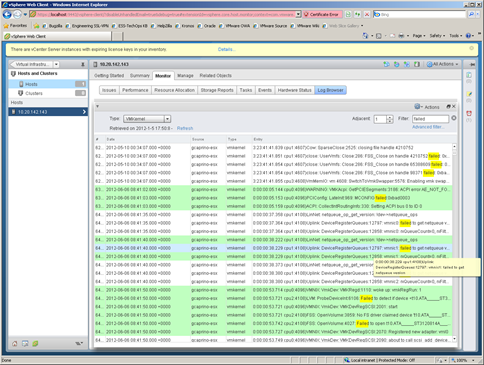
Centralised Log Browser

Proven framework to provide rich troubleshooting tools

vSphere Web Client plugin

Takes snapshot of specified host / vCenter logs

Provides rich user interface to review log data

  • search
  • filter by name / event / keyword
  • compare multiple logs
  • highlight key words

image

Simplifies Troubleshooting

The new vSphere Web Client looks to be a great replacement for the viclient and with SRM and other tools tipped to integrate it should provide every vSphere administrator an easier way to manage and administer their environments and give them all the stats and tools needed.

There are going to be a whole bunch of web based tutorial’s for people to learn how to use the new vSphere Web Client on

http://blogs.vmware.com/vsphere/vcenter-server/

I’m really looking forward to learning how it all works and being able to integrate all the new and existing plugins into it.

Gregg

Note: Screenshots thanks to VMware.


Leave a comment

VCDX Spotlight: Tom Ralph

Name: Tom Ralph

Twitter Handle: @tomralph

Blog URL: http://www.virtualserverguy.com

Current Employer: VMware, Inc

VCDX #: 51

How did you get into using VMware?

I first started by purchasing an IBM xSeries 1U rack mount server off eBay to try out this new product from VMware. I fired up the server in my home office, installed ESX 2.53, and started to learn about virtualization. After the first 20 minutes, I could see that VMware and server virtualization was the future.

What made you decide to do the VCDX?

As soon as I learned of the VCDX certification, I made it a goal to achieve the VCDX certification and a number under 100.

How long did it take you to complete the whole VCDX journey?

I had already had my VCP from 2007, I first took my VMware Design Exam in March of 2010, with the Administration shortly after that. I then defended my design in August of 2010. I then paced around VMworld awaiting my results, which finally came 2 weeks after the show ended.

What advice would you give to people thinking of pursuing the VCDX accreditation?

If you want it, go for it! I learned more about technology, enterprise architecture, and process than I ever thought I would have. During your defence know when to say ‘I do not know’, it is a hard skill to master but a critical one. Know the smallest details of your design and know them through and through.

If you could do the whole VCDX journey again what would you do differently?

When I first attempted the VCDX certification, I was newly married to a wonderful woman that allowed me to focus 100% on the process. Now we have a 1-year-old child, I am not able to devote the time needed. I would take more time to thoroughly understand and complete my design.

Life after the VCDX?  How did your company respond?  Was it worth it?

My previous company did not know what to make of the certification or what it really meant. It wasn’t soon after I got the VCDX certification that I made the choice to leave that company and move to VMware. From there, my career has blossomed and continues to do so.


Leave a comment

VCDX Spotlight: Michael Webster

Name: Michael Webster

Twitter Handle: @vcdxnz001

Blog URL: https://longwhiteclouds.com

Current Employer : I own IT Solutions 2000 Ltd

VCDX #: 66


How did you get into using VMware?

In 1998 I started with the first early versions of VMware workstation on Linux while I was working at a large ISP. This allowed me some great options for supporting customers on multiple OS’s without having multiple machines. I started using ESX in 2002, and even with the very early versions could see the potential.


What made you decide to do the VCDX?

I wanted to achieve VCDX as a competitive differentiator from other consultants and consulting businesses and I wanted to prove to myself that I could be one of the best in the world at what I do. I also wanted to prove to VMware that I was a serious partner.


How long did it take you to complete the whole VCDX journey?

At least 10 years, if you include the work experience that leads up to it. I think the previous work experience I had was one of the factors that helped me be successful the first time through. If you’re just interested in the certificate path it took about 12 months in total from the time I passed VCP4, VCAP4-DCD, VCAP4-DCA and VCDX defence. Most of the time was spent waiting for the exams to become available.


What advice would you give to people thinking of pursuing the VCDX accreditation?

Read the blueprints and application documents very carefully and do exactly what they say. Re-read them multiple times and make sure you cover everything. Make sure you know your design inside and out like the back of your hand. Be prepared to answer any questions on any aspect of it. Make sure you know where you made mistakes and can point them out and make sure you know where you deviated from best practices and why. Read all of the blog posts from the other VCDX’s about their journey and the tips that they give. Everything you need to know to be successful in VCDX is already publically available if you’re ready. Be prepared to invest hundreds of hours and a significant amount of money (yours or your companies). Do a mock defence with people that can ask pointed questions as a customer would so you have to explain and justify everything. Make sure you are comfortable presenting and can think and design and troubleshoot on your feet.


If you could do the whole VCDX journey again what would you do differently?

I don’t think I’d change anything.

Life after the VCDX?  How did your company respond?  Was it worth it?


Regardless of how my company and customers responded the process was definitely worth it. I loved the process and I learned a lot from it. Even if I wasn’t successful at the defence it would still have been worth it, just for the learning experience alone.

It has opened a lot more doors since I achieved VCDX and I have had the opportunity to work on a few more exciting projects that I may not have had otherwise. Some customers are specifying a requirement for VCDX in their RFP’s. So being one of such a small group really is worth it.

I get the opportunity to contact and work with quite a few other VCDX’s and this is very valuable, as everyone has different experience and there is always opportunities to learn more.

One thing that I constantly have running through my mind is “With great power comes great responsibility.” I think with having achieved VCDX people pay a lot more attention to what I say and do and I have to be a good role model. The number of followers and connections I have has certainly increased a lot. So there can be a lot greater consequences for what I say in public and I try to be mindful of that. But it’s not going to stop me speaking my mind. But I do consider the impact a lot more before I take a position on something.

But everybody is human, even VCDX’s. We can’t know everything, but we do try and know what we don’t know, and if we don’t know something say so. Integrity is of the utmost importance.

This is always nice also:

IMG_3437


Leave a comment

VCDX Spotlight: Chris Colotti

Name: Chris Colotti

Twitter Handle: @CColotti

Blog URL: http://www.chriscolotti.us

Current Employer: VMware, Inc.

VCDX #: 37

How did you get into using VMware?

This is actually a long story, but I will try to keep it brief. Back in late 2003, I began playing with ESX 1.5 in a home lab for my own personal education. At the time I was a business analyst working for the office of the Executive Vice President at PC Connection in NH, helping create a new custom application for the sales team. However, I really wanted to work in the IT department. I started to learn as much about VMware and virtualization as I could as part of the project. Once the project needed to move into implementation I saw my opening to pitch the use of VMware. I also knew that nobody in IT at the time even heard or it, so I ended up being the VMware expert and was moved into IT to run the implementation of the systems. I deployed PC Connection’s first groups of clusters on IBM hardware and storage with good success. At the time we were one of very few companies using VMware 2.x in Production at the time and we were a great story for IBM and VMware.

What made you decide to do the VCDX?

I’d like to say it was for career advancement, or recognition, but really the main reason was personal growth. As a VMware PSO employee at the time it was harder to find the time and the support from some managers back then to take the tests, let alone the defence. Like many things I do in my life, I do them just to see if I can and to help myself grow to a new personal level. It’s a challenge to myself to learn new things and VCDX was one I wanted to see if I could get. I simply wanted to be one of the first people in VMware PSO to achieve the certification and my mission was accomplished.

How long did it take you to complete the whole VCDX journey?

This for me took almost 2 years. I started the process by taking the original tests once they were released. Getting support from managers as a PSO person on delivery engagements was always a challenge, but there was also delays in the early stages of the tests and defences. Once I passed the tests, there were not many defences available to get into at first. I think I recall there only being ones at PEX and VMworld at that time. If memory serves there was not any outside of corporate events like the big two. I also think the limited spots were being given to VMware employees at fist in order to get the word out on the program for non VMware people. Travel budgets and other restrictions got lifted and finally made it possible at Partner Exchange in Las Vegas.

What advice would you give to people thinking of pursuing the VCDX accreditation?

I think the best advice I can give is like any challenge, do it for you. Not for you’re company, your boss, the hope of a raise, or jumping ship with a shiny new certification to get you a new job. If you go into it with goals that are not for personal growth, it’s not going to be fun or rewarding. You should WANT to get your VCDX, you should not feel like you HAVE to get it. The other things may or may not come, but nothing is ever guaranteed except personal satisfaction. Prepare for the defence properly. It’s a conversation between you and the panel. It’s not a grilling session of you by them, or a 90 minute PowerPoint by you. Have fun with it and I say these days, enjoy the journey. I think the best part for me was the defence itself, and that is where most people freak out. I actually had fun talking about the solution and admitting where things were not really great in the design. Those areas gave me talking points for the panel. No design is perfect, you should admit where you made mistakes, and why they may have been bad decisions. Lastly, too many people worry about the names of the panellists and who they will get. Don’t worry about it, frankly it does not matter who you get on your panel.

If you could do the whole VCDX journey again what would you do differently?

 I’m not sure really. I passed the defence on the first attempt, so I really have nothing to look back on and change. Personally the written exams are tough for me. If I could change anything it would be to study for those more. Even today I have trouble with the exams to maintain my upgrade status. I cannot even say I’d want a different group of panel members as a joke. I liked having both Frank and Duncan in the room for my defence. We have all three been friends really ever since and found mutually newfound respect for one another. My journey led to many projects with both of them. I can’t say I’d personally change anything, I’d do it the same a second time around.

Life after the VCDX?  How did your company respond?  Was it worth it?

Trick question since I work for VMware. At the time it was so new and not well known so there was not much response to be honest. I think now as people pass it there is more visibility to it, so there may be more recognition internally. For me being #37 and the fact it was so new made it hard for people to understand what it meant. Life is the same as it was before for the most part. I’d say it was worth it for my personal growth like anything else I do, but for me it has not change anything in what I do or how I do it. Back then I wish it had more recognition, but as they say, it is what it is.


4 Comments

Deploying an Isolated Update Manager Download Service Architecture

During a recent customer engagement for a Virtual Infrastructure build out I was tasked with deploying an Isolated/Air Gap Update Manager Download Service architecture. If you do not know what an isolated Update Manager Download Service is then read this article first before carrying on. I came across a few hurdles during this deployment and so i waned to create a quick reference of what I followed for my future reference and to hopefully help anyone who gets the problems I was getting during the setup

  1. For this setup, I got a service account created that would be used for the installation of VUM and the UMDS.
  2. For my setup I setup VUM and UMDs on their own dedicated servers as you obviously have to do as the UMDS has to be in the DMZ.
  3. For the installation of UMDS I followed the following steps from the vSphere 5 Documentation Center.
  4. Next I installed VUM following the steps detailed from this vSphere 5 Documentation Center article.
    1. Note: The first hurdle I hit in this installation was that the SQL Client for SQL 2012 doesn’t work for the ODBC connections so I had to install the SQL 2008 Client from here for it to show the ODBC configuration when I went through each of the installations.
  5. Next was the configuration of UMDS and I followed this vSphere 5 Documentation Center article.
  6. Next was the creation of the IIS server for the UMDS so that VUM can contact and download the patches. I followed this vSphere 5 Documentation Center article.
  7. Next was the exporting of the downloaded patches to the UMDS folder under the IIS website (for mine I did a virtual directory to a folder on my data drive so that the c drive was not filled up with patches.)
    1. Note: For the exporting, I kept getting an error as detailed in this VMware Communities discussion I created. As detailed in the discussion the problem was I had to set the folder location as my default export store by running vmware-umds -S –default-export-store <your path to the UMDS folder>.
    2. Then you can export the patches to the folder location by running: vmware-umds –E <your path to the UMDS folder>.
  8. Now you can go into your vCenter and setup the UMDS as your shared repository location by pointing to the IIS website you created for the UMDS folder

clip_image001

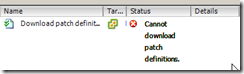
    1. Note: For the downloading of the patches I kept getting a failure where the downloading patches task would get stuck at 50% for a few minutes and then fail stating “Cannot download patch definitions” as shown below.

clip_image002

2. The problem here was that the service account running the VUM service on the VUM server did not have full permissions to the folder. After reapplying the patches the downloading of the patches worked clip_image003

After going through all of the above steps, my air gap Update Manager Download Service was now setup clip_image004[1]

I hope that this saves someone the headaches I had along the way

Gregg


Leave a comment

VCDX Spotlight: Brian Smith

Name: Brian Smith

Twitter Handle: @bsmith9999

Blog URL: bsmith9999.com

Current Employer: VMware

VCDX #: 91

How did you get into using VMware?

I started using workstation in 2001, but the real work began in 2006 with GSX (now called VMware Server) and ESX. We had a lab full of software development and testing servers, out of Power, Space, & Cooling. We needed consolidation and test automation that included full OS re-installs multiple times daily, virtualization was the only solution. At the time I worked for a Microsoft gold partner we were pressured to use their solutions, but they were weak. VMware’s platform was/is robust and solid, we made the obvious decision. A year later we added Lab Manager to assist with the automation, now we use vCloud Director for the same functionality.

What made you decide to do the VCDX?

I have spent a lot of time creating and implementing vSphere designs the past 7 years, this certification seemed like a worthy challenge. I began blogging about my IT experiences in 2008. I created a couple of popular posts, one of them about VMware Lab Manager best practices that gained a lot of traction in the community. I hoped VCDX certification would add to my credibility.

How long did it take you to complete the whole VCDX journey?

I have had a current VCP since 2008. I really started considering VCDX and passed my VCAP4 exams in Sept & October of 2011. I then passed on my first paper/defence attempt in May of 2012 gaining VCDX4 certification. After passing the VCAP5-DCD exam I now have VCDX5 certification as well.

What advice would you give to people thinking of pursuing the VCDX accreditation?

It’s a very positive life changing experience, it will vault you into an impressive peer group that I doubt I will ever feel worthy of. Be sure to allocate plenty of time for preparation, know your design and be ready to explain why you made every decision you did and why you didn’t make the other choices.

If you could do the whole VCDX journey again what would you do differently?

One thing I never read anywhere else is not only that you should do practice defence of your paper, but also do some mock design problems. I posted some thoughts about the defence before I got my results http://bsmith9999.blogspot.com/2012/05/vcdx-thoughts.html

Life after the VCDX?  How did your company respond?  Was it worth it?

I have already been given more opportunities to work on bigger and more visible projects. I now enter any situation with more confidence and my ideas are worth a lot more than just another suggestion in the room. Meeting other VCDX candidates was a great experience; I have a few new friends and a lot of new career networking options. It was definitely worth it. The only change I would make is to have pursued it earlier.


Leave a comment

VCDX Spotlight: Lane Leverett

Name: Lane Leverett

Twitter Handle: @wolfbrthr

Current Employer: Enterprise Networking Solutions Inc.

VCDX #: 53


How did you get into using VMware?

I first started using VMware Workstation and ESX in 2005 while working at JTS Communities as a Network Administrator. As I worked with ESX and saw the isolation/encapsulation capabilities I could see just how disruptive virtualization would be for the technology industry and that it would enable and usher in so many new capabilities that were either very difficult and/or costly to implement and manage. I also liked the fact that in order to do virtualization well it would require me to be well rounded in Server Operating Systems, Networking, and Storage as well as virtualization itself. I liked that challenge and saw this as the career path I wanted to target. So I then looked for employers where I could design and implement virtualization solutions or where I could manage and administer large and complex virtual environments.

How long did it take you to complete the whole VCDX journey?

I started in November of 2009 taking the VMware Administrator and VMware Design exams (now the VCAP-DCA and VCAP-DCD exams). VMware was still working out kinks in the communication process for how you were enrolled for those exams, and then getting back to you on when you could schedule the next step. I then took the first VCDX Boot Camp at Partner Exchange in Vegas in 2010. I sat in the back of the room and started to soak in the information. I ended up sitting next to Frank Denneman (VCDX#29) and he was giving his VCDX defense the very next day. He was SO gracious and helpful pointing me in the right direction giving me a heads up that I would need to spend a good deal of time and attention on the application and design documentation. I then ended up filling out the application and augmenting and providing the necessary required documentation from my real world design in May and submitted all of that information right before the deadline (Like I think I maybe had an hour to spare). That was really the most gut wrenching part of the entire process, and in my opinion the most difficult. I got the thumbs up that my application and documents had been accepted and that I would be defending my design the Thursday before VMworld. I then spent the remaining time till then reviewing my design and based on the advice from the VCDX boot camp, going over not only why I had made certain design decisions, but also why I chose not to make different design decisions. Was it because of a constraint, a customer requirement, or perhaps even preference towards a certain hardware vendor on the customers end. For me, the defense, while nerve wracking, was not actually the most difficult portion of the entire process. I am pretty good at thinking on my feet, I have excellent communication and soft skills, and I’ve had plenty of experience delivering designs and doing presales sessions in front of customers. Doing the defense was really no different. I just had a VERY well educated and technical astute customer. Smile It was nice to be done with the defense and enjoy VMworld, but it wasn’t till almost a month later that I got the e-mail with the good news.

What advice would you give to people thinking of pursuing the VCDX accreditation?

First off, the VCDX isn’t for everyone. It really is for those that are currently VMware design architects or that aspire to that kind of position. This certification is really geared for folks that understand how to take a customer’s business requirements and can turn that into a technical solution given all the potential risks, requirements, and constraints for that particular customer.

If you do feel this is the right path for you then I first of all recommend that you use a real customer design. Even though a fictitious customer is acceptable, it will drive you crazy having to create from scratch a whole customer scenario (this would be analogous to the work of J.R.R. Tolkien coming up with the entire history of Middle Earth, legends, the Elvish language, etc. – you don’t want to really do that unless you’re a glutton for punishment).

Another item of advice is to make sure you’ve given yourself enough time to put together the application and documents. Don’t put it off or procrastinate. You’ll be sorry if you do.

Also, keep your design simple. Your design doesn’t have to be a 500 page multi-site international design complete with VDI, every hardware vendor under the sun, etc. The cleaner and simpler you can make your design, the better off you’ll be. Don’t hand in a five page design doc – that would also be hurtful to your chances of passing. But remember, you’re gonna need to know this design like the back of your hand when you give your defense, so do yourself (and the VCDX application review board) a favour and keep it short, but also complete (DO NOT leave out anything that they ask you in the application to have included in your documentation).

And finally get peer support. Get advice from folks on twitter or the community forums. Have people review your design and folks you respect watch your mock defense sessions.

If you could do the whole VCDX journey again what would you do differently?

Have given myself more time on the application and design documentation.

Life after the VCDX?  How did your company respond?  Was it worth it?

Life is good. I feel truly honoured (and still quite shocked) to be in the company of some truly amazing people. I actually ended up changing jobs weeks before I found out if I had gotten the VCDX. But that was really just a chance for me to move back home from Kansas to Northern California. That in itself has been a true joy. I’m working at a small integrator out of Sacramento, CA and I have the privilege to work alongside some truly fantastic peers. I know I could have my pick of several great opportunities out there, but for now, the ability to stay close to home with almost no travel allows me to spend quality and quantity time with my son and daughter.


Leave a comment

VCDX Spotlight: Doug Baer

Name: Doug Baer
Twitter Handle: dobaer
Blog URL: http://www.goitpartners.com/blog
Current Employer : IT Partners
VCDX #: 19

How did you get into using VMware?
As a software developer in the late 90’s, I encountered VMware Workstation as a solution to the "aww, man, that bug goofed up my configuration" problem. I had used the product as a sandbox for testing software or developing installation and configuration documentation: step-by-step processes with screenshots. Fast forward to 2002, we had a test lab built for our Netware/NDS to Windows 2000/AD migration project. The hardware consumed 2 full 42U datacenter racks and made quite a bit of noise. We installed VMware GSX on one machine and reduced the hardware footprint of our test lab to something closer to 15U of gear, including the tape drive used to back the environment up. The lab room became so much quieter (and cooler!) that you could barely tell the gear was powered up. Based on that success, we looked at ESX 2.0 as an even more efficient way to consolidate, and started looking at moving some low-impact workloads from old hardware into VMs on newer hardware.  With the advent of VMotion (capital ‘V’ back then) then HA and DRS in VI3, we were able to accommodate production workloads by addressing the ‘all of your eggs in one basket’ problem. Adoption of the platform simply took off from there.

What made you decide to do the VCDX?
I had moved from a customer to a VMware partner at this point. I actually credit my interest in consulting to my involvement with VMware. Based on some interactions on the VMware forums that turned into in-person Q&A sessions, I realized that I enjoyed that part a lot more than operational maintenance and carrying a pager. At the time, in late 2007 or early 2008, there was no VMware certification beyond the VCP. I was talking with a coworker, Mark Gabryjelski — he’s got a crazy-low VCP number (#46) — about the value of some kind of advanced VMware certification that would help further differentiate the people who really focused on this technology and its application. A quick visit to the certification section of VMware’s website revealed that VMware was creating a new Design certification called VCDX. Right there, we challenged one another to become part of the program as a way to validate our skills, help differentiate the company, and ultimately help shape the certification itself. We saw it as becoming even more involved with the growing VMware community.

How long did it take you to complete the whole VCDX journey?
I filled out a ‘skills assessment’ on the website in Q1 of 2008, and received an invitation to take the "VMware Enterprise Administration Exam."  After passing that exam, I was invited to take the "VMware Design Exam" in Q1 of 2009. At the end of July 2009, I was notified that I had passed the second exam and that there were going to be VCDX Defense opportunities at VMworld 2009. In order to get in to that group, I had to have my application completed by August 14, so, I had roughly 2 weeks to complete my application, design and design documentation. Fortunately, I was able to work things out and was able to complete my documentation AND reserve a slot for the defense. I was notified that I had passed on September 1, 2009, so the whole process took a little shy of two years for me.

What advice would you give to people thinking of pursuing the VCDX accreditation?
If you’re even considering it, get started now. Do some research and find out if it is something you really want to do. There is a lot of information about VCDX out there — blueprints, blog posts, workshops, even sessions at Partner Exchange and VMworld that walk you through the process. I’ve even presented a session at VMUG about it. I don’t think any of the VCDX certified individuals, or the people who run the VCDX program, are secretive about how the process works and what it takes to pass. As long as you don’t ask us something that would violate our NDA, most of us are pretty open to talking about it.
To get started down the path, get the blueprints for the VCAP exams, get them scheduled, and take a look at what is required for a VCDX-level design. If you’re not building your designs that way today, start using the guidelines to make your current work that much better. As an added benefit, this gives you plenty of practice towards building the documentation for your application and defense. Don’t rush the process, but don’t be afraid of it, either. Once you have your defense scheduled, make sure that you know your design. Not just the, "here’s how we built it," but the "why did you choose to build it that way" aspects. Understand how your customer’s requirements and constraints shaped the design — be able to explain the WHY.
Once you get to the defense, relax and have fun with it!

If you could do the whole VCDX journey again what would you do differently?
I don’t think I would have done much different. I was fortunate to be working with a great customer at the time my defense was scheduled. They agreed to answer all kinds of crazy questions, and provided me with excellent feedback that helped me solidify the design and get everything straight in my head. Having that kind of support from my customer was amazing. I strongly recommend using a real design for your defense and reviewing it with the actual customer or coworkers/peers who can ask you tough questions about it.

Life after the VCDX?  How did your company respond?  Was it worth it
I received accolades from the local VMware team as well as recognition from my company, both internally and at events we sponsored. In the early days, nobody knew what a VCDX meant, so I had to explain what it was at just about every event — my apologies to those who had to hear me say the same thing multiple times! Today, the situation is better, and more people understand what VCDX means, although we do have a ways to go before it achieves the widespread recognition of, say, CCIE.