TheSaffaGeek

My ramblings about all things technical


1 Comment

VCDX Spotlight: Simon Long

Name: Simon Long

Twitter Handle: @simonlong_

Blog URL: www.simonlong.co.uk

Current Employer: VMware

VCDX #: 105


How did you get into using VMware?

Around 5/6 years ago the company that I was working for at the time installed ESX 3.0 to use as part of their Dev/Test environment. The “VMware stuff” as we knew it then, was installed by a contractor as our team didn’t really know too much about it. Once the installation was complete, the contractor left and we were left to fend for ourselves. I nominated myself to look after the “VMware stuff”, and that’s how this love affair began.


What made you decide to do the VCDX?

It’s hard to put my finger on one thing. I think working closely with Frank Denneman during my time at VMware Professional Services certain contributed to me wanting to aim high.

I also like to make goals for myself and I made the VCDX one of those goals. However I didn’t put a time frame on it. I could have probably defended a lot earlier than I did, but I was never really completely ready for it until 2012.


How long did it take you to complete the whole VCDX journey?


It’s hard to say as I guess it includes VCP, VCAP exams as well. A lot of these exams I just took as and when I had time to take them, so there wasn’t a sense of, if I take the VCAP’s by this date, I can then submit for the VCDX. It just happened really. I had both VCAP’s, then one day I decided I was going to go for it.


What advice would you give to people thinking of pursuing the VCDX accreditation?

Don’t be scared. A lot of people who talk about going for VCDX are reluctant because they have heard “It’s really scary and the panellists are after your blood” etc, but this really is not the truth. The panellists actually want you to pass.

Pick a design you have architected yourself, and that covers most of the areas of the Blueprint. If you use a design that is not completely yours, you may find it hard when asked question on those sections.

Know that design inside out (read every word). Know why you chose each feature, understand what each feature you chose does and understand why you didn’t choose the other features.

The technology is not the only focus in the VCDX. Make sure you fully understand and have documented; Risks, Constraints etc that affected your design.

And don’t be afraid to say you don’t know to something. The guys who are asking questions will know if you’re making it up or not.


If you could do the whole VCDX journey again what would you do differently?

Nothing. It went pretty smooth I thought. Smile


Life after the VCDX?  How did your company respond?  Was it worth it

My Company were pleased for me. No pay rise as yet….. 😉 But I think this is normal in the majority of companies.

I think it was worth it. It certainly improved me as an architect. I now have great attention to detail (when needed). This has come from the scrutinizing of my design over a period of months.

And if, in the future I decide to leave VMware, having VCDX #105 on my CV might improve my chances of securing another role.


1 Comment

VCDX Spotlight: Chris Fendya

Name: Chris Fendya

Twitter Handle: @ChrisFendya

Current Employer: World Wide Technology www.wwt.com

VCDX #: 96

How did you get into using VMware?

I first started using VMware back in the GSX days when researching a way to save data center space for a global supplier to energy products I worked for. I remember hearing about this “vMotion” thing which pushed me to look into ESX. I built a small environment, staged the scenario, issued the vMotion command, and was hooked. I will never forget that moment and what followed by relaying the good news to our CIO. He promptly challenged me on what I just described to him. The demo date was set, I again built the scenario, and in a small conference room showed our CIO the power of vMotion. He just smiled and said “Continue forward and get this stuff in our data center!”. I haven’t stopped with VMware since that day and that was over eight years ago. It’s been an amazing adventure seeing VMware grow and watching the changes and impact it has made to all our lives and how we work.

What made you decide to do the VCDX?

I was challenged by an old boss to go after it a couple of years ago back when it was in its infancy. I began reading up on what all was required, the process, and reading others blog about their experience of the journey. Saying I was intimidated is an underestimate but the funny thing was I was inspired and challenged all at the same time.

How long did it take you to complete the whole VCDX journey?

My journey lasted a couple years. I did not pass my first defense. That first defense was an eye opening experience for me and drove me to go after it a second time. When I received notice I failed after my second defense, I had a range of emotions and for a long time decided the certification wasn’t for me. When VMware announced a final defense for VCDX4 at VMworld 2012, I had many within the community contact me and encourage me to give it another attempt. Had it not been for them, I don’t believe I would be writing this right now 😉

What advice would you give to people thinking of pursuing the VCDX accreditation?

Take their time! It’s not a race to get the certification. Learn all you can about every aspect of an entire solution. Where the certification is obviously centered around VMware, it will challenge you on every aspect of a design and a total solution (Networking, Storage, Compute, Business impact, etc) and how each and every one of those relate to VMware and the end design. I found I was questioned on things I never thought of during my preparation and honestly, sometimes things I didn’t know. The panel isn’t there to make you look dumb or prove that they are smarter than you. They will help you through it as much as they can, so as much as it’s about challenging you on what you know, it’s also about your thought process and how you approach a problem and work through it.

If you could do the whole VCDX journey again what would you do differently?

I believe things happen for a reason so to say I would do it differently or have it happen differently…No. I obviously would’ve loved to pass on the first or even second try but not doing so had it’s own rewards 😉

Life after the VCDX?  How did your company respond?  Was it worth it?

I work for a pretty amazing company! Throughout the entire process they embraced my journey, encouraged me along the way, and in the end were extremely proud when I shared the good news. They wrote this blog article to celebrate the news which I was honored to have done.

I get the “Was it worth it” question a lot. Mostly from customers who have heard of the certification and want to know about it and my journey but also from others in the community. I always respond ABSOLUTELY! I learned an immense amount about designing solutions and myself as an individual. In addition and probably most important, I became a better Architect, Engineer, and Consultant. The people I met and interacted with throughout the entire process has been amazing… Many of those who I know will be a part of my career for a very long time!


Leave a comment

VCDX Spotlight: Shane White

Name: Shane White

Twitter Handle: @ausvmguy

Blog URL: none (yet)

Current Employer: Southern Cross Computer Systems

VCDX #: 95

How did you get into using VMware?

In 2007, I started playing with Workstation. In the 2nd half of that year, I completed a training program I had been on for a while. I had seen ESX 2.5 installed but didn’t know a lot about it. When I asked my employer what the options were for continued training and/or specialisation and virtualisation was an option, I elected to go down this road. I got my VCP3 in October of that year and had the opportunity to do nothing but VMware onsite for the next 3 years or so with one of our clients.

What made you decide to do the VCDX?

I have always liked a challenge. With the exposure and skills I obtained onsite, and the satisfaction I got from working with VMware technologies, I decided that attempting VCDX would be enjoyable, definitely challenging, but not unachievable.

How long did it take you to complete the whole VCDX journey?

If you count from the time I decided to go for it, just under 2 years. Due to my commitments onsite, I couldn’t spend large blocks of time on my design. I achieved both VCAP4 exams in Nov 2010 (4 days apart!). I started working up the design in late November 2010 and had my 1st defence attempt in Singapore in November 2011, which was unsuccessful. The feedback received from this defense and from a 2nd unsuccessful defense in Toronto in May 2012 was applied to a revised submission aimed for defense at VMworld in San Francisco in August 2012. On the 3rd attempt, I was successful!

What advice would you give to people thinking of pursuing the VCDX accreditation?

I found it particularly valuable to have had practical experience working with a real environment. While a home lab is very useful as well, a real environment will encounter real design decisions and configuration issues that may not arise in a home environment.

Consider carefully the kind of design you are planning on submitting. My design was a totally fictitious one. My success shows that you can defend a fictitious design, but it is likely to be harder than if a real design is used.

Either way, read the blueprint and make sure you address ALL the criteria and that you know, not only what your design decisions are, but also understand why that choice was the most appropriate in your situation. This means having a good grasp on the business requirements that have a bearing on those decisions.

Don’t get discouraged if your 1st (or subsequent) attempts are unsuccessful. View it as an opportunity to improve. Achieving VCDX has been described as a journey, and the entire journey can be beneficial and bring satisfaction if you let it.

If you could do the whole VCDX journey again what would you do differently?

I’d read the blueprint more closely and more often! Apart from that, I wouldn’t do anything else differently. I enjoyed the whole experience and found the whole process immensely educational.

Life after the VCDX?  How did your company respond?  Was it worth it?

SCCS was definitely pleased with the successful defense.

As for me, the sense of satisfaction of achieving something significant is immense. The increased confidence when facing a situation is also noticeable.

Was it worth it? Absolutely. Even if I had decided not to reattempt, the process of developing the design, all the researching, and preparing for the defense and developing the presentation was of great benefit.


Leave a comment

VCDX Spotlight: Sachin Bhowan

Name: Sachin Bhowan

Twitter Handle: @sbhowan

Current Employer: VMXperts

VCDX #: 38

How did you get into using VMware?

My first use of VMware was back in 2004 when we were investigating bare metal recoveries for Tivoli Storage Manager (TSM) and were experimenting with WinPE and GSX. I was looking for a way to standardize the recovery hardware platform for recovery as at the time there was no bare metal recovery option for TSM. It was after that then I started exploring and testing the ESX platform for server workloads and with the onset of Version 3, as the cliché goes….rest became history!

What made you decide to do the VCDX?

An interesting question in that there are two reasons for this; the main reason was for the challenge to prove to myself that the solutions I was actively “preaching” and delivering on were on par and on the right track. The second reason was simply being at the right place at the right time as we were having a meeting with our VMware Partner Manager and our CEO was complaining about the lack of elitism within the VMware certification portfolio and then they announced the VCDX program. I was then “volunteered” to make this happen!

How long did it take you to complete the whole VCDX journey?

I started this journey in September 2008 and tried to track and get as much information as possible, however being in the geo that I was, the most helpful information I got was from the active blogs run by Duncan Epping, Rick Scherer, VCDX001, and twitter tips, as exam information and details were only given out after successful registrations. The process was also impacted by the fact that I had to take all my exams in Europe or the US as there was no authorized testing centre in South Africa at that time. Therefore I had to wait for exams to open as well as align them with the major VMware events to reduce costs. This also forced me to be prepared at very short notice when I was given the availability of the exams! That said I completed my defence in February 2010 giving a total time of about 18 months.

What advice would you give to people thinking of pursuing the VCDX accreditation?

My advice is to be passionate about what you are doing and if you feel that doing the research and working out the solution interdependencies and limitations is mundane and tedious then this might not be the right track for you. Working towards the VCDX in my experience involved a lot of patience, dedication, passion and not to mention discipline as this is a method for working studiously and diligently on an everyday basis because not all solution requirements are the same. It also means investing a lot of your time over and above of your daily responsibilities and duties (work and family included); so commit for the long haul.

If you could do the whole VCDX journey again what would you do differently?

I do not think I would change much aside from the fact that with exams now available locally it would have meant a shorter timespan to get the accreditation.

Life after the VCDX?  How did your company respond?  Was it worth it?

Life for me has pretty much been the same since I achieved the VCDX accreditation and simply so because I chose for it to be that way as there were some tempting offers and I opted out for personal reasons. However I am now responsible for heading up a new business called VMXperts, that is a subsidiary of my former company Aptronics. (You can guess what platform this company’s focus will be). As for the response from my company everyone was simply elated and it also went well that I was the very first person in Africa to achieve this. This made their investment in the VCDX program a worthy one!


Leave a comment

VCDX Spotlight: Randy Stanley

Name: Randy Stanley

Twitter Handle: @randystanley

Blog URL: http://www.randystanley.com

Current Employer: IT Partners

VCDX #: 94

How did you get into using VMware?

In 2003 I was working for a small software development company managing their business applications and supporting their software development team. Initially we began utilizing VMware GSX Server for those simple use cases trying to consolidate and save on our hardware spend where ever we could. In support of the software development team we also deployed ESX in a lab environment for testing and development purposes only. A fairly common introduction and use case early on in the adoption of VMware solutions. Plus, vMotion was the coolest freakin’ thing I had ever seen.

It wasn’t until I re-entered the consulting field in 2007 that I really started to dive deep into the VMware products and they have been an integral part of every solution we sell and deploy. It was this exposure to the VMware technology that really allowed me to develop my abilities and deepen my experience. I also should say that a large draw for me was the large, friendly and helpful community that supported and shared knowledge around the VMware products; easily the best community with which to be associated.

What made you decide to do the VCDX?

For me the decision was twofold, first because I’ve had the great fortune of working with one of the best consultants I know in Doug Baer, VCDX #19 and second for the shear challenge of obtaining the certification. A natural, underlying part of the equation has always been my love of the technology and interest in understanding how it works at its core. In my current line of work, utilizing the skills and knowledge measured by the VCDX certification is highly relevant and in many ways a validation of those abilities.

How long did it take you to complete the whole VCDX journey?

It’s hard to say exactly when the journey started, as I had wanted to go after it for the last couple of years, but it seemed so far off and I never really got going. In May 2011, I started and then stopped my journey with a failed attempt on the required VCAP-DCA exam which in combination with a heavy load of customer commitments limited my ability to focus on it. Since I wasn’t accustomed to failing an exam, the DCA failure caught me off guard and I needed to regroup. It was then about 6 months later over the 2011 Thanksgiving (US) holiday that I had a little heart-to-heart with myself and decided regardless of the time, effort or success, I was going to go after the VCDX4 before it was updated to version 5. I was leaving too many good designs on the table which I had worked on with vSphere 4 to not try to at least defend one of them. That’s when my real, 6-month journey toward VCDX began. This involved the DCD4 exam in December, the DCA4 exam in January, the VCP5 upgrade and the DCD5 beta in February, the VCDX4 Design and application in March and then the VCDX4 Defense in May. Approximately 6-months start to finish, but ultimately the journey never ends or at least I hope it doesn’t.

What advice would you give to people thinking of pursuing the VCDX accreditation?

My advice to those interested in the VCDX would be to dedicate themselves to the investment of time and resources necessary in the effort. This may mean the setup of a home lab, the time to read product guides, the repetition of product implementation and design, and/or the review of countless blogs and knowledge base articles. But beyond having a sound technical and architectural knowledge it will also require comfort in the spotlight, an ability to present from a white board, a quickness to think on your feet, an ability to envision the big picture design, and an openness to feedback, critique and improvement. With all that said, bottom line for anyone seriously considering it, I would say go for it. You’ll never know what could have been if you don’t try. I believe many will be surprised by what they can accomplish when they focus on a goal like the VCDX.

If you could do the whole VCDX journey again what would you do differently?

I probably would have started it earlier. Overall I felt the execution was successful once I got going, but for me it was just the issue of starting and sticking with it. Beyond that I don’t think I would have changed much.

Life after the VCDX?  How did your company respond?  Was it worth it

In my consulting position, the certifications are very much a part of the role and needed by the company to market, sell and deliver the solutions that we focus on. The certification definitely brought some recognition and accolades. It also provided some instant credibility amongst those in our community. For the most part, I do believe it was worth it mainly because of the challenge it provided to me and the opportunity to do what I love most which is work with the technology, understand the architecture of the products, solve the business problems of my customers, and participate in a community that is passionate about all these same things.


Leave a comment

VCDX Spotlight: Rick Scherer

Name: Rick Scherer

Twitter Handle: @rick_vmwaretips

Blog URL: http://www.vmwaretips.com

Current Employer: EMC

VCDX #: 21

How did you get into using VMware?

I first heard of and started using VMware Workstation in late 1999. I was a UNIX Administrator that was forced to live in a corporate Windows world. Workstation allowed me to have the best of both worlds. After thorough use and testing of the GSX and ESX products, by 2003 I was able to convince my (then employers) management that virtualization was a must for our datacenter. The rest is history.

What made you decide to do the VCDX?

Since day one I’ve been convinced that virtualization was a huge benefit for organizations large and small. Obtaining my first VCP (VCP2 #7315) in 2006 I’ve been following the work of the education team closely. When I was invited to be a beta participant in the then newly created VCDX program I saw it as an opportunity to validate my dedication, knowledge and experience. By making a candidate jump through as many hurdles that the VCDX program has, it really shows that VMware users are dedicated to the cause. This is a great way to give VMware additional validation to the industry.

How long did it take you to complete the whole VCDX journey?

From start to finish, an extremely long year, it was extremely rewarding being part of the beta program process though. Being able to assist in the shaping of the program, how the Design and Administration exams were written was really fun.

What advice would you give to people thinking of pursuing the VCDX accreditation?

Know your stuff, inside and out. The VCDX is really a mixture of everything, knowing not only how to fully design and architect a virtualized infrastructure (not only from a VMware perspective but the associated compute, network and storage), but also how to implement that design, manage that design, upgrade that design and operate that design.

Get as much hands on as possible. Learn as much as possible about how compute, network and storage relate to virtualization. Learn how applications relate to virtual machines. Know your design. That’s probably the most important thing, for your defense do not design your dream architecture, keep it simple and keep it to something you’ve done before. Know it inside and out, know what failed and how you fixed it. Don’t say you designed a specific thing to meet Best Practices, know why it’s the best practice.

Also, if you’re married… get your spouse’s buy-in on the journey as well. You’re going to spend a lot of time away from them while you’re on the journey and you’ll need more support than you’ve ever needed before.

If you could do the whole VCDX journey again what would you do differently?

No regrets, I loved every single part of the process. I wish I didn’t rush through it as fast as I possibly did, but I was so excited to be part of something new, something fresh and something fun! How awesome is it to be VCDX #21! J

Life after the VCDX?  How did your company respond?  Was it worth it?

I think obtaining the VCDX certification opened a lot of new doors and opportunities. Since obtaining my VCDX I’ve joined EMC as part of their vSpecialist organization, here I’m able to put my knowledge and experience directly to use as I evangelize companies about all of the amazing benefits of virtualization, application modernization, end-user computing and now cloud computing.


Leave a comment

VMware vSphere Data Protection

vSphere Data Protection (VDP) is a robust, simple-to-deploy, disk-based backup and recovery solution. VDP is fully integrated with VMware vCenter Server and enables centralized and efficient management of backup jobs while storing backups in de-duplicated destination storage.

Benefits:

•VDP leverages VMware vSphere API for Data Protection (VADP) which includes Changed Block Tracking (CBT) along with the EMC Avamar variable-length segment de-duplication engine to optimize backup and recovery times. Initial backups take a fair amount of time, but subsequent backups can be as little as a few minutes depending on the number of changes that have occurred since the last backup.

•Backup agents are not needed as VDP leverages VADP. VMs are backed up to disk-based storage (.vmdk files attached to the VDP virtual appliance).

•De-duplication occurs not only within each VM, but across all backups jobs and all VMs being backed up by the VDP appliance.

•A VM that utilizes an agent for backup and recovery require the VM to be in a powered on state. With VDP, that is not the case – backups and recoveries can be performed regardless of the VM’s power state.

•The is no need to install backup management software on an administrator’s workstation. Configuration and management of VDP is web browser based. Currently supported browsers: IE 7, 8 on Windows. Firefox 3.6 and higher on Windows or Linux. Adobe Flash is required.

•Restores can be entire VM or individual files and folders/directories. The file-level restore user interface (UI) is web based, simple, and intuitive meaning end-users can perform self-service file-level restores (administrator permissions required).

•Deployment, configuration and management of VDP is done via a web browser based graphical user interface (GUI). The majority of configuration tasks are completed using intuitive wizard-driven workflows.

vSphere Data Protection Key Components

VDP VM Appliance

•VDP is a virtual machine appliance deployed from a .ova (open virtual appliance or application) file.

vSphere Infrastructure

vSphere API for Data Protection (VADP) is utilized by VDP. This includes the Changed Block Tracking (CBT) mechanism. CBT tracks the changes made to a VM at the block level and provides this information to VDP so that only changed blocks are backed up. This significantly reduces storage consumption and speeds up backup and recovery times with VDP.

•VMware Tools on Windows contains Volume Shadow Copy Service (VSS) components to assist with guest OS and application quiescing when backing up Windows VMs. More details on VSS can be found here: http://technet.microsoft.com/en-us/library/ee923636(v=WS.10).aspx

VDP Architecture

•The appliance is deployed by default with 4 vCPUs and 4 GB RAM.

•Available in three sizes: 5 TB, 1 TB, and 2 TB – these are usable destination datastore sizes. The actual amount of disk space (thick provisioned) consumed by the appliance is 850 GB (3 .vmdk files), 1600 GB (7 .vmdk files), and 3100 GB (13 .vmdk files) respectively. Thin provisioning can be used, but the administrator should closely monitor disk consumption. It is important to note that once the VDP appliance is deployed, the size cannot be changed.

•The VDP appliance guest OS is SuSE Linux 11.

•vCenter Server 5.1 is required to use VDP. VDP can backup VMs on hosts running vSphere 4.0 and higher.

•VDP management is done via the vSphere Web Client. There is no plug-in for the vCenter Server “thick” client.


4 Comments

vSphere 5.1 Announced with Enhanced vSphere Replication

vSphere Replication

vSphere Replication (VR) is the industry’s first and only genuinely hypervisor-level replication engine.

It is a feature first introduced with Site Recovery Manager 5.0 to allow for the vSphere platform to protect virtual machines natively by copying their disk files to another location where they are ready to be recovered.

VR is a software based replication engine that works at the host level rather than the array level.

Identical hardware is not required between sites, and in fact customers can run their VMs on any type of storage they choose at their site – even local storage on the vSphere hosts, and VR will still work.

It provides simple and cost-efficient replication of applications to a failover site

VR is a component delivered with vSphere editions of Essentials Plus and above, and also comes bundled with Site Recovery Manager. This offers protection and simple recoverability to the vast majority of VMware customers without extra cost.

•With VR, a virtual machine is replicated by components of the hypervisor, removing any dependency on the underlying storage, and without the need for storage-level replication.

•VMs can be replicated between *any* type of storage platform: Replicate between VMFS and NFS, from iSCSI to local disk. Because VR works above the storage layer it can replicated independently of the file systems. (It will not, however, work with physical RDMs.)

•Replication is controlled as a property of the VM itself and its VMDKs, eliminating the need to configure storage any differently or to impose constraints on storage layout or management. If the VM is changed or migrated then the policy for replication will follow the VM.

•VR creates a “shadow VM” at the recovery side, then populates the VM’s data through replication of changed data.

•While VR can be deployed through the “thick client” all management and interaction with VR is done strictly through the vCenter 5.1 web interface.

•Only vSphere 5.0 and 5.1 will work for vSphere Replication as the VR Agent is a component of the vSphere 5.x hypervisor.

•vSphere Replication can not co-exist with the vSphere Replication pieces originally shipped with SRM 5.0. If an existing SRM 5.0 vSphere Replication environment is in place it will need to be uninstalled and replaced with the standalone vSphere Replication from vSphere 5.1.

•While both Storage DRS and sVmotion are supported, they will cause certain scenarios to be aware of

•While Storage vMotion of a VR protected VM can be done by an administrator, on vSphere 5.0 this may create a “full sync” scenario in which a VM must be completely resynchronized between source and destination, possibly violating the configured recovery point objective for that VM.

•Storage DRS compounds this problem by automating storage vMotion, and thereby may potentially cause the protected virtual machines to create continual full sync scenarios, driving up I/O on the storage, thereby creating cyclical storage DRS events. Because of this it is unsupported with 5.0.

•Storage vMotion and SDRS are only able to be run on the *protected* VM and can not execute against the *replica* of the VM.

•When using vSphere Replication with Site Recovery Manager, storage vMotion and storage DRS are *not supported*

•Neither of these scenarios is true with vSphere 5.1 as the persistent state file that contains current replication data is migrated along with the rest of the VM, which did not occur in vSphere 5.0.

vSphere Replication is not “new” as it has more than a year-long track record of success with Site Recovery Manager.

VR is a non-disruptive technology: It does not use vSphere file-system snapshots nor impact the execution of the VM in any abnormal way.

Since VR tracks changes at a sub-VM level, but above the file system, it is completely transparent to the VM unless Microsoft Volume Snapshot Service is being used to make the VM quiescent. Even then VR uses fully standard VSS calls to the Microsoft operating system.

Virtual machines can be replicated irrespective of underlying storage type • Can use local disk, SAN, NFS, and VSA
• Enables replication between heterogeneous datastores
• Replication is managed as a property of a virtual machine

• Efficient replication minimizes impact on VM workloads

vSphere Replication Use Cases

Protecting VMs within a site, between sites, or to and from remote and branch offices.

Can use dissimilar storage, low cost NAS Appliances, even independent vSphere hosts with only local disk.

VR Deployment

VR is deployed via a standard virtual appliance OVF format.

The OVF contains all the necessary components for VR.

•What used to be both the “VRMS and VRS” in the SRM 5.0 implementation of VR are included in the “VR Appliance” now

•This allows a single appliance to act in both a VR management capacity and as the recipient of changed blocks

•Scaling sites is an easy task, simply deploy another VR Appliance at the target site and it will contain the necessary pieces to either pair and mange replication for a site or simply receive changed blocks as per the VRS

vSphere Replication Limitations

vSphere Replication is targeted at replicating the virtual disks of powered on virtual machines only. It is based on a disk filter to track changes that pass through it, therefore static images can not be tracked.

Powered-off or suspended VMs will not be replicated. The assumption is that if the VM is important enough for protection, it is powered on.

That also means non-disks attached to a VM (ISOs, floppy images, etc) are not replicated. Also any disks, ISOs, or configuration files not associated with a VM will not be replicated.

Files that moreover are not required for the VM to restart (e.g., vswp files or log files) are not replicated by VR.

Since VR works above the disk itself at the virtual device layer, it can be completely independent of specifics about the VMDK it is replicating. VR can replicate to a different format than its primary disk – i.e. you can replicate a thick provisioned disk to be a thin provisioned replica.

VM snapshots in and of themselves are not replicated but instead are collapsed during replication. A VM with snapshots may be configured for protection by VR (and you can take and revert snapshots), but the remote state for such VMs will be “flat” without any snapshots. Snapshots are aggregated into a single VMDK at the recovery location.

Note: Reverting from a snapshot may cause a full sync!

VMs can be replicated with a recovery point objective (RPO) of at most 15 minutes and at least 24 hours. This means that a recovery of replicated VMs will lose at least 15 minutes worth of recent data.

How it works

Fundamentally VR is a handful of virtual appliances that allow the vSphere kernel to identify and replicate changed blocks between sites. The configuration and deployment is a handful of simple steps.

Once the administrator has deployed the components it is a matter of pairing a source and destination.

Lastly, configuration of an individual VM for protection tells VR to start replicating its changes, and where to put them at the recovery location.

Only replicates changed blocks

On an ongoing basis, after the first sync, VR will only ship changed blocks.

Within the RPO defined by the administrator, VR tracks which blocks are being dirtied and will create a “lightweight delta” (LWD) bundle of data to be transferred to the remote site.

Pointers to changed blocks are kept in both a memory bitmap as well as a “persistent state file” (psf) located in the directory of a VM. Memory contents are always current, the PSF file represents the current shipping LWD. After an LWD is shipped and completely acknowledgd, the memory bitmap is copied to the PSF file and the memory bitmap is restarted for the next LWD.

VR will use the defined RPO to determine how often to create a LWD. Time must be allowed to create the block bundle, transfer it, and successfully complete writing the entire bundle to ensure that the RPO is not violated. In order to do this, VR will track the length of the previous 15 transfers to create an estimate of how long it will take to complete the transaction of the subsequent LWD.

For example, if a transfer takes 1 minute to create, 8 minutes to transfer, and 1 minute to write, by the time the data is successfully written the original VM is now 10 minutes old. With, for example, a 1 hour RPO set for a VM, the next transfer would need to take place at least within the next 40 minutes. This presumes 10 minute old data plus the next 10 minute transfer = 20 minutes gone out of the 1 hour RPO to ensure the data at the recovery site is never older than the RPO defined.

If a transfer of a LWD takes more than half the time of the RPO it is very likely that the RPO will be violated based on the incremental “catch up” to the RPO period and it will be flagged as a potential RPO violation.

VR will create a per-host replication schedule by taking into account *all* the VMs being replicated from that particular host. This allows it to do host-wide scheduling for each replicated VMDK and allows transfers to take place according to variables such as length of transfer, size of LWD, etc. and gives the scheduler flexibility to send data when appropriate.

The scheduler will execute each time an event occurs that alters replication patterns, such as a power task on a replicated VM, changes to RPOs or a full sync, or an HA event such as a host crash.

Only the most-recent transfer information is persisted. If hostd crashes, or the VM is migrated, or reconfigured, the historic transfer state is lost, and must be re-accumulated for the scheduler to be most effective.

It is important to note that VR is *not* using vSphere based snapshots to create redo logs of the primary VMDK. The VMDK is not interrupted in any fashion at all, and there is no snapshot created.

It also does NOT use “CBT” or “Changed Block Tracking”, another feature of the vSphere Platform. The vSCSI filter of VR is completely independent of CBT by design. This allows CBT to remain untouched for other tools such as VADP and backup software. If CBT were to be used it would reset the changed block tracking epoch, breaking backups and other uses of CBT.

VR is 100% isolated from snapshots and CBT.

Recovering a VM with a few clicks

A VM can be recovered only if it is not powered on somewhere else or is not reachable by the recovery vCenter Server. This is to avoid having duplicate VMs running at the same time.

For further safety, the VM is booted with no networks connected to help avoid duplicate VMs colliding.

Once the recovery is processed, you can not reconnect and re-enable replication of that VM. You must re-start protection all over again. You may, however, use the old VMDK that might remain at either site as a seed to begin replication again.

Four steps for full recovery

As long as the replication has completed at least once a VM can be recovered quickly and easily directly from the vCenter Web Client.

From the Replication location in the Web Client, choose a VM that has been replicated, right-click and choose to recover.

Choosing a target folder and resource (Cluster, host, or resource pool) will then instantiate the replicated vm, create and register the vmx, attach the VMDK and power-on the VM if chosen.

This can not be automated, and can only be done a single VM at a time.


2 Comments

vSphere 5.1 Announced with Distributed Switch Enhancements

With the release of vSphere 5.1, VMware brings a number of powerful new features and enhancements to the networking capabilities in the vSphere platform. These new features enable customers to manage their virtual switch infrastructure with greater efficiency and confidence. The new capabilities can be categorized into three main areas: operational improvements, monitoring and troubleshooting enhancements, and improved scalability and extensibility of the VMware vSphere Distributed Switch (VDS) platform. Following are some of the key features:

1)Network Health Check support – helps detect mis configurations across physical and virtual switches

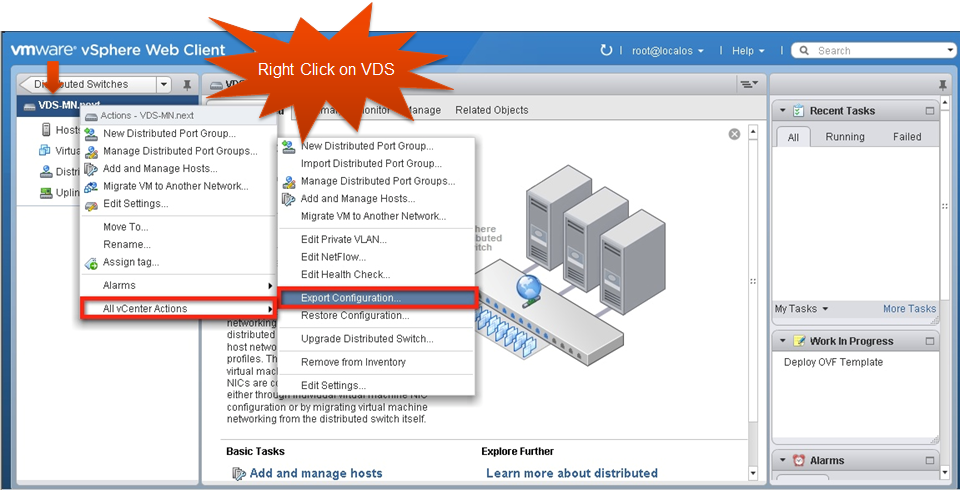
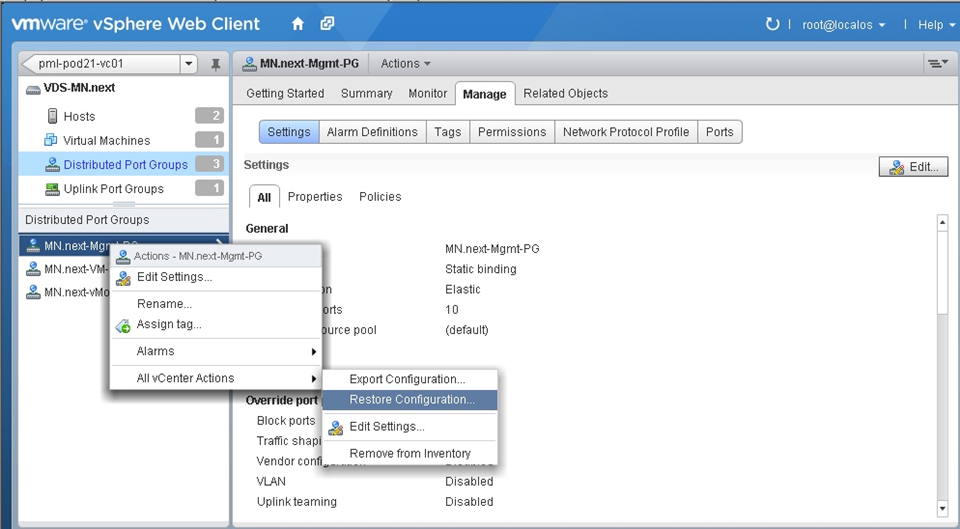
2)Configuration Backup Restore – Allows vSphere admins to store the VDS configuration as well as recover the network from the old configurations

3)Rollback and recovery – Addresses the challenges that customer faced when management network failure caused the Hosts to disconnect from the vCenter Server

4)Port Mirroring enhancements – New troubleshooting capabilities are introduced by supporting RSPAN and ERSPAN

5)Netdump – Provides the ESXI hosts without disk (stateless/Autodeploy) the ability to core dump over network

6)Improved Scaling numbers

Network Health Check

Network Health check prevents the common configuration error such as Mismatched VLAN, MTU and teaming configuration.

This tool is very helpful in an organization where the network administrators and vSphere administrators respectively take the management ownership of physical network switches and vSphere hosts. In such organizations vSphere admins can provide the network related warnings to the network admins and help identify issues quickly.

Configuration Backup and Restore

VDS configuration is managed through vCenter Server and all the virtual network configuration details are stored in the vCenter database. Previously, In case of database corruption or database loss events, customers were not able to recover their network configurations and had to rebuild the virtual networking configuration from scratch. Also, there was no easy way to replicate the virtual network configuration in another environment or go back to the last working configuration after any accidental changes to virtual networking settings.

All of the above concerns are addressed through the VDS configuration backup and restore feature.

Backup a VDS Configuration

image

Restore a Port Group Configuration

image

Rollback and Recovery

The management network is configured on every host and is used to communicate with vCenter Server as well as to interact with other host during vSphere HA configuration. This is critical when it comes to centrally managing hosts through vCenter Server. If the management network on the host goes down or there is a misconfiguration, vCenter Server can’t connect to the host and thus can’t centrally manage resources.

If there is any issue with management network the Hosts can’t reach the vCenter server. And thus vCenter server can’t make any changes to the network and push to the hosts.

In such situation, The only way for the customer to recover is to go to individual hosts and build a standard switch with proper management network configuration. Once all the hosts have their management networks attached to a standard switch, vCenter Server can manage the hosts and re-configure the VDS.

With Rollback and recovery option customers don’t have to worry about going to standard switch route to recover from any mgmt. network failure scenario.

The Automatic Rollback and Recovery feature addresses all the concerns that customers have regarding the use of management network on a VDS. First, the automatic rollback feature automatically detects any configuration changes on the management network and if the host can’t reach the vCenter Server, it doesn’t allow the changes to take effect. Second, customers also have an option to reconfigure the management network of the VDS per host through DCUI. Customers have to connect to each host and through DCUI can change the management network parameters of the VDS

LACP

Link Aggregation Control Protocol (LACP) is a standard based link aggregation method to control the bundling of several physical network links together to form a logical channel for increased bandwidth and redundancy purposes. LACP allows a network device to negotiate an automatic bundling of links by sending LACP packets to the peer. As part of the vSphere 5.1 release, VMware now supports this standard based link aggregation protocol.

Single Root IO Virtualization is a standard that allows one PCI express (PCIe) adapter to be presented as multiple separate logical devices to the VMs. The hypervisor manages the physical function (PF) while the virtual functions (VFs) are exposed to the VMs. In the hypervisor SR-IOV capable network devices offer the benefits of direct I/O, which includes reduced latency and reduced host CPU utilization. VMware vSphere ESXi platform’s VM Direct Path (pass through) functionality provides similar benefits to the customer, but requires a physical adapter per VM. In SR-IOV the pass through functionality can be provided from a single adapter to multiple VMs through VFs.

SR-IOV

Single Root IO Virtualization is a standard that allows one PCI express (PCIe) adapter to be presented as multiple separate logical devices to the VMs. The hypervisor manages the physical function (PF) while the virtual functions (VFs) are exposed to the VMs. In the hypervisor SR-IOV capable network devices offer the benefits of direct I/O, which includes reduced latency and reduced host CPU utilization. VMware vSphere ESXi platform’s VM Direct Path (pass through) functionality provides similar benefits to the customer, but requires a physical adapter per VM. In SR-IOV the pass through functionality can be provided from a single adapter to multiple VMs through VFs.

BPDU Filter

BPDUs are data messages or packets that are exchanged across switches to detect loops in a network. These packets are part of the Spanning Tree Protocol (STP) and are used to discover the network topology. The VMware virtual switches (VDS and VSS) do not support STP and thus do not participate in BPDU exchange across external physical access switches over the uplinks.

The BPDU filter feature available in this release allows customer to filter the BPDU packets that are generated by virtual machines and thus prevents any Denial of Service attack situation. This feature is available on VMware vSphere Standard and Distributed switches, and can be enabled by changing the advanced “Net” settings on ESXi host.

Port Mirroring and NetFlow Enhancements

To address the network administrator’s need for visibility into virtual infrastructure traffic, VMware introduced port mirroring and NetFlow features as part of the vSphere 5.0 release. These features provide necessary and familiar tools to network administrators that help them in monitoring and troubleshooting tasks. In vSphere 5.1, the port-mirroring feature is enhanced through the additional support for RSPAN and ERSPAN capability.

IPFIX or NetFlow version 10 is the advanced and flexible protocol that allows customer to define the NetFlow records that can be collected at the VDS and sent across to a collector tool. Following are some key attributes of the protocol:

Customers can use templates to define the records

Template descriptions are communicated by the VDS to the Collector engine

Can report IPv6, MPLS, VXLAN flows.

VDS Management Plane Scalability

Following are the scalability numbers for VDS management plane

  • Static dvPortgroups goes up from 5 K to 10 K
  • Number of dvports goes up from 20 K to 60 K
  • Number of Hosts per VDS goes up from 350 to 500
  • Number of VDS supported on a VC goes up from 32 to 128

Netdump

Netdump is a vSphere ESXi platform debug feature that helps dump the vmkernels core dump to a server on the network. In this release of vSphere 5.1 the netdump support is extended to the ESXi host without local disks or also termed as stateless ESXi or Auto deploy environments.

In vSphere 5.0, enabling netdump on an ESXi host with the management network configured on a VDS was not allowed. In vSphere 5.1, this limitation has been removed. Users now can configure netdump on ESXi hosts using management network on VDS.


1 Comment

vSphere 5.1 Announced with Enhanced vSphere Web Client

Another of the new features of vSphere 5.1 is the Enhanced vSphere Web Client. The web Client was already part of vSphere 5 but now it is the Primary client for administrators in vSphere 5.1. Some facts

Enhanced vSphere Web Client:

The NEW virtual infrastructure client

  • Primary client for vSphere administrators in vSphere 5.1
  • Matched functionality to legacy vSphere Client
  • Additional vCenter 5.1 functionality, only available through the vSphere Web Client

Browser based

  • Internet Explorer / FireFox / Chrome fully supported (Rumours are Chrome is the fastest)
  • others (Safari, etc.) are possible (But without VM console access)

vSphere Web Client – Installation

Installer located on ISO image

Install on vCenter Server or separate server (recommended)

Login using

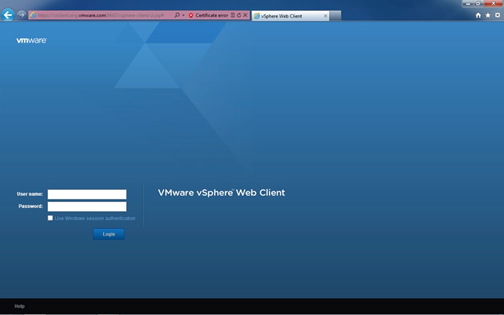
  • https://<FQDN or IP Address>:9443/vsphere-client/
  • Install Client Integration Plugin for console access

image

  • vSphere Web Client included with vCenter Server Appliance

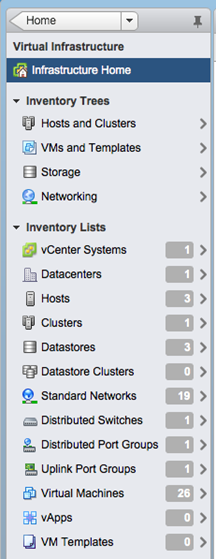
vSphere Web Client – Object Navigator

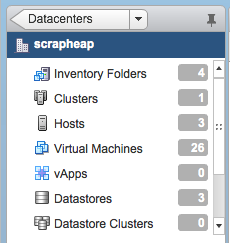
Breaks the traditional hierarchy view of an object

  • Objects linked and displayed by relationships

image

Conventional top level hierarchy view maintained on HOME screen and links to object navigator

  • Allows an admin to view objects by solutions
  • But maintains global perspectives

image

  • Allows an admin to jump to the crucial element faster via object relationships and object search
  • Reduces client clutter and repetitive information by simplifying display of objects
  • Displayed objects are all that is communicated between server and browser

image

vSphere Web Client Interface

The new interface has the look and feel of vCloud Director but with loads of new features and goes to the same layout that vCenter Operations Manager for example has already.

image

vSphere Web Client – Plugin’s

Plugins are now server based

•Recreated in FLEX

•HTML Plugins (temporary work around)

VMware Plugins (90 Days post GA)

•vSphere Update Manager (VUM)

•vCenter Site Recovery Manager (SRM)

•vShield Manager

All VMware Solutions will integrate as they get updated

Third Party Plugins

•EMC, NetApp, HP, Dell etc

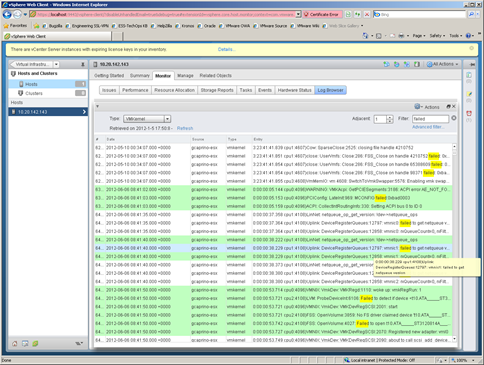
Centralised Log Browser

Proven framework to provide rich troubleshooting tools

vSphere Web Client plugin

Takes snapshot of specified host / vCenter logs

Provides rich user interface to review log data

  • search
  • filter by name / event / keyword
  • compare multiple logs
  • highlight key words

image

Simplifies Troubleshooting

The new vSphere Web Client looks to be a great replacement for the viclient and with SRM and other tools tipped to integrate it should provide every vSphere administrator an easier way to manage and administer their environments and give them all the stats and tools needed.

There are going to be a whole bunch of web based tutorial’s for people to learn how to use the new vSphere Web Client on

http://blogs.vmware.com/vsphere/vcenter-server/

I’m really looking forward to learning how it all works and being able to integrate all the new and existing plugins into it.

Gregg

Note: Screenshots thanks to VMware.