TheSaffaGeek

My ramblings about all things technical


1 Comment

What’s New In vCloud Automation Center 6.1

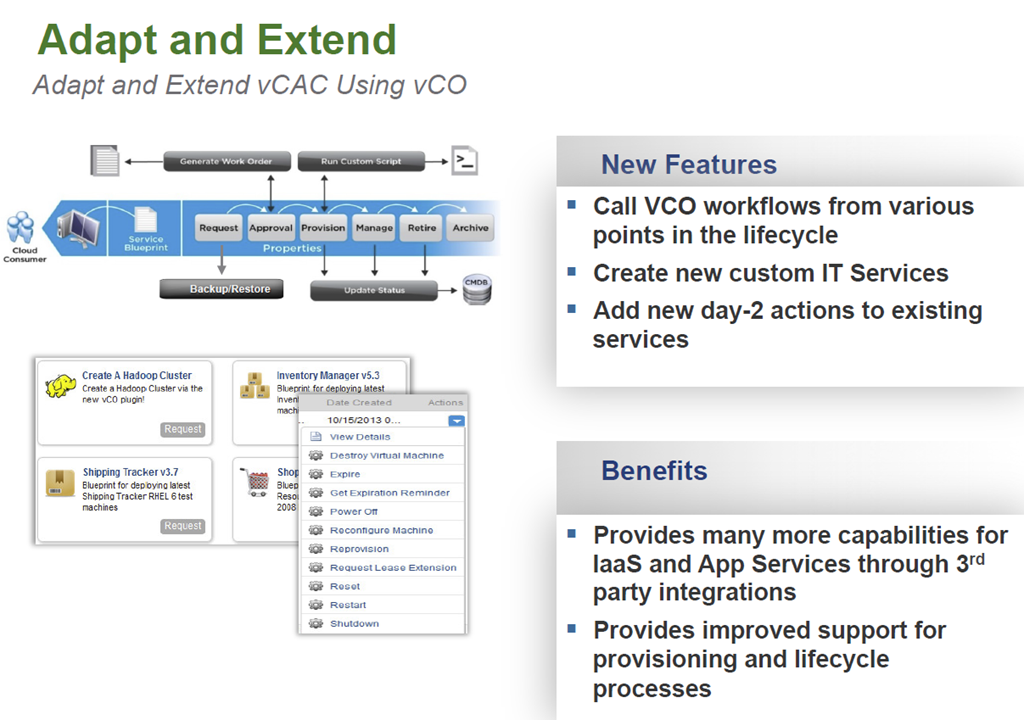
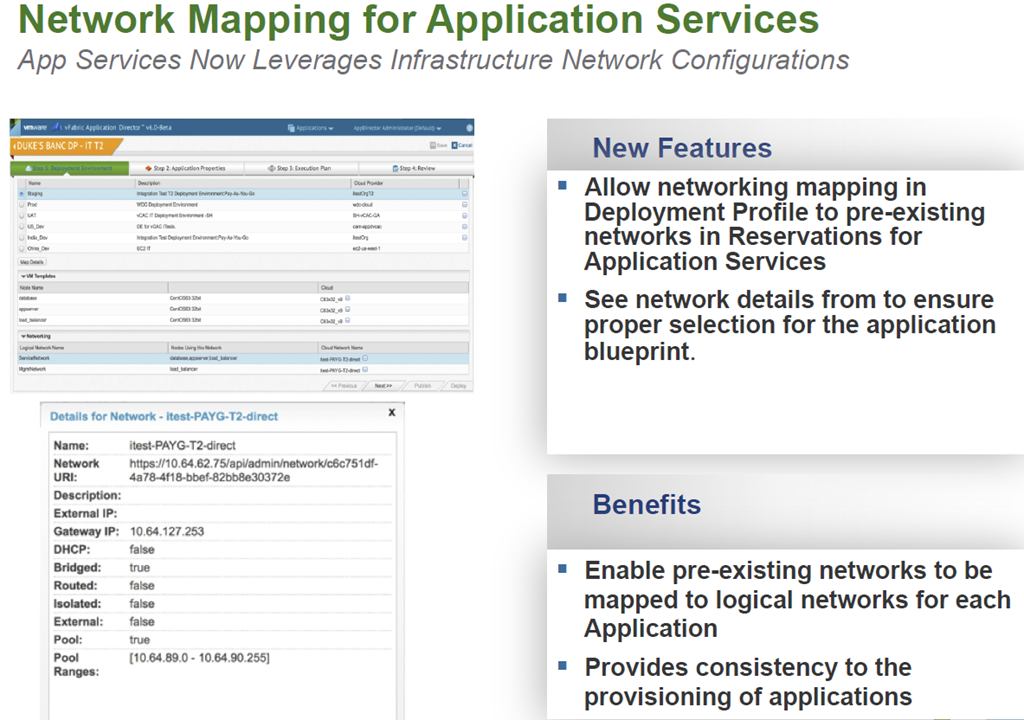
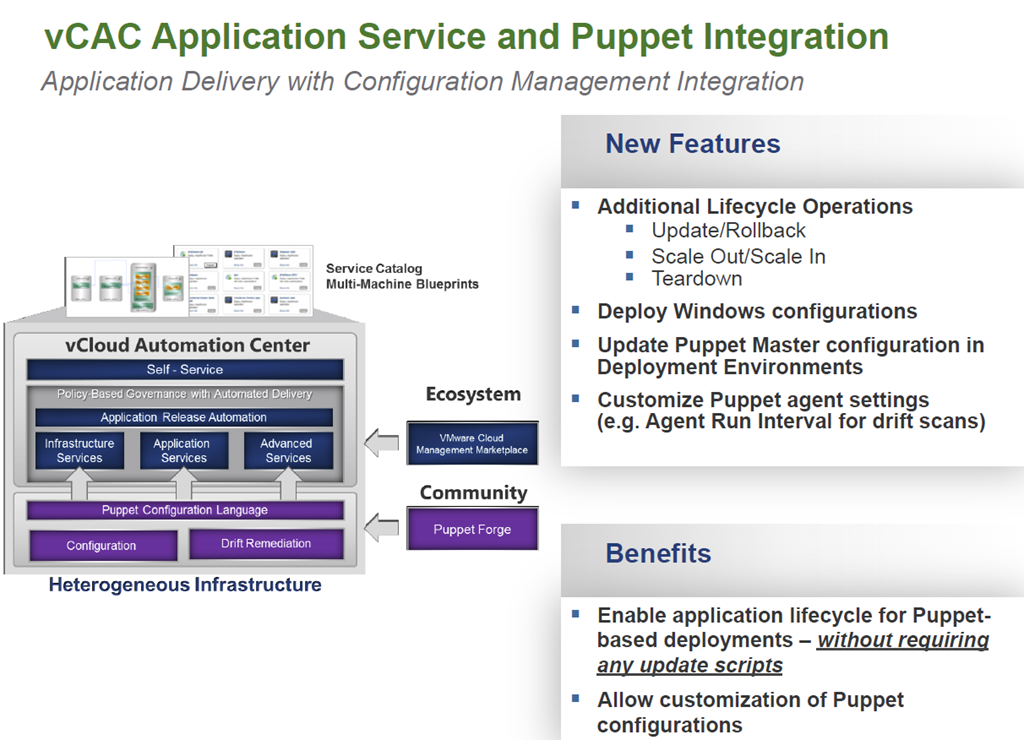
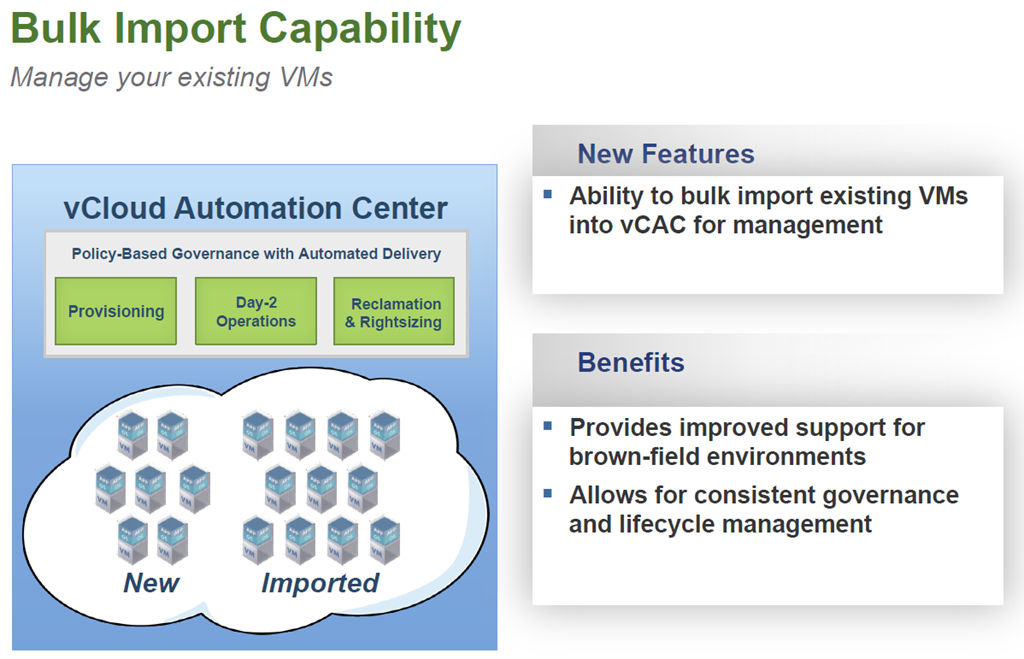
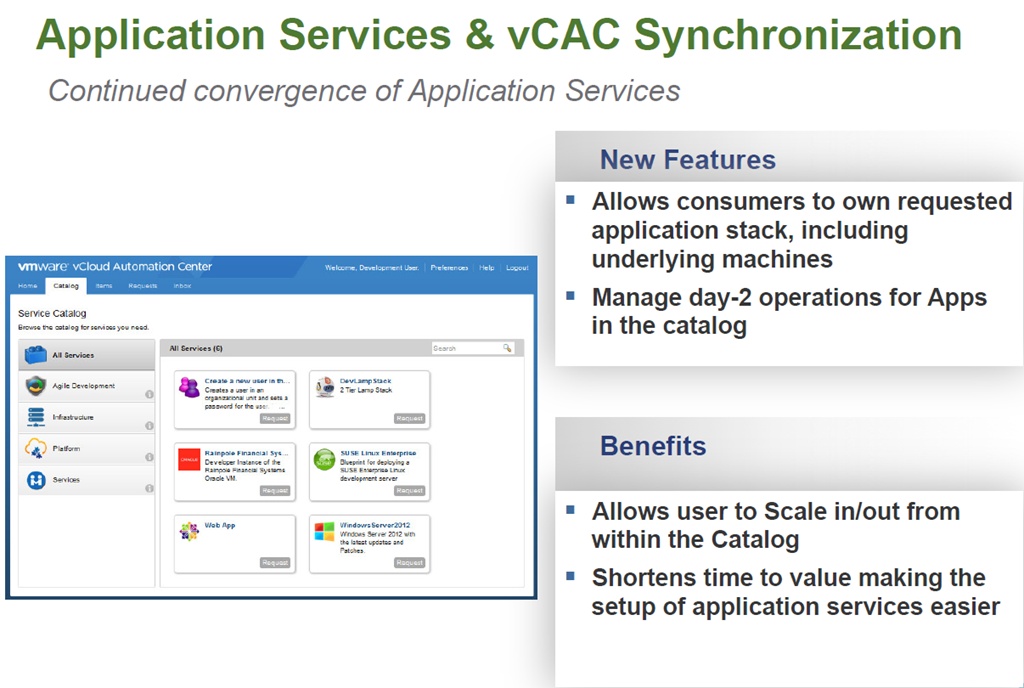
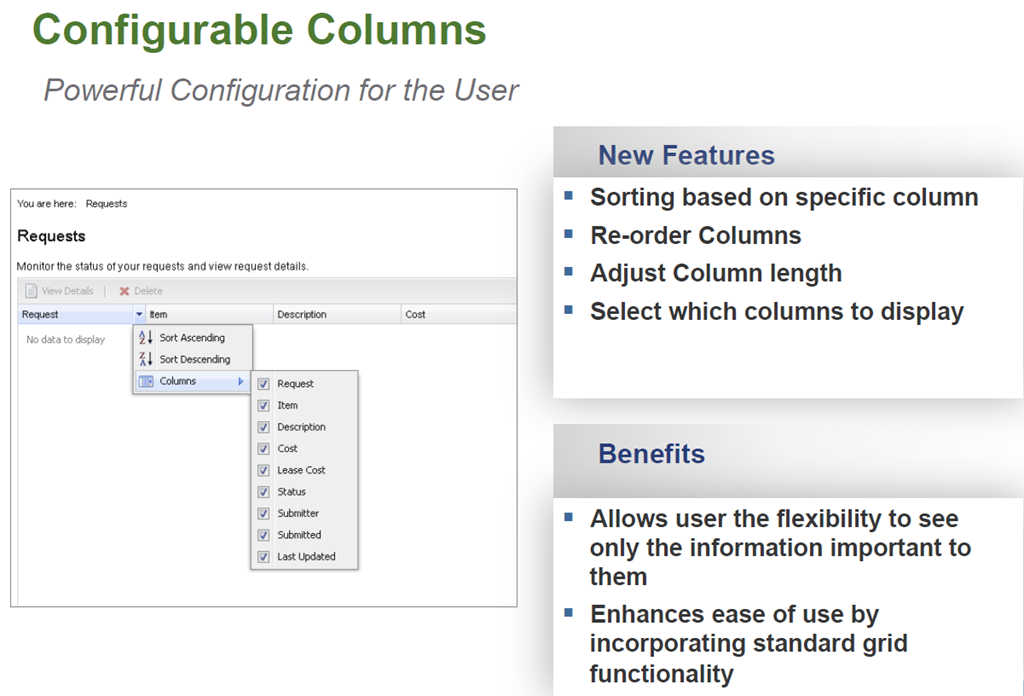
Not long after VMworld Europe vCAC 6.1 was released. For the past year I have been very fortunate to have been on some very large vCAC projects as an extension of VMware PSO and have seen the product change dramatically. there have certainly been some challenges but I’m super excited about vCAC 6.1 and from the experience I have gained of it so far it is looking very solid and now can work seemlessly with vCO along with a number of other great new feaures. So below is an overview of what is new in vCAC  6.1.

vCAC Extension

image

image

image

image

Interested in Developing a VCO Plugin?
Free Access to the vCO Plug-in SDK

  • The SDK has samples and documentation to facilitate development
  • http://communities.vmware.com/community/vmtn/developer/forums/orchestrator
  • Additional Resources

    Distribution on VMware Solutions Exchange
    – Contact: Meenakshi Nagarajan
    mnagarajan@vmware.com for additional info

    image

    image

    Automating Application and Infrastructure Services

    Simplifying the deployment and management of single machines and complex multi-tired applications.

    image

    image

    image

    image

    image

    User Experience

    image

    image

    image

    image

    image


    1 Comment

    vRealize Operations 6.0

    Today at VMworld EU there are going to be a number of announcements and as has become the norm for VMworld Europe, VMware are making a number of announcements around their new management solutions. One of these announcements is vRealize Operations 6.0.

    If you are wondering what I mean with the vRealize name then below is a very quick summary:

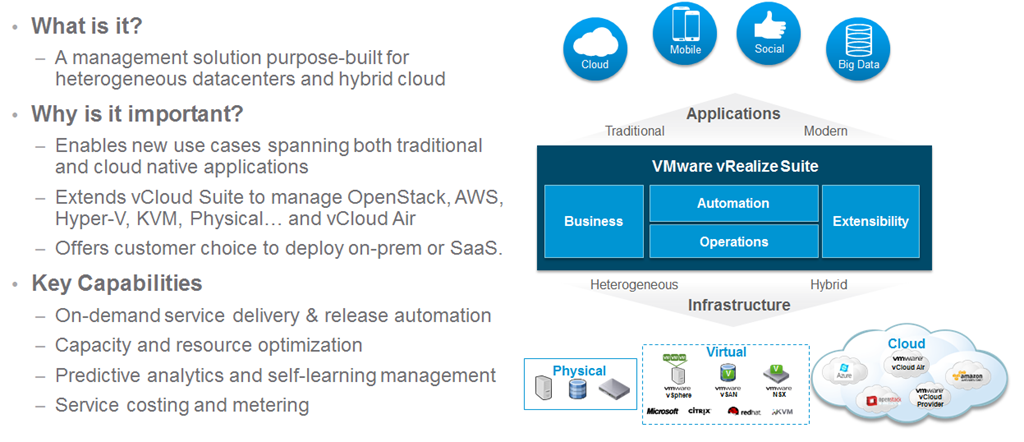
    vRealize Suite

    image

    VMware vRealize is changing the name of the management solutions into simpler packaging and suites and as announced at VMworld US, vRealize Air Operations,Automation and Business will be available soon to provide a new SaaS solution for VMware customers via the renamed vCloud Air offering.

    image

    vRealize Operations 6

    There are a number of new features and enhancements in vRealize Operations 6.0 one of these is the new scale-out architecture allowing high resiliency and availability as well as self monitoring to ensure that if an instance/slice is lost, it is reported and brought back seamlessly.

    image

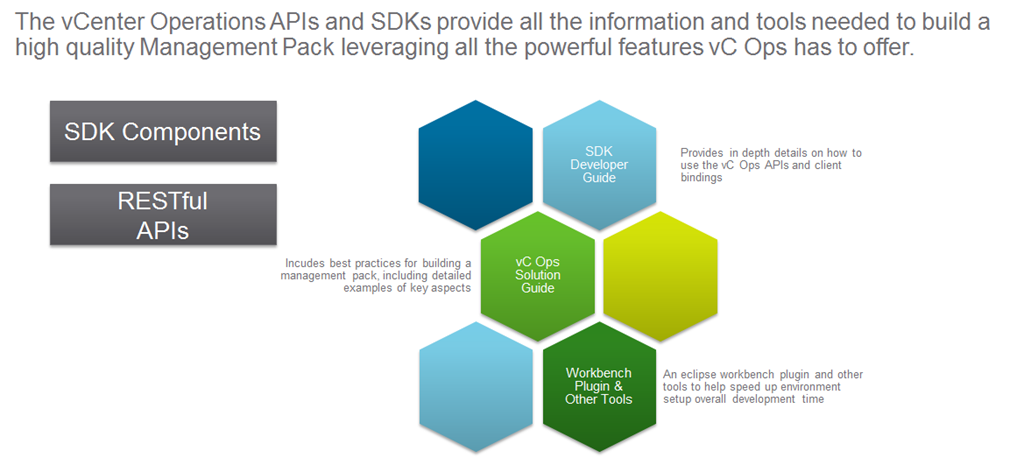
    vRealize Operations 6.0 is now providing a public set of RESTful API’s to allow customers and partners to extend as well as get information in and out with ease so that it can be used for custom reporting or in the case of a project i have been on recently will allow monitoring of vCAC DEM’s and automatic provisioning of more if required.

    image

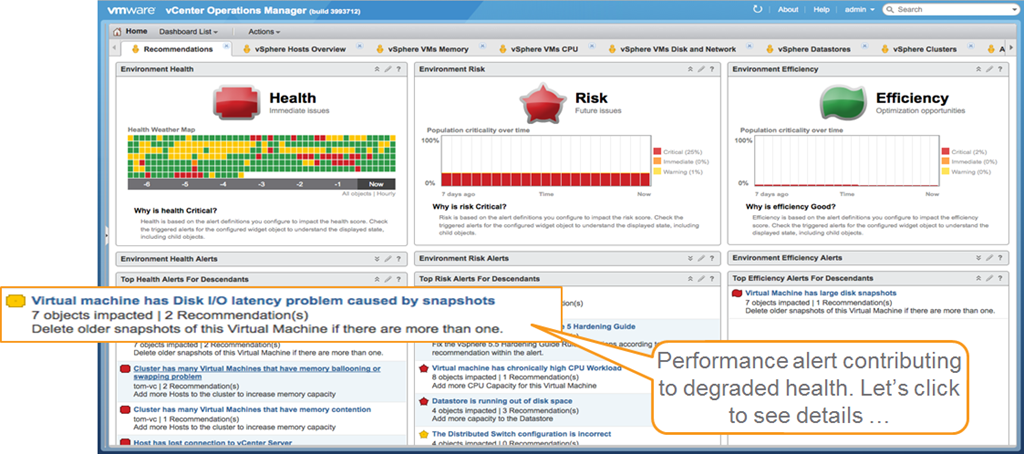
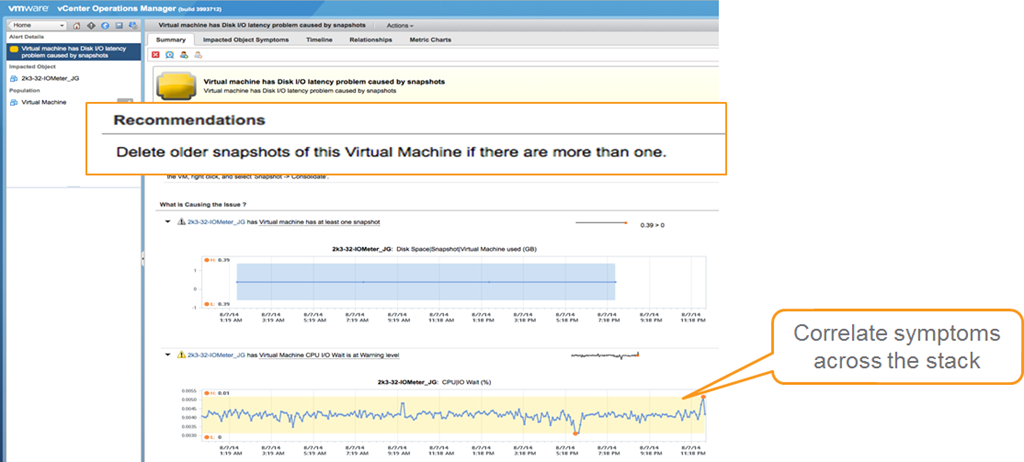
    The management dashboard of vRealize Operations 6.0 has maintained the same three panels on health Risk and Efficiency to  provide viewing and reporting of immediate and future problems as well as opportunities to optimise. With vRealize Operations 6.0 you now have a new section below each of the three panels there are now problem alerts which give you correlation of problems and the ability to click the alerts to see the details as shown below.

    image

    image

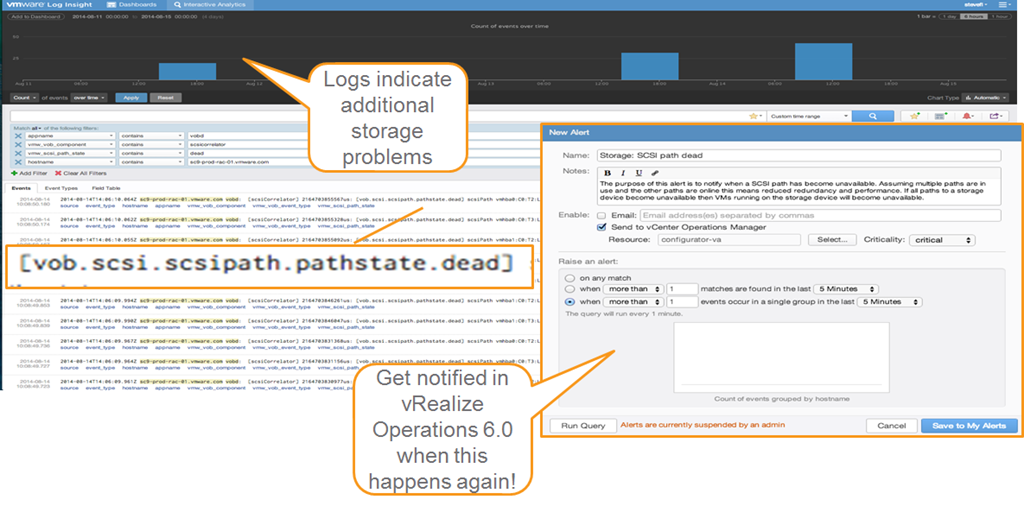
    There is also the ability to dig deeper into the problems by using vRealize Log Insight which can send alerts into vRealize Operations 6.0 if certain problems arise and allow custom reporting and alerting for partners and bigger customers who are looking for custom reporting and deep analysis.

    image

    Below is a summary of all the new features and solutions in vRealize Operations 6.0 allowing reporting of public and private architecture as well as simplistic single pane of glass management.

    image

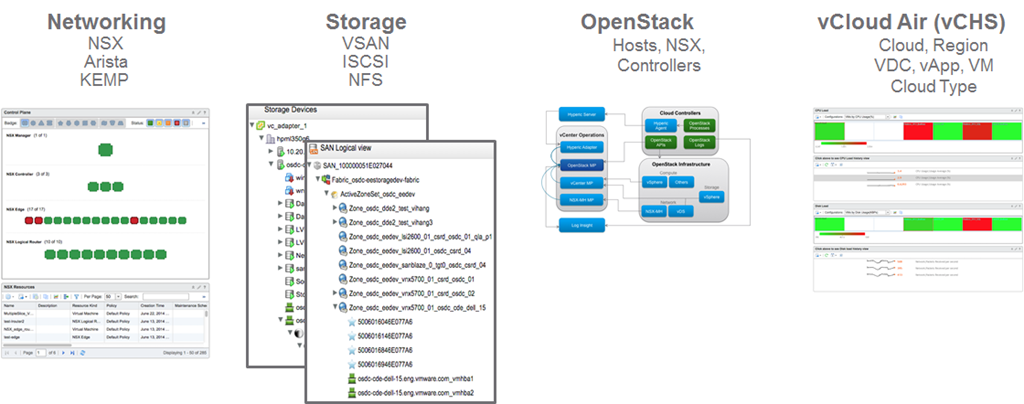
    One of the biggest abilities of vRealize Operations 6.0 that I really like and i think will make all the customers I see as a consultant very happy is the support for new SDDC and hybrid cloud platforms meaning you can now monitor and report on networking,storage, OpenStack and vCloud Air. This will truly allow you to manage and report on your whole SDDC environment.

    image

    vRealize Operations 6.0 NSX Management Pack

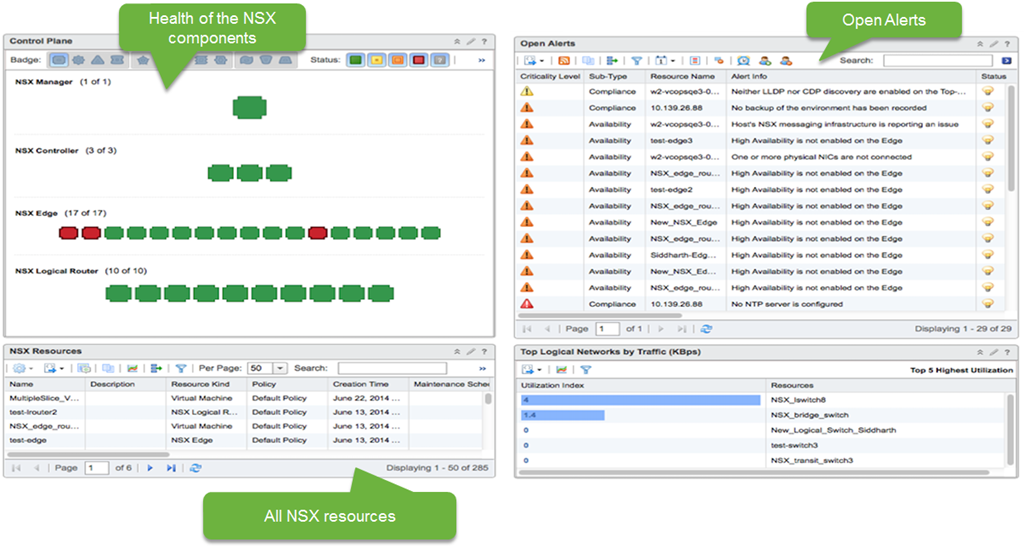
    With vRealize Operations 6.o as shown above is the ability to monitor and report on SDN solution NSX. With vRealize Operations 6.0 there is a new management pack for NSX.In the image below, you can see the heat map showing the transport layer. The transport layer is effectively all of the transport nodes (NSX term for hypervisors). These boxes are the ESX hosts registered with NSX, grouped by a particular transport zone. Transport zone is a group of hypervisors that share the same transport behaviour. On the bottom, the widget shows the top talkers. If there is a lot of traffic, this widget can help us figure out which VMs are responsible for the most network traffic.

    image

    There are three NSX dashboards: NSX main dashboard, NSX logical topology and NSX Edge services.

    The current view is from the NSX main dashboard. Currently, we are a seeing information for a particular NSX Manager instance. The control plane widget is all the objects corresponding to the NSX Manager (API and connection to the vCenter Server for configuration), Controllers (responsible for configuring switches), Edge (VMs that deploy certain logical network services like DHCP, Load balancer etc. ), Logical Routers (Distributed routers responsible for configuring the routing software on each individual host).

    All the alerts related to NSX are captured in Open Alerts widgets. This is based on hard threshold violations. We can see a number of High Availability violations. We have 40-50 alerts that are configured out of the box. We have detailed documentation on each of these metrics and what the alerts mean.

    image

    vRealize Operations Management Pack for OpenStack

    OpenStack is emerging as the leading cloud platform for enterprises and some SPs. VMware are going to provide a management pack to support OpenStack providers. It will mostly be sold to existing vSphere customers who have OpenStack deployments currently.

    Based on vRealize Operations 6.0image

    • Unified UI for vSphere, NSX, OpenStack and other resources
    • Health, Risk and Efficiency badges for OpenStack objects
    • Sub-badges for OpenStack objects (workload, faults etc.) and capacity model
    • Problem detection and remediation for OpenStack infrastructure and tenants
    • Reporting templates for activity, capacity and issue frequency

    OpenStack Compute, Storage & Network Infrastructure Analytics

    • Inventory, availability and capacity of ESX and non-ESX hosts, NSX and vSphere data stores registered with OpenStack
    • Integration with vSphere and NSX Multi Hypervisor Management Packs

    OpenStack Controller Services Dashboard

    • Correlation of OpenStack Controllers to vSphere VMs
    • Services availability monitoring

    Availability

    • Target GA date is Dec 2014

    vRealize Operations Management Pack for vCloud Air

    ’Hybrid Cloud ‘Analytics

    • Provides utilization for cloud resources and deep VM performance data
    • Supports shared and dedicated/private Cloud
    • Includes 40 VM metrics related to CPU/memory/disk/network
    • Collects change events and resource topology from vCloud Air

    Comprehensive vSphere like Out-of-box Dashboards

    • One operations console across private and public clouds
    • Out-of-the-box dashboards enable isolation and quick resolution of performance issue

    Multiple Resources Supported

    • vCHS Cloud, vCHS Region, vCHS vApp, VDC ,VM, Cloud Type

    All Form Factors Supported

    • vApp, Standalone – Windows and Linux

    What’s Coming Next

    • Storage and networking service resource details or metrics

    Summary

    vRealize Operations 6.0 is going to enable both SMB and Enterprise customers who have either or both on premise and off premise workloads in their private or public clouds to monitor, report and make more efficient their environments.  I am looking forward to working with vRealize Operations 6.0 and seeing all the capabilities especially through the RESTful API availability to enable my customers both large and small to get all the reporting and management they require integrated into their existing solutions.Make sure you  watch the live VMworld keynote to learn more.


    Leave a comment

    VMworld Day 0 – Partner Day

    photo

    VMworld officially only starts tomorrow for most attendees but for those that are partners there is partner day where VMware done a number of sessions for their partners to allow them to understand the roadmap and the solutions on the roadmap.

    I flew in yesterday so that I was ready for partner day and also to attend the vRockstar party which has become an annual event on the Sunday night at the hard rock cafe before VMworld and is the only party that really happens on Sunday. I have attended for the last two years and this year they got the upper section booked out which was certainly cooler on the much more humid and hot Barcelona nights (compared to the UK in my case). The vRockstar party was sponsored by Cisco , EMC , VMUG and Nutanix which enabled us to have some champagne on arrival and then beers for the remainder of the night, so a big thanks to all the sponsors and thanks to the organisers Patrick Redknap, Marco Broeken, Robert Payne and Hans De Leenheer.

    photo (2)

    The remainder of my day was spent chatting to fellow vExperts and bloggers at the bloggers table and providing moral support to the vBrownbag crew (Alastair had it all done before I arrived). The vBrownbag TechTalks kick off tomorrow and just like it was in San Francisco we will be streaming it live as well as recording them so please tune in and we promise to try get the audio clearer this time. If you are at the conference then come watch them as they are happening in hall 7 near the bloggers table and across from the general session hall.

    My night will be spent at an exclusive VMworld drinks reception hosted by TD Azlan and then I will be attending the PernixData party held at an amazing venue on the Barcelona shorefront who are one of Xtravirt’s partners. I’m looking forward to all the announcements tomorrow and the reason i spent so much time at the bloggers table was scheduling a number of blogs around these announcements so keep an eye on my blog tomorrow.

    Also don’t forget to sign up for the Xtravirt SONAR beta bit.ly/1sjutrX .


    2 Comments

    #VMworld Announcement #1 VMware EVO:RAIL – What is it?


    imageAt VMworld US this morning VMware will announce numerous new solutions and one of these will be VMware EVO: RAIL I mean MARVIN I mean VMware EVO: RAIL, but what is it and what does it do. Below is a high level overview of the solution. Make sure you also  watch the live keynote to learn more.

    Introducing VMware EVO: RAIL
    image

    VMware EVO: RAIL™ combines compute, networking, and storage resources into a hyper-converged infrastructure appliance to create a simple, easy to deploy, all-in-one solution offered by VMware qualified partners.

    Simplicity Transformed

    EVO: RAIL enables power-on to VM creation in minutes, radically easy VM deployment, one-click non-disruptive patch and upgrades, simplified management…you get the idea.

    Software-Defined Building Block

    EVO: RAIL is a scalable Software-Defined Data Center (SDDC) building block that delivers compute, networking, storage, and management to empower private/hybrid-cloud, end-user computing, test/dev, and branch office environments.

    Trusted Foundation

    Building on the proven technology of VMware vSphere®, vCenter Server™, and VMware Virtual SAN™, EVO: RAIL delivers the first hyper-converged infrastructure appliance 100% powered by VMware software.

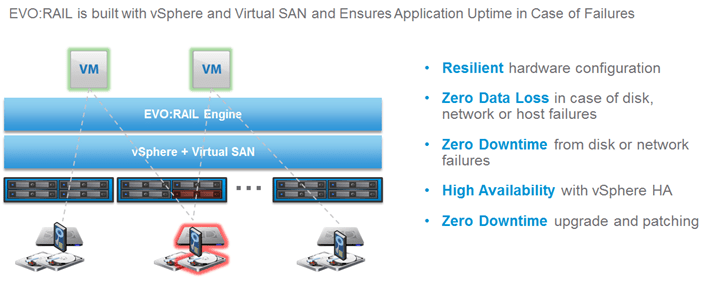
    Highly Resilient by Design

    Resilient appliance design starting with four independent hosts and a distributed Virtual SAN datastore ensures zero application downtime during planned maintenance or during disk, network, or host failures.

    Infrastructure at the Speed of Innovation

    Meet accelerating business demands by simplifying infrastructure design with predictable sizing and scaling,by streamlining purchase and deployment with a single appliance SKU, and by reducing CapEx and OpEx.

    Freedom of Choice

    EVO: RAIL is delivered as a complete appliance solution with hardware, software, and support through leading
    systems vendors; customers choose their preferred brand.

    Hardware

    VMware is not entering the hardware market. The EVO: RAIL software bundle is available to qualifying EVO:RAIL partners. The partner, in turn, sells the hardware with integrated EVO: RAIL software, and provides all hardware and software support to customers.

    Appliance

    Each EVO: RAIL appliance has four independent nodes with dedicated computer, network, and storage resources and dual, redundant power supplies.
    image

    Nodes

    Each of the four EVO: RAIL nodes have:

    • Two Intel E5-2620v2 six-core CPUs
    • 192GB of memory
    • One SLC SATADOM or SAS HDD for the ESXi™ boot device
    • Three SAS 10K RPM 1.2TB HDD for the VMware Virtual SAN™ datastore
    • One 400GB MLC enterprise-grade SSD for read/write cache
    • One Virtual SAN-certified pass-through disk controller
    • Two 10GbE NIC ports (configured for either 10GBase-T or SFP+ connections)
    • One 1GbE IPMI port for remote (out-of-band) management

    Fault Tolerance and Reliability

    Each EVO: RAIL appliance has the following hardware components and reliability features:

    • Four ESXi hosts in a single appliance enables resiliency for hardware failures or maintenance
    • Two fully redundant power supplies
    • Redundant 2 x 10GbE NIC ports per node for all communication
    • ESXi boot device, HDDs, and SSD are all enterprise-grade
    image

    Automatic Scale-Out

    EVO: RAIL Version 1.0 can scale out to four appliances – for a total of 16 ESXi hosts, 1 Virtual SAN datastore backed by a single vCenter Server and EVO: RAIL instance. EVO: RAIL handles deployment, configuration, and management, allowing the compute capacity and the Virtual SAN datastore to grow automatically. New appliances are automatically discovered and easily added to an EVO: RAIL cluster with a few mouse clicks.

    Software

    EVO: RAIL delivers the first hyper-converged infrastructure appliance 100% powered by VMware’s proven suite of core products. The EVO: RAIL software bundle is fully loaded onto the EVO: RAIL qualified partner’s hardware.
    This software bundle is comprised of:

    • EVO: RAIL Deployment, Configuration, and Management
    • VMware vSphere® Enterprise Plus, including ESXi for compute
    • Virtual SAN for storage
    • vCenter Server™
    • vCenter Log Insight™

    EVO: RAIL is optimized for the new VMware user as well as for experienced administrators. Minimal IT experience is required to deploy, configure, and manage EVO: RAIL, allowing it to be used where there is limited or no IT staff on-site. As EVO: RAIL utilizes VMware’s core products, administrators can apply existing VMware knowledge,
    best practices, and processes.

    EVO: RAIL leverages the same database as vCenter Server, so any changes in EVO: RAIL configuration and management are also reflected in vCenter Server and vice-versa.

    Compute, Networking, Storage, and Management

    EVO: RAIL Compute

    Virtual Machine Density

    • EVO: RAIL is sized to run approximately 100 average-sized, general-purpose, data center VMs. Actual capacity varies by VM size and workload. There are no restrictions on application type. EVO: RAIL supports any application that a customer would run on vSphere.
      General-purpose VM profile: 2 vCPU, 4GB vMEM, 60GB of vDisk, with redundancy
    • EVO: RAIL is optimized for VMware Horizon® View with configuration options that allow up to 250 View VMs on a single EVO: RAIL appliance. Actual capacity varies by desktop size and workload.
      Horizon View virtual desktop profile: 2vCPU, 2GB vMEM, 32GB vDisk linked clones

    EVO: RAIL Network

    image

    Connections

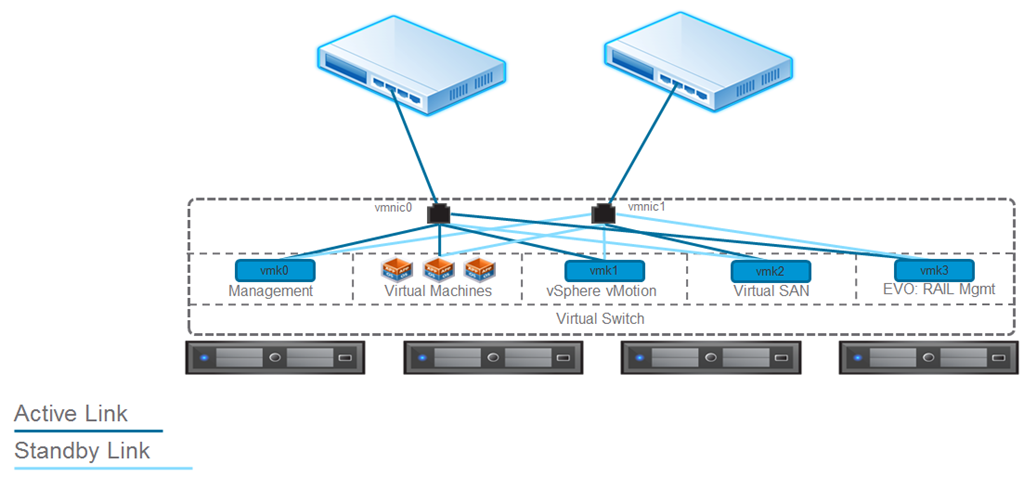
    • Each node in EVO: RAIL has two 10GbE network ports. Each port must be connected to a 10GbE top-of-rack switch that has IPv4 and IPv6 multicast enabled.
    • Remote/lights out management is available on each node through a 1GbE IPMI port that can connect to a management network. NOTE: In some configurations, there may be additional 1GbE ports that are covered and disabled.

    Traffic

    • EVO: RAIL supports four types of traffic: Management, vSphere vMotion®, Virtual SAN, and Virtual Machine.Traffic isolation on separate VLANs is recommended for vSphere vMotion, Virtual SAN, and VMs. EVO: RAIL
      Version 1.0 does not put management traffic on a VLAN.
    • IPv4 and IPv6 multicast must be enabled on the top-of-rack switch(es). EVO: RAIL’s automated scale-out feature uses IPv6. (It is not required for your complete network to support IPv6.)
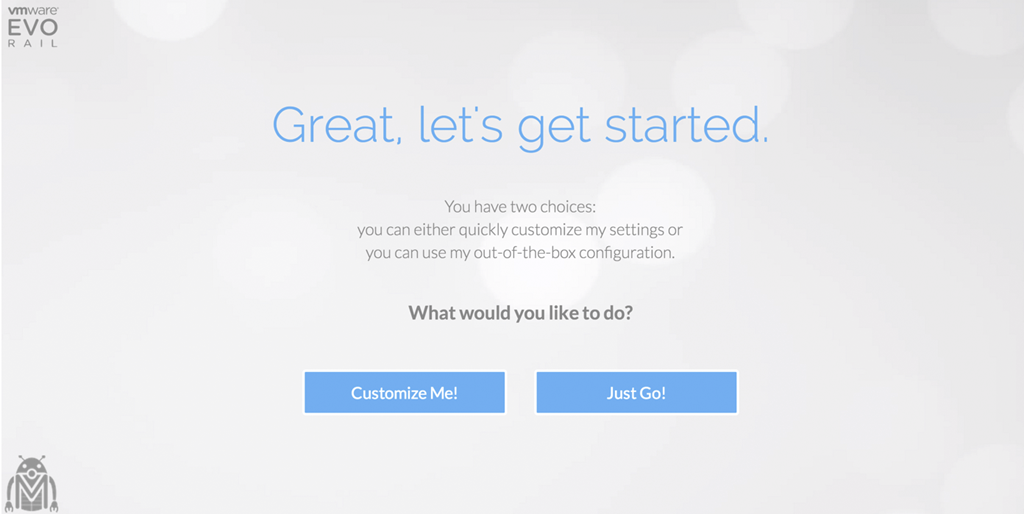
    • VLANs are not required when customizing a EVO: RAIL configuration; however, they are highly recommended.When using the Just Go! option, it is assumed VLANs are configured.

    EVO: RAIL Storage

    EVO: RAIL creates a single Virtual SAN datastore from all local HDDs on each ESXi host in a EVO: RAIL cluster. Virtual SAN read caching and write buffering uses SSD capacity. Total storage capacity is 16TB per EVO: RAIL appliance:

    • 14.4TB HDD capacity (approximately 13TB usable) per appliance, allocated to the Virtual SAN datastore for virtual machines
    • 1.6TB SSD capacity per appliance for read/write cache
    • Size of pre-provisioned management VM: 30GB

    EVO: RAIL Management

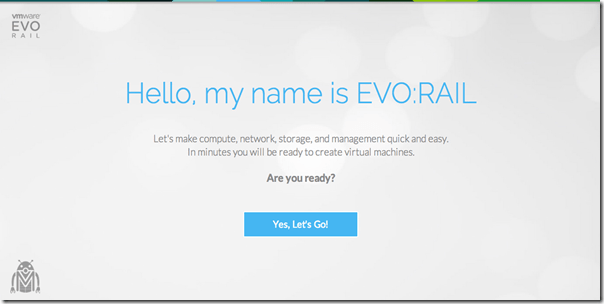
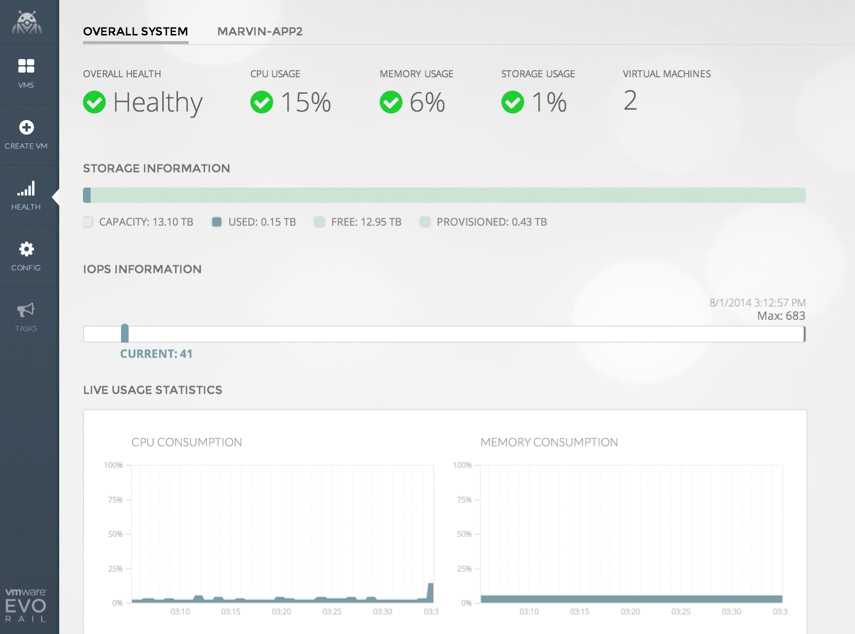
    EVO: RAIL enables deployment, configuration, and management through a new, intuitive HTML5-based user interface showcased in the next section. EVO: RAIL provides new non-disruptive updates for VMware software with zero downtime and automatic scale-out of EVO: RAIL appliances.

    User Interface

    image

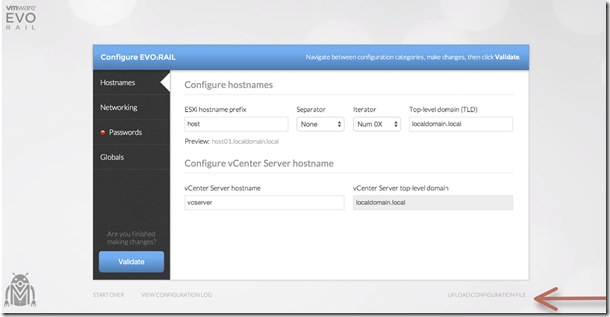
    Configuration Screenshots

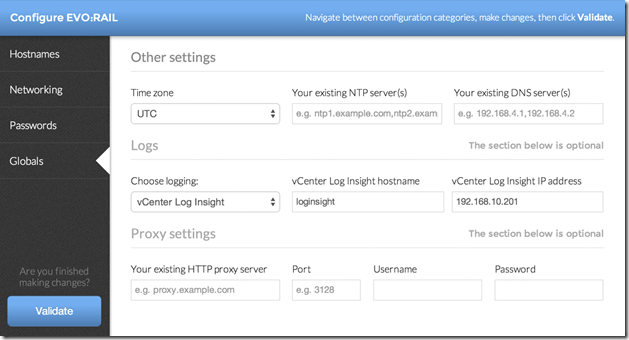
    Below are a few configuration screenshots showing how intuitive and easy it is to configure EVO:RAIL.

    image

    image

    image

    image

    image

    image

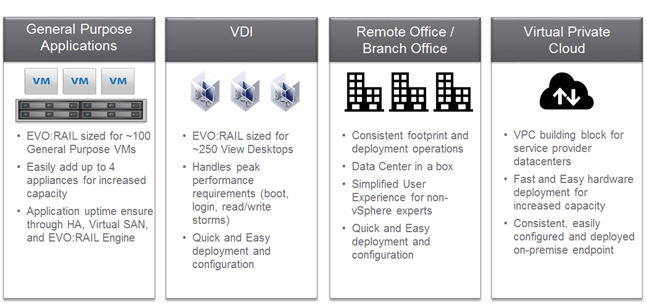
    Use Cases

    Below are some of the use cases for EVO:RAIL.
    image

    Make sure you  watch the live VMworld keynote to learn more.


    Leave a comment

    VCDX Spotlight: Joseph Griffiths

    Name: Joseph Griffiths

    Twitter Handle: @Gortees

    Blog URL: http://blog.jgriffiths.org

    Current Employer : IBM

    VCDX #: 143

    How did you get into using VMware?

    I came into IT when virtualization was just getting started. The more time I spent on call in the middle of the night the more I became motivated to find solutions. Application clustering was too costly for the developers and no business unit would agreed to it. Then came VMware it provided a live solution to hardware failures and great manageability benefits. At first chance I encouraged a proof of concept using VMware. Within the next two years we were 90% virtualized.

    What made you decide to do the VCDX?

    At some point every technical person is faced with the choice to specialize in their field. When I looked at my possible options I was faced with some tough options. I have to choose between operating systems (Linux), Storage or virtualization. It was the same year I had the opportunity to attend my first VMworld (2012). While attending the conference I really enjoyed being surrounded by such a great eco system and company. I was able to have some great technical discussions with people and I love the conference. It became clear to me that I wanted to specialize in VMware. I needed to learn a lot more about VMware. I have always found that certifications make me learn with purpose so I started setting certification goals for myself. Since I had been in a technical role the VCAP-DCA made sense. Once I passed that test I just kept going.

    How long did it take you to complete the whole VCDX journey?

    I got a VCP5 on Feb 2012. The certification journey really started with VMworld 2013 when I passed the VCAP-DCA and IaaS exams. This was followed up by the VCAP-DCD in Oct. 2013. I started on the VCDX on January of 2014 and submitted the design May 2014. The VCDX is not really a destination it’s really about becoming something not achieving it. I feel that my life’s experiences from a young child are part of my VCDX journey. I spent two years as a missionary for my church knocking on doors in Michigan. I like to think that really prepared me to stand my ground in a design defence better than any mock defence ever could. At the same time I feel like I am still trying to become a VCDX, I have a lot to learn.

    What advice would you give to people thinking of pursuing the VCDX accreditation?

    I have lots of advice and there is a write up on my blog (poorly written). The three largest pieces of advice I can give are the following:

    • Don’t kill yourself, set goals and keep them but keep balance don’t sacrifice the world for a cert. Lots of people think they are going to get it done by pulling all nighters… don’t it’s not going to end well.
    • Your design does not have to be perfect.. it’s not about perfect, nothing is perfect.
    • The key to school is figuring out what the teacher wants… read the blue print figure out what the teacher wants and do it… don’t try to outsmart the teacher.
    • Find a format for your documentation and stick with it.

    If you could do the whole VCDX journey again what would you do differently?

    Spend less time trying to figure out the format and more time on content.

    Life after the VCDX?  How did your company respond?  Was it worth it?

    LOL… well I switched jobs the week before my VCDX defence so the new employer was happy. I am still getting used to life after and a new job. Was the VCDX worth it? Yes, in fact even if I had not got the VCDX it was worth it. I learned so much about design… preparing for the VCDX forced me to learn more in six months than the last two years. If your desire to become a VCDX is purely in order to get a new job or more money you may not be on the right path.

    What is next for you?

    Great question. More certifications just don’t tell my wife… I already have the VCP-Cloud and I just finished a massive vCloud project and I am moving into a VCAC and NSX project so VCDX-Cloud might be in the future. Short term I think it’s time for a CCNA to help smooth over a rough bit in my knowledge.


    Leave a comment

    VMworld US 2014 – The Calm Before the vStorm

    For several years I have been very fortunate to attend VMworld Europe either via my company paying for the trip or in the case of last year, being able to attend as part of the vBrownbag crew and I’m very pleased to say that I will be attending this years VMworld US via the welcomed sponsorships of the vBrownbag sponsors (VMTurbo , Cisco , Brocade ,Infinio and Coho Data) for the TechTalks. Due to going as part of the vBrownbag crew VMware were gracious enough to give me a bloggers pass to cover my conference entrance fee and when I am not helping with the TechTalks or the VMunderground Open Acts i plan to blogging and tweeting away. But I am not only looking forward to going just for these reasons (certainly they are amazing enough reasons) but for several others and so I thought I would put out the reasons I’m looking forward to VMworld US and why if you haven’t booked to attend yet then why I would HIGHLY encourage you to register.

    Social

    142679-spongebob-square-pants-sponge-nerd

    I know what you are thinking and yes there certainly are some amazing parties and there are people who sadly take it as a jolly rather than experiencing the conference but the social I am referring to is social media as well as actual human interaction with like minded people. I am sure a number of people are like me where we sit behind a computer for countless hours,then sit on our phone or tablet tweeting away to people about the latest virtualisation or related technology but have never actually met these people. In fact most of the people you tweet with are actually on the opposite side of the world but their blog posting/communities response/book/podcast/webinar or twitter response to a question you posted saved you countless hours of work or helped you get that new role or certification. Well VMworld is the perfect place to meet these people and thank them for their help, get your book signed by the author or throw the book at them if they were wrong (physical violence no matter how funny it may be from afar isn’t the answer…most of the time). This also allows you to talk about how cool the new features in vSphere 6.0 are and not get that placating nod your wife/girlfriend (husband/boyfriend for those super vWoman in the community) gives you when you get excited about it. For me the interaction and friendships I have had and made from VMworld conferences have sometimes been the best part as being able to chat to the person who wrote the book on VSAN/PowerCLI/VMware Networking for example is worth the conference fee in itself.

    Sessions/Labs

    The sessions,labs and announcements are brilliant and the only reason I chose social first is due to it being something not that many people think about. The sessions and labs are amazing and even though you can watch almost all the sessions (breakouts aren’t recorded) and do all the labs now via  labs.hol.vmware.com ,being able to attend the sessions for the week and hear about all the great new features and how people have taken the solutions provided by VMware and met their companies or customers requirements with them without being bothered by home life or work is an amazing learning experience. The same applies to the Hands on Labs where you can take the labs and skill up on the most recent technologies or even older ones that you might not have had the time to learn up until now. There are sessions for everyone as there are sessions where they are entry level for those people just getting into VMware technologies to advanced sessions where it is VMware engineers or product teams talking about the knitty gritty of the solutions. There are also loads of panel sessions ranging from meet the vExpert bloggers panel sessions to VCDX panel sessions where you can ask questions and learn from top vBloggers and or ask all those questions about the VCDX or the pre-requisites exams from those who have done it. If you are working for a VMware partner there is a partner day where as you guessed it, it is exclusively for partners and VMware will do sessions covering all the technologies and how they are working to make it better for partners or those selling their solutions.

    TechTalks

    Ok I’m probably very biased but the vBrownbag crew along with the help of our sponsors run the TechTalks from the community area where people who may not have had their sessions accepted to present at VMworld (this is not a reflection on the quality I can assure you) present about numerous different topics (no sales pitches) for ten minutes and they are streamed as well as recorded. The TechTalks have been a major success with loads of people watching the live stream, a very large number of views of the recordings and we also have a very good amount of live audience watching them. The schedule for the TechTalks is due out imminently and from having seen some of the amazing names on the list it will not disappoint.

    Solutions Exchange

    The solutions exchange is where all the vendors including sponsors have their stalls/booths where you can talk to them about their latest release, speak to some of their top people around possibly solutions you are looking to implement or need help fixing and even go to the VMware Expert bar. The Expert bar allows you to talk to the best people for each VMware technology and hear and see what all the new solutions from VMware can do for your business. As you would expect there are loads of freebies and competitions from all the vendors and this is the place where you can hear about that new technology and then be able to drop it in a conversation with your boss to show how on the ball you really are.

    vmworld12-solutions exchange.png

    General

    There are also numerous activities that fall under the general banner like the VMworld party which last year had Train and Imagine dragons performing at the AT&T Park and three years ago were the Killers. There are also a number of vendor parties, parties exclusively for VCDX/vExperts and vendor excursions (brewery tours etc.) . The parties and meet ups in the evenings are amazing and if you have some self restraint and make sure you answer your phone when the wife calls, you can have an amazing time and still get the most out of the conference during the day. These are also a really great place to make new friends and even speak to some of the top names in the industry and realise they are 9 out of ten times really humble and friendly people.

    If your significant other wishes to join you then there is spousetivities run by Crystal Lowe where vWidows/ partners of conference attendees can do day excursions.

    Register Now!

    If you haven’t registered for VMworld then I would highly recommend doing so here as it is well worth attending and if you need to justify it to your boss then why not use the VMworld letter for that. If you are attending then I would love to meet you and have a beverage with you or just chat tech. I will most likely be wearing one of my vExpert shirts or hanging around with the vBrownbag crew.

    I am also planning to blog about a number of the announcements from VMworld so keep an eye out on my blog for those Smile

    Gregg


    Leave a comment

    VCDX Spotlight: Magnus Andersson

    Name: Magnus Andersson

    Twitter Handle: @magander3

    Blog URL: http://vcdx56.com

    Current Employer : Nutanix

    VCDX #: 56

    How did you get into using VMware?

    I start using VMware Workstation back in 2001 and the reason was to lower the number of physical desktops i had to use at the office. Worked for a service provider and different customers required different images when joining their network for administrative purposes.

    I started with server virtualization about 10 years ago.

    What made you decide to do the VCDX?

    The reason for giving it a try all comes down to the personal challenge to see if i had what it takes to:

    · Master the technical aspect of the VMware software, Virtual Infrastructure 3 at the time I started the VCDX journey.

    · Putting my thoughts and decisions on paper in a structured way.

    · Stand in front of a couple of very skilful persons and explain what i have done and why.

    How long did it take you to complete the whole VCDX journey?

    From the time I decided to give the VCDX certification a try it took 18 months before i completed the VCDX defence. I had already completed the VCP 3.0 so my first leg was the Enterprise-Level Systems Administration Exam, which is the VCAP-DCA these days. This was back in August 2009.

    What advice would you give to people thinking of pursuing the VCDX accreditation?

    Don’t rush and be prepared to put a lot a hours into this certification. In addition, take time to get experience in all the areas included in the VCDX path you’re interested in. Include as much customer facing activities as possible.

    It’s not about creating the best design, it’s about showing you understand the customer needs and being able to explain why you chose one kind of component over another,”

    Have fun!”

    If you could do the whole VCDX journey again what would you do differently?

    Don’t think I would change much in the actual process but obviously in the design choices because other alternatives are available today. I would try to connect with other VCDX candidates, which I didn’t back in 2010, and join study groups or at least find someone to discuss my design with. Now, VMware also offers a VCDX mentor program, which I would definitely sign up for.

    Life after the VCDX?  How did your company respond?  Was it worth it?

    The VCDX journey was totally worth it, no question about that.

    I think I’m a better architect now and during the certification I improved my skills to document, present and defend my thoughts. The VCDX certification was not that known in Sweden back in 2010 when I completed my first VCDX so it actually didn’t impact my daily job that much in terms of customer assignments. My company benefited from my VCDX certification a couple of times when a potential customer requested it.

    After my second VCDX (Cloud) certification there was a lot more recognition via social media e.g. twitter and I was also interviewed by VMware Certification regarding my double VCDX.


    1 Comment

    VCDX Spotlight: Harsha Hosur

    Name: Harsha Hosur

    Twitter Handle: @harsha_hosur

    Blog URL: harshahosur.com

    Current Employer: VCE

    VCDX #: 135

    How did you get into using VMware?

    I started using VMware back in 2004/5 when I was working for HP. My first vMotion experience was incredible. Started designing and managing VMware environments since 2008.

    What made you decide to do the VCDX?

    I attended a VMUG session, which was spearheaded by Andrew Mitchell (#30) back in 2009 about VCDX. He spoke about this certification I never knew about and how there were only (at that point) 50 people in the world that had it. I wanted to be one of those who have this certification. One could call it an aspiration to be one. Like when you look at a pilot when young and think “I want to be one”.

    Andrew Mitchell, Josh Odgers, Scott Lowe, Duncan Epping, Frank Denneman, Michael Webster and all the other VCDXs are the inspiration to “prove to myself” that I have what it takes to achieve this.

    How long did it take you to complete the whole VCDX journey?

    I did my VCP 4 in early 2009. Did my VCAPs in 2010 and again in 2012. I started working very seriously on VCDX only in 2013. I would say it was done over a year. VCDX is only the start of the journey to excellence. You never stop learning.

    What advice would you give to people thinking of pursuing the VCDX accreditation?

    Plan your certifications. It’s a big investment in time and effort. Don’t rush. Form a study group. Ask current VCDXs for help with mock panels. Without help from Josh Odgers and others I wouldn’t have been able to do it. Do lots of mock defence panels including design and TS scenarios. Be open to feedback. Learn from your mistakes. Be prepared to spend a lot of nights studying. I mean a lot of nights J.

    Ever tried. Ever failed. No matter. Try Again. Fail again. Fail better.

    If you could do the whole VCDX journey again what would you do differently?

    Injure my leg and have a head full of painkillers during my first defence J. On a serious note, I would do nothing differently. I should probably have done this a lot sooner.

    Life after the VCDX?  How did your company respond?  Was it worth it?

    Life hasn’t changed much, except I get to sleep a lot earlier now. And have a few new followers on twitter. My company responded well. Haven’t changed what I am doing yet. It was worth doing VCDX as it’s now given me a solid platform to learn more. VCDX is only the beginning of the journey not the destination.


    Leave a comment

    VCAP-CID Objective 1.5 – Determine Security and Compliance Requirements for a Conceptual Design

    Knowledge

    Identify relevant industry security standards.

    • For security standards there are a few and for these they are normally for government,finance,military and telecommunications. There are a few standards each of these keep to and they largely overlap into the next point of compliancy. For example here in the United Kingdom there are a few cloud vendors who run community clouds where they assure they meet business impact levels and each of these levels determines the requirements for protection. A really good article straight from the UK government is here where information security is defined based on a number of criteria. A lot of government and military companies keep data in IL2 or IL3 and vSphere 4.0 and 4.1 were actually verified to meet IL3 compliancy. Recently they are still EAL4+ and FISMA certified.
    • For your conceptual design you will need to know what abstraction is required based on whatever the relevant security standard is and most likely have to sit down with the compliancy officer and determine what they feel is required for them to approve your solution meets their security standards.

    Identify relevant industry compliance standards.

    • There are a number of compliance standards that are used  from various companies who process credit cards, hospitals who keep peoples personal data to companies who have to keep to specific regulations. There are a number of these and some are only applicable in specific countries but the ones I think are the most likely to be seen in a vCloud environment are:
      • Sarbanes-Oxley
      • Health Insurance Portability and Accountability Act (HIPAA)
      • Federal Financial Institutions Examination Council (FFIEC)
      • Payment Card Industry Data Security Standard (PCI DSS)
      • International Organization for Standardization (ISO) 17799
      • National Institute of Standards and Technology (NIST)
      • International Organization for Standardization (ISO) 27001
    • A really great example of this is the Architecture Design Guide for Payment Card Industry (PCI) document by VMware. This is PERFECT in showing the kinds of things you need to keep in mind and the varying mechanisms to achieve this. The document goes much deeper than conceptual but seeing as you will have to go from conceptual to logical and then to physical it makes sense to learn it now.
    • Another great document by VMware that is mentioned on the blueprint is the Infrastructure Security: Getting to the Bottom of Compliance in the Cloud document.

    Explain vCloud security capabilities.

    • This along with the two points above are covered  perfectly in appendix B of the vCAT Architecting a VMware vCloud pdf. For the conceptual design this is more around isolation and multi-tenancy but the whole of appendix B gives a great break down of the kinds of security that is possible within vCloud and the mechanisms and products that can be used to achieve this.

    Identify the auditing capabilities of vCloud technologies.

    • This is the vast mechanisms such as logging,log retention, syslog shipping and firewall logging via vCNS to name but a few that are possible via vCloud. Appendix B of the vCAT covers these off really well and the retention policies mentioned in the Architecture Design Guide for Payment Card Industry (PCI) document cover off the kinds of auditing you may be requested to do. For conceptual this isn’t very applicable and I’m amazed it is actually mentioned here.
    Skills and Abilities

    Based on customer requirements, determine auditing requirements for a vCloud conceptual design.

    • These would be determined in design workshops and discussions with different subject matter experts within the customer around what they are looking to audit/log and if there are any compliancy standards they needs to meet. If they are a service provider who provides public cloud to the general public then there is a very good chance they have to meet PCI compliancy for example and so retain logs and do auditing to ensure security and allow retrospective inspection. For a conceptual design auditing isn’t something you would put in your “napkin” design but knowing if you need additional auditing does mean you have to design to be prepared for this in the logical and physical designs.

    Based on customer requirements, determine security requirements for a vCloud conceptual design.

    • A large portion of this is the same as above as with security requirements around compliancy includes auditing also.  For example if it is a private cloud that is being designed but it is for a hospital, then HIPAA standards need to be met and so certain security measures need to be applied. For conceptual this is mainly around separation, defence in depth and usage of two factor authentication to name a few off my head. How different zones within the cloud offering are separated and secured also need to be planned for and conceptually designed.

    Based on customer requirements and vShield Edge security capabilities, determine the impact to a vCloud conceptual design.

    • For this you need to know what vShield Edge is capable of doing and in what use cases each of these would be used. A perfect document that describes this is the vShield Edge Design Guide Whitepaper. The actual impact to a conceptual design is mainly that vShield Edge allows isolated virtual datacentre’s hosted on a common physical infrastructure instead of needing siloed physical infrastructures. The separation via the vShield Edge firewall is in most cases more than sufficient but knowing where physical separation is required (PCI for example) is also very important.
    • vShield Edge also provides IPSec VPN capabilities which are very important for the security of your cloud infrastructure. Knowing that the vShield edge can provide this along with NAT,Load balancing and most importantly for this section firewall capabilities via one device means you don’t need multiple devices like in a traditional multitenant design.

    Explain the logging capabilities of the various VMware products.

    If you feel I have covered something incorrectly please let me know as I’m learning like everyone else and I certainly don’t claim to be perfect (near it but not perfect Winking smile ). Also the vBrownbag covered the whole of objective 1 here.

    Gregg


    Leave a comment

    VCAP-CID Objective 1.4 – Determine Availability Requirements for a Conceptual Design

    Knowledge

    Identify availability options for management components.

    • Availability can achieved within the vCloud architecture in a number of different ways and via differing methods. I’m going to break them up into different categories and i’m not going to cover each one but if you understand the different methods I think when you are reading the vCAT or any other kind of design book you’ll be able to identify them with ease.
      • Redundancy: This is simply creating multiple instances of an important service to ensure that if one or more fail that the solution isn’t impacted by this. There are multiple examples of this but the most simple but one of the most important in my opinion is the creation and usage of multiple vCloud cells to ensure load balancing but more importantly redundancy in the event of a loss of a vCloud cell. You can also cover this further down the stack with Heartbeat in the vSphere layer(even though this has now been made end of life) ,multiple network cards from the physical networking and multiple redundant switches to multiple redundant storage processors.
      • Disaster Recovery/Failover: This is covered in a whole section in the vCAT which goes over methods of utilising products like SRM to configure disaster recovery of the management layer. For conceptual this is more about knowing what is and isn’t possible but also taking the availability requirements of the customer from a business impact analysis where it is deemed the amount of money a customer is willing to lose due to downtime and then equate this to a number of nines. The table below gives an example of the number of times compared to amount of downtime and with the larger the number of nines this will then mean more expensive solutions which you will need to advise your customer about (99.9 can be met by HA for example but 99.99 will require heartbeat and synchronise replication with QoS). For conceptual you don’t cover specific products but knowing that you will need a DR site with fast links between will cover this for example.

    HA

    Differentiate between management components and resource components.

    • This is simply determining what should be part of your management cluster and what should be part of your resource cluster. I think this is really straight forward as anything in your management cluster is used to provide services to you the vCloud administrator and the resource cluster/s are for your customers to provision to and is the pools of resources you configure as your provider virtual datacentres. The below image is a great example of a conceptual diagram of the management and resource clusters.

    conceptual

    Skills and Abilities

    Explain compatibility of various vSphere high availability features with a vCloud design.

    • This is covered perfectly in appendix A of the vCAT Architecting a VMware vCloud pdf so I don’t see the need to explain it here and i think it is better if you go through that instead. The link to the online documentation centre is here 

    Given customer requirements and constraints, determine appropriate customer Service Level Agreements (SLAs) for the conceptual design.

    • This is covered in more depth within objective 1.6 so we will cover this in that section.

    Determine how given SLAs impact availability design decisions.

    • This is covered in more depth within objective 1.6 so we will cover this in that section.

    Given customer requirements and constraints, determine how to achieve desired availability.

    • From the design workshops and requirements collecting you will have worked out what the customers requirements and constraints are and will then have to work with these to try meet them all. For this it is their availability requirements which will be as I mentioned above their permitted amount of downtime per year along with their RPO’s ,RTO’s , MTD’s and WRT’s. From this you will have to work with their constraints to design a solution that meets their requirements so for example if they have an RPO of 5 minutes for critical systems within the management cluster in the event of a site failure this cannot be achieved via SRM with vSphere replication. For the conceptual design my example isn’t applicable but knowing this kind of limitation will then mean you know conceptually what needs to be created (multiple sites with fast links that have near zero latency for multiple data service providers and storage that can achieve this)

    Given customer requirements and VMware technologies, determine availability impact to the conceptual design.

    • I feel this is largely what i have mentioned above but now you are including VMware technologies limitations/capabilities into your thinking which I actually did above. You will need to know what is and isn’t possible with HA for example and how it’s can only provide a certain level of availability and is limited by the amount of restarts it can achieve at once whilst being possibly limited by priority groups.

    If you feel I have covered something incorrectly please let me know as I’m learning like everyone else and I certainly don’t claim to be perfect (near it but not perfect Winking smile ). Also the vBrownbag covered the whole of objective 1 here.

    Gregg