TheSaffaGeek

My ramblings about all things technical


10 Comments

vCenter Operations Management Suite Resources

Recently I was tasked to get myself up to speed with vCenter Operations Manager and Configuration Manager as part of the vCenter Management Suite for a client delivery we’re doing at Xtravirt. So due to this I have been collecting all the resources I could to help me do this and thought I may as well do a blog posting on it for anyone also looking to implement the suite soon or who are just interested in learning about it. I will be constantly updating this and plan to do two separate postings on the tips and tricks I learnt after deployment for each of the products and my opinions of each.

VMware Operations Manager 5.x

  • The below videos are a great introduction to the product done by VMware via their YouTube channel

VMware vCenter Operations Manager Introduction
VMware vCenter Operations Manager
  • As is standard there are the Administration and Installation Guides which I would highly recommend reading through especially the Getting Started Guide to help you prepare before you deploy it.

http://www.vmware.com/support/pubs/vcops-pubs.html

http://www.vmware.com/pdf/vcops-5-installation-guide.pdf

http://www.vmware.com/pdf/vcops-5-getting-started-guide.pdf

  • You can download an evaluation of VCOPS for your own testing and to let you play around with it and learn how it all works. I’ve already done this as actually deploying and working with the solution helps me understand a hundred times better than reading documents on it.

https://www.vmware.com/tryvmware/index.php?p=vcenter-ops5&lp=default

  • The communities are a great place to read a few people problems and make sure you don’t make the same mistakes/prepare so you don’t hit the same hurdles:

http://communities.vmware.com/community/vmtn/server/vcenter/vcops

  • VMware have done a webcast on Automating Infrastructure and Operations Management with VMware vCenter Operations Management Suitewhich gives a great overview of the whole Operation Management Suite and Operations Manager capabilities:

http://event.on24.com/r.htm?e=397322&s=1&k=22E3A47A4D3EEC4794EEEAD75C1BC6E7&partnerref=WEB

VMware vCenter Configuration Manager

  • VMwareTV have also done a video covering vCenter Configuration Manager and the change management capabilities of the product. The video gives you a really good overview of the layout of the product too and the extensive amount of data and information you can find and create.
  • VMware vCenter Configuration Manager 5.5 has just been released and the best place for all the information is the Documentation Resources page for the product here:

http://www.vmware.com/support/pubs/vcm_pubs.html

  • The communities are a great place to read a few people problems and make sure you don’t make the same mistakes/prepare so you don’t hit the same hurdles.

http://communities.vmware.com/community/vmtn/server/vcenter/vcm

  • I’m very fortunate to work for a VMware partner and so there are a whole load of really great resources for VCM. The ones I have used and would recommend to people who also work for VMware partners are:

VMware vCenter Configuration Manager Essentials [V5.X]

vmLIVE – What’s New with vCenter Configuration Manager 5.5

Both give you a good overview of the product, it’s layout and what it is capable of and with the vmLIVE presentation you will be able to update your knowledge for the latest release.

  • The VMware Operations Management team were nice enough to ReTweet this posting and advised me that there is an official course called VMware vCenter Configuration Manager Fundamentals that has been upgraded to version 5.5 . The course looks to cover everything you could possibly need and I’m hoping I can get myself added onto it as it is self-paced which is perfect for consultant like myself who can’t take the time away from the client to attend a course.

Fellow vExpert and #LonVMUG attendee Ed Grigson has done an amazing blog posting all about Using vCenter Operations v5 – Introduction and deployment and has linked to loads of top VMworld Sessions and podcasts that I had no idea were out there. Make sure you have a look at his posting and keep an eye out for his future two postings on the subject.

vCenter Operations Manager for View


Hopefully these will help people looking to learn about the Suite and as I stated at the beginning I plan to update this with more resources as I come across them. If you know of any other resources out there please do leave a comment or drop me a tweet on twitter on @greggrobertson5

Gregg


1 Comment

VMware vExpert 2012 nominations and applications are open

Wow I can’t believe it’s been a year since the last nominations and applications for the VMware vExpert designation! But it has been and the nominations and applications for vExpert 2012 are now open. If you don’t know what being a VMware vExpert means here is VMware’s description: “The annual VMware vExpert title is given to individuals who have significantly contributed to the community of VMware users over the past year. The title is awarded to individuals (not employers) for their commitment to sharing their knowledge and passion for VMware technology above and beyond their job requirements.”

I was very blessed to be selected as a VMware vExpert 2011 and loved every moment of it and was amazed how well my vExpert Spotlight series of postings went this past year. This year the paths have changed a bit with there now being three paths people can be selected from. The description of the paths are:

Evangelist Path
The Evangelist Path includes book authors, bloggers, tool builders, public speakers, and other IT professionals who share their knowledge and passion with others with the leverage of a personal public platform to reach many people. Employees of VMware can also apply via the Evangelist path.

Customer Path
The Customer Path is for internal evangelists and community leaders from VMware customer organizations. They have contributed to success stories, customer references, or public interviews and talks, or were active community contributors, such as VMUG leaders.

VPN (VMware Partner Network) Path
The VPN Path is for employees of our partner companies who lead with passion and by example, who are committed to continuous learning and to making their technical knowledge and expertise available to many. This can take shape of event participation, video, IP generation, as well as public speaking engagements.

With the program growing, our goal still remains the same: to honour individuals who go above and beyond their everyday job requirements to share their technical knowledge and expertise with others; to help enable these individuals to make an even greater impact in the world; and to keep a high standard of vExpert recipients.

If you feel yourself or someone you know would be a good candidate for the designation then go to the vExpert page here: http://communities.vmware.com/vexpert.jspa and submit your application or nomination.

Good luck to everyone who has and is applying and hopefully I’ll be fortunate enough to be a vExpert 2012 Open-mouthed smile

Gregg


2 Comments

January 2012 London VMware User Group

Yesterday I was fortunate enough to not only attend the London VMware user Group but actually presentclip_image002. The day started pretty early and due to traffic I arrived half an hour late to the welcome and introduction from Alaric Davies so snuck into the back to not disturb and t allow me to have one or two last read through’s of my session at the end of the day.

The first session was from Symantec all about their ApplicationHA offering and then a live demo of bringing down a SQL instance on a virtual machine and how Application HA would automatically restart the service. They next demoed the product by deleting the database and showed how ApplicationHA would utilise Backup Exec to restore the database back and get it working again. A very cool product and one I’m hoping to test out in my home lab although sadly I wasn’t able to get myself an NFR licence that they were offering from their stand so hopefully I can find it and play with it.(UPDATE: Symantec saw this posting and have got in contact with me and have given me an NFR licence =0) ) Below is a video of what was shown to us on Thursday

ApplicationHA and Backup Exec Auto Recovery Demo

Next was Chris Kranz and Alex Smith presenting a session titled “would you like fries with your VM?” the session was a really great one as the guys spoke about how the landscape for IT professionals is constantly changing and how a normal server administrator was replaced quite largely by virtualisation and advancements in automation and with every release of the vSphere suite of products more and more work is being taken away from storage admins and network admins and now with cloud picking up the virtualisation admins are having to adapt or lose their roles. A very chilling reminder that if you don’t adapt in IT sooner or later you’ll be out of a job.

There was then a break where I got to meet a soon to start recruitment for Xtravirt Sean Duffy and chat about South Africa a bit with him being a Saffa too clip_image004I also talked shop with Alan Renouf, Steve Chambers, Simon Davies, Ed Grigson, Jeremy Bowman and Harry Potter look alike Jonathan Medd.

The next session I attended was the VMware View session titled “End User Computing: Today & Tomorrow” by Clive Wenman from VMware. Sadly due to connection speeds he wasn’t able to do the demo he wanted but instead gave us a good overview of the new features in VMware View 5 and ThinApp 5. We then got talking about Horizon Manager and got a nice impromptu demo of the product and how it works which was highly interesting to me and looks to be a very good product once it’s released outside the US.

After lunch I attended the NimbleStorage presentation all about their offerings and the savings their products can bring you and how it all works. for me personally there was tiny bit too much comparison to competitors products but the product does look very interesting and I might actually be getting my hands on the product in my current role so hopefully I can write up and posting or two on my thought on the product once I’ve had a good play with it clip_image006

Next was Dave Hill and Aidan Dalgleish presenting largely what Dave and Chris Collotti presented at the VMworld last year titled “Private vCloud Architecture Deep Dive”. I found this highly interesting as it was something I had hoped to attend at VMworld Europe but unfortunately due to the times they did them I was unable to attend. The session was highly interesting and gave loads of reference architectures and all the varying network pool methods and what each will enable you to do. I think the main recommendation from Dave that I think everyone needs to remember is that you need to build your vSphere environment correctly or else you vCloud environment won’t work like it should.

Now was the time of reckoning, my session was due and a number of people I chat to on twitter had made sure they were in the front row to heckle me and ask me loads of questions too. I was due to co-host the session with Scott Vessey from Global knowledge and of vmwaretraining.blogspot.com fame. My presentation was half around my VCP5 study resources page and all the resources mentioned on there that I used in my preparations for the VCP5 exam and how they helped me pass the exam and then a whole bunch of sample questions from Global Knowledge’s VCP5 Exam Preparation Workshop. Even though I started off quite nervous I think it went well and once we got to the sample questions at the end there were loads of discussions around the answers with some of the questions getting people calling out all the answers as correct even though there was actually only one correct answer. Quite few people said they enjoyed it and I think I put the fear into a large portion of the people in the audience after the sample questions and those knowing that have 31 days until the waiver period for VCP4 holders not needing to do the What’s New course to pass expires.

Afterwards we made our way to vBeers where I got to talk to loads of people (including fellow Xtravirt new starter Darren Woollard)and got some very helpful pointers on how to improve my presentation skills in my aim to hopefully present at VMworld this year. The day was a huge success in my opinion and it was great that over half the attendees were first time attendees! Thanks to the VMUG panel for setting it all up and hopefully I can attend the next one on the 17th of May (work permitting of course)

Gregg


12 Comments

VCP 5 Exam Experience.

This morning I sat my VCP 5 after around two and half weeks of studying. As I’m sure, you know I’m under NDA so I can’t mention too much but what I can I will in the hope that maybe it will help someone prepare better and thereby pass the exam.

I utilised a large amount of resources although due to my time constraints I did have to pick and choose which ones I felt would help me most. All the resources I used in my preparations are listed on my VCP 5 page here: https://thesaffageek.co.uk/vcp5/ .The ones i personally used from my list were:

  • The vSphere 5 Trainsignal videos by David M Davis and Elias Khnaser. I watched all the videos as i wanted to make sure i didn’t miss a low level setting that might come up in the exam and had a feeling the VCP 5 would require you to know each features inside out (which they do)
  • I know not helpful for people who haven’t attempted it but the preparations for my VCAP4-DCA really helped me as it gave me a really good base knowledge and loads of experience installing configuring and managing loads of the less utilised features. Off of this i would recommend getting loads of hands on lab time and make sure you install all the features and know how they work as the exam is based much more on experience rather than picking the new feature in vSphere 5 from a list. As mentioned in the BrownBag webinar I did last week with Damian Karlson you can create a lab from a few desktop computers or even use VMware workstation on your laptop and build a small lab that way.
  • The vSphere 5 Clustering Technical Deepdive by Frank Denneman and Duncan Epping helped me loads! the exam doesn’t expect you to know the deepest configurations but i read the whole book anyway and it really did help me better understand how it all works and even if you don’t want to read the whole thing then get the book and read the first few chapters of each of the sections so you know how it all works and what the new features are all about.
  • Andrea Mauro’s study guides were amazing and really helped me systematically make my way through the blueprint and flagged up points i possibly wasn’t very strong in so I could go research and learn more about it. All his guides are on his blog here: http://vinfrastructure.it/certifications-on-virtualization/vcp/vcp5/. They really are great
  • One of the resources I used to do the further research of features I wasn’t that strong in was Scott Lowe’s Mastering VMware vSphere 5 book. The book is great and gives amazing examples and explanations for all the features. Due to time constraints, i wasn’t able to read the whole book but it was really helpful for further studies and if I had more time I would have liked to have read the book.
  • The practice exams by Simon Long and the VMware mock exam were highly beneficial as they gave me a really good idea of the style of questions and helped flag up parts I was weak in and thereby needed to spend more time studying. As mentioned in the BrownBag, if you get 100% for the VMware mock exam you can’t retake it, which is insane but something to keep in mind.
  • I did mention it above but I feel it’s so important I want to mention it again. Get yourself a lab/build a lab on your laptop/desktop and practice everything as the exam is based on experience so the only way you are going to get a really good understanding of how everything works and all the features and settings is to get a number of practice hours in.

Well that’s all the things I used for the exam and I’m pleased to say I passed the examclip_image001. The score was a lot closer than I had hoped but seeing as the exam was so difficult I’m very pleased with my pass. Good luck to anyone sitting the exam soon.

Gregg


Leave a comment

BrownBag VCP 5 Guest Appearance

A very quick posting to point out that the recording of my guest appearance as a panellist on Cody Bunch and Damian Karlson’s VCP 5 BrownBag is now available for viewing. The BrownBag was at 22:30 GMT to make sure loads of people in the US could join it but it wasn’t extremely late for me out of the UK. In the BrownBag I go through all the resources I’m using for my VCP 5 study preparations as mentioned in my VCP5 page.You can watch the video here:

ProfessionalVMware BrownBag – VCP5 from ProfessionalVMware on Vimeo.

I really enjoyed it and hopefully I can do a few more in the future. A big thanks to Cody and Damian for inviting me and hopefully the resources i covered will help people

Gregg


7 Comments

VCP5 Study Resources Page

Just a very quick posting that I have finally created my VCP5 Study Resources Page with all the resources I’m planning to use in preparation for my VCP5 exam. As mentioned on the page I decided to create the page as it seems the VCAP5 exams aren’t going to be out before the grace period for people with the VCP4 accreditation not needing to take the What’s New course expires. So like with my VCAP4 and VCAP5 pages I’m planning on listing all the resources I plan to use and the great study resources I come across that may help other people of varying degrees of expertise prepare for the exam

Good luck to anyone preparing for any of the VMware exams soon, good luck! Also tell me how you’ve done or if you think I have missed an amazing resource by either leaving a comment or sending me a tweet on @greggrobertson5 on twitter

Gregg


1 Comment

All Things VMworld Europe Day 1


Day 1 started early for me as I wanted to get in early and make sure I got a full day out. So I arrived at the Bella Centre at 7:45 and got myself onto a hands on lab as it opened.

The lab I took was Deploying ESXi hosts via auto deploy (not the official name but it’s close). The lab was really informative and I would highly recommend it as it gives you a great overview of how the whole auto deploy feature with vSphere 5 works and all the things you will need to do in your own environment to enable this feature. The lab also gave me a whole load of things to think about and start preparing to allow me implement auto deploy in my own environments.

After the lab I made my way to the bloggers lounge to start writing up my All Things VMworld Day 0 posting and also chat to some of the vExpert bloggers. There’s nothing like sitting at the same table as Mike Laverick,Scott Lowe and Jason Boche to name but three and as I’ve said before, this for me is one of the biggest features of VMworld.

After posting up my blog posting and having talked shop with a number of the fellow bloggers I made my way to my first session of the day "#CIM2363 Building an Enterprise Hybrid Cloud for Dummies: 10 Steps (or Less)" the session was good but obviously when they said for dummies they weren’t kidding as it was the real basics of vCloud director and what it’s all made up of. If you have never used vCloud Director and want to get a great overview of all the necessary components then I would highly recommend the session.

Then it was lunch where I spotted the MonsterVM character wandering around and sat and chatted with the PowerCLI guru’s of Alan Renouf, Luc Dekens and Jonathan Medd over lunch. I then wandered back to the bloggers lounge and chatted to a few fellow bloggers about each of the sessions we’ve all been to and what we thought of them. I then went to Alan and Luc’s session "VMware vSphere PowerCLI Best Practices" The session was really good and the guys gave some really great tips on things to look out for and best practices. I hope they’ll upload their slidedeck as they had so many best practices (42 in total) that they couldn’t cover them all.

Next was the General session keynote by Stephen Herrod. The keynote was largely a repeat of the VMworld US one with even the same jokes being said. After about an hour and half of the keynote the first new announcement was announced with it being vCenter Operations Management Suite 5.0. Fellow vExpert and London based Saffa Julian Wood has done a really great posting about the suite and what it does here. The next announcement was vFabric Application Management Suite. As I’ve yet to play with it thereby be able to give you a good description of all it’s features etc. the best resource I’ve found is the VMworld TV video all about it

The last announcement of the day was the VMware IT Business Management Suite. So far there doesn’t seem to be a large amount of information out about it apart from the VMware product page about it here. All three suites look amazing and it looks like VMware is definitely aiming to take some of the management market away from people such as vKernel and Xangati to name but two. One of the topics that was covered again like Vegas was Horizon Mobile and it looks like the deals are already growing as VMware have now signed deals with Verizon in the US and Telefonica in Europe to give their users the ability to have Horizon Mobile on their phones.

After the keynote was the welcoming party with drinks and some snacks  in the Solutions Exchange to allow everyone to speak to the exhibitors. I spoke to a few exhibitors but the two that had some interesting products which I may try out in my lab are vKernel’s vOperations Suite and Embotics’ V-Commander tool which I’m hoping will be helpful for creating baselines and understanding how things were provisioned and if I can claw back some resources in certain areas.

I was then fortunate enough to attend the VMware vExpert 2011 meeting and meet loads of the European based (and a few Americans and Australians who also flew over) vExperts and talk about all the announcements and how we saw the market going and what it will mean for our roles. We then all made our ways to our respective parties and that was the end of Day 1 at VMworld Europe 2011.

Gregg


1 Comment

All Things VMworld Europe Day 0

Yet again, i have been fortunate enough to be given the opportunity to attend VMworld Europe. I really enjoyed my time last year and knowing what to expect made it even more exciting for me than last year. Monday is Partner day and they definitely made sure all the partners felt welcome with free drinks, loads of top sessions and awards at the end of the day. I only arrived around 2pm so i had already missed one or two of the sessions and felt like a number of the VMworld sessions that I can watch them off the VMworld website in my own time later on and i would rather meet up with fellow vExpert’s and some of the top bloggers and talk shop. One confirmation that I am a real nerd is that I got Duncan Epping and Frank Denneman to sign my copy of the VMware vSphere 5 Clustering technical deepdive book clip_image001. Day 0 went by very quickly and I had been invited to two of the parties. The official VMUG party hosted by the Danish VMUG and the vGeekfest run by EMC. Seeing as EMC were so nice in sending me yet again and because a number of the people I really wanted to meet and chat to were going to the vGeekfest party. After getting lost trying to find the party, I finally found it at the Apollo Brewery. A very nice location and the whole ground floor was allocated to us with home brewed beers and very nice food. The main thing I really enjoyed about the evening though was meeting loads of the top bloggers and social media experts so I’m sure I’m going to miss out a few but I was fortunate enough to meet Aaron Demp,Fred Nix (@nixfred) ,Delon Karrim (@delonk) , Travers Nicholas (@travern),Simon Rahilly (@noneonemany), Scott Lowe,Bas Raayman, Simon Long ( aka the SLOG) ,Steve Chambers, Craig Stewart and Simon Seagrave to name but a few clip_image002. The VMworld TV team have already posted a video of Day 0 although due to it not being the official first day they don’t cover very much of the technology yet but more the conference centre and what they are hoping to see and here

If you are at the conference and see some nerdy Saffa walking around stop me and say hi, as I’d love to meet as many people as possible

Gregg


1 Comment

VCAP4-DCA Exam Experience


I decided to wait until I got my results before I wrote up this blog posting as I felt writing it up straight afterwards would mean I might miss something out and to see if VMware would give me credit for doing things in another way even though I made a mistake. Firstly, unfortunately I failed the exam by 23 points. This was mainly down to my making a major mistake very early in the exam and VMware not giving me the ability to fix it even though I knew how and the ability to know how to fix it is one of the exam objectives. I agree that if I make a mistake it’s only right that now I should use up my exam time fixing my mistake but not giving me the ability to fix it when in a real world situation you would have this ability isn’t very fair in my opinion.

Study Resources:

But enough of that as it’s done and seeing as I made that mistake so early on and still got so close is pretty pleasing in my opinion. For my studying of the exam, I decided I wanted to cover everything and so set myself a month and a half to study for the exam. I covered everything in my VCAP-DCA study notes list and went through both Sean Crookston and Ed Grigson’s study guides. I did all four of the VCAP courses trainsignal videos (these were honestly the best for it and taught me things so in depth that even questions in the exam that was very unusual I knew them because of these videos). I also researched anything I didn’t understand and as linked to in both Sean and Ed’s study guides I read up on loads of blogs, watched loads of YouTube videos from people like Eric Sloof (you can find these by just searching for Eric on YouTube as he has loads of them up) and watched a whole load of VMworld videos. Using all of these resources prepared me amazingly; the only thing I didn’t do enough of which was mainly to blame for me making my major mistake was not enough lab hours. I’ve got so used to question and answer exams that even though I obviously knew the exam would be 100% lab based I never realised the real importance of my practicing all the tasks twenty times until I knew it without even thinking as trust me the pdf’s give you nothing apart from the real basics and if you don’t know those you won’t pass the exam anyhow.

The Exam:

The exam was hard and is probably the hardest IT exam I have ever done (previously this title was held by my MCSE 2003 upgrade exams) but I think it is only right it is as tough as it is as it really does separate the men from the boys and really shows if you know your stuff or not. As mentioned by every one, time is extremely tight and you won’t finish all the questions unless you skip certain ones. One bit of advice I was given which was really helpful was, if you don’t know how to do the question mark it down on your notes and carry on as rather do the ones you can do rather than waste time on ones you are unsure of as I knew how to do some of the last questions just before time ran out whereas if I had sat and tried to work my through ones I didn’t know I probably wouldn’t have even had the time to see and do the ones I could.

Summary:

If you do all the study resources I’ve listed in my study resources page and put in loads of hours deploying and playing around with every single thing on the blueprint in your lab then you’ll pass it. I’ve already started rebuilding my lab to get in a serious number more hours of practice for my re-sitting of the exam and making sure that the stuff I was unsure of in the exam I now know 150%. Good luck for anyone writing

Gregg


1 Comment

PSOD while trying to install vSphere ESXi5 on a Dell PowerEdge 1950 and OMSA 6.5 installation

This blog has been sitting in my drafts for a while and I have edited it a number of times while I tried to work out my problems and then my trying of multiple different paths to fix the problems I kept encountering.

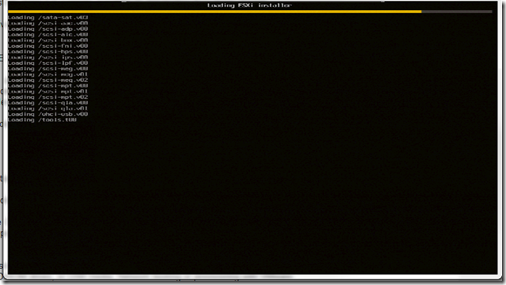
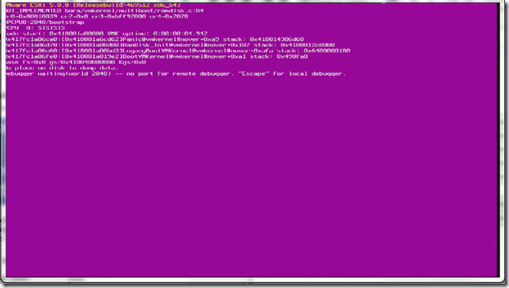
First was my attempt to install ESXi5 onto my test lab Dell Poweredge1950 server which had ESXi5 beta installed on it already. The server booted fine off on the disc but once it reached “loading /tools.t00” it would give me a PSOD as shown in the two screen shots below.

clip_image001

clip_image002

After making sure it wasn’t my disc I went to the place I really should have looked at first (VCP4 101 Gregg…) and looked to make sure my server was actually supported on ESXi5 by going to the VMware HCL . As shown below the server is supported but requires the latest BIOS revision, which is a real pain as this server as i mentioned, had the ESXi5 latest beta on it so obviously this requirement has only been implemented in the GA release.

clip_image003

clip_image004

The fun part of all of this is my servers are remote to me as they are sitting in one of EMC’s corporate Datacentre’s. Now here is the part where the steps I followed to get my BIOS updated has been changed a number of times as I tried booting off the system Build DVD and updating the BIOS that way but this requires a formatted USB stick/key with the BIOS software on it which is fine for my one server but not for the future upgrades I need to do. So I followed the Open Manage route. After speaking to Kong Yang at Dell via twitter, he pointed to me to the currently unsupported but the latest available OMSA package for ESXi5 and steps of how to do it. The difficulty for me originally was that OMSA 6.4 didn’t work for me on ESXi5 beta and the unsupported version isn’t on the dell website or FTP site due to it not being supported yet. The steps of how to install OMSA on ESXi 5 via ESXCLI are here:

http://attachments.wetpaintserv.us/32hS7wyYeMyal_il29fegw528983

Also as mentioned, the VIB for OMSA 6.5 isn’t available via FTP.DELL.COM so you need to download it from this link:

http://en.community.dell.com/dell-groups/dtcmedia/m/mediagallery/19928975/download.aspx

The page Kong pointed me to with the above two links is here:

http://en.community.dell.com/dell-blogs/enterprise/b/tech-center/archive/2011/08/26/dell-openmanage-server-assistant-omsa-support-for-vmware-esxi-5-0.aspx

Next is another snag I hit as now the old process of managing your dell server via openmanage on port 1311 isn’t supported for ESXi and Dell recommends you use the Dell Management Console, which requires a distributed web server, installed on a Windows server. Also you have to licence the Dell management Console.Due to my  desperate need for my test server to be upgraded to the Ga version on ESXi5 I did the BIOS upgrade for my test server by quickly installing Windows 2008 and just running the BIOS upgrade application so as to make sure ESXi5 did install once the BIOS was at the correct version and it does install perfectly.

But for my future servers I expressed my amazement at this requirement to pay for a licence for the DMC to allow me to do something I used to be able to do for free on twitter and Jonathan Medd replied to me with a blog posting he has done with a work around (What a Legend). This route does work if your servers are ESX/i 4.x and then you can use OpenManage to update your BIOS.

For me installing the latest OMSA on my ESXi5 beta and now GA test server didnt bring up the UserVars.CIMoemProviderEnabled parameter unfortunately and so I  created a VMware Communities posting looking for a way to connect to OpenManage by using OMSA6.5 and ESXi5 to allow me to manage all my future ESXi5 servers.  I got a number of responses and as mentioned in the thread it looks like the new variable is now UserVars.CIMvmw_OpenManageProviderEnabled

Gregg