TheSaffaGeek

My ramblings about all things technical


Leave a comment

London VMUG May 2012

Just a very quick posting to remind anyone around the south of England or who is willing to come to the south of England for it that the next London VMware User Group (LonVMUG)  is happening THIS Thursday the 17th of May. Also my fellow vExpert, partner in crime and Xtravirt colleague Darren Woollard is presenting which should be an incentive for anyone to go just to heckle him Smile

If you haven’t registered I would highly recommend you do so ASAP . You can register for the event here and there will also be a large contingent of my fellow Xtravirt colleagues attending as well and should be easily recognisable due to them all wearing the shirt shown below (one each obviously Winking smile )

.photo

After the VMUG the standard vBeers will take place. If you’ve somehow never heard of vBeers before the below is just for you Smile.

vBeers

Is an informal get together of virtualisation enthusiasts and professionals to meet and discuss all things IT. It’s a great opportunity to network, learn and meet like minded people.

clip_image001

The following is part quoted from Simon Seagrave’s Website :

Enjoy Talking Virtualization? Come & Socialise at vBeers!

vBeers[7]Fancy meeting up every month with other IT virtualization enthusiasts to socialise and chat over a cold beer, wine or soft-drink? If so, then vBeers is for you! This is a great opportunity to meet with other virtualization enthusiasts and professionals and enjoy discussing all things virtualization, and in fact anything else that comes up in conversation…

vBeers is open to everyone so whether you are a VMware vSphere, Microsoft Hyper-V, Citrix XenServer user/fan or none of the above it really doesn’t matter as “it’s all about the virtualization”.

The London vBeers meet-up is held at the Pavilion End Pub . Details and directions below:

When & Where

The London vBeers are held on the first Thursday of every month or after a VMUG meeting starting at 6pm in the ‘pavilion end pub

407fefe6-2a76-102d-855f-000e0cc30319

Location: The ‘pavilion end pub’, London

Address: 23 Watling Street Moorgate EC4M 9BR

Date: First Thursday of every month and after VMUG meetings

Time: 6:00pm

Map:

image

Gregg


10 Comments

vCenter Operations Management Suite Resources

Recently I was tasked to get myself up to speed with vCenter Operations Manager and Configuration Manager as part of the vCenter Management Suite for a client delivery we’re doing at Xtravirt. So due to this I have been collecting all the resources I could to help me do this and thought I may as well do a blog posting on it for anyone also looking to implement the suite soon or who are just interested in learning about it. I will be constantly updating this and plan to do two separate postings on the tips and tricks I learnt after deployment for each of the products and my opinions of each.

VMware Operations Manager 5.x

  • The below videos are a great introduction to the product done by VMware via their YouTube channel

VMware vCenter Operations Manager Introduction
VMware vCenter Operations Manager
  • As is standard there are the Administration and Installation Guides which I would highly recommend reading through especially the Getting Started Guide to help you prepare before you deploy it.

http://www.vmware.com/support/pubs/vcops-pubs.html

http://www.vmware.com/pdf/vcops-5-installation-guide.pdf

http://www.vmware.com/pdf/vcops-5-getting-started-guide.pdf

  • You can download an evaluation of VCOPS for your own testing and to let you play around with it and learn how it all works. I’ve already done this as actually deploying and working with the solution helps me understand a hundred times better than reading documents on it.

https://www.vmware.com/tryvmware/index.php?p=vcenter-ops5&lp=default

  • The communities are a great place to read a few people problems and make sure you don’t make the same mistakes/prepare so you don’t hit the same hurdles:

http://communities.vmware.com/community/vmtn/server/vcenter/vcops

  • VMware have done a webcast on Automating Infrastructure and Operations Management with VMware vCenter Operations Management Suitewhich gives a great overview of the whole Operation Management Suite and Operations Manager capabilities:

http://event.on24.com/r.htm?e=397322&s=1&k=22E3A47A4D3EEC4794EEEAD75C1BC6E7&partnerref=WEB

VMware vCenter Configuration Manager

  • VMwareTV have also done a video covering vCenter Configuration Manager and the change management capabilities of the product. The video gives you a really good overview of the layout of the product too and the extensive amount of data and information you can find and create.
  • VMware vCenter Configuration Manager 5.5 has just been released and the best place for all the information is the Documentation Resources page for the product here:

http://www.vmware.com/support/pubs/vcm_pubs.html

  • The communities are a great place to read a few people problems and make sure you don’t make the same mistakes/prepare so you don’t hit the same hurdles.

http://communities.vmware.com/community/vmtn/server/vcenter/vcm

  • I’m very fortunate to work for a VMware partner and so there are a whole load of really great resources for VCM. The ones I have used and would recommend to people who also work for VMware partners are:

VMware vCenter Configuration Manager Essentials [V5.X]

vmLIVE – What’s New with vCenter Configuration Manager 5.5

Both give you a good overview of the product, it’s layout and what it is capable of and with the vmLIVE presentation you will be able to update your knowledge for the latest release.

  • The VMware Operations Management team were nice enough to ReTweet this posting and advised me that there is an official course called VMware vCenter Configuration Manager Fundamentals that has been upgraded to version 5.5 . The course looks to cover everything you could possibly need and I’m hoping I can get myself added onto it as it is self-paced which is perfect for consultant like myself who can’t take the time away from the client to attend a course.

Fellow vExpert and #LonVMUG attendee Ed Grigson has done an amazing blog posting all about Using vCenter Operations v5 – Introduction and deployment and has linked to loads of top VMworld Sessions and podcasts that I had no idea were out there. Make sure you have a look at his posting and keep an eye out for his future two postings on the subject.

vCenter Operations Manager for View


Hopefully these will help people looking to learn about the Suite and as I stated at the beginning I plan to update this with more resources as I come across them. If you know of any other resources out there please do leave a comment or drop me a tweet on twitter on @greggrobertson5

Gregg


1 Comment

DevonIT VDI Blaster Experiences

Recently I’ve been introduced to and have been rolling out DevonIT’s VDI Blaster at one of Xtravirt’s customer sites to temporarily enable VDI connectivity whilst still having the ability to boot back into the normal OS should any problems arise. So I thought I would do a blog posting on my experiences with the solution and how I did it.

Overview

DevonIT marketing state:  “VDI Blaster™ can be used without taking the risk to erase your existing Windows installation. To install VDI Blaster™, just execute the installer on the PC you want to repurpose. After installation, the PC reboots by default in thin client mode, running Devon IT’s Terminal Operating System (DeTOS™).”  When I initially heard what the product did I was a little sceptical, especially seeing as it only costs $29.99 (£22) per licence. But I was keen to give it a try and see if it was as easy as they stated.

We also decided to use their Echo Thin Client Management Software to allow us to control what the users saw once they booted into the DeTOS and to make sure all they saw was a kiosk view with the logon page to the VDI environment.

Before I did the installation I found a fairly good overview video for the product on YouTube (below) although it’s unfortunate they don’t actually show the screen but rather zoom in partially with the camera so you can’t see it very clearly.

Installation

Echo Management Server

For the installation of the Echo Management Server it was quite straight forward as all that needed to be done was to download the Virtual Appliance and import it into my virtual infrastructure. Once imported all that needed to be done was to set an administrator password, give it geographical settings,DNS settings, a static IP address and then set a custom DNS setting to allow machines to obviously resolve the ws-broker name of the Echo server.

VDI Blaster Thinclient

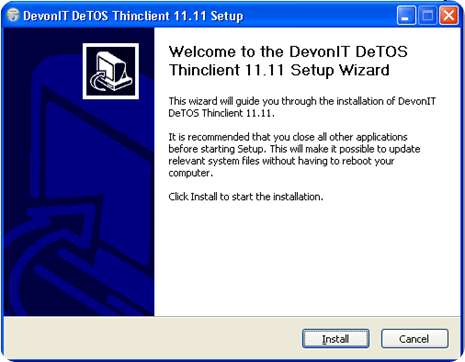
The installation of the Thinclient software is extremely simple and is essentially a next, next, next finish installation.
image

image

image

Once the machine reboots you will now have the dual boot option of your unaltered original OS or the new Devon IT DeTOS for VDI Blaster

image

Management and customisation

As mentioned we also purchased the Echo Thin Client Management Software so we could manage the VDI blaster desktops and also push out a customised profile.

  • To connect to the administration page you will need to browse to the name or ip you assigned the management server via an internet browser. Once in you will need to add your licences to the management server to allow terminals to connect and be managed by the management server by clicking on the Maintenance tab on the left and then clicking on Manage Licences and inserting your licence key/s.

clip_image010

We created our customised profile with the URL to our VDI web interface automatically in the browser so that it opened up in kiosk mode on device bootup.

  • To do this you first need to create the connection settings or else you will need to go edit your profile once you have created the connection.You create the connection by going to the connections section of the Echo Administration page

clip_image001[6]

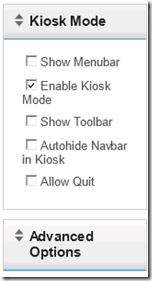
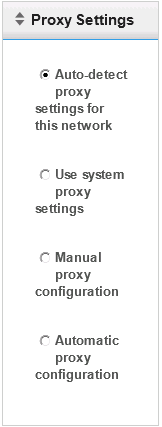
  • Select Firefox as the protocol,set the URL to the VDI web interface for your VDI environment,give the connection a name and description and tick the box for the autostart of the page upon the device bootup. You can also specify a proxy server if there is one and the kiosk mode settings you want

clip_image002[6]

clip_image003[8]

clip_image004[7]

clip_image005

clip_image006

Once the connection has been created you can now create a profile that you can then apply to any client that connects to the management server

To create a profile:

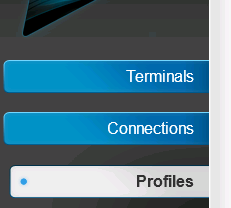
  • Click on the Profiles tab on the left

clip_image007

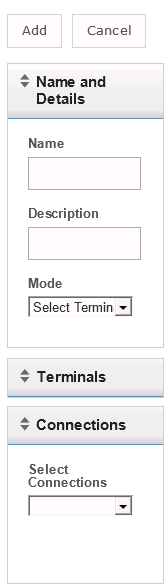
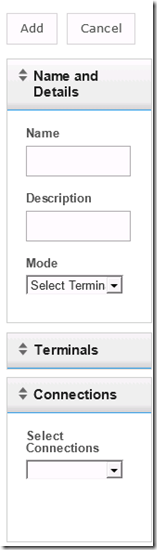
  • Give the profile a name and description and select if you want it to be the default profile for all your terminals or selected terminals. Then expand the connection dropdown and select your newly created connection
clip_image008

  • You can add additional settings like terminal settings,assign certificates and apply a specific disk image that you either downloaded or one you created yourself.

clip_image009

Now that the profile is created, when a terminal boots up it will get the applied settings and the connection from the assigned profile and go straight to the VDI web interface.

Conclusion

The software does what it says it does and the installation and configuration is really simple. For me personally I think it works perfectly as a small interim solution in your migration to a full VDI deployment as it allows you to let the user boot into their old machine if there are any problems thereby allowing them to carry on with their job and is also a great way of possibly using old hardware as a VDI terminal if you can’t afford to buy dedicated thin client hardware(Which DevonIT do also sell)

Gregg


Leave a comment

Umshini Wam’…. *Cough* I mean Vote for me.


A very quick posting that the voting is now open for the top VMware & virtualization blogs. Eric Siebert runs this every year and this year has even been sponsored by Trainsignal.

I’m very honoured to be included on the list of blogs available to be voted for.So if any of my blog postings or my VCP/VCAP study resources pages have helped you in any way a vote would be appreciated Open-mouthed smile

image

If anything at least cast a vote for the blogs you do enjoy even if it isn’t my blog as getting onto Eric’s list is a very high honour for a VMware related blogger and there are some amazing blogs and podcasts out there that deserve your votes.

Gregg


11 Comments

The Next Chapter

Until you spread your wings, youll have no idea how far you can fly.- anonymous

Almost five years ago, I made the decision to make a change or risk the chance of possibly never getting the opportunity to spread my wings. After having worked for my company in South Africa for just over three years and having grown from someone on a three month contract tasked with creating an IT equipment inventory of all the companies IT equipment to being a permanent employee and the Systems Administrator I handed in my notice and decided I wanted to move to the UK to try get a job with a large IT organisation and work with cutting edge technologies. I left my then girlfriend (now wife), parents, lifestyle and comfortable job back in South Africa and make a leap of faith that I could do it. I’m proud to say the risk paid off and five years down the line, I’m working for one of the biggest IT companies in the world, working with innovative technologies and have grown immensely from when I first came over to the UK both personally and professionally. However, the time has come yet again for me to push myself out of my comfort zone and try spread my wings even more. So as of the 12th of December, I will be joining Xtravirt as a Technical Consultant specialising in virtualisation and complimenting technologies. I have loved my time at EMC Consulting and owe so much of my growth to the people I have worked with at EMC and previously Conchango and the opportunities both have granted me to grow and keep advancing my knowledge.

My leaving is not down to disliking my role at EMC Consulting, as I’ve loved it immensely. I’ve felt that the next logical step in my career was to test and hone my skills and knowledge in the consulting arena as a consultant and Xtravirt have given me an amazing opportunity to learn and grow an immense amount while joining a very exciting team of people working on loads of very exciting projects.

If you haven’t heard of Xtravirt before, you should have and I have full confidence you will hear a lot more of us in the future. Some quick facts about Xtravirt:

  • Xtravirt were awarded VMware EMEA Consulting Partner of the Year at this year’s VMworld Europe.
  • Xtravirt are also very well known in the virtualisation community for their tools especially the Free vAlarm application which David M Davis of Trainsignal fame covered in one of his VMware vSphere Performance Monitoring Training lessons and the vLogView application which provides the ability to store, view and search ESX Server log files from multiple ESX Servers, without requiring individual login, navigation and manual file transfer to name but two.
  • Xtravirt is a knowledge-based company that delivers its expertise in virtualization online and in person. They have a reputation for astute leadership and expertise through their work with an impressive array of organisations. It is this real-world experience that drives the ability to provide the best professional consultancy services available

I’m still planning on blogging as much as possible and am actually very confident of being able to blog about a lot more technologies and a much broader base due to Xtravirt having no affinity to any specific vendor or technology. Although I don’t know about any Hyper-V postings clip_image001I’ll still be on twitter whenever I have the opportunity and will still try answer and help people on the VMware Communities and try attend the London VMUG’s and vBeers.

Gregg


7 Comments

VCP5 Study Resources Page

Just a very quick posting that I have finally created my VCP5 Study Resources Page with all the resources I’m planning to use in preparation for my VCP5 exam. As mentioned on the page I decided to create the page as it seems the VCAP5 exams aren’t going to be out before the grace period for people with the VCP4 accreditation not needing to take the What’s New course expires. So like with my VCAP4 and VCAP5 pages I’m planning on listing all the resources I plan to use and the great study resources I come across that may help other people of varying degrees of expertise prepare for the exam

Good luck to anyone preparing for any of the VMware exams soon, good luck! Also tell me how you’ve done or if you think I have missed an amazing resource by either leaving a comment or sending me a tweet on @greggrobertson5 on twitter

Gregg


1 Comment

VCAP4-DCA Exam Experience


I decided to wait until I got my results before I wrote up this blog posting as I felt writing it up straight afterwards would mean I might miss something out and to see if VMware would give me credit for doing things in another way even though I made a mistake. Firstly, unfortunately I failed the exam by 23 points. This was mainly down to my making a major mistake very early in the exam and VMware not giving me the ability to fix it even though I knew how and the ability to know how to fix it is one of the exam objectives. I agree that if I make a mistake it’s only right that now I should use up my exam time fixing my mistake but not giving me the ability to fix it when in a real world situation you would have this ability isn’t very fair in my opinion.

Study Resources:

But enough of that as it’s done and seeing as I made that mistake so early on and still got so close is pretty pleasing in my opinion. For my studying of the exam, I decided I wanted to cover everything and so set myself a month and a half to study for the exam. I covered everything in my VCAP-DCA study notes list and went through both Sean Crookston and Ed Grigson’s study guides. I did all four of the VCAP courses trainsignal videos (these were honestly the best for it and taught me things so in depth that even questions in the exam that was very unusual I knew them because of these videos). I also researched anything I didn’t understand and as linked to in both Sean and Ed’s study guides I read up on loads of blogs, watched loads of YouTube videos from people like Eric Sloof (you can find these by just searching for Eric on YouTube as he has loads of them up) and watched a whole load of VMworld videos. Using all of these resources prepared me amazingly; the only thing I didn’t do enough of which was mainly to blame for me making my major mistake was not enough lab hours. I’ve got so used to question and answer exams that even though I obviously knew the exam would be 100% lab based I never realised the real importance of my practicing all the tasks twenty times until I knew it without even thinking as trust me the pdf’s give you nothing apart from the real basics and if you don’t know those you won’t pass the exam anyhow.

The Exam:

The exam was hard and is probably the hardest IT exam I have ever done (previously this title was held by my MCSE 2003 upgrade exams) but I think it is only right it is as tough as it is as it really does separate the men from the boys and really shows if you know your stuff or not. As mentioned by every one, time is extremely tight and you won’t finish all the questions unless you skip certain ones. One bit of advice I was given which was really helpful was, if you don’t know how to do the question mark it down on your notes and carry on as rather do the ones you can do rather than waste time on ones you are unsure of as I knew how to do some of the last questions just before time ran out whereas if I had sat and tried to work my through ones I didn’t know I probably wouldn’t have even had the time to see and do the ones I could.

Summary:

If you do all the study resources I’ve listed in my study resources page and put in loads of hours deploying and playing around with every single thing on the blueprint in your lab then you’ll pass it. I’ve already started rebuilding my lab to get in a serious number more hours of practice for my re-sitting of the exam and making sure that the stuff I was unsure of in the exam I now know 150%. Good luck for anyone writing

Gregg


1 Comment

PSOD while trying to install vSphere ESXi5 on a Dell PowerEdge 1950 and OMSA 6.5 installation

This blog has been sitting in my drafts for a while and I have edited it a number of times while I tried to work out my problems and then my trying of multiple different paths to fix the problems I kept encountering.

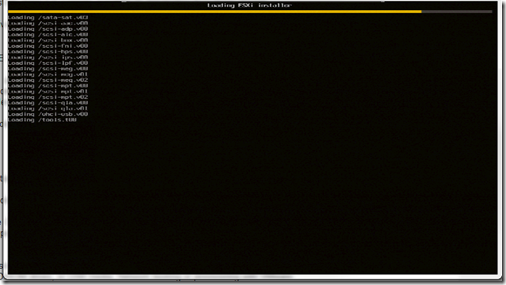
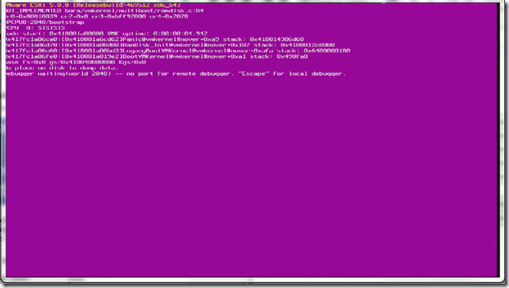
First was my attempt to install ESXi5 onto my test lab Dell Poweredge1950 server which had ESXi5 beta installed on it already. The server booted fine off on the disc but once it reached “loading /tools.t00” it would give me a PSOD as shown in the two screen shots below.

clip_image001

clip_image002

After making sure it wasn’t my disc I went to the place I really should have looked at first (VCP4 101 Gregg…) and looked to make sure my server was actually supported on ESXi5 by going to the VMware HCL . As shown below the server is supported but requires the latest BIOS revision, which is a real pain as this server as i mentioned, had the ESXi5 latest beta on it so obviously this requirement has only been implemented in the GA release.

clip_image003

clip_image004

The fun part of all of this is my servers are remote to me as they are sitting in one of EMC’s corporate Datacentre’s. Now here is the part where the steps I followed to get my BIOS updated has been changed a number of times as I tried booting off the system Build DVD and updating the BIOS that way but this requires a formatted USB stick/key with the BIOS software on it which is fine for my one server but not for the future upgrades I need to do. So I followed the Open Manage route. After speaking to Kong Yang at Dell via twitter, he pointed to me to the currently unsupported but the latest available OMSA package for ESXi5 and steps of how to do it. The difficulty for me originally was that OMSA 6.4 didn’t work for me on ESXi5 beta and the unsupported version isn’t on the dell website or FTP site due to it not being supported yet. The steps of how to install OMSA on ESXi 5 via ESXCLI are here:

http://attachments.wetpaintserv.us/32hS7wyYeMyal_il29fegw528983

Also as mentioned, the VIB for OMSA 6.5 isn’t available via FTP.DELL.COM so you need to download it from this link:

http://en.community.dell.com/dell-groups/dtcmedia/m/mediagallery/19928975/download.aspx

The page Kong pointed me to with the above two links is here:

http://en.community.dell.com/dell-blogs/enterprise/b/tech-center/archive/2011/08/26/dell-openmanage-server-assistant-omsa-support-for-vmware-esxi-5-0.aspx

Next is another snag I hit as now the old process of managing your dell server via openmanage on port 1311 isn’t supported for ESXi and Dell recommends you use the Dell Management Console, which requires a distributed web server, installed on a Windows server. Also you have to licence the Dell management Console.Due to my  desperate need for my test server to be upgraded to the Ga version on ESXi5 I did the BIOS upgrade for my test server by quickly installing Windows 2008 and just running the BIOS upgrade application so as to make sure ESXi5 did install once the BIOS was at the correct version and it does install perfectly.

But for my future servers I expressed my amazement at this requirement to pay for a licence for the DMC to allow me to do something I used to be able to do for free on twitter and Jonathan Medd replied to me with a blog posting he has done with a work around (What a Legend). This route does work if your servers are ESX/i 4.x and then you can use OpenManage to update your BIOS.

For me installing the latest OMSA on my ESXi5 beta and now GA test server didnt bring up the UserVars.CIMoemProviderEnabled parameter unfortunately and so I  created a VMware Communities posting looking for a way to connect to OpenManage by using OMSA6.5 and ESXi5 to allow me to manage all my future ESXi5 servers.  I got a number of responses and as mentioned in the thread it looks like the new variable is now UserVars.CIMvmw_OpenManageProviderEnabled

Gregg


Leave a comment

VMware vSphere 5 Released


After three days of waiting from the rumoured release date of vSphere 5, VMware have finally released the binaries for the vSphere 5 suite of products. Having been on a few beta’s that incorporated the new vSphere suite of products I’ve been dying to finally get a hold of the GA version so that I could finally start using it. The binaries are available to download now via the VMware download page  as long as you have a valid account to download it with. I’m already downloading all the binaries and really looking forward to trying it all out and utilising all the new features.

image

There are a number of documents that have been released for the suite which should provide a substantial amount of reading for all us who are now looking to implement it and know how it all works. The VMware site has all the documents for vSphere5 here and as Simon Seagrave pointed out in his blog posting there are even kindle formats of them now.Also remember to purchase Duncan Epping and Frank Denneman’s new book vSphere 5 Clustering Technical Deepdive

So get downloading and hopefully I’ll be posting a load more resources on the new suite especially with VMworld US happening next week.

Gregg


Leave a comment

All Things Virtual 26


As you would expect there has been loads of news about the release of vSphere 5 and all the new features. A large amount of it early on and all over the VMware communities and the vExpert community has been about the vRAM licencing model.

  • Last week Wednesday the rumours that VMware were going to make changes to the licencing model came true. A massive amount of people blogged about it and VMware also posted a blog posting about it. So seeing as they did such a great job of it and to save me repeating what has already been covered, here is the official VMware blog posting about the changes as well as a brilliant posting from fellow vExpert Eric Siebert all about how VMware has a change of heart on licensing. From these two postings I think I’ve finally got my head around the new licencing model and how it will impact my environments.
  • William Lam the master of vMA and ESXCLI posted about the new features and enhancements in vSphere 5 for ESXCLI and some awesome tips and tricks for vMA 5. For my VCAP-DCA study preparations I’ve been forcing myself to try do as much of my daily job via the vMA and it really is an amazing tool and with the tricks William has listed you can do pretty much anything you want in your VMware environment with ease and on mass.
  • Scott Drummonds has written up a really great posting all about what he feels are the Top 10 Reasons to Upgrade to vSphere 5. This is a great list for anyone who needs to explain to their boss on management why they need to upgrade to vSphere 5 apart from the obvious eventual expiration of vSphere 4. There really are some amazing new features and enhancements that are going to make daily tasks so much easier and faster.
  • When you’ve convinced your boss and management that the upgrade to vSphere 5 is well worth their while and you’re planning on using auto deploy to create your ESXi hosts then Paul Richards’ (@eprich) posting all about 3 Design Considerations for Your vSphere 5 Auto Deploy Environment. These are really great tips and things that may seem obvious but are also easily forgotten or missed in your design planning.
  • Eric Sloof has done a brilliant list of all  the videos he has done for vSphere 5 from migrating to vSphere 5 to Storage DRS. Eric’s videos are always really great especially for someone like me who likes to see the actual steps and features before trying them out for myself. Duncan Epping has also done a list of all the vSphere 5 Coverage he has done since the announcement. These two are some of the best in the industry and their blogs are rightfully in the top ten VMware blogs in the world so the articles and videos they have created are some of the best you’ll find out there.
  • For those who are fortunate enough to have been approved to go to VMworld 2011 in Vegas this year or if you’re like me and will be tweeting and blogging about it all from the comfort of your desk then add your twitter handle to the VMworld 2011 Vegas twitter list and the bloggers list . I’ve already added my information and it makes sure your tweets and blog postings about VMworld are shown on the VMworld page and streams to make sure people can find and read your postings easily.
  • If you are going to VMworld for the first time this year then these tips for first time attendees and possibly anyone who hasn’t been for a while will be very helpful. The tips came about from a discussion on the vExpert community from a fellow vExpert asking for tips seeing as he was attending for the first time. Christopher Kusek listed all the responses that were given to Bilal Hashmi into his posting VMworld Tips, Tricks and Prize winning. Bilal also listed them and more in his  VMworld Tips by vExperts (title edited due to my not wanting four billion spam messages)
  • Just a very quick plug that I’ve now created a VCAP5-DCA & DCD Resources page to start listing all the resources that I’ll be using in my preparations once the exams are released. If you know of any materials I haven’t listed on it please leave a comment on the page and I’ll make sure it’s added.
  • Lastly is a posting by Tom Howarth on How to Report an Issue to a VMTN Moderator. This is sometimes a necessary step on the VMware communities due to people either publishing NDA information about new releases or exams. Or the occasional spam message that is unfortunately posted.

Well that’s all the things that have caught my interest in the past few weeks and the things I need to finish reading to try keep up to date. If you want to follow me on twitter my handle is @greggrobertson5.

Gregg