TheSaffaGeek

My ramblings about all things technical


1 Comment

How to ease the management and monitoring of VMware Snapshots


Recently I have been doing some cleaning up of old snapshots that users have created and forgotten to delete and have therefore been around for too long and are in danger of either using up all the space on the datastore they are on or corrupting once the snapshot is ”deleted”/applied to the vm. I came across an additional way I can make my management and monitoring snapshot tasks easier and so I though I would write up a quick post of all the tools I use that save me having to manually go through a crazy amount of machines. I have used a few of my fellow virtualisation friends scripts and tools to help me do this.

  • First and the one i use the most is the SnapReminder script by scripting guru Alan Renouf. Alan’s script is a fairly straight forward one (his words not mine as I’m not at the level yet to be able to write this). The script is simple yet so very effective as it automatically finds the snapshot that meets your time criteria,finds out who created it ,retrieves their mail address from AD and mails them reminding them that they have this snapshot and it is older than a number of days. It’s really great when you get a mail back from a user replying to one of these mails and saying they don’t need it anymore as you know it’s going to make your environment better while you barely had to do anything to remind and alert them to it.
  • Next is part of the vCheck daily report ,one I have spoken of before which is also created by Alan. The vCheck tool is a brilliant reporter for gathering all the information you need to know to make sure your environment isn’t having any problems and enables you to be proactive so as to stop problems before the arise. The snapshot part of this report is always helpful so i know if people have removed their snapshots after being pestered by the SnapReminder e-mails and gives me a good idea of my progress in minimising the amount of snapshots over the limit.
  • Last one is one I stumbled across this morning while researching some other things and is one i didn’t think of creating but is one that is a brilliant idea especially for automated monitoring. Sadly i can’t seem to find the name of the guy who wrote up the article and did the video as i like to give credit where i can but good work to them for doing a video of it. The article shows and details how to configure VMware vCenter Server to send alerts when virtual machines are running from snapshots and reach a certain size. I’ve always used the alerts for memory,cpu and hosts errors which are pretty much the standard ones you get with vSphere with the additional and tweaking of a few to customise it for our environment but I’ve never thought of it for alerting me about snapshots. 

 Hopefully these tips and tricks will help save you some time and heartache with the management and monitoring of your companies snapshots.

Gregg Robertson

VMW_09Q3_LGO_VMwareCertifiedProfessional_K

MCSES(rgb)MCTS(rgb)_1079_1080_1078image

***UPDATE****

As is my luck ,on the heels of me posting this Alan brings out his latest instalment of vCheck, version 5. This new one has some brilliant features and really is an improvement over the last one. I’ve already given it a run over a few of the environments I support and the webpage view it now allows you to view the report in is actually a bit overwhelming with all the data and reporting you get back and has flared up some warnings i didn’t even know were there which is brilliant!

Also a quick congrats to Alan who has now become the latest member of Chad Sakac’s vSpecialists. A brilliant hire there if I do say so myself and very exciting for an EMC employee like myself that someone like him is now part of the team.

1 Comment

All things virtual VI

It’s definitely been a very hectic past few weeks for me and due to this it’s taken me quite a while  to get this posting to a post able standard. There has been some brilliant articles and news in the virtualisation arena and some resources that are currently and will in the future help me to make my daily job a lot easier.

First is one that i think is a common mistake among many people when they plan/build their VMware virtual environments.Craig Risinger has posted a guest posting on Duncan Epping’s yellow bricks website all about resource pools and how people need to keep an eye on the amount of resources allocated to a resource pool compared to the amount of machines that are in the resource pool. It does seem a very obvious thing to monitor but I even had to run an eye over the ones in my environment as with the amount of migrations and builds that happen it’s something you forget to check or amend.

Next is a great article I found when trying to explain blocks sizes to a fellow IT friend and about alignments and what both are and what you need to think about in your decision of aligning your data or not. Steve Chambers (@stevie_chambers) wrote the article and is one that I learnt some more from as well as helped me to refresh some of the knowledge i knew but due to not having used it for ages had forgotten some of.

Another posting is stumbled across these past few weeks that caught my interest was a posting by Ian Koenig all about IO DRS. This is a fairly new idea to me as I’ve obviously always done cpu and memory DRS as it’s standard to monitor and make changes dependent on vSphere’s DRS clusters settings but Ian has done a very intriguing and exciting posting all about IO DRS and how it could come very soon to allow you to monitor and make changes dependent on IOPS and details how it would all work. I then did a bit more research on the topic and it seems I’m not alone in my interest and excitement about this feature. Rich Brambley (@rbrambley) wrote a blog posting all about it and detailed some of the things that were mentioned about it at this years VMware Partner Exchange.

Fellow Saffa , Rynardt Spies’(@rynardtspies) has written up a very detailed and thought provoking posting all about VMware vCentre 4 Design Considerations and has given all the pro’s and cons he took when deciding  32bit or 64 bit, physical or Virtual and placement of the vCentre database as well as the Update Manager Server and database.

Simon Seagrave (@kiwi_si) has done a very clever and interesting 5 minute video reviewing vkernel capacity view and how it works and looks.  An application I haven’t tried myself but a it’s nice to be able to get a quick run through of what it is and does.

The infamous Eric Sloof (@esloof) posted up his vmClient last week. the tool looks amazing is something everyone needs to have a try out of as it has helped me tremendously by allowing me to quickly jump between virtual machines while trying to do loads of things at once. He’s also done a great video run through of how it looks and works

While listening to the VMware Communities podcast about ESXi last week I was reminded of the latest release by trainsignal the VMware Pro Series Training Vol1. As i mentioned in my posting about the resources i used for my vcp4 exam, the trainsignal videos are priceless in your studying and preparing for the exam as well as a very helpful tool if you need to refresh your knowledge on things you may have become rusty on. I’m planning on getting my hands on this latest instalment but if Kendrick Coleman’s(@kendrickcoleman) twitter and blog posting about it are anything to go by it should be brilliant.

Vladan Seget has posted a great little posting on how to add a second service console via cli. This caught my attention firstly because I’m personally trying to do more and more via vma and cli to prepare myself for ESXi as well as very good troubleshooting step by step.

David Convery has done a very interesting posting all about the problems he encountered with his vshield zones and the ways he got around them. I’ve been planning to implement vshield zones into my home lab for a while but haven’t got around to doing it yet, so David’s posting is now one of the pointers and steps I’ve added in my implementation of it.

Over the past week there has been a major buzz all about the release of simdk. Andrew Kutz(@sakutz) is the man behind this creation and what a little creation it is. Andrew has managed to create a VMware vSphere4 simulator which provides vSphere4 API-compatibility. I’m seriously excited to get it implemented and deployed in my lab environment as it should allow me to get so much more of my testing done and hopefully will save me some money in my VCDX lab deployment. I’m also keeping my eye on the official site of the product for any news and update.

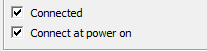
Lastly one from my daily troubleshooting. While migrating machines to new hosts we noticed that certain machines network cards were unticking the connected radio box in the vm’s settings

image

Even if we ticked connected and applied the changes it kept on reverting back to being unticked. My colleague Simon Phillips noticed the solution, that we had created the vSwitches with the standard 24 ports and therefore once we had reached that number of ports used there were obviously no more spare ports and so the machines couldn’t be connected. There were no errors telling us this was the problem but it’s a very good example that early simple planning and configuration would have fixed.

Gregg Robertson

VMW_09Q3_LGO_VMwareCertifiedProfessional_K

MCSES(rgb)MCTS(rgb)_1079_1080_1078image

Technorati Tags: VCP4,VMware,VCP,virtualisation

del.icio.us Tags: VCP4,VMware,VCP,virtualisation


5 Comments

VM’s can’t ping while on Distributed Virtual Switches VLAN’s

This blog posting has been sitting in my drafts for a few weeks now as I’ve been battling and troubleshooting for ages so that I could give the solution to all our Distributed Virtual Switching problems we’ve been having. Thankfully I believe I finally can although I’m amazed that this may be the only blog out there with a solution. I put this down mainly due to Distributed Virtual Switches only being available in the Enterprise Plus edition of vSphere and therefore not many people either feeling the need to get this version or their companies not seeing the need to buy the edition. Thankfully I work for EMC and therefore I was able to procure myself a licence key for this edition and so set myself on the way to many eventual problems.

As I said in my communities open question the machines always seemed to fall off at differing times and showed no kind of patterns. Later on I noticed the machines were for some reason losing their ARP tables. The solution I found was one I am still unable to find a VMware article about.

It all came down to a difference in ESX versions and virtual hardware. Not 3.5 and vSphere(I’m not that thick…often) but the build versions. It seems that ESX servers installed with builds pre update 1 and ESX servers with update 1 installed don’t communicate/lose connectivity between themselves. So for instance when i had five servers on an ESX 4.0.0, 175625 build(pre update 1) and five on an ESX 4.0.0, 208167 (update 1a) build the ten total servers initially will all communicate fine with no problems, but then over time all the machines on the pre update 1 host will lose connectivity to both the machines they are on the same host as as well as the machines on the update 1a host and the outside world(aka the lose all connectivity). The five servers on the update 1a host though won’t lose connectivity to each other (although if the dns server they are using is on the pre update 1 then obviously dns will be lost) or to the outside world.

So the steps i followed to fix the problem were:

  • Firstly upgrade the hosts to the latest versions. This can be done by VMware Update Manager if you have it setup in your environment or by the way I did it with esxupdate. Now I know loads of you who have been in the virtualisation field for a while will know this tool well as it was the only tool you could use pre esx 3.5 to update your machines and I’m still puzzled why the vSphere Host Update Utility cannot patch or upgrade ESX 4.0 hosts. I was going to write up the steps I use but David Davis @davidmdavis of TrainSignal fame has written up a great step by step guide of how to do this if you’re not familiar.
  • Once this is done you will then need to upgrade the virtual machine hardware to version 7. Scott Lowe has done a brilliantly detailed posting of how to do this and the changes you need to make to allow you to use the latest networking capabilities. Now i know a bunch of you will think that you don’t need to update your esx hosts to the latest version to be able to upgrade virtual machine hardware but due partly I believe to the problems I was experiencing when I tried I got a very vague error of image .Only once I had migrated the machine to the latest host would it let me upgrade the virtual hardware. My colleague Simon Phillips noticed this virtual hardware upgrade was a difference between machine that worked and ones that didn’t so credit is due to him on spotting this and finding Scott’s posting on how to upgrade the virtual hardware.

After these changes the machines all communicated without any problems and almost a week in haven’t shown any of the problems we were experiencing.

Funnily enough while building up this blog posting i came across a load of really interesting articles from fellow virtualisation professionals and i was going to do a wrap up of it all with the thoughts of putting your machine on standard or distributed switches and should you make it a virtual machine or not. But as of this morning Richard Brambley @rbrambley did a great one himself on the virtual centre side ,so definitely have a read. As well as these articles all surrounding the same topics and the problems and opinions some of the top people thought/have come across.

Sadly after finding out these solutions we’re now having to migrate all our machines back to standard switches due to our virtual centre server having database problems and needing a rebuild. I still think I would like to try use Distributed Virtual Switches again in the future but unless you have an enormous environment where you need the DVS’ I feel standard switches are more than adequate and at the moment less the pain.

Also a big thanks to Simon Phillips for all his help in this, Gabrie van Zanten for chatting through loads of it with me on gchat, all the guys on twitter who replied to me with ideas,the people who replied to my VMware communities question and the VMware helpdesk guy I caught unawares with all my questions when he called me about my virtual centre problems.

I’m always open for a chat/troubleshoot if you’re having the same problems so either leave a comment below or add me on twitter at @greggrobertson5.

Gregg Robertson

VMW_09Q3_LGO_VMwareCertifiedProfessional_K

MCSES(rgb)MCTS(rgb)_1079_1080_1078image


Leave a comment

Location of sysprep files on a Windows 2008 vCentre server.


I recently installed/migrated my virtual centre server to a Windows 2008 server and came across the problem of losing my sysprep files for the usage of configuration wizard as I posted about on my corporate blog quite a while back now (pre any kind of VMware training in my defence). Thankfully Simon Gallagher (@vinf_net) posted about the exact problem I was having this week and has saved me having to fiddle around and look for the solution. I know not the biggest of problems you could face but when you’re deploying the amount of machines I have recently, having to run sysprep on each of them once they are built is a step I’d like to skip.Hope it saves someone else the time like it has for me =0)

Gregg Robertson

VMW_09Q3_LGO_VMwareCertifiedProfessional_K

MCSES(rgb)MCTS(rgb)_1079_1080_1078image


2 Comments

All things Virtual V


The past few weeks have been very busy both personally and in the virtualisation arena. My previous posting on the DNS issues I came across and my still unanswered problem with Virtual Distributed Switching VLAN connectivity(which I will post a blog about when I find a solution better than the long winded work around I detailed in my discussion) while deploying a large number of projects both here in the UK as well as in the US has kept me very busy. As for the virtualisation side there has been a large amount of interesting articles,more employment movements by some of the top people in virtualisation and a very nice bit of coverage of this blog.

Unfortunately even though I work for one of the major VMware partners I wasn’t fortunate enough to make it to the VMware Partner Exchange in Las Vegas last week. Sadly I didn’t see a large amount of new and interesting news coming out of this either,but the blogs I found very interesting and which covered the events was blogs Duncan Epping(@duncanyb) of Yellow Bricks fame’s blog on the event detailed. From these blogs the points that really interested me were:

  • VMware’s recently acquired company Zimbra. I would firmly recommend reading up on what Zimbra is and what it does as I have a very strong feeling we’ll be hearing plenty about it in the coming weeks and months.A very interesting acquisition which I’m sure is one they have done to increase their clout in the Cloud Computing arena.
  • The news and painful lack of definite news on the decommissioning of the service console was of upmost interest to me obviously as we have a large array of esx machines here in my environment that are all using the service console. I’ve still not read any really good reasons for this happening apart from someone at VMware thinking it would be fun to make VMware Systems Administrators have cold sweats at the the threat of it coming in soon and the work that will need to be done as well as the skills that will need to be learnt for this to happen.  From chatting to a few fellow virtualisation sys admin’s there is a lot of dissatisfaction with this decision and the reasoning of “minimize the possible attack surface”. This is complete rubbish to me as the trade off of ease of configuration and management compared to the possibility of your systems being attacked is massively painful as with correct security procedures there shouldn’t be any real chance of this happening so why take it away and make my job that much more difficult and complex. Hopefully someone will be able to answer this with better reasoning.Scott Lowe’s first session’s blog comments have detailed part of this and is where my disappointment in the still lack of news is detailed by a few people.
  • The next part that i did find interesting due to my plans to utilise the software for my works own environment was the talk about VMware Chargeback. Scott Lowe’s blog about this session was the one i got the most out of on the topic and is one I’m currently using as a resource for my roll out of the appliance. Hopefully if all goes well I can post my findings and opinions of what it does and how it has or hasn’t helped me.
  • If you want a really good overview of the day Chad Sakac of virtual geek fame has posted a very in depth and detailed posting on the event and is a blog i would recommend if you have the time to read(I’m currently still making my way through it)

This week Monday Nicholas Weaver (@lynxbat) posted his latest update to the much tweeted about and highly spoke of vSphere Mini Monitor. I have personally installed the tool and am busy configuring it to suit my needs. It’s a brilliant tool for anyone wishing to monitor their virtual environment in new practical ways(twitter feed especially). Also a big welcome to Nick on his joining EMC. Seems the tide of top virtualisation people joining EMC is carrying on. Nick’s posting on his leaving and his reasons for leaving are something I can relate to as is his desire to constantly learn and push himself and is what I did when I left my then gf,parents,lifestyle and comfy job back in South Africa to move over to the UK just so that I could push myself and become better and hopefully end up working with some of the industry leaders(which I’m very proud to say I am now that I work at EMC and previously Conchango)

After much waiting (almost three months) my VCP4 certificate finally arrived this past week and with it my workstation 7 licence key. The licence is very helpful as I use workstation 7 for a lot of my home testing/workshop testing and work. Eric Sloof(@esloof) posted about the kits being sent out and as well as the new vcp logo which I have now attached to my signature at the bottom to keep in accordance.

In the past two weeks one of my team members and I have now been tasked with the backing up of our virtual machines and so i needed to brush up my knowledge on vcb backups. While asking an open question on this David Convery(@dconvery) pointed me to a blog posting he did detailing a document he wrote all about vcb and how it works and how to deploy it. It’s a brilliant document and one I have saved and have been using to manage our vcb backup environment.

As I have detailed in previous blog postings my aim this year to try better my skills in Powershell so that I can make my life easier in managing my companies virtualised environment. One of the leaders in this field in using powershell for VMware tasks is Alan Renouf(@alanrenouf). Last Monday he posted a brilliant article detailing automated vm provisioning. I have yet to try these scripts out but if these do what they say they can do and are anything like his vcheck tool then I can’t wait to get them to make my daily job easier.

Simon Seagrave from techhead.co.uk posted about the ability to Pre-register now to be notified when you will be able to register for VMworld2010 (i had to read that twice myself to make sure it made sense) I’m planning on going to the European one this year, which I’m extremely excited for for so many obvious reasons!!

While busy working this past week I decided to catch up on all the VMTN podcasts I hadn’t listened to yet as I like to keep up to date on everything happening and unfortunately with the amount of new and information coming out all the time the only time I can listen to these things is while I’m at work. The last one had Mike Laverick of RTFM-ED fame and Stevie Chambers from the UCS team and of viewyonder.com fame. The podcast was extremely interesting to me and I found myself sitting still at points to concentrate on the things the podcast was covering. The podcasts are very informative and I would highly recommend them to anyone wanting to learn and keep up to date with everything happening and due to happen in the virtualisation field.

As I said in my previous All Things Virtual posting the London/South England VMUG is happening next week Thursday. Sadly I’m not able to attend as I stated in the posting which was made even more painful this week when I heard it’s fully booked before my co-workers had registered so now none of us are going and that so many of the top british virtualisation industry leaders are attending. I’ll definitely be glued to twitter during the day and Simon Long of SLOG fame has promised me a detailed blog about the days proceedings.

Gregg Robertson

VMW_09Q3_LGO_VMwareCertifiedProfessional_K

MCSES(rgb)MCTS(rgb)_1079_1080_1078image

Technorati Tags: VCP4,VMware,VCP,virtualisation

del.icio.us Tags: ,,,


2 Comments

All things Virtual IV

I know it’s the end of January but due to my being on holiday back in South Africa then on honeymoon this is my first posting of the new year.  Due to this, there has been a large amount of virtual things i have been interested by and learning about.

I see the next UK south/London VMware User Group is happening on the 25th of February. The last one I went to was really interesting and also a great day of meeting some fellow virtualisation geeks like myself who I talk to and follow on twitter. Unfortunately it doesn’t look like I’m going to be able to make this one as out of our team of four only two of us can afford to go due to work constraints and so my fellow co-workers who didn’t go last time now have preference.

A new addition to EMC’s ranks is Scott Lowe. I’ve spoken of Scott before as his book Mastering VMware vSphere 4 was extremely beneficial to me in my studies for my VCP4 exam. He recently posted a brilliant article on Resetting the Root Password on VMware ESX 4.0. If you are like me and pretty much any IT person i know then you have forgotten the admin password at least once in your career. One of the main ones you don’t want to forget is your esx host’s root password. Scott has detailed a few simple steps of resetting yours and I’ve already added the link to my favourites as I’m sure it’s only a matter of time before someone forgets theirs and asks me how to reset it.

Talking of EMC employees Chad Sakac posted a blog entry all about EMC and Cisco looking for people to fill some positions. There was a very large amount of conversation and comments on twitter about this and most amusing to me was his first test of people having to work out his EMC e-mail address to apply for the roles. Even more scary was that people couldn’t work it out somehow and were posting comments to the blog asking how to apply still.

As everyone knows there is a large amount of competition(yes an understatement) between Microsoft and VMware for the best virtualisation applications and services. A very recent and interesting bit of this came out in the last few weeks. Nick Weaver (@lynxbat) has covered both sides of it all and is a blog i highly recommend if you want to amuse yourself and keep yourself informed of what is happening.

A big congratulations has to go out to Mike Laverick(@mike_laverick) who has now joined SearchVMware.com.Mike’s website and blog are renowned in the virtualisation industry so his joining is of great interest and seems in another one in the top 15 blogs who has now joined a new company He details his joining in his blog posting on the subject and his thought behind it.

This is just a nerd bit, but recently i was alluded to Jason Boche’s home lab setup which boggles my mind. A brilliant setup and one i would LOVE to have although i bet his electricity bills are seriously high having to run the setup. Another geek toy that has caught my eye this past week is the new v.Clone from Iomega. A very impressive little tool that they say will allow you to “move seamlessly back and forth between a physical environment (home or office PC) and a virtual environment (Iomega Hard Drive connected to any PC) “. Hopefully i can talk myself into getting one for corporate testing =0)

There has been loads of talk over the past weeks about how virtualisation is now making its way from consolidating old back end servers to running tier 1 Applications. A brilliant posting on this was Jason Nash’s blog Why Isn’t Your Data Centre 100% Virtualized? which was the Winner of Cycle 7 on Virtualizing Tier 1 Applications. It does raise many valid points and also shows that virtualisation technologies are rightfully slowly being accepted as being capable of running companies tier 1 applications. Another blog stemming off this growth of virtualisation is one i read last week about how it’s believed that the best days of virtualization are still ahead of us. A very interesting posting even if you aren’t in the virtualisation industry.

As I’ve said many times before in my blog postings i enjoy challenging myself and growing my knowledge by doing courses in fields I’m currently working in and/or fields that interest me. Recently a new VMware course was released called VMware vSphere: Manage and Design for Performance. Scott Vessey from global knowledge was the person who i saw mention it first then Scott Drummonds posted a blog entry about how he actioned the idea of the course,how himself and his team have worked alongside the Education Services team at VMware to get the course up to standard and complete and the full layout of the courses modules. Hopefully i can get myself on this course very soon as it would be highly beneficial to my daily job. also congratulations to Scott V on his being chosen as Global Knowledge UK “Trainer of the Year” for 2009.

Gabrie van Zanten(@gabvirtualworld) wrote a really interesting and myth busting posting all about memory overcommiting and how he has proven it doesn’t impact your environment any more than normal memory usage. I would highly recommend it as it’s well worth a read to prove it not only to yourself but others of how overcommiting your memory will save you physical resources without the heavy payment.

Both Simon Long (@simonlong_) and Simon Seagrave(@kiwi_si) have posted entries on their blog sites:The SLOG and Techhead today about the new vSphere 4.0 Security Hardening Guide. The guide looks like a brilliant resource tool and is definitely something i will be printing out and adding to my resource library.

Last but not least is all the nifty tools and diagrams people have been creating over the past few weeks. I’ve just listed them as it’s easier for you to choose the ones that might interest you rather than me waffling on about them.

Cert_Prof_Logo_B

MCSES(rgb)MCTS(rgb)_1079_1080_1078image

Technorati Tags: VCP4,VMware,VCP,virtualisation

del.icio.us Tags: VCP4,VMware,VCP,virtualisation


Leave a comment

All things Virtual III


For anyone who works in the virtualisation field like i do and read any of the top blogs and/or follow any of the top people in virtualisation you would know that Holland has a large presence in the top people in the industry and even more crazy is the number who are VCP’s. Last week Friday was the 5th annual Dutch VMUG and true to form over 600 people attended it. Due to this a great number of resources and videos from the event have been posted on the internet in the past days which have been extremely interesting and taught me loads of  cool new things.

Duncan Epping(@duncanyb) of yellow bricks posted a great blog posting all about the VMUG with loads of links to the videos and resources that were mentioned at the event. I hope the UK VMUG’s can get to this size as having that many people interested and coming up with new ideas can only make the industry better and also bring out some brilliant ideas and tools to make the daily job of a VMware administrator easier.

Eric Sloof(@esloof) posted a very interesting and informative video from the VMUG of Scott Herold’s(@vmguru) talk all about Vizioncore’s  vRanger PowerPack. A very cool tool i must say!!! Something I have added to my list of things I need to learn to use and have a play around with. He has also posted a very interesting video of him being interviewed by Scott.

Luc Dekens(@lucd22) posted two great posts from his session at the Dutch VMUG. One showing the scripts he talked about and the other an amazing one with all the demos he showed on PowerCLI’s Web Service Access cmdlets and how to set a breakpoint and investigate the properties of SDK objects to name two  . Luc always works out and shows amazing scripts and is constantly putting up new ones on his blog and via twitter. I would highly recommend following his blog if you want to start learning all about using powershell scripts to make your daily job easier and how to find things you never even imagined you could with powercli and scripting. I have added his blog to my blog roll so have a look!!

Scott Vessey posted all about the new vsphere troubleshooting course now being certified as being valid for the vSphere training requirement for the VCP4 certification this week. Personally I’m thinking of getting myself on the course at some point in the new year as it’s curriculum looks really good and I think it will help me in my job(which is obviously the main idea of training =0)  )!! Scott also has posted some brilliant blog postings all about the vcp courses plus great resources in preparing yourself for the exams. His blog is also on my blogroll and one I would highly recommend.

Talking of the VCP4 certification I was very pleased to see said on twitter and clarified on Eric Sloofs blog that the VCP4 Welcome Kits are being shipped. It’s sad, but I really like seeing the certificate when i have got a certification and even more I can’t wait for my personal  workstation 7 licence key.

I was alerted to a very interesting blog posting this week of a video  with Chris Murphy, EMC’s Director of International IT Operations discussing VDI and how he feels it will enable EMC’s desktops of the future. The video is a very good case study,a good example of a large organisation eating their own dog food, how they are using and plan to use VDI tools to achieve their VDI goals

Lastly is a very aptly timed blog by Eric Siebert(@ericsiebert) all about Christmas gift ideas for VMware administrators. I hadn’t heard about the Optimus Maximus Keyboard before, but now I can’t get the thought of all the things I could do with it out of my head.

Gregg Robertson

Cert_Prof_Logo_B

MCSES(rgb)MCTS(rgb)_1079_1080_1078image

Technorati Tags: VCP4,VMware,VCP,virtualisation

del.icio.us Tags: VCP4,VMware,VCP,virtualisation


1 Comment

All Things Virtual II

Seeing as so many people read my previous blog posting I thought I would continue with my keeping people up to date with all the things virtual and linked to virtual that i have been doing/working with/learning/reading up on this week so far.

I think the first one should definitely be about the release of esx(i)4 Update 1 a. Duncan Epping(@duncanyb) was the first person I saw talk about it and has done a very detailed blog posting about the update

Recently I had to explain to some people what Distributed V switches were and how they worked. Not wanting to make a fool of myself I went back to an article I used to strengthen my knowledge on the topic before my VCP4 exam and clarified what I was telling the people was correct (which it was thankfully) .It’s a great posting from Barry Coombs(@virtualisedreal) for anyone unsure or confused on what distributed switches are and what they do/are used for.

When I started in IT I always dreamed of working for a big company that was on the forefront of technology. This dream was one of the reasons I moved over to the UK and recently this dream was partly clarified by EMC being in the Fortune 500 list of companies. It’s a small thing in reality as you don’t have to be in the fortune 500 to be at the forefront of technology but 19 year old Gregg would have been impressed I think if I could tell him where he would be working 7 years later

As I’ve said in previous blog postings, I’m trying to grow my knowledge in powershell scripting as I feel this will only help make my daily job easier but it will also enable me to do it better in the future. Jonathan Medd directed me to a great podcast covering the topic called Get Scripting Podcast. I’ve unfortunately only been able to listen to a few of them but my aim is to get through them all before January next year. They are great for anyone wanting to learn ways of making their daily jobs easier and also to learn all the latest going’s on.

EMC recently announced their new storage technology called FAST. I’ve heard it called the DRS of storage technologies and was obviously interested to see what it was(as my knowledge on storage technologies has only started to grow in the past few months so is quite minimal at the moment) and how it worked. Two great pieces of information that came out this week that cleared some it up was Chad Sakac’s blog on the topic in which he goes into amazing detail on the topic and a great YouTube video Steve Chambers(@Stevie_chambers) tweeted a few days back showing Fully Automated Storage Tiering (FAST) on a Symmetrix V-Max

If you’ve read my blog postings on my preparing for the vcp4 exam you would know I used Scott Lowe’s (@scott_lowe) mastering VMware vSphere book. Now he has a new reference guide out called: VMware vSphere 4 Administration Instant Reference. It looks like another great reference guide for anybody in the VMware field and is another book I have added to my ever increasing Amazon wish list.

Last but not least a big congratulations to Jonathan Medd(@jonatanmedd) ,Matt Roblin(@mattroblin) , and Maish Saidel-Keesing(@maishsk) on the passing of their vcp4 exams this past week .

Gregg Robertson

Cert_Prof_Logo_B

MCSES(rgb)MCTS(rgb)_1079_1080_1078image

Technorati Tags: VCP4,VMware,VCP,virtualisation

del.icio.us Tags: VCP4,VMware,VCP,virtualisation


Leave a comment

All Things Virtual

I planned to get this post out last week but unfortunately time ran out before I had a chance. I thought I would put a quick post up of all the things virtual and linked to virtual that i have been doing/working with/learning/reading up on in the past week and a bit.

If you’ve been reading any of my previous postings you would know I have been fiddling fairly extensively and trying to grow my knowledge of powershell,powercli and all the things that can be done with these tools. A professional i follow on twitter who is a guru at all things powershell is Luc Dekens(@lucd22). He has many great scripts and tools for anyone interested and put up a very helpful script of how to search for all VMX files in all datastores and register them into VC.

Scott Lowe(@scott_lowe) did a great write up of  the book vSphere 4.0 Quick Start Guide.The book was written by many people Duncan Epping(@duncanyb) and Alan Renouf being two of them. It’s a book I’m planning to get myself in the new year and a great book for someone wanting to increase their knowledge in a short space of time as well as a brilliant reference book for people who have been in the industry for ages. The book has just been made available for those of us in Europe wishing to buy it.

For all my powershell and PowerCLI scripting and learning I have been using a brilliant tool called PowerGUI. Dmitry Sotnikov posted last week the new addition of the software and detailed all the new features. This tool is awesome and I would recommend it to anyone planning to use and currently using powershell scripting.

Simon Seagrave(@kiwi_si) wrote a very useful posting all about some great virtualization fundamentals videos from VMware. These are brilliant if you’re trying to learn about virtualisation and are even better for those of you who need to show the benefits of virtualisation to management to maybe get them to agree to converting to VMware.

Alan Renouf (@alanrenouf) has created an absolute life saver reference guide for all things PowerCLI. I printed this off straight away and will be using it extensively in my daily job and my continued learning of PowerCLI. Alan has been a MASSIVE help in my learning of PowerCLI. If you want to learn PowerCLI, his blog posting on PowerCLI where do i start is a great place to start and is the place I’ve recently started at. Also I would recommend keeping an eye on the PowerCLI page of the VMware communities as there are some very informative and interesting discussions on the topic.

Scott Lowe has put up two great posts explaining the differences and similarities of npiv and npv as well as what sr iov is in another posting. I love these kinds of posts as for someone like me who needs things explained in laymen terms to understand it fully it really helps and Scott does this in a great way in these two posts. For those out there who somehow don’t know Scott has a brilliant book called Mastering VMware VSphere 4. If you haven’t got this book already I would highly recommend it for the studying for your vcp4 exam and even more so as a brilliant reference book.

Duncan Epping of Yellow-Bricks.com fame has recently put up two great posts announcing ESX 3.5’s update 5 release and detailing what’s contained in it. As well as a posting of how to do the infamous kill –9 command of ESX in ESXi. If you haven’t had to restart your mgmt-VMware service before due to it hanging or had to use the kill –9 command as the service won’t stop/restart then either you have an environment all VMware admins dream of or you’ve been very very lucky so far. Simon Long (@simonlong_) has posted a great blog posting recently with videos from VMware  showing how to do these service restarts if you’ve never done them before.

Lastly is my blog roll on the right hand side of the page. All of these blogs are my favourites and are blogs I highly recommend to anyone wishing to learn and stay informed of everything happening in the virtual world. These are some of the best and the best in the industry so try take some time to get through them all and add rss feeds for the ones you find the most interesting.

Feel free to follow or even message me on twitter  on @greggrobertson5 and I would recommend following the people I have detailed above and in my previous blog postings.

Gregg Robertson

Cert_Prof_Logo_B

MCSES(rgb)MCTS(rgb)_1079_1080_1078image


3 Comments

VMware Certified Professional vSphere passed

Below is my posting about my passing of the VMware Certified Professional vSphere exam that i passed almost a month ago now on  my company blog site http://consultingblogs.emc.com/greggrobertson/.

For anyone that has read my previous blog postings or is a follower of my random ramblings on twitter you would know i have been preparing for my VCP4 exam for the past couple of weeks/months. I wrote it last Friday being filled with an unbelievable amount of nerves due to a lot of people saying this exam was much harder than the vcp3 exam which i found very challenging.

Obviously by the title of this post i passed the exam and with an unexpectedly high score of 444 with the required pass mark being 300 (I’m more shocked by this score than anyone else as for a couple of the really hard three answer questions i had to make educated guesses ,which obviously i seem to have got right ) . I didn’t feel the exam was harder than the vcp3 exam but i did study a large amount more for this exam, had a much stronger base of knowledge this time due to my working with the technology for quite a while now, having built almost a dozen vSphere esx servers, several large environments ,having studied for and done my vcp3 recently as well as having attended the “what’s new” course for vSphere .  So the exam may be much harder for people.

As I’ve detailed in my past two blogs on the VCP subject I used and tried to cover a very large amount of resources in my studying which definitely kept me very busy in trying to get it all done/covered and understood before the exam.The reasons I took on such a large amount is firstly I obviously wanted to pass the exam but also I wanted to make sure of my knowledge so that I can do my job effectively, really make sure I understand everything I was learning and got experience in the certain things I haven’t had to use before which therefore I didn’t fully understand how they worked.

Many people have spoken and detailed the layout etc of the exam so i don’t see any point in repeating what they have said already in that respect.

I do agree though with the people saying this exam definitely tests you more on things you only really know about/how to do if you have worked with/played around with all the technologies in the vSphere suite of products which i think is a much better thing as i think it proves you haven’t just regurgitated information and also keep the accreditations status quite high.

A massive thank you has to go out to all the people i follow and chat with on twitter. They were more than happy to answer any questions i might have on things i couldn’t get my head around and also were a great help in giving examples from their real world experience of using the products. I would definitely recommend following the list created by @ericsiebert of the top 100 virtualisation people to follow on twitter. Sadly I’m not on it , but my aim is to keep working and learning so as to prove my inclusion on the list soon.

Good luck to anyone writing the exam, hopefully if you have to make educated guesses for some questions ,they will work out as well for you as they did for me.

Gregg Robertson

Cert_Prof_Logo_B

MCSES(rgb)MCTS(rgb)_1079_1080_1078image