TheSaffaGeek

My ramblings about all things technical


2 Comments

Windows Server 2008 drive doesn’t expand correctly after extending in VMware VI client


I thought I’d stick up a quick posting about this seeing as today it’s the second time the problem has come about and this time i made sure i did it really carefully just to make sure it wasn’t my fat fingers the first time.

A user requested me to extend one of their windows server 2008 vm’s c drives by 20gb. Standard practice is to make sure there are no snapshots attached (was reminded to make sure of this painfully recently),edit the settings of the vm and increase the size/value of the drive you wish to be increased,log into the vm,go to storage>disk management and rescan the disks. the new space should now show up and then you just right click on the drive to be extended and select extend and increase the space. But after extending it a error came up saying “invalid parameters”, after which the disk showed as the new size at the bottom of the disk management panel but in windows explorer and the top part of the disk management pane it still showed the original size.

What i had to do was shrink the drive i wanted to increase by the free space still left on the drive(this value will be automatically shown in the shrink drive wizard), rescan the disks by which it shows the drive shrunk by the free space and the free space of the shrunk drive added to the space you added earlier. Now you just extend it again like normal and it all works as it should.

If you want to know how to extend your drive via Windows Server 2003 Jonathon Medd has detailed it in a blog posting along with the steps I did above.

Gregg Robertson

VMW_09Q3_LGO_VMwareCertifiedProfessional_K

MCSES(rgb)MCTS(rgb)_1079_1080_1078image


Leave a comment

New VMware Exams Released


Just a very quick posting as so many of the top bloggers out there have covered it so well that VMware have released their new Exam set the VMware Certified Advanced Professional – VCAP.

Simon Long has posted a blog all about the VCAP side and what will be required for the administrator and design exams here

Duncan Epping has posted all about the VCDX 4 (VCDX4-DCD) side of things here and details the steps now to become a VCDX4-DCD. Quite disappointed they had to add the DCD part personally as all it’s doing is adding to the long winded acronyms some of us carry at the end of our mail signatures/business cards.

Eric Sloof also posted all about the VCDX4-DCD here and gives a brilliantly detailed break down of the VCAP here. I’ve already signed up to receive an email alert when registration opens (yes I’m seemingly that sad)

I plan to update this blog in the coming days/weeks as more information becomes available. Hopefully to the person who came across my blog a week back by searching “I’m a vcp4. Now what” has an answer 🙂

Gregg Robertson

VMW_09Q3_LGO_VMwareCertifiedProfessional_K

MCSES(rgb)MCTS(rgb)_1079_1080_1078image


Leave a comment

All things virtual X

The past two weeks have brought some really great news and views in the virtualisation arena.

On the 6th of this month i was able to attend the London VMware User Group for the second time. There were some very interesting discussions and presentations. I wrote up a blog posting on the day here if you’re interested. I would firmly recommend anyone interested in this field to find out where and when your local VMUG is happening and get your spot as conversing with fellow virtualisation administrators can increase your knowledge on new things very quickly and easily. Hopefully the content from the user group will be uploaded to the normal location soon.

If you somehow haven’t heard about it yet the features due to be in vSphere 4.1 were “leaked” a few weeks back now. There are quite a few new features I’d welcome with open arms like support for up to 4 vMotion concurrent live migrations in 1GbE networks and up to 8 concurrent live migrations in 10GbE networks and Support for 8GB Fibre Channel HBAs. As the article says there is no guarantee that the features will actually be in the public release. I say “leaked” as personally i think if they didn’t want it getting out it wouldn’t have got out, i think it’s just a perfect way of judging people reactions to the features mentioned and see see how they can make some minor changes before making it available.

One of the people i got to meet in person at the London VMUG was Ricky El-Qasem of Veeam. As I’ve said numerous times before I’m hoping to better my powershell/PowerCLI skills as at the moment they are terribly basic and therefore are in dire need of bettering to enable me to script portions of my work to save me time and hopefully prepare me for the lack of the COS in possibly vSphere 4.1. Ricky has posted a few blogs all about his journey in learning PowerCLI in PowerCLI lessons and the resources he has used to grow his skills. Embarrassingly i still haven’t forced myself the time to sit down and get through all of the posts but after speed reading most it it looks like it is going to be highly beneficial to me when I stop being lazy and start working at it.

EMC world that ran from the 10th to the 13th of May brought some really interesting news.The most interesting to me was the announcement of the VPLEX which will enable “VM teleportation”. I won’t try and describe what the technology does and enables you as Chad Sakac has done a brilliant blog posting all about it and what it enables you to do. I can’t wait to be able to play with VPLEX once it’s available. There is also a very interesting KB article all about Enabling long distance vMotion with EMC VPLEX here

Last week the Call for Papers Public Voting opened up for VMworld 2010. Quite a few of the guys I’m friendly with on twitter have made the cut and their sessions have been made available to be voted on. I’m quite amazed by the massive amount of cloud sessions that have been selected. I’m really hoping that VMworld isn’t overshadowed(pun kind of intended) by all the cloud talk. I’ve cast my votes some of which were for fellow UK virtualisation friends and others obviously for ones i really want to be able to see/attend. If you’re like me and gain loads of information and help from Alan Renouf’s PowerCLI scripts then I would recommend a vote for his and Luc Dekens’ “ PowerCLI is for administrators! “ session. There are also sessions by Simon Seagrave of TechHead fame with “Building A Successful vSphere Lab” and “Network Segmentation in a Virtualized Environment ñ Best Practices and Approaches” by Nicholas Weaver of Nickapedia fame to name but a few. So go vote if you’re going to make it to either of the events and hopefully we’ll have loads of really great sessions. If you haven’t registered to attend VMworld then you can still register and get a $250 or €200 early bird discount.

Gregg Robertson

VMW_09Q3_LGO_VMwareCertifiedProfessional_K

MCSES(rgb)MCTS(rgb)_1079_1080_1078image


Leave a comment

VPXD service keeps crashing when a host is selected in vMotion

Just a very quick posting about a problem we were experiencing on the weekend while doing some VMware upgrades and what the solution was.

We were upgrading our virtual centre and esx hosts to version 4, we had upgraded the esx hosts to the latest version of ESX3.5 prior to upgrading the virtual centre sever as this is a prerequisite for the agent to communicate with virtual centre 4. We upgraded the Virtual Centre server without any problems and rebooted the server. We logged back in and started to now try migrate vm’s from one of the esx hosts to another so that we could start the upgrading of the ESX hosts to vSphere. We selected a low priority vm initially to make sure vmotion hadn’t been affected and selected migrate,once we got to the destination selection page, as soon as we selected a host to move the vm to  the server thought about it for about twenty seconds and then dropped us out of the vicleint session. We tested from differing boxes to others and it was affecting all VMotioning between the hosts. I checked the task manger services tab of the virtual centre as we tried the VMotioning and each time the vpxd service would double in processing then stop thereby kicking us out of our session and a manual restart had to be done.

After speaking to a colleague Simon Phillips he mentioned something him and I had done for another of our environments where we removed the hosts from the virtual Infrastructure and re-added it so that the agent could reconnect after we had done upgrades. We tried to do this but there was an ESX3.x cluster in place. Luckily it had no configurations so we removed the cluster with the hosts included from the environment(as this is obviously unavoidable unless the hosts are put in maintenance mode) and re-added the hosts one by one without any problems. Once we had done this we tried the migrations again and they worked perfectly. So it was either down to the old 3.5 cluster causing problems now that virtual centre had been upgraded or the re-adding of the hosts to the environment helped upgrade/reconnect the host agents and allow VMotion.

We did scour the web for anyone or any page mentioning this but we never came across it so hopefully this helps someone save some time or a call to VMware.

Thanks to Simon for his reminder of what we did before and for jumping online to help us and Gabe Martinez for sitting with me till 1am completing the upgrade

Gregg Robertson

VMW_09Q3_LGO_VMwareCertifiedProfessional_K

MCSES(rgb)MCTS(rgb)_1079_1080_1078image


3 Comments

London VMUG

For only the second time I made it to the London VMware User Group (VMUG) yesterday. The day was very interesting and the most exciting part for me was I got to meet some of the top VMware people i follow and chat to on twitter.

The day started off nicely with my colleague Simon Phillips and I attending the optional early presentation by Alan Renouf (@alanrenouf) . His session was all about the VESI and how he has used it to create a whole load of scripts he uses in his daily life. He also announced that his “Virtu-Al.net PowerPack” has now been re-launched as the VMware Community PowerPack to allow anyone to add their scripts to the powerpack he had built up and it already has contributors from the likes of Jonathan Medd (@jonathanmedd), Armin Van Liesenhout (@avlieshout) and Luc Dekens (@lucd22) to name but a few. The VESI application is one I unfortunately haven’t had a very large amount of time to play with but it is now higher on my list of things to learn and play with and hopefully I can contribute a script or two to it once I have honed my PowerCLI skills. A very funny point of his presentation was his slide with a hypnotising pattern on it saying VMware works better on EMC products.

We then had a lunch break and then the “real” VMUG started. Alaric Davies welcomed everyone and detailed the itinerary and then we got right into the first presentation by the sponsors RES Software.The product they spoke of and demoed was a was highly interesting one called PowerFuse. To not say the wrong facts etc I would highly recommend downloading the introduction guide from here and reading through it yourself.

Next was a presentation by Colin Styles from Prudential all about his experiences of migrating his servers from ESX 3.5 to ESXi 4 while also migrating to a new HP blade system. His experiences were very interesting and it’s always invaluable to hear some of the problems he came across as if VMware do actually follow through with removing the COS in version 4.1 then the migrations to ESXi will be inevitable. One thing I’m glad about was that I don’t have an HP blade setup as hearing Colin and many of the other attendees numerous problems they have had with them it’s pretty scary especially seeing as how much of the market they dominate.

Then Peter Polkinghorne of Brunel University spoke all about his environment and the challenges and lessons he has learnt and why he chose specific VMware technologies to storage technologies. The discussions that came off of his presentation were very interesting especially the discussions around SNMP monitoring and how he battled once he migrated from 3.5 to 4.

We then had a very quick refreshment break as we were already 40 minutes overtime and then Simon Gallagher (@vinf_net) spoke all about Virtualising Terminal Server workloads and his experiences in doing it. I was quite impressed with the results he noticed from doing this and the idea is one I’ve never thought of doing before but is a perfect example of the capabilities of VMware and that even tier 1 applications are perfectly safe to be virtualised and even made more productive.

Then Dave Burgess from VMware spoke about VMsafe and the features it is due to bring. I’ve personally never used VMsafe before but was very impressed by what Dave said it could bring to your environment. I had only briefly read about VMsafe before so the session was very interesting. I won’t try cover what was said as I’m sure I’ll explain it wrong so check out the page for it here

Simon Townsend  also from VMware then presented and discussed VMforce as it seems not many people watched the webcast from last week all about it. I won’t embarrass myself by trying to cover everything he said as there are some brilliant blogs and nice demo of it’s capabilities and feature.

  • Parker Harris posted a blog posting all about VMforce here.
  • Rod Johnson of Springsource also posted a brilliant posting all about it
  • Then there’s the video demo which is a bit cheesy but shows all the features really well

We then started the interactive panel discussion. Mike laverick and Stevie chambers discussed the “egg’s in one basket” theories and how the real thing in the end is no one really notices the difference of a highly utilised host but everyone knows when a host goes down. Stevie then invited us all to come see the Cisco UCS environment which is a very exciting idea as it would be amazing to see it all in action and see it’s capabilities.

We then finished due to us having overrun and those of us who could make it went down to The Pavilion end pub for vBeers. I hung around a lot longer than I planned to as I ended up chatting with Simon Long (@simonlong_) of The SLOG fame , daniel eason (@daniel_eason) ,Doug Hazelman (@vmdoug) from Veeam software, Simon Seagrave (@kiwi_si) the recent joiner to the EMC vSpecialist team , Matt Roblin (@mattroblin) ,Steve Chambers (@ Stevie_Chambers) from Cisco and Ricky Alqasem (@rickyelqasem) also from Veeam. It was really great to put faces to names and chat to them all. I’m really glad I got to go to it and hopefully I’ll make it to the next one on the !5th of July.

Gregg Robertson

VMW_09Q3_LGO_VMwareCertifiedProfessional_K

MCSES(rgb)MCTS(rgb)_1079_1080_1078image


Leave a comment

All things virtual IX


It’s been a very interesting week in the virtualisation arena and a number of really great resources and news has come out.

  • First is the news that VMworld registrations are now open.  Since following every bit of last years VMworld via twitter to peoples streaming videos to peoples blogs I’ve been excited that this year I’ve been given approval to attend the conference and hopefully i too can give back some top blog postings like so many of the people i read last year did. Richard Garsthagen (@the_anykey) has posted a great blog posting all about what you can expect to see and be able to do at this years VMworld. I’m personally really excited to play with quite a few of the labs and increase my knowledge on some of the technologies and features i haven’t had a chance to test drive/learn about yet. That and nerdy as it is to hopefully meet and “Chinwag” as Mike Laverick would say(I would highly recommend listening to Mikes chinwags as they are remarkably interesting and helpful to hear what other top virtualisation people are doing and what their views are on things happening in the virtualisation arena). Richard also posted some ways of winning your way to VMworld as the cost for it is obviously very costly especially if you work for a small company or are self employed.
  • Next is the news of the names of the new VMware exams. I posted all about it a few days back  and how I feel this is a very helpful idea and necessary step by VMware to help people grow their knowledge and bridge the gap between the VCP and the VCDX. Have a look at the links I’ve mentioned in the posting..
  • Steve Jin posted a very interesting article about how to use HTTP with the vSphere Client. As he says in the posting the video by Carter Shanklin (@cshanklin) is where the “trick” is shown and is a brilliant video for anyone wishing to learn more about Onyx. This trick is really great and very helpful. Luc Dekens (@LucD22) also posted a very interesting article all about using fiddler as a onyx alternative. I’ve used fiddler a few times before to try work out why certain things weren’t running or what ports an application/server was trying to reach and it’s a very helpful tool, i haven’t had the time to try out Luc’s idea but if it works like he says it does this will be a very good trick and tool in every virtual administrators tool belt.
  • Duncan Epping (@DuncanYB) posted all about the vSphere Resource Kit a book that will have all the things the Microsoft Resource kits had but obviously covering everything vSphere. If the chapter names of the book are anything to go by this book is going to be the bible for vSphere. Check out the webpage of the book here.
  • Rich Brambley (@rbrambley) has done a great posting all about his use case for using VMware Data Recovery and all the positives and negatives of using it. We personally use it here for some small backups and the software is brilliant and very simple to use and understand and is a great tool for small businesses looking for a backup solution for the virtual environment.
  • The hardening guide for vSphere 4.0 has finally come out. For those of you that haven’t used or seen these  before they are brilliant guides by VMware for securing your virtual environments by following more than 100 guidelines from ones for your virtual machines to your hosts to the console OS.
  • VMware have put out a survey/questionnaire all about HA (High Availability) and FT(Fault tolerance) asking about everyone’s experiences of using it. I’ve already filled it in and feel everyone should fill it out as the more people that fill it out obviously the better VMware can understand everyone’s needs and make the products better. The survey is here
  • Next week Thursday is the London VMUG and I’ve just received my confirmation that I have got myself a seat so really looking forward to meeting up with a load of fellow south UK virtualisation geeks and then getting to vbeers afterwards. If you haven’t requested your spot then get a mail sent as the more the merrier. Also Doug Hazelman from Veeam (@VMDoug) is coming to the user group so should be very exciting.
  • A big welcome to Simon Seagrave (@Kiwi_Si) on joining EMC. That’s two of the top virtualisation guys i look up to that have joined EMC now with Alan Renouf also having joined EMC. Hopefully I can work my way into being able to be around these guys and tap into their amazing knowledge.
  • Duncan Epping posted all about the availability of the VCDX application form. As I’ve said in previous postings I’m hoping that one day i have the expertise and knowledge to gain this accreditation.  The application form is also a great view into the kinds of things that will be necessary for you to do the defence and so is helpful to anyone planning to do it and wanting to gain the knowledge necessary.

Gregg Robertson

VMW_09Q3_LGO_VMwareCertifiedProfessional_K

MCSES(rgb)MCTS(rgb)_1079_1080_1078image


1 Comment

vBeers – May 6th

Just to spread the word and hopefully get as many people as possible I’m reposting Simon Longs posting about the vBeers. I plan to attend both the VMUG beers and the vBeers after the London VMUG . The following is quoted from Simon’s Website:

Definition of vBeers

vBeers is an informal get together of virtualisation enthusiasts and professionals to meet and discuss all things IT.  It’s a great opportunity to network, learn and meet like minded people.

clip_image001

When? Where?

So now you know what it is, it’s time for me to let you know the when and the where.The first vBeers evening will be held on:

May 6th6pm till late at The Pavillion End, Watling Street – MAP

This is straight after the London VMUG. For those of you who regularly attend the VMUG, vBeers will be help at the same pub as the usual after-VMUG beers.

The next vBeers evening

June 3rd6pm till late at The Cittie Of Yorke, Holborn – MAP

Gregg Robertson

VMW_09Q3_LGO_VMwareCertifiedProfessional_K

MCSES(rgb)MCTS(rgb)_1079_1080_1078image


Leave a comment

The names of the new VMware exams have been released

Just a quick posting about the recent news detailing the now released names of the new VMware exams to bridge the gap between the VCP and the VCDX as well as the VCDX4 official announcement.

Scott Vessey’s (@vmtraining) blog details the names of the exams and the criteria for them and what he feels are good courses to prepare you for the exams. I won’t take anything away from his blog posting about it so read it here.

I’m keeping a very keen eye on these as the gap between the VCP and the VCDX is a very large one and for someone like me who hasn’t gained the experience and expertise required to be able to defend my designs just yet it will enable me to grow my knowledge and also hopefully set me apart from the other 53,000 VCPs, of which over 15,000 are VCP4s and this was a figure from early February.

Gregg Robertson


Leave a comment

All things virtual VIII


It’s been a very busy but also a very rewarding productive few weeks for me. Even though it came down to a relatively simple solution the working of my VMware Update Manager was a massive weight off my shoulders and a lot of lessons learnt from it which is always something valuable.

On the virtualisation news side it’s been a very interesting couple of weeks with some brilliantly written blogs and articles.

  • Vladan Seget (@vladan) did a very good posting on setting a static MAC address in VMware. This is something you learn when you’re studying for your VCP but is something that personally I’ve forgotten really easily but is a very helpful feature especially if you have a vm with software on it that requires a licence to be attached to the vm’s MAC address but you still want to be able to migrate the vm around for either HA or DRS capabilities.
  • Next is the VMware Support Toolbar by Rick Blythe (@rickblythe) aka VMwareWolf. The toolbar is a very clever idea and the only reason I’ve linked Vladan’s posting on it is that he details all the features it has and how to set it up etc and seeing as Rick linked to it at the top of his posting about the toolbar it seems he’s happy with the posting being used for his toolbar. I’ve only partly played around with the toolbar but it’s a great example of how professionals are thinking of new ways for a VMware administrator to be able to keep up to date and easily search for VMware knowledge base items.
  • Cody Bunch (@cody_bunch) of http://professionalvmware.com has been doing some really great VCDX brown bag sessions on all the things you should know for you VCDX and obviously as the name alludes to they are discussions amongst fellow professionals about the topics you will need to know to do your defence. A “study group” is another way of describing it. Cody was nice enough to reply to me on twitter when I enquired about the ability to watch/listen to the previous brown bag sessions and I was pleased to find out they have been recorded and the second brown bag session is already up. I’ve always found discussions amongst fellow professionals about a common technology highly beneficial as sometimes i really need someone to explain something in laymen’s terms to me for me to understand it. I’d recommend registering for the next one and to keep an eye out for the future sessions. He’s also done a few VCP brown bag sessions and theses have also been recorded so if you’re looking to write your VCP soon or even like me keep your knowledge fresh then these are perfect for this.
  • Duncan Epping of Yellow Bricks fame did a very informative posting all about aligning your VMs virtual hard disks. I spoke partly of this in one of my blog postings a few weeks back and Duncan has added some great information to this discussion and is one i learnt quite a few things from so is well worth the read. Duncan also did a very helpful posting on where to find pre-windows 2008 sysprep packages for those who are battling to find them.
  • Eric Sloof (@esloof) posted two great articles these past few weeks. The first one was a very interesting interview with one of the attendee’s of his VMware vSphere Design Workshop course and his opinions of how the course went and how good it was. After watching it it’s made me even more keen to attend the course and gain the knowledge they you can gain from it especially from fellow VMware professionals. The other is his announcing of the upcoming vSphere 4 Automation course. It shows the growing need and trend of VMware professionals to have the knowledge and ability to automate some of the tasks performed in their VMware environment as well as a great course for gaining the knowledge you will require for managing your environment in ESXi.
  • Talking of ESXi and the push by VMware for people to migrate from ESX to ESXi, Eric Siebert (@ericsiebert) of http://vmware-land.com/ posted a very very good blog posting all about how VMware’s desire for people to adopt ESXi isn’t going as well as they may have hoped and how VMware are going to need to fix a number of issues that ESXi has that ESX doesn’t before the change over and how their motivators for the switch aren’t as strong as they make out. The article is brilliant and is especially so to me as I agree wholeheartedly with many of the points in it and myself don’t see nor agree with the whole idea of them moving over to ESXi and scrapping ESX.
  • There has always been the discussion of scale up versus scale out when you are creating a Virtual environment and over the past few weeks there have been a few great postings from some of the top virtualisations bloggers about this discussion. It seems the whole thing kicked off from a blog posting Duncan Epping did about scaling up due to the release of the new Intel 5600 series that has six cores. Which set off a blog posting by Ian Koenig at http://itsjustanotherlayer.com/ titled scale up or scale out in which he brings up some brilliant check points every VMware administrator should ask when determining whether to scale up or scale out. Scott Lowe then commented on Ian’s posting  in his Virtualization Short Take #37 and gave his opinion on the discussion which in turn made Steve Chambers (@Stevie_chambers) write an article about how he feels UCS is the solution to the worry about having “all your eggs in one basket”. His blog posting is also very informative about the features UCS has and how it allows you to have all your machines on one big server. This in turn brought Scott to write a posting describing his opinions in full and how he feels as is always said for anything in IT “it depends”  on a number of factors and one model or decision is never the same for every company/environment/situation. Lastly a great blog posting by a twitter friend of mine and top VMware professional Daniel Eason(@Daniel_Eason) about High Density Virtual Hosts gives a great insight into more of the factors you need to consider when building a “Super ESX Host(my own words)”. All of these articles are brilliantly informative and as with any great article they encourage discussion. You make your own decisions and I encourage you to read all the comments below each of the articles as these are as good if not maybe a little bit better than the articles.
  • This past week the applications for the VMware vExpert award have been opened. The vExpert for anyone that doesn’t know it is “a way for VMware to acknowledge and help those who ‘go the extra mile’ and give back to the VMware user community by sharing their expertise and time. vExperts are bloggers, book authors, VMUG leaders, event organizers, speakers, tool builders, forum leaders, and others who share their virtualization expertise.” As you can imagine there has been a very large amount of chat in twitterverse about the applications and who may be honoured by the awarding of it. Personally I’d love to become one and hope that with my continued efforts to give back to the community and grow my contributions to the field I’ll one day soon be awarded the title. If you know of anyone that deserves this award then get an application in for them. But be warned that multiple nominations don’t count extra so applying for yourself 100 times and asking loads of people to apply for you won’t help you to win this.
  • In my Distributed Virtual Switches blog posting i detailed the process of upgrading your virtual machines hardware version to version 7 but Sander Daems (@sanderdaems) posted a very helpful posting on how to downgrade your vm hardware level from 7 to 4 if it is needed to fix an issue you may be having. It always makes me smile when a blog posting like this is posted as I’m always so focused on the newest things and the latest versions of software that i forget that sometimes the need for rolling back to an older possibly more stable version is the option.
  • Even though this next posting is old it’s one I feel is very important and useful in the growth of anyone’s scripting knowledge. Alan Renouf created a very helpful Quick Reference Guide for the VI toolkit which you can print off and obviously reference whenever you need it.
  • VMware have recently posted a new white paper detailing performance results of tests conducted of a vSphere 4.0 environment using Microsoft SQL Server 2008. The white paper can be downloaded here.
  • Rich Brambley (@rbrambley) posted all about the reasoning and some fixes/solutions you can make as to why cloning a vm from a template can take such a long time. Rick’s posting has some great links for IOPS and gives some very in depth solutions and reasons as to why the problem might happen. The posting is very helpful and sheds light on points some people may miss in their aim of making their virtual environment run as quickly and smoothly as possible.
  • Arnim van Lieshout (@avlieshout) did a great blog posting about how to setup and get running The VESI (Virtualization EcoShell Initiative). If you’ve never heard of The VESI before then i would recommend reading the FAQ before reading and then implementing the solution into your environment. Arnim has detailed every step and installation needed in getting it working and is a massive help for someone trying to get it setup.
  • Last by definitely not least was a posting by Devang Panchigar (@storagenerve) with the video of the VBlocks presentation at the GestaltIT Tech Field Day 2010 in Boston Massachusetts this past week. The presentation was highly informative and a great insight into the solution and is well worth the watch.

As I’ve said before I’m always happy for people to leave a comment below or add me on twitter at @greggrobertson5. If you feel I’ve missed something or not given credit or wrongly described yours or someone else’s posting as this is the last thing i mean to do, please tell me an I’ll change it.

Gregg Robertson

VMW_09Q3_LGO_VMwareCertifiedProfessional_K

MCSES(rgb)MCTS(rgb)_1079_1080_1078image


1 Comment

How to disable Internet Explorer Enhanced Security Configuration on a Windows 2008 Server

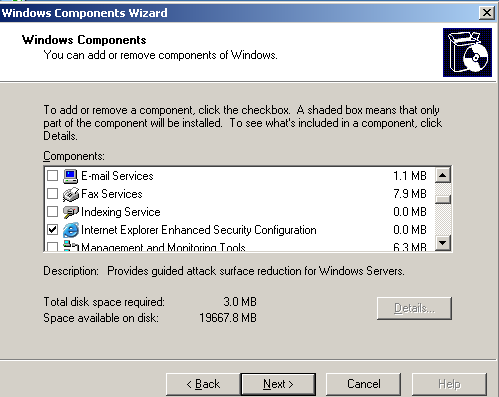
Yesterday while trying to work out why VMware update manager hated me and wouldn’t scan any of my hosts, one of the many fixes I was trying was making sure that my VMware Update Manager server could reach the patch stores to download updates and do patch checks and so decided to make sure of this I wanted to remove the painfully irritating Internet Explorer Enhanced Security Configuration. Now before I get loads of comments saying this is dangerous etc etc and that it’s a security risk,I know it is but for testing purposes I wanted to do it so I did. Now the point of this blog is that to disable it isn’t as easy as it used to be in 2003 as you used to just:

  • Go to Control Panel
  • Add/Remove Programs, 
  • Add/Remove Windows Components on the left hand side

 image

  • Untick it from the drop down list

image

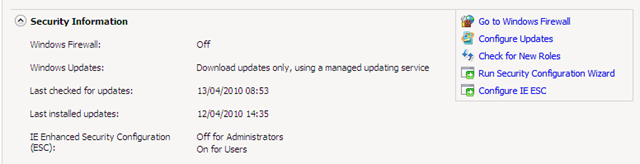
But for Windows Server 2008 I couldn’t find it anywhere in the features drop down lists which has replaced the Windows Components in Server 2008. Fortunately while on another Server 2008 server I noticed the place to disable it. In the Server Manager root page under the Security Information section is Configure IE ESC

image

All you need to do is click on this link and disable it for either Administrators and/or for Users. I only needed for Administrators so this is what I selected for the testing.

image

Gregg Robertson

VMW_09Q3_LGO_VMwareCertifiedProfessional_K

MCSES(rgb)MCTS(rgb)_1079_1080_1078image