TheSaffaGeek

My ramblings about all things technical


1 Comment

How to ease the management and monitoring of VMware Snapshots


Recently I have been doing some cleaning up of old snapshots that users have created and forgotten to delete and have therefore been around for too long and are in danger of either using up all the space on the datastore they are on or corrupting once the snapshot is ”deleted”/applied to the vm. I came across an additional way I can make my management and monitoring snapshot tasks easier and so I though I would write up a quick post of all the tools I use that save me having to manually go through a crazy amount of machines. I have used a few of my fellow virtualisation friends scripts and tools to help me do this.

  • First and the one i use the most is the SnapReminder script by scripting guru Alan Renouf. Alan’s script is a fairly straight forward one (his words not mine as I’m not at the level yet to be able to write this). The script is simple yet so very effective as it automatically finds the snapshot that meets your time criteria,finds out who created it ,retrieves their mail address from AD and mails them reminding them that they have this snapshot and it is older than a number of days. It’s really great when you get a mail back from a user replying to one of these mails and saying they don’t need it anymore as you know it’s going to make your environment better while you barely had to do anything to remind and alert them to it.
  • Next is part of the vCheck daily report ,one I have spoken of before which is also created by Alan. The vCheck tool is a brilliant reporter for gathering all the information you need to know to make sure your environment isn’t having any problems and enables you to be proactive so as to stop problems before the arise. The snapshot part of this report is always helpful so i know if people have removed their snapshots after being pestered by the SnapReminder e-mails and gives me a good idea of my progress in minimising the amount of snapshots over the limit.
  • Last one is one I stumbled across this morning while researching some other things and is one i didn’t think of creating but is one that is a brilliant idea especially for automated monitoring. Sadly i can’t seem to find the name of the guy who wrote up the article and did the video as i like to give credit where i can but good work to them for doing a video of it. The article shows and details how to configure VMware vCenter Server to send alerts when virtual machines are running from snapshots and reach a certain size. I’ve always used the alerts for memory,cpu and hosts errors which are pretty much the standard ones you get with vSphere with the additional and tweaking of a few to customise it for our environment but I’ve never thought of it for alerting me about snapshots. 

 Hopefully these tips and tricks will help save you some time and heartache with the management and monitoring of your companies snapshots.

Gregg Robertson

VMW_09Q3_LGO_VMwareCertifiedProfessional_K

MCSES(rgb)MCTS(rgb)_1079_1080_1078image

***UPDATE****

As is my luck ,on the heels of me posting this Alan brings out his latest instalment of vCheck, version 5. This new one has some brilliant features and really is an improvement over the last one. I’ve already given it a run over a few of the environments I support and the webpage view it now allows you to view the report in is actually a bit overwhelming with all the data and reporting you get back and has flared up some warnings i didn’t even know were there which is brilliant!

Also a quick congrats to Alan who has now become the latest member of Chad Sakac’s vSpecialists. A brilliant hire there if I do say so myself and very exciting for an EMC employee like myself that someone like him is now part of the team.

1 Comment

All things virtual VI

It’s definitely been a very hectic past few weeks for me and due to this it’s taken me quite a while  to get this posting to a post able standard. There has been some brilliant articles and news in the virtualisation arena and some resources that are currently and will in the future help me to make my daily job a lot easier.

First is one that i think is a common mistake among many people when they plan/build their VMware virtual environments.Craig Risinger has posted a guest posting on Duncan Epping’s yellow bricks website all about resource pools and how people need to keep an eye on the amount of resources allocated to a resource pool compared to the amount of machines that are in the resource pool. It does seem a very obvious thing to monitor but I even had to run an eye over the ones in my environment as with the amount of migrations and builds that happen it’s something you forget to check or amend.

Next is a great article I found when trying to explain blocks sizes to a fellow IT friend and about alignments and what both are and what you need to think about in your decision of aligning your data or not. Steve Chambers (@stevie_chambers) wrote the article and is one that I learnt some more from as well as helped me to refresh some of the knowledge i knew but due to not having used it for ages had forgotten some of.

Another posting is stumbled across these past few weeks that caught my interest was a posting by Ian Koenig all about IO DRS. This is a fairly new idea to me as I’ve obviously always done cpu and memory DRS as it’s standard to monitor and make changes dependent on vSphere’s DRS clusters settings but Ian has done a very intriguing and exciting posting all about IO DRS and how it could come very soon to allow you to monitor and make changes dependent on IOPS and details how it would all work. I then did a bit more research on the topic and it seems I’m not alone in my interest and excitement about this feature. Rich Brambley (@rbrambley) wrote a blog posting all about it and detailed some of the things that were mentioned about it at this years VMware Partner Exchange.

Fellow Saffa , Rynardt Spies’(@rynardtspies) has written up a very detailed and thought provoking posting all about VMware vCentre 4 Design Considerations and has given all the pro’s and cons he took when deciding  32bit or 64 bit, physical or Virtual and placement of the vCentre database as well as the Update Manager Server and database.

Simon Seagrave (@kiwi_si) has done a very clever and interesting 5 minute video reviewing vkernel capacity view and how it works and looks.  An application I haven’t tried myself but a it’s nice to be able to get a quick run through of what it is and does.

The infamous Eric Sloof (@esloof) posted up his vmClient last week. the tool looks amazing is something everyone needs to have a try out of as it has helped me tremendously by allowing me to quickly jump between virtual machines while trying to do loads of things at once. He’s also done a great video run through of how it looks and works

While listening to the VMware Communities podcast about ESXi last week I was reminded of the latest release by trainsignal the VMware Pro Series Training Vol1. As i mentioned in my posting about the resources i used for my vcp4 exam, the trainsignal videos are priceless in your studying and preparing for the exam as well as a very helpful tool if you need to refresh your knowledge on things you may have become rusty on. I’m planning on getting my hands on this latest instalment but if Kendrick Coleman’s(@kendrickcoleman) twitter and blog posting about it are anything to go by it should be brilliant.

Vladan Seget has posted a great little posting on how to add a second service console via cli. This caught my attention firstly because I’m personally trying to do more and more via vma and cli to prepare myself for ESXi as well as very good troubleshooting step by step.

David Convery has done a very interesting posting all about the problems he encountered with his vshield zones and the ways he got around them. I’ve been planning to implement vshield zones into my home lab for a while but haven’t got around to doing it yet, so David’s posting is now one of the pointers and steps I’ve added in my implementation of it.

Over the past week there has been a major buzz all about the release of simdk. Andrew Kutz(@sakutz) is the man behind this creation and what a little creation it is. Andrew has managed to create a VMware vSphere4 simulator which provides vSphere4 API-compatibility. I’m seriously excited to get it implemented and deployed in my lab environment as it should allow me to get so much more of my testing done and hopefully will save me some money in my VCDX lab deployment. I’m also keeping my eye on the official site of the product for any news and update.

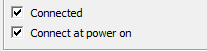
Lastly one from my daily troubleshooting. While migrating machines to new hosts we noticed that certain machines network cards were unticking the connected radio box in the vm’s settings

image

Even if we ticked connected and applied the changes it kept on reverting back to being unticked. My colleague Simon Phillips noticed the solution, that we had created the vSwitches with the standard 24 ports and therefore once we had reached that number of ports used there were obviously no more spare ports and so the machines couldn’t be connected. There were no errors telling us this was the problem but it’s a very good example that early simple planning and configuration would have fixed.

Gregg Robertson

VMW_09Q3_LGO_VMwareCertifiedProfessional_K

MCSES(rgb)MCTS(rgb)_1079_1080_1078image

Technorati Tags: VCP4,VMware,VCP,virtualisation

del.icio.us Tags: VCP4,VMware,VCP,virtualisation


1 Comment

All Things Virtual II

Seeing as so many people read my previous blog posting I thought I would continue with my keeping people up to date with all the things virtual and linked to virtual that i have been doing/working with/learning/reading up on this week so far.

I think the first one should definitely be about the release of esx(i)4 Update 1 a. Duncan Epping(@duncanyb) was the first person I saw talk about it and has done a very detailed blog posting about the update

Recently I had to explain to some people what Distributed V switches were and how they worked. Not wanting to make a fool of myself I went back to an article I used to strengthen my knowledge on the topic before my VCP4 exam and clarified what I was telling the people was correct (which it was thankfully) .It’s a great posting from Barry Coombs(@virtualisedreal) for anyone unsure or confused on what distributed switches are and what they do/are used for.

When I started in IT I always dreamed of working for a big company that was on the forefront of technology. This dream was one of the reasons I moved over to the UK and recently this dream was partly clarified by EMC being in the Fortune 500 list of companies. It’s a small thing in reality as you don’t have to be in the fortune 500 to be at the forefront of technology but 19 year old Gregg would have been impressed I think if I could tell him where he would be working 7 years later

As I’ve said in previous blog postings, I’m trying to grow my knowledge in powershell scripting as I feel this will only help make my daily job easier but it will also enable me to do it better in the future. Jonathan Medd directed me to a great podcast covering the topic called Get Scripting Podcast. I’ve unfortunately only been able to listen to a few of them but my aim is to get through them all before January next year. They are great for anyone wanting to learn ways of making their daily jobs easier and also to learn all the latest going’s on.

EMC recently announced their new storage technology called FAST. I’ve heard it called the DRS of storage technologies and was obviously interested to see what it was(as my knowledge on storage technologies has only started to grow in the past few months so is quite minimal at the moment) and how it worked. Two great pieces of information that came out this week that cleared some it up was Chad Sakac’s blog on the topic in which he goes into amazing detail on the topic and a great YouTube video Steve Chambers(@Stevie_chambers) tweeted a few days back showing Fully Automated Storage Tiering (FAST) on a Symmetrix V-Max

If you’ve read my blog postings on my preparing for the vcp4 exam you would know I used Scott Lowe’s (@scott_lowe) mastering VMware vSphere book. Now he has a new reference guide out called: VMware vSphere 4 Administration Instant Reference. It looks like another great reference guide for anybody in the VMware field and is another book I have added to my ever increasing Amazon wish list.

Last but not least a big congratulations to Jonathan Medd(@jonatanmedd) ,Matt Roblin(@mattroblin) , and Maish Saidel-Keesing(@maishsk) on the passing of their vcp4 exams this past week .

Gregg Robertson

Cert_Prof_Logo_B

MCSES(rgb)MCTS(rgb)_1079_1080_1078image

Technorati Tags: VCP4,VMware,VCP,virtualisation

del.icio.us Tags: VCP4,VMware,VCP,virtualisation


3 Comments

VMware Certified Professional vSphere passed

Below is my posting about my passing of the VMware Certified Professional vSphere exam that i passed almost a month ago now on  my company blog site http://consultingblogs.emc.com/greggrobertson/.

For anyone that has read my previous blog postings or is a follower of my random ramblings on twitter you would know i have been preparing for my VCP4 exam for the past couple of weeks/months. I wrote it last Friday being filled with an unbelievable amount of nerves due to a lot of people saying this exam was much harder than the vcp3 exam which i found very challenging.

Obviously by the title of this post i passed the exam and with an unexpectedly high score of 444 with the required pass mark being 300 (I’m more shocked by this score than anyone else as for a couple of the really hard three answer questions i had to make educated guesses ,which obviously i seem to have got right ) . I didn’t feel the exam was harder than the vcp3 exam but i did study a large amount more for this exam, had a much stronger base of knowledge this time due to my working with the technology for quite a while now, having built almost a dozen vSphere esx servers, several large environments ,having studied for and done my vcp3 recently as well as having attended the “what’s new” course for vSphere .  So the exam may be much harder for people.

As I’ve detailed in my past two blogs on the VCP subject I used and tried to cover a very large amount of resources in my studying which definitely kept me very busy in trying to get it all done/covered and understood before the exam.The reasons I took on such a large amount is firstly I obviously wanted to pass the exam but also I wanted to make sure of my knowledge so that I can do my job effectively, really make sure I understand everything I was learning and got experience in the certain things I haven’t had to use before which therefore I didn’t fully understand how they worked.

Many people have spoken and detailed the layout etc of the exam so i don’t see any point in repeating what they have said already in that respect.

I do agree though with the people saying this exam definitely tests you more on things you only really know about/how to do if you have worked with/played around with all the technologies in the vSphere suite of products which i think is a much better thing as i think it proves you haven’t just regurgitated information and also keep the accreditations status quite high.

A massive thank you has to go out to all the people i follow and chat with on twitter. They were more than happy to answer any questions i might have on things i couldn’t get my head around and also were a great help in giving examples from their real world experience of using the products. I would definitely recommend following the list created by @ericsiebert of the top 100 virtualisation people to follow on twitter. Sadly I’m not on it , but my aim is to keep working and learning so as to prove my inclusion on the list soon.

Good luck to anyone writing the exam, hopefully if you have to make educated guesses for some questions ,they will work out as well for you as they did for me.

Gregg Robertson

Cert_Prof_Logo_B

MCSES(rgb)MCTS(rgb)_1079_1080_1078image