TheSaffaGeek

My ramblings about all things technical


10 Comments

vCenter Operations Management Suite Resources

Recently I was tasked to get myself up to speed with vCenter Operations Manager and Configuration Manager as part of the vCenter Management Suite for a client delivery we’re doing at Xtravirt. So due to this I have been collecting all the resources I could to help me do this and thought I may as well do a blog posting on it for anyone also looking to implement the suite soon or who are just interested in learning about it. I will be constantly updating this and plan to do two separate postings on the tips and tricks I learnt after deployment for each of the products and my opinions of each.

VMware Operations Manager 5.x

  • The below videos are a great introduction to the product done by VMware via their YouTube channel

VMware vCenter Operations Manager Introduction
VMware vCenter Operations Manager
  • As is standard there are the Administration and Installation Guides which I would highly recommend reading through especially the Getting Started Guide to help you prepare before you deploy it.

http://www.vmware.com/support/pubs/vcops-pubs.html

http://www.vmware.com/pdf/vcops-5-installation-guide.pdf

http://www.vmware.com/pdf/vcops-5-getting-started-guide.pdf

  • You can download an evaluation of VCOPS for your own testing and to let you play around with it and learn how it all works. I’ve already done this as actually deploying and working with the solution helps me understand a hundred times better than reading documents on it.

https://www.vmware.com/tryvmware/index.php?p=vcenter-ops5&lp=default

  • The communities are a great place to read a few people problems and make sure you don’t make the same mistakes/prepare so you don’t hit the same hurdles:

http://communities.vmware.com/community/vmtn/server/vcenter/vcops

  • VMware have done a webcast on Automating Infrastructure and Operations Management with VMware vCenter Operations Management Suitewhich gives a great overview of the whole Operation Management Suite and Operations Manager capabilities:

http://event.on24.com/r.htm?e=397322&s=1&k=22E3A47A4D3EEC4794EEEAD75C1BC6E7&partnerref=WEB

VMware vCenter Configuration Manager

  • VMwareTV have also done a video covering vCenter Configuration Manager and the change management capabilities of the product. The video gives you a really good overview of the layout of the product too and the extensive amount of data and information you can find and create.
  • VMware vCenter Configuration Manager 5.5 has just been released and the best place for all the information is the Documentation Resources page for the product here:

http://www.vmware.com/support/pubs/vcm_pubs.html

  • The communities are a great place to read a few people problems and make sure you don’t make the same mistakes/prepare so you don’t hit the same hurdles.

http://communities.vmware.com/community/vmtn/server/vcenter/vcm

  • I’m very fortunate to work for a VMware partner and so there are a whole load of really great resources for VCM. The ones I have used and would recommend to people who also work for VMware partners are:

VMware vCenter Configuration Manager Essentials [V5.X]

vmLIVE – What’s New with vCenter Configuration Manager 5.5

Both give you a good overview of the product, it’s layout and what it is capable of and with the vmLIVE presentation you will be able to update your knowledge for the latest release.

  • The VMware Operations Management team were nice enough to ReTweet this posting and advised me that there is an official course called VMware vCenter Configuration Manager Fundamentals that has been upgraded to version 5.5 . The course looks to cover everything you could possibly need and I’m hoping I can get myself added onto it as it is self-paced which is perfect for consultant like myself who can’t take the time away from the client to attend a course.

Fellow vExpert and #LonVMUG attendee Ed Grigson has done an amazing blog posting all about Using vCenter Operations v5 – Introduction and deployment and has linked to loads of top VMworld Sessions and podcasts that I had no idea were out there. Make sure you have a look at his posting and keep an eye out for his future two postings on the subject.

vCenter Operations Manager for View


Hopefully these will help people looking to learn about the Suite and as I stated at the beginning I plan to update this with more resources as I come across them. If you know of any other resources out there please do leave a comment or drop me a tweet on twitter on @greggrobertson5

Gregg


Leave a comment

All Things Virtual 27


Yep I’ve decided to start trying to build up my All Things Virtual postings so as to try help myself keep up to date on the latest news happening in the virtualisation arena and also help people like myself who don’t have the time during the day/work week to keep up to date on the latest blog postings,news and articles. I’ve only listed the past few week’s worth of blog postings that have caught my interest and for future All Things Virtual I’m planning on doing it fortnightly/monthly.

First on my list is a reminder to all that the “applications” for the VMware vExpert title are still open. there are now three paths for the title which I blogged about in my VMware vExpert 2012 nominations and applications are open blog posting. You can find the application form and all the information also on the vExpert communities page here

Next was the results of Eric Sieberts yearly Top Virtualisation Blog poll. I was very honoured to be included in the voting this year for the first time and came in at 103rd which I’m really pleased about Smile. A massively congratulations to all the top 10 and top 25 blogs and it’s amazing to see that 1 in 10 of the blogs in the votes were from the London VMware User Group #LonVMUG crew.

The mad rush for the VCP5 upgrade before the end of February cut off date is in full swing. Almost all my colleagues at Xtravirt have done theirs in the past week and almost every day loads and loads of the people I follow on twitter are posting about their passing of the exam. For those that have decided to bypass the cut off date due to possibly already having done the what’s new course or are happy to do the what’s new course there is a massive amount of top resources out there for you to use. I’ve tried to list them all on my VCP5 page. Cody Bunch’s VCP5 Brownbag series is now in full swing with videos of all the objectives listed by Cody in his VCP5 Brownbag Playlist posting.

Talking of certifications there were four new VCDX’s announced, so a massive and envious congratulations to Tom Arentsen @tomarentsen,Mike Brown @vmikebrown, Matthew Meyer @mattdmeyer and Hugo Phan @hugophan. Hugo did a very helpful blog posting all about his 5 simple steps to the VCDX certification . His steps do seem very manageable and are great for those people out there feeling up for the challenge. One of the people who has already thrown his hat in the ring is fellow vExpert and top blogger Christian Mohn who announced his intent in his blog posting here . Good luck Christian, maybe now that my new role with Xtravirt is gaining me some serious design exposure and experience I may join you in attempting the VCDX if i can find the time to do what I couldn’t do for VCAP4 and gain both my VCAP5-DCA and DCD. I’ll keep you all posted on my decision Smile

Next is a posting by Gabrie van Zanten all about the Auto Deploy GUI VMware fling. Gabrie does a great walkthrough of how to use the tool and how it makes your life much easier. I’m currently planning to use the tool in my testing of Auto Deploy in my home lab and hopefully it’s as good as he describes

As I’ve mentioned loads of times in my VCAP4,VCP5 and VCAP5 study resources pages, the trainsignal videos are an amazing learning resource in my opinion and are as good if not better than attending the respective courses. TrainSignal have recently released the VMware View 5 Essentials Training videos. The videos are described by Trainsignal as  “Virtualisation experts Brian Knudtson and Lane Leverett guide you from VDI basics, through app virtualization and more. Learn how to get your View environment up and running and reduce costs for your end-user desktops”. I’m currently started to use these videos in my attempt to strengthen my VDI skills and hopefully if all goes to plan try obtain my VCP5-DT.

Talking about VMware View and the VCP5-DT, the VMware View 5 Install Configure and Manage course was released in early January and Eric Sloof posted all about it in his posting here. The course looks really good and maybe if I am given the opportunity i may be able to attend it and give a good overview for anyone thinking about attending the course.

Lastly, a massive thanks to John Troyer and Alex Maier for the vExpert gift and Certificate. I’ve already started using my bag as my main bag and geekingly added my vExpert and blogger badges from the past two VMworld’s also (yep I’m sad)

image

Gregg


1 Comment

VMware vExpert 2012 nominations and applications are open

Wow I can’t believe it’s been a year since the last nominations and applications for the VMware vExpert designation! But it has been and the nominations and applications for vExpert 2012 are now open. If you don’t know what being a VMware vExpert means here is VMware’s description: “The annual VMware vExpert title is given to individuals who have significantly contributed to the community of VMware users over the past year. The title is awarded to individuals (not employers) for their commitment to sharing their knowledge and passion for VMware technology above and beyond their job requirements.”

I was very blessed to be selected as a VMware vExpert 2011 and loved every moment of it and was amazed how well my vExpert Spotlight series of postings went this past year. This year the paths have changed a bit with there now being three paths people can be selected from. The description of the paths are:

Evangelist Path
The Evangelist Path includes book authors, bloggers, tool builders, public speakers, and other IT professionals who share their knowledge and passion with others with the leverage of a personal public platform to reach many people. Employees of VMware can also apply via the Evangelist path.

Customer Path
The Customer Path is for internal evangelists and community leaders from VMware customer organizations. They have contributed to success stories, customer references, or public interviews and talks, or were active community contributors, such as VMUG leaders.

VPN (VMware Partner Network) Path
The VPN Path is for employees of our partner companies who lead with passion and by example, who are committed to continuous learning and to making their technical knowledge and expertise available to many. This can take shape of event participation, video, IP generation, as well as public speaking engagements.

With the program growing, our goal still remains the same: to honour individuals who go above and beyond their everyday job requirements to share their technical knowledge and expertise with others; to help enable these individuals to make an even greater impact in the world; and to keep a high standard of vExpert recipients.

If you feel yourself or someone you know would be a good candidate for the designation then go to the vExpert page here: http://communities.vmware.com/vexpert.jspa and submit your application or nomination.

Good luck to everyone who has and is applying and hopefully I’ll be fortunate enough to be a vExpert 2012 Open-mouthed smile

Gregg


1 Comment

DevonIT VDI Blaster Experiences

Recently I’ve been introduced to and have been rolling out DevonIT’s VDI Blaster at one of Xtravirt’s customer sites to temporarily enable VDI connectivity whilst still having the ability to boot back into the normal OS should any problems arise. So I thought I would do a blog posting on my experiences with the solution and how I did it.

Overview

DevonIT marketing state:  “VDI Blaster™ can be used without taking the risk to erase your existing Windows installation. To install VDI Blaster™, just execute the installer on the PC you want to repurpose. After installation, the PC reboots by default in thin client mode, running Devon IT’s Terminal Operating System (DeTOS™).”  When I initially heard what the product did I was a little sceptical, especially seeing as it only costs $29.99 (£22) per licence. But I was keen to give it a try and see if it was as easy as they stated.

We also decided to use their Echo Thin Client Management Software to allow us to control what the users saw once they booted into the DeTOS and to make sure all they saw was a kiosk view with the logon page to the VDI environment.

Before I did the installation I found a fairly good overview video for the product on YouTube (below) although it’s unfortunate they don’t actually show the screen but rather zoom in partially with the camera so you can’t see it very clearly.

Installation

Echo Management Server

For the installation of the Echo Management Server it was quite straight forward as all that needed to be done was to download the Virtual Appliance and import it into my virtual infrastructure. Once imported all that needed to be done was to set an administrator password, give it geographical settings,DNS settings, a static IP address and then set a custom DNS setting to allow machines to obviously resolve the ws-broker name of the Echo server.

VDI Blaster Thinclient

The installation of the Thinclient software is extremely simple and is essentially a next, next, next finish installation.

image

image

image

Once the machine reboots you will now have the dual boot option of your unaltered original OS or the new Devon IT DeTOS for VDI Blaster

image

Management and customisation

As mentioned we also purchased the Echo Thin Client Management Software so we could manage the VDI blaster desktops and also push out a customised profile.

  • To connect to the administration page you will need to browse to the name or ip you assigned the management server via an internet browser. Once in you will need to add your licences to the management server to allow terminals to connect and be managed by the management server by clicking on the Maintenance tab on the left and then clicking on Manage Licences and inserting your licence key/s.

clip_image010

We created our customised profile with the URL to our VDI web interface automatically in the browser so that it opened up in kiosk mode on device bootup.

  • To do this you first need to create the connection settings or else you will need to go edit your profile once you have created the connection.You create the connection by going to the connections section of the Echo Administration page

clip_image001[6]

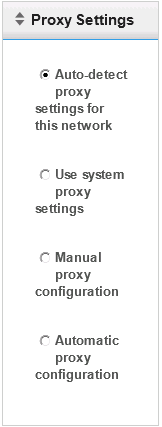
  • Select Firefox as the protocol,set the URL to the VDI web interface for your VDI environment,give the connection a name and description and tick the box for the autostart of the page upon the device bootup. You can also specify a proxy server if there is one and the kiosk mode settings you want

clip_image002[6]

clip_image003[8]

clip_image004[7]

clip_image005

clip_image006

Once the connection has been created you can now create a profile that you can then apply to any client that connects to the management server

To create a profile:

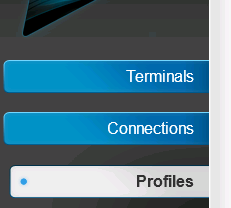
  • Click on the Profiles tab on the left

clip_image007

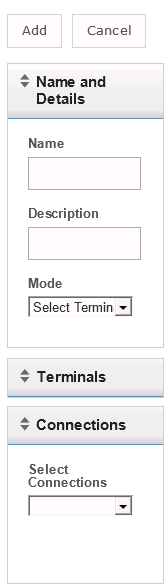
  • Give the profile a name and description and select if you want it to be the default profile for all your terminals or selected terminals. Then expand the connection dropdown and select your newly created connection

clip_image008

  • You can add additional settings like terminal settings,assign certificates and apply a specific disk image that you either downloaded or one you created yourself.

clip_image009

Now that the profile is created, when a terminal boots up it will get the applied settings and the connection from the assigned profile and go straight to the VDI web interface.

Conclusion

The software does what it says it does and the installation and configuration is really simple. For me personally I think it works perfectly as a small interim solution in your migration to a full VDI deployment as it allows you to let the user boot into their old machine if there are any problems thereby allowing them to carry on with their job and is also a great way of possibly using old hardware as a VDI terminal if you can’t afford to buy dedicated thin client hardware(Which DevonIT do also sell)

Gregg


Leave a comment

Umshini Wam’…. *Cough* I mean Vote for me.


A very quick posting that the voting is now open for the top VMware & virtualization blogs. Eric Siebert runs this every year and this year has even been sponsored by Trainsignal.

I’m very honoured to be included on the list of blogs available to be voted for.So if any of my blog postings or my VCP/VCAP study resources pages have helped you in any way a vote would be appreciated Open-mouthed smile

image

If anything at least cast a vote for the blogs you do enjoy even if it isn’t my blog as getting onto Eric’s list is a very high honour for a VMware related blogger and there are some amazing blogs and podcasts out there that deserve your votes.

Gregg


2 Comments

January 2012 London VMware User Group

Yesterday I was fortunate enough to not only attend the London VMware user Group but actually presentclip_image002. The day started pretty early and due to traffic I arrived half an hour late to the welcome and introduction from Alaric Davies so snuck into the back to not disturb and t allow me to have one or two last read through’s of my session at the end of the day.

The first session was from Symantec all about their ApplicationHA offering and then a live demo of bringing down a SQL instance on a virtual machine and how Application HA would automatically restart the service. They next demoed the product by deleting the database and showed how ApplicationHA would utilise Backup Exec to restore the database back and get it working again. A very cool product and one I’m hoping to test out in my home lab although sadly I wasn’t able to get myself an NFR licence that they were offering from their stand so hopefully I can find it and play with it.(UPDATE: Symantec saw this posting and have got in contact with me and have given me an NFR licence =0) ) Below is a video of what was shown to us on Thursday

ApplicationHA and Backup Exec Auto Recovery Demo

Next was Chris Kranz and Alex Smith presenting a session titled “would you like fries with your VM?” the session was a really great one as the guys spoke about how the landscape for IT professionals is constantly changing and how a normal server administrator was replaced quite largely by virtualisation and advancements in automation and with every release of the vSphere suite of products more and more work is being taken away from storage admins and network admins and now with cloud picking up the virtualisation admins are having to adapt or lose their roles. A very chilling reminder that if you don’t adapt in IT sooner or later you’ll be out of a job.

There was then a break where I got to meet a soon to start recruitment for Xtravirt Sean Duffy and chat about South Africa a bit with him being a Saffa too clip_image004I also talked shop with Alan Renouf, Steve Chambers, Simon Davies, Ed Grigson, Jeremy Bowman and Harry Potter look alike Jonathan Medd.

The next session I attended was the VMware View session titled “End User Computing: Today & Tomorrow” by Clive Wenman from VMware. Sadly due to connection speeds he wasn’t able to do the demo he wanted but instead gave us a good overview of the new features in VMware View 5 and ThinApp 5. We then got talking about Horizon Manager and got a nice impromptu demo of the product and how it works which was highly interesting to me and looks to be a very good product once it’s released outside the US.

After lunch I attended the NimbleStorage presentation all about their offerings and the savings their products can bring you and how it all works. for me personally there was tiny bit too much comparison to competitors products but the product does look very interesting and I might actually be getting my hands on the product in my current role so hopefully I can write up and posting or two on my thought on the product once I’ve had a good play with it clip_image006

Next was Dave Hill and Aidan Dalgleish presenting largely what Dave and Chris Collotti presented at the VMworld last year titled “Private vCloud Architecture Deep Dive”. I found this highly interesting as it was something I had hoped to attend at VMworld Europe but unfortunately due to the times they did them I was unable to attend. The session was highly interesting and gave loads of reference architectures and all the varying network pool methods and what each will enable you to do. I think the main recommendation from Dave that I think everyone needs to remember is that you need to build your vSphere environment correctly or else you vCloud environment won’t work like it should.

Now was the time of reckoning, my session was due and a number of people I chat to on twitter had made sure they were in the front row to heckle me and ask me loads of questions too. I was due to co-host the session with Scott Vessey from Global knowledge and of vmwaretraining.blogspot.com fame. My presentation was half around my VCP5 study resources page and all the resources mentioned on there that I used in my preparations for the VCP5 exam and how they helped me pass the exam and then a whole bunch of sample questions from Global Knowledge’s VCP5 Exam Preparation Workshop. Even though I started off quite nervous I think it went well and once we got to the sample questions at the end there were loads of discussions around the answers with some of the questions getting people calling out all the answers as correct even though there was actually only one correct answer. Quite few people said they enjoyed it and I think I put the fear into a large portion of the people in the audience after the sample questions and those knowing that have 31 days until the waiver period for VCP4 holders not needing to do the What’s New course to pass expires.

Afterwards we made our way to vBeers where I got to talk to loads of people (including fellow Xtravirt new starter Darren Woollard)and got some very helpful pointers on how to improve my presentation skills in my aim to hopefully present at VMworld this year. The day was a huge success in my opinion and it was great that over half the attendees were first time attendees! Thanks to the VMUG panel for setting it all up and hopefully I can attend the next one on the 17th of May (work permitting of course)

Gregg


Leave a comment

January 2012 London VMware Users Group (LONVMUG) and I’m presenting

Just a very quick posting to remind anyone around the south of England or who is willing to come to the south of England for it that the next London VMware User Group (LonVMUG) and the first one of 2012 is happening on Thursday the 26th of January. Also I’ll be presenting at it, the first time I’ve ever done a session at a VMUG. Mine will be around my VCP 5 Study Resources, my exam experiences and a few surprises Smile

If you haven’t registered I would highly recommend you do so ASAP as these are more often than not fully booked a week or two before the event. You can register for the event here and hopefully I’ll get to meet you there.

After the VMUG the standard vBeers will take place. If you’ve somehow never heard of vBeers before the below is just for you Smile.

vBeers

Is an informal get together of virtualisation enthusiasts and professionals to meet and discuss all things IT. It’s a great opportunity to network, learn and meet like minded people.

clip_image001

The following is part quoted from Simon Seagrave’s Website :

Enjoy Talking Virtualization? Come & Socialise at vBeers!

vBeers[7]Fancy meeting up every month with other IT virtualization enthusiasts to socialise and chat over a cold beer, wine or soft-drink? If so, then vBeers is for you! This is a great opportunity to meet with other virtualization enthusiasts and professionals and enjoy discussing all things virtualization, and in fact anything else that comes up in conversation…

vBeers is open to everyone so whether you are a VMware vSphere, Microsoft Hyper-V, Citrix XenServer user/fan or none of the above it really doesn’t matter as “it’s all about the virtualization”.

The London vBeers meet-up is held at the Pavilion End Pub . Details and directions below:

When & Where

The London vBeers are held on the first Thursday of every month or after a VMUG meeting starting at 6pm in the ‘pavilion end pub

407fefe6-2a76-102d-855f-000e0cc30319

Location: The ‘pavilion end pub’, London

Address: 23 Watling Street Moorgate EC4M 9BR

Date: First Thursday of every month and after VMUG meetings

Time: 6:00pm

Map:

image

Gregg


12 Comments

VCP 5 Exam Experience.

This morning I sat my VCP 5 after around two and half weeks of studying. As I’m sure, you know I’m under NDA so I can’t mention too much but what I can I will in the hope that maybe it will help someone prepare better and thereby pass the exam.

I utilised a large amount of resources although due to my time constraints I did have to pick and choose which ones I felt would help me most. All the resources I used in my preparations are listed on my VCP 5 page here: https://thesaffageek.co.uk/vcp5/ .The ones i personally used from my list were:

  • The vSphere 5 Trainsignal videos by David M Davis and Elias Khnaser. I watched all the videos as i wanted to make sure i didn’t miss a low level setting that might come up in the exam and had a feeling the VCP 5 would require you to know each features inside out (which they do)
  • I know not helpful for people who haven’t attempted it but the preparations for my VCAP4-DCA really helped me as it gave me a really good base knowledge and loads of experience installing configuring and managing loads of the less utilised features. Off of this i would recommend getting loads of hands on lab time and make sure you install all the features and know how they work as the exam is based much more on experience rather than picking the new feature in vSphere 5 from a list. As mentioned in the BrownBag webinar I did last week with Damian Karlson you can create a lab from a few desktop computers or even use VMware workstation on your laptop and build a small lab that way.
  • The vSphere 5 Clustering Technical Deepdive by Frank Denneman and Duncan Epping helped me loads! the exam doesn’t expect you to know the deepest configurations but i read the whole book anyway and it really did help me better understand how it all works and even if you don’t want to read the whole thing then get the book and read the first few chapters of each of the sections so you know how it all works and what the new features are all about.
  • Andrea Mauro’s study guides were amazing and really helped me systematically make my way through the blueprint and flagged up points i possibly wasn’t very strong in so I could go research and learn more about it. All his guides are on his blog here: http://vinfrastructure.it/certifications-on-virtualization/vcp/vcp5/. They really are great
  • One of the resources I used to do the further research of features I wasn’t that strong in was Scott Lowe’s Mastering VMware vSphere 5 book. The book is great and gives amazing examples and explanations for all the features. Due to time constraints, i wasn’t able to read the whole book but it was really helpful for further studies and if I had more time I would have liked to have read the book.
  • The practice exams by Simon Long and the VMware mock exam were highly beneficial as they gave me a really good idea of the style of questions and helped flag up parts I was weak in and thereby needed to spend more time studying. As mentioned in the BrownBag, if you get 100% for the VMware mock exam you can’t retake it, which is insane but something to keep in mind.
  • I did mention it above but I feel it’s so important I want to mention it again. Get yourself a lab/build a lab on your laptop/desktop and practice everything as the exam is based on experience so the only way you are going to get a really good understanding of how everything works and all the features and settings is to get a number of practice hours in.

Well that’s all the things I used for the exam and I’m pleased to say I passed the examclip_image001. The score was a lot closer than I had hoped but seeing as the exam was so difficult I’m very pleased with my pass. Good luck to anyone sitting the exam soon.

Gregg


11 Comments

The Next Chapter

Until you spread your wings, youll have no idea how far you can fly.- anonymous

Almost five years ago, I made the decision to make a change or risk the chance of possibly never getting the opportunity to spread my wings. After having worked for my company in South Africa for just over three years and having grown from someone on a three month contract tasked with creating an IT equipment inventory of all the companies IT equipment to being a permanent employee and the Systems Administrator I handed in my notice and decided I wanted to move to the UK to try get a job with a large IT organisation and work with cutting edge technologies. I left my then girlfriend (now wife), parents, lifestyle and comfortable job back in South Africa and make a leap of faith that I could do it. I’m proud to say the risk paid off and five years down the line, I’m working for one of the biggest IT companies in the world, working with innovative technologies and have grown immensely from when I first came over to the UK both personally and professionally. However, the time has come yet again for me to push myself out of my comfort zone and try spread my wings even more. So as of the 12th of December, I will be joining Xtravirt as a Technical Consultant specialising in virtualisation and complimenting technologies. I have loved my time at EMC Consulting and owe so much of my growth to the people I have worked with at EMC and previously Conchango and the opportunities both have granted me to grow and keep advancing my knowledge.

My leaving is not down to disliking my role at EMC Consulting, as I’ve loved it immensely. I’ve felt that the next logical step in my career was to test and hone my skills and knowledge in the consulting arena as a consultant and Xtravirt have given me an amazing opportunity to learn and grow an immense amount while joining a very exciting team of people working on loads of very exciting projects.

If you haven’t heard of Xtravirt before, you should have and I have full confidence you will hear a lot more of us in the future. Some quick facts about Xtravirt:

  • Xtravirt were awarded VMware EMEA Consulting Partner of the Year at this year’s VMworld Europe.
  • Xtravirt are also very well known in the virtualisation community for their tools especially the Free vAlarm application which David M Davis of Trainsignal fame covered in one of his VMware vSphere Performance Monitoring Training lessons and the vLogView application which provides the ability to store, view and search ESX Server log files from multiple ESX Servers, without requiring individual login, navigation and manual file transfer to name but two.
  • Xtravirt is a knowledge-based company that delivers its expertise in virtualization online and in person. They have a reputation for astute leadership and expertise through their work with an impressive array of organisations. It is this real-world experience that drives the ability to provide the best professional consultancy services available

I’m still planning on blogging as much as possible and am actually very confident of being able to blog about a lot more technologies and a much broader base due to Xtravirt having no affinity to any specific vendor or technology. Although I don’t know about any Hyper-V postings clip_image001I’ll still be on twitter whenever I have the opportunity and will still try answer and help people on the VMware Communities and try attend the London VMUG’s and vBeers.

Gregg


Leave a comment

BrownBag VCP 5 Guest Appearance

A very quick posting to point out that the recording of my guest appearance as a panellist on Cody Bunch and Damian Karlson’s VCP 5 BrownBag is now available for viewing. The BrownBag was at 22:30 GMT to make sure loads of people in the US could join it but it wasn’t extremely late for me out of the UK. In the BrownBag I go through all the resources I’m using for my VCP 5 study preparations as mentioned in my VCP5 page.You can watch the video here:

ProfessionalVMware BrownBag – VCP5 from ProfessionalVMware on Vimeo.

I really enjoyed it and hopefully I can do a few more in the future. A big thanks to Cody and Damian for inviting me and hopefully the resources i covered will help people

Gregg