TheSaffaGeek

My ramblings about all things technical


5 Comments

Upgrading from vSphere 4.1 to vSphere 5

Yep the time has yet again come round that the bi yearly mass upgrade of all of my VMware environments needs upgrading to the latest version. Thankfully this upgrade process hasn’t been too difficult but seeing as so many people said they found my posting all about the upgrading of my environments from 4 to 4.1 helpful I thought I’d keep the idea going and do one for my upgrading to 5 and give people some hints on things that slowed me down and things to plan for before doing the upgrade

  • First is the upgrade notes, I would recommend reading through this and following it step by step and using it as a reference guide as it really does flag up all the things you need to think about and know before during and after the upgrade.
  • Second is the Licencing. If you haven’t upgraded your licencing then i would recommend going to the licencing page where you can get all the answers to your licencing questions and concerns.
  • Next is the checklist to make sure you have planned for everything and you won’t get any nasty surprises
  • Make sure you run the vCentre Host Agent Pre-Upgrade Checker to make sure all your hosts are compatible
  • The upgrade follows the same steps as previous upgrades with:
    • Upgrade the vCentre Server: I already have my vCentre on x64 etc so there was no need for major changes this time if you do need to follow the steps then I covered them in my upgrade from 4 to 4.1 posting)
    • Upgrade your VMware Update manager Server: This was straightforward to do and is really helpful to do prior to the upgrading of your hosts, as there are already two patches for ESXi 5.
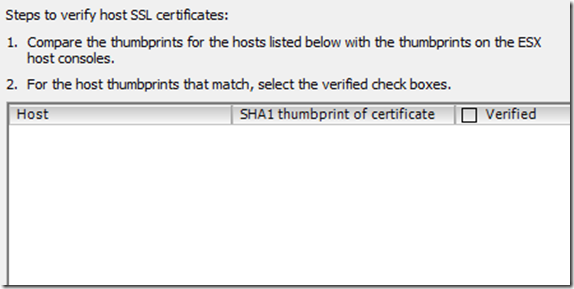
    • Upgrade your hosts to ESXi 5: This can be done in numerous ways, the one major snag I hit was that 80% of my hosts needed their BIOS updated to the latest version to be able to run ESXi 5. Not sure when they added this as ESXi 5 beta worked on them so they must have changed something last minute before GA but I wrote about all my steps in my posting PSOD while trying to install vSphere ESXi5 on a Dell PowerEdge 1950 and OMSA 6.5 installation. As the title states there is also a currently unsupported version of OMSA for ESXi 5 (OMSA 6.5) which I would highly recommend installing prior to upgrading your host and the new variable to allow you to connect to the host via the Dell Management Console (DMC). Also don’t forget to verify your hosts so that HA is enabled, i spent a bit of time scratching my head wondering why the HA agents were failing on my hosts until i remembered the step to verify them, Administration->vCentre Server Settings-> SSL –> verify the hosts in the bottom box clip_image001
    • Upgrade your Virtual Machines: This also follows the same steps of update all the vmtools on your virtual machines, then upgrade the hardware version to version 8 on all of them. If you have machines you don’t want to take down then it’s not a train smash as vSphere 5.0 fully supports running virtual machines with VMware Tools version 4.x as well as versions hardware versions 4 and 7. So you’ll have plenty of time to plan for that outage upgrade window to do the work at a later date.
    • Upgrade your Datastores : Personally, I’m waiting this out as we change datastores relatively often so when the time comes to make a change I’m going to upgrade them to VMFS 5. The steps to do it are really simple and vSphere supports VMFS 3 up so you can take your time upgrading your datastores, although obviously, the new VMFS does have all the new features and capabilities so don’t wait too long.
  • There are two videos created by VMware detailing how to upgrade you hosts to ESXi 5 with the installer and with VUM which are really great to watch before you do the upgrades and give you the peace of mind you’re doing it correctly.
  • Also there is the VMware upgrade community which is a great place to see problems people have had and the fixes they found for them if you hit any problems or if you just want to have a look and see if there is anything that may apply to you and will save you having the same problem
That’s my list and how I’ve done my upgrades. Apart from the need to have a large number of my hosts on the latest BIOS revision, the process was fairly simple in my opinion.

Gregg


Leave a comment

PowerEdge 6950 shows 112GB of RAM even though 128GB is installed


For the past few days we’ve had the above problem where we upgraded one of our PowerEdge 6950 server to 128Gb of RAM but once we booted it it only showed 112GB of RAM. My colleague James Voll and I tested to try work out which RAM bank may have been causing the issue and found one where if we removed the two RAM sticks it still only showed 112GB so we contacted Dell and got an engineer out who replaced the motherboard for us but still after the replacement it wasn’t showing the full amount. in actual fact due to the motherboard coming with the basic BIOS update it only showed 12GB!! So we updated the BIOS to the latest revision and it was still showing 112GB. I logged into the BIOS and went to the memory settings for the server and noticed “Server Memory Test” was enabled so decided to disable it and reboot the server to see if possibly it would change something and remarkably it seems it did as now the server showed 128GB of RAM and booted twenty times faster through the post screen. I’m not if it’s a bug or because the 6950’s don’t normally have that amount of RAM in them but disabling the Server Memory Test feature seems to have given back our missing 16GB of RAM Smile

Hope this saves someone the time and effort it took for us to work it out

Gregg


1 Comment

PSOD while trying to install vSphere ESXi5 on a Dell PowerEdge 1950 and OMSA 6.5 installation

This blog has been sitting in my drafts for a while and I have edited it a number of times while I tried to work out my problems and then my trying of multiple different paths to fix the problems I kept encountering.

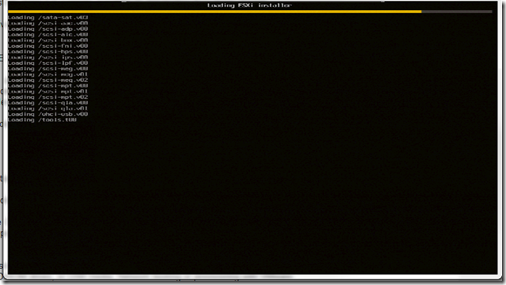
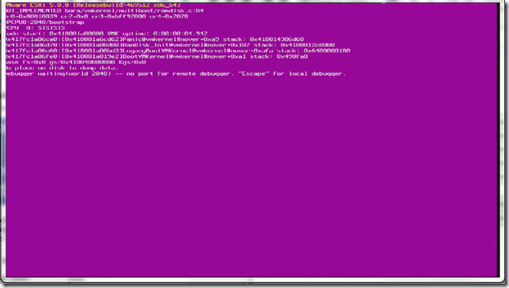
First was my attempt to install ESXi5 onto my test lab Dell Poweredge1950 server which had ESXi5 beta installed on it already. The server booted fine off on the disc but once it reached “loading /tools.t00” it would give me a PSOD as shown in the two screen shots below.

clip_image001

clip_image002

After making sure it wasn’t my disc I went to the place I really should have looked at first (VCP4 101 Gregg…) and looked to make sure my server was actually supported on ESXi5 by going to the VMware HCL . As shown below the server is supported but requires the latest BIOS revision, which is a real pain as this server as i mentioned, had the ESXi5 latest beta on it so obviously this requirement has only been implemented in the GA release.

clip_image003

clip_image004

The fun part of all of this is my servers are remote to me as they are sitting in one of EMC’s corporate Datacentre’s. Now here is the part where the steps I followed to get my BIOS updated has been changed a number of times as I tried booting off the system Build DVD and updating the BIOS that way but this requires a formatted USB stick/key with the BIOS software on it which is fine for my one server but not for the future upgrades I need to do. So I followed the Open Manage route. After speaking to Kong Yang at Dell via twitter, he pointed to me to the currently unsupported but the latest available OMSA package for ESXi5 and steps of how to do it. The difficulty for me originally was that OMSA 6.4 didn’t work for me on ESXi5 beta and the unsupported version isn’t on the dell website or FTP site due to it not being supported yet. The steps of how to install OMSA on ESXi 5 via ESXCLI are here:

http://attachments.wetpaintserv.us/32hS7wyYeMyal_il29fegw528983

Also as mentioned, the VIB for OMSA 6.5 isn’t available via FTP.DELL.COM so you need to download it from this link:

http://en.community.dell.com/dell-groups/dtcmedia/m/mediagallery/19928975/download.aspx

The page Kong pointed me to with the above two links is here:

http://en.community.dell.com/dell-blogs/enterprise/b/tech-center/archive/2011/08/26/dell-openmanage-server-assistant-omsa-support-for-vmware-esxi-5-0.aspx

Next is another snag I hit as now the old process of managing your dell server via openmanage on port 1311 isn’t supported for ESXi and Dell recommends you use the Dell Management Console, which requires a distributed web server, installed on a Windows server. Also you have to licence the Dell management Console.Due to my  desperate need for my test server to be upgraded to the Ga version on ESXi5 I did the BIOS upgrade for my test server by quickly installing Windows 2008 and just running the BIOS upgrade application so as to make sure ESXi5 did install once the BIOS was at the correct version and it does install perfectly.

But for my future servers I expressed my amazement at this requirement to pay for a licence for the DMC to allow me to do something I used to be able to do for free on twitter and Jonathan Medd replied to me with a blog posting he has done with a work around (What a Legend). This route does work if your servers are ESX/i 4.x and then you can use OpenManage to update your BIOS.

For me installing the latest OMSA on my ESXi5 beta and now GA test server didnt bring up the UserVars.CIMoemProviderEnabled parameter unfortunately and so I  created a VMware Communities posting looking for a way to connect to OpenManage by using OMSA6.5 and ESXi5 to allow me to manage all my future ESXi5 servers.  I got a number of responses and as mentioned in the thread it looks like the new variable is now UserVars.CIMvmw_OpenManageProviderEnabled

Gregg


Leave a comment

All Things VMworld US 2011 Day 3


Well that’s VMworld coming to an end. It seems to have gone by so quickly but it also means that now we can start talking about VMworld in Copenhagen and I don’t have to keep hearing about the killers playing the VMworld closing party (I’m not jealous at all Winking smile ) . Day 3 is normally the day where everyone hits the solutions exchange, the sessions and the hands on labs. For me day 3 is great for all the videos that are put out as now they can show us all the new products and announcements mentioned in the keynote by Steve Herrod on VMworldTV and even an interviews with Steve himself detailing all the announcements he made.

  • First is the preview of Horizon mobile by Samsung and LG who are the two mobile phone providers working with VMware to bring out Horizon Mobile
Horizon Mobile
  • The next video is done by @the_anykey and is the interview with VMware CTO Steve Herrod. This is a must watch as it gives you a brilliant idea of the announcements he made and what they will mean for peoples daily lives (Horizon mobile for one)
Steve Herrod
  • Next is the VMworldTV video all about Project Octopus. As I said in my Day 2 posting I think this is the best announcement so far and will be changing a lot of peoples way of working in the near future.
Project Octopus
  • Next is an interview with Scott Davis, VMware’s CTO of end user computing and is all about AppBlast with a really awesome demo of it too! I’m really looking forward to this technology being released.
AppBlast
  • The next has to be my favourite, probably because of the highly amusing appearance of “PowerCLI man” and my knowing of Alan due to him being a fellow London VMUG attendee and former EMC vSpecialist. Alan gives a great overview of all the new features in PowerCLI 5 and even mentions one of my firm favourites the vCheck script. Also as said there’s even an appearance by PowerCLI man Smile
PowerCLI
  • Another twitter and Fellow vExpert friend of mine Kendrick Coleman was also interviewed by VMworldTV all about the free tools available out there for people to use. Kendrick and David M Davis of Trainsignal fame are doing their Top 10 free tools sessions again and from this Kendrick mentions a few of them in the video and even mentions a few that have been developed by people all by themselves like Ricky El Qasem’s vSphere Plugin Wizard which is mentioned by Kendrick. It’s very sad to hear that the session Kendrick and David have done in VMworld Us has been cut from VMworld Europe. Hopefully they get one of the slots for most popular session again
Kendrick Coleman Free Tools
  • Last but not least is the Day summaries of the Past three days at VMworld. As mentioned in my Day 2 posting these are a great way to find out what’s been announced and is happening if you don’t have a lot of time to read up on what’s come out.

Day 1

Day 2

Day 3

Well that’s everything for Day 3 of VMworld US 2011.

Gregg


Leave a comment

All Things VMworld US 2011 Day 2


Wow day 2 of VMworld really stepped it up and the keynote announcements did not disappoint at all. Some amazing announcements during the keynote by VMware CTO Steve Herrod and even a really classic line by Vittorio (Product Manager for EUC at VMware) stating a yellow Ferrari he supposedly hit as part of one of the demo’s isn’t a real Ferrari due to it being yellow. So here are all the things that caught my eye from the news of VMworld day 2:

  • The main news of the whole day in my opinion has to be from the keynote by VMware CTO Steve Herrod. Due to it being in the morning unlike Paul Maritz’s the day before I was able to watch the keynote streaming and personally (possibly because new technology keeps my attention a million times more) a lot more interesting. If you haven’t watched the keynote, you can still see it and Paul’s by registering here. I’m not going to give a minute by minute detail of the keynote but in my opinion the big announcements of the keynote were:
    • The announcement of VMware View 5. Steve did a demonstration of View 5 in his keynote where he provisioned a pool of virtual desktops using a “technology called linked clones” as he said. It did look quite good but wasn’t very much of an in-depth demo in my opinion and gave more of a look of it rather than what it can do. Vladan Seget has done a great blog posting all about the announcement of VMware View 5 and has given some great details all about it if you are interested here. Some of the new features do look amazing and I’m really looking forward to seeing more about it in the coming weeks. The VMware View team also did a very light hearted video of a Rock Parody here
    • Next was the demo of Project ThinApp Factory (love how they refuse to call it an app store clip_image001). This demo was much more interesting and is very exciting, as it will be using ThinApp and Horizon to extract your applications from your windows systems and move them into an application portal where you can provision the applications to your users. This also enables you to access these applications via your mobile device with the Horizon Application Manager and Horizon mobile. LG and Samsung are already working with VMware to enable horizon mobile on their devices and supposedly a load more are due in the future.
    • Steve then mentioned what i think was the announcement of the keynote and it was Project Octopus. Where you can offer a corporate DropBox style repository to your users and your clients. It will supposedly be available via the public and private cloud and will have a load of security enhancements and features to keep your companies security team happy in the knowledge that only the correct people will be able to access the applications. You can sign up now for news and the beta of project Octopus here.
    • Vittorio (Product Manager for EUC at VMware) then took to the stage and gave a great users perspective of all these new announcements as well as Project AppBlast which converts your traditional desktop applications into HTML5 to allow you run them on any HTML compliant device. I would highly recommend watching the keynote for this part as it’s great to see how it all works and looks and also the breakdown of it all by Steve afterwards gives you a really good idea of how it’s all done. VMware’s description of the technology is:
      • Project AppBlast will provide the universal delivery of any application, including Windows-based applications, to any device supporting HTML5, enabling instant remote access to applications without the heavy footprint of the underlying operating system. Project Octopus will leverage data sync technology from VMware Zimbra™ and Mozy™to enable enterprise-grade collaboration and information/data sharing. Additionally, Project Octopus will offer easy integration with VMware Horizon, VMware View and Project AppBlast to create a secure enterprise cloud service. These two projects promise to dramatically simplify the access and sharing of information across people and mobile devices, contributing to the Connected Enterprise.”
    • Next Steve showed off the new vSphere iPad Client and how you can now vMotion virtual machines from the client. Personally no matter what people may try to say to convince me otherwise i do think that doing these kinds of tasks via your iPad is more of a gimmick than a very useful day-to-day tool. However, I guess if the masses want to try using their iPad to do their daily work then this is obviously going to be a very popular announcement for some. As a number of people on twitter were saying it does lend itself to “oops sorry boss my kid just migrated the oracle DB server by mistake via my iPad’s vSphere client”
    • VMware Go was then shown and covered. The offering will allow SMB’s to use a web based tool to scan their environment and allow them to work out what machines can be virtualised and give them a “for dummies” admin portal to do this all in. Also as part of this drive to help the SMB market Steve mentions the VSA that was released with vSphere5 and how it will allow users to utilise three hosts local storage to create a virtual storage array for their usage. You can read up more about the VSA here
    • There is more talk about new features that were released with vSphere5 from auto deploy to the “monster VM” capabilities that vSphere5 has now enabled. I’m not going to really cover these as there’s loads of resources out there about the new features due to it being released last week before VMworld.
    • One part of the new features that was very interesting though was the announcement of the VXLAN which will allow encapsulation of L2packets into L3 packets and will supposedly remedy the identifier=location problems. I have to be honest I’m not very much of a networking guru and so this is something I’m going to need to read up more on before i can fully understand it’s capabilities. VMware have however submitted the specification to the IETF here for those who are more networking based and might understand it a lot better than what I do.
    • Steve then announces SRM 5 and its new capability of automated Failback and uses the recent hurricane Irene in the US as a great example of the benefits of having a technology like this. You can read more about SRM 5 here. I’m not going to attempt to cover it, as there’s a fair amount of features that come with it and it’s easier to go through the datasheet of it than my repeating what is already covered in there.
    • Lastly, Steve goes into vShield 5 and the changes and enhancements that are now available with the new release. The biggest part for my out of this is the news that vShield App will now incorporate DLP technologies (via RSA) to enable additional protection.

Well that’s all the big news out of VMworld that caught my interest.

Gregg


1 Comment

All Things VMworld US 2011 Day 1


Yep seeing as loads of people seemed to like my postings from last year I thought I would do it again and it should also help me to list all the news I need to read up on seeing as my twitter feed for VMworld is going crazy and is going to be a nightmare to keep up with. So here is all the news from day 1 of VMworld US 2011 that I want to read when I have a chance and caught my eye:

  • First has to be a number of postings covered by Vladan Seget of Vladan.fr fame as he has already posted some great postings about announcements happening at VMworld. His first is all about the announcement by vKernel of their new version of their flagship product vOps- vKernel Operations Suite. Vladan has detailed all the new features in his blog posting so have a read through it as it looks to be an amazing product. Second is his covering of the announcement that David M Davis and  Elias Khnaser have now released their VMware vSphere 5 Trainsignal videos. As I’ve mentioned numerous times and even in my review of one of David videos yesterday I really enjoy these videos and owe a large portion of my passing of my VCP4 to David’s videos. So I cant wait to get my hands on this new set especially seeing as I’m going to need to know it not just for my daily job but also for my eventual upgrading of my VCAP’s to version 5. Talking of vSphere 5 certifications Vladan covered that the registration for the VCP5 exams are now open. I’m hoping that the rumours of being able to achieve the VCP5 automatically by upgrading my VCAP exams are true but as I say those aren’t confirmed as yet.
  • Next is all the great sites and links that can be used to keep up with all the latest news from VMworld US.
    • You can register and watch Paul Maritz’s keynote and Steve Herrods session today here if you possibly miss it like I did Paul’s last night.
    • There is the live stream from VMworld with interviews and news and even a link to the Keynote by Steve Herrod the Chief Technology Officer and Senior Vice President of R&D for VMware from 8am-9:30am Vegas time tomorrow.Plus all the videos from the past few days so make sure you have a look at them all here and make sure you’re watching the keynote.
    • There is also the VMware Community TV booth run by John Troyer and Alex Maier. These ones are my favourite as it covers all types of things from the vExpert daily podcast (where a number of the 2011 VMware vExperts give us their views on the announcements of the day and what they think it might mean to the future of virtualisation) to Mike Laverick’s Chinwags and the vChats by David Davis, Eric Siebert and Simon Seagrave. The schedule for it all and when it is happening can be found here.
    • VMworldTV is also running again on YouTube and already there’s a number of videos up including Day1 Summary of VMworld 2011 in Vegas and the very exciting news that a load of us have all been waiting for that VMworld Hands-on Labs will be going public in 2012 (also it’s great to hear a fellow Saffa Mornay van der Walt ,Senior Director of R&D for VMware describing it all) . I really enjoyed the videos from VMworld TV last year as they covered loads of the great news really quickly allowing me to get a very good high level view of the things happening and then I could further research the things I wanted to know more about.
  • Next is a number of announcements from EMC all about the compatibility of it’s service offerings with VMware vSphere5 and all the new features they are releasing. So as to not explain things incorrectly and to make this posting non biased I’ll let you read the postings by Chad Sakac himself in his EMC and vSphere5 what’s supported when posting as well as his EMC virtual storage integrator version 5 posting. Some really exciting stuff and personally I’m loving the free licence period for PowerPath
  • Some of the top bloggers have given their perspective’s on the first day and even given their opinions on some of the sessions they attended. Duncan Epping of Yellow-bricks.com fame posted all about his VMworld Day 1 experiences and gave some brilliant insight into his session with Frank Denneman (one I’m definitely planning to attend in Copenhagen) as well as other sessions he attended. Scott Lowe also blogged about Duncan and Franks session in his posting  VSP1682: VMware vSphere Clustering Q&A. Scott also did a brilliant posting all about Monday’s General Session. Some amazing facts and figures mentioned in the General Session.
  • Last but not least is something people may miss during all the news coming out of VMworld and that is that the vExpert Spotlight postings are still being published every other day and already there’s been some really great ones with Jane Rimmer’s last Friday and James Bowling’s yesterday. So keep an eye out for them as there really are some great tips and advice from the 2011 VMware vExperts

Gregg


1 Comment

Trainsignal VMware vSphere Troubleshooting Training videos review


As I’ve mentioned in my VCAP4-DCA&DCD Resources Page one of the main resources I’m using is David M Davis’ VMware vSphere 4 VCAP Training Package set of videos. The first of the videos of this set I’ve gone through in my study preparations for the VCAP-DCA exam is his VMware vSphere Troubleshooting Training set of videos.

I was very fortunate to gain access to these videos and I’ve honestly learnt so so much from them as David’s videos not only cover objective 6 of the VCAP-DCA blueprint but due to the nature of troubleshooting your VMware infrastructure meaning you will need to all parts of it David has given great lessons and tips covering everything from storage basics, to VLANs to utilising third party tools to try troubleshoot problems. A perfect example of this overlap is David’s Lesson 20 where he goes into great detail all about VMware storage terms,concepts and logs where he gives a brilliant refresher/lesson all about the PSA architecture to name but one part of it which perfectly links in the VCAP-DCA Objective 1.3 – Configure and Manage Complex Multipathing and PSA Plug-ins.

image_thumb[1]

The lessons have been really great and for most of them David gives some in-depth demo’s of the steps necessary to troubleshoot the problems and what each feature of that troubleshooting entails. This is especially helpful if maybe you don’t have access to your own lab environment where you can try some of the things you need to do to fully understand how it works.

David also gives some great links and resources at the end of each lesson for you to do further reading and links to where he found all the resources he mentions and covers. These have proved extremely helpful as if I’m unsure of something or as is my nature that I want to read it all just to make sure I don’t miss something then i can use his links to quickly gain this knowledge without having to scour the web.

So if you’re studying for the VCAP4-DCA you have to get this course and if possible try get yourself the whole set but as mentioned by numerous VMware trainers, the troubleshooting course is supposedly the most beneficial to the VCAP-DCA exam and David covers it all amazingly. Also even if you aren’t looking to write the VCAP exam the tips and tricks David mentions are unbelievably beneficial to you when you will need to troubleshooting possible problems in your VMware environment.

If you don’t know who David is here a bit of a background:

David Davis -  (VCP4, VCAP-DCA, vExpert, CCIE #9369)

David has been in the IT industry for over 18+ years. He has served as a server/network admin, IT manager, and independent contractor. Today, David is a full-time instructor for TrainSignal.com where he has created over 10 different IT training courses.

Gregg

*Disclaimer: Trainsignal never paid me to write up this review nor did David. I wanted to write up this review due to the high quality of David’s training video’s  and how much it has helped me in my studies and in my daily work administering multiple VMware environments”


Leave a comment

VMware vSphere 5 Released


After three days of waiting from the rumoured release date of vSphere 5, VMware have finally released the binaries for the vSphere 5 suite of products. Having been on a few beta’s that incorporated the new vSphere suite of products I’ve been dying to finally get a hold of the GA version so that I could finally start using it. The binaries are available to download now via the VMware download page  as long as you have a valid account to download it with. I’m already downloading all the binaries and really looking forward to trying it all out and utilising all the new features.

image

There are a number of documents that have been released for the suite which should provide a substantial amount of reading for all us who are now looking to implement it and know how it all works. The VMware site has all the documents for vSphere5 here and as Simon Seagrave pointed out in his blog posting there are even kindle formats of them now.Also remember to purchase Duncan Epping and Frank Denneman’s new book vSphere 5 Clustering Technical Deepdive

So get downloading and hopefully I’ll be posting a load more resources on the new suite especially with VMworld US happening next week.

Gregg


Leave a comment

vExpert Spotlight

Just a very quick posting to alert people who may not follow me on twitter that a secret project very close to heart has started being published on the VMware Communities site. It’s been an idea I’ve had for a while and since I was blessed this year by being selected as a vExpert for 2011 it gave me the perfect opportunity to do it.

The first posting http://blogs.vmware.com/vmtn/2011/08/vexpert-spotlight-gregg-robertson.html has just come out and as mentioned in the posting,we are hoping to have as many of the 2011 vExpert’s instalments published as possible. So keep an eye out as some of the top people in the virtualisation industry have already sent me theirs and there’s some really great tips from all involved.

Gregg


Leave a comment

All Things Virtual 26


As you would expect there has been loads of news about the release of vSphere 5 and all the new features. A large amount of it early on and all over the VMware communities and the vExpert community has been about the vRAM licencing model.

  • Last week Wednesday the rumours that VMware were going to make changes to the licencing model came true. A massive amount of people blogged about it and VMware also posted a blog posting about it. So seeing as they did such a great job of it and to save me repeating what has already been covered, here is the official VMware blog posting about the changes as well as a brilliant posting from fellow vExpert Eric Siebert all about how VMware has a change of heart on licensing. From these two postings I think I’ve finally got my head around the new licencing model and how it will impact my environments.
  • William Lam the master of vMA and ESXCLI posted about the new features and enhancements in vSphere 5 for ESXCLI and some awesome tips and tricks for vMA 5. For my VCAP-DCA study preparations I’ve been forcing myself to try do as much of my daily job via the vMA and it really is an amazing tool and with the tricks William has listed you can do pretty much anything you want in your VMware environment with ease and on mass.
  • Scott Drummonds has written up a really great posting all about what he feels are the Top 10 Reasons to Upgrade to vSphere 5. This is a great list for anyone who needs to explain to their boss on management why they need to upgrade to vSphere 5 apart from the obvious eventual expiration of vSphere 4. There really are some amazing new features and enhancements that are going to make daily tasks so much easier and faster.
  • When you’ve convinced your boss and management that the upgrade to vSphere 5 is well worth their while and you’re planning on using auto deploy to create your ESXi hosts then Paul Richards’ (@eprich) posting all about 3 Design Considerations for Your vSphere 5 Auto Deploy Environment. These are really great tips and things that may seem obvious but are also easily forgotten or missed in your design planning.
  • Eric Sloof has done a brilliant list of all  the videos he has done for vSphere 5 from migrating to vSphere 5 to Storage DRS. Eric’s videos are always really great especially for someone like me who likes to see the actual steps and features before trying them out for myself. Duncan Epping has also done a list of all the vSphere 5 Coverage he has done since the announcement. These two are some of the best in the industry and their blogs are rightfully in the top ten VMware blogs in the world so the articles and videos they have created are some of the best you’ll find out there.
  • For those who are fortunate enough to have been approved to go to VMworld 2011 in Vegas this year or if you’re like me and will be tweeting and blogging about it all from the comfort of your desk then add your twitter handle to the VMworld 2011 Vegas twitter list and the bloggers list . I’ve already added my information and it makes sure your tweets and blog postings about VMworld are shown on the VMworld page and streams to make sure people can find and read your postings easily.
  • If you are going to VMworld for the first time this year then these tips for first time attendees and possibly anyone who hasn’t been for a while will be very helpful. The tips came about from a discussion on the vExpert community from a fellow vExpert asking for tips seeing as he was attending for the first time. Christopher Kusek listed all the responses that were given to Bilal Hashmi into his posting VMworld Tips, Tricks and Prize winning. Bilal also listed them and more in his  VMworld Tips by vExperts (title edited due to my not wanting four billion spam messages)
  • Just a very quick plug that I’ve now created a VCAP5-DCA & DCD Resources page to start listing all the resources that I’ll be using in my preparations once the exams are released. If you know of any materials I haven’t listed on it please leave a comment on the page and I’ll make sure it’s added.
  • Lastly is a posting by Tom Howarth on How to Report an Issue to a VMTN Moderator. This is sometimes a necessary step on the VMware communities due to people either publishing NDA information about new releases or exams. Or the occasional spam message that is unfortunately posted.

Well that’s all the things that have caught my interest in the past few weeks and the things I need to finish reading to try keep up to date. If you want to follow me on twitter my handle is @greggrobertson5.

Gregg